Executive Overview
In the world of automated data pipelines, web scraping, and scheduled monitoring, developers frequently hit a frustrating architectural wall. You configure an Actor—such as an Apify scraper designed to track public Telegram channels—set up a reliable cron schedule, and watch it execute successfully. The logs show a clean exit, the run returns five recent posts complete with unique identifiers, timestamps, and permalinks, and everything seems to be working.
Then, you ask the single question the automation actually needs to answer: Which posts are actually new?
The honest, often unsettling answer is that the current run cannot know by itself.
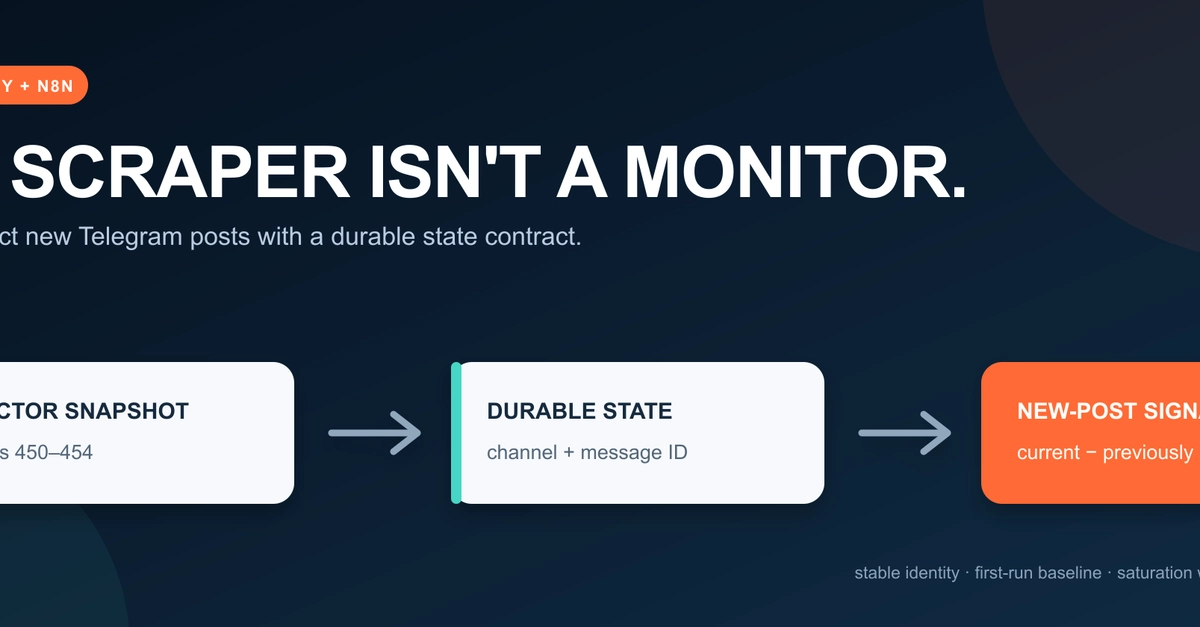
Nothing has failed. The scraper did its job perfectly by retrieving whatever was visible at that exact millisecond. However, "new" is not a property contained within a single static snapshot. Instead, "newness" is the delta—the mathematical difference—between the current snapshot and a previously recorded historical state.
This foundational distinction separates a naive scraper that merely executes on a schedule from a production-grade monitor you can actually trust. Without a dedicated state layer, automated workflows risk flooding notification channels with alert storms, misinterpreting fluctuating metrics (like view counts or edited text) as brand-new content, or failing silently when historical context disappears.
This article explores a robust architectural pattern that adds a durable state layer to an Apify Actor using an n8n workflow. Whether you are building price trackers, job monitors, lead generation feeds, or inventory checkers, this design answers the recurring workflow question: What changed?
Detailed Chronology: Exposing the Missing State Layer
The realization of this architectural gap typically begins during testing. When first developing a monitoring pipeline, developers often connect an AI client or orchestrator directly to a scraper using tools like the Apify Model Context Protocol (MCP) server.
The Four-Condition Experiment
To understand how context affects data ingestion, consider an experiment conducted across four distinct invocation conditions:
- Baseline Condition: No previous result exists. The workflow is executed for the very first time. The question of "newness" is bypassed entirely because the initial dataset becomes the baseline.
- Same Conversation Condition: Previous message identifiers remain active within the LLM or execution context window. The system can successfully compare the current payload against the immediate past.
- Fresh Session Condition: A new session is initialized with no reachable prior results. Retrieval functions normally, but the system cannot mathematically determine which records are new.
- Fresh Session with Prior IDs: A small, persistent state file combined with strict comparison rules is introduced. The system successfully isolates new records despite operating in a fresh environment.
In all four scenarios, the underlying Apify Actor executes successfully, returning the exact same set of five message identifiers (ranging from ID 454 down to 450). Yet, in the fresh session lacking a baseline, retrieval succeeds while comparison fails completely.
This highlights a critical operational truth: "No new records" and "I cannot determine whether records are new" are entirely different answers. A reliable monitoring system must maintain this distinction rather than collapsing them into a false equivalence.
Furthermore, these runs expose a tempting identity trap: mutable attributes. During observation, a message’s view count or timestamp may shift, while its core identifier remains completely static. A naive comparison script that checks entire records would mistakenly classify all five messages as entirely "new" or "modified." By anchoring the logic strictly to stable, immutable identifiers, the system correctly recognizes them as the exact same messages.
Supporting Context & Metrics: Architecture and Design Patterns
To solve the state-tracking problem, developers must decouple data retrieval from change detection. They are fundamentally different jobs requiring distinct architectural boundaries.
1. Retrieval vs. Change Detection
The Apify Actor reads Telegram’s public preview pages (t.me/s/) and returns recent messages ordered from newest to oldest. A typical JSON payload looks like this:
  "channel": "telegram",
  "id": 454,
  "url": "https://t.me/telegram/454",
  "date": "2026-07-19T17:58:20+00:00",
  "text": "For all the details on these new features...",
  "views": 1180000,
  "scraped_at": "2026-08-05T14:13:17.444080+00:00"
While this payload successfully answers "What is visible right now?", it cannot answer "What appeared since the previous successful check?"
To bridge this gap, the architecture places the Actor in a stateless retrieval role while pushing comparison state down into the orchestration layer (such as an n8n workflow). The data flow follows a strict sequence:
- Schedule Trigger initiates the pipeline.
- Run Apify Actor fetches the current message window.
- Validate & Partition cleans and normalizes incoming records.
- Compare with Durable State checks identifiers against historical memory.
- Branching Logic splits output into notification candidates and operational warnings.
- Persist New State updates the durable baseline for subsequent runs.
2. Choosing Identity Before Storage
Before selecting a database or state file format, you must define the record’s true identity. In Telegram’s ecosystem, a message_id is only unique within a specific chat. Therefore, id alone cannot serve as a global key. Instead, the monitor constructs a partitioned composite identity:
$$textIdentity = (textNormalized Channel, textMessage ID)$$
function normalizeChannel(value)
  return String(value ?? '')
    .trim()
    .replace(/^@/, '')
    .toLowerCase();


function messageKey(channel, id)
  const normalizedChannel = normalizeChannel(channel);
  if (!normalizedChannel)
    throw new Error('Channel is required.');


  if (!Number.isSafeInteger(id)
By explicitly excluding volatile fields like views and scraped_at, the system ensures that fluctuating metrics do not trigger false alarms.
3. Storing a Baseline, Not a Vague Memory
A minimal prior-state file for tracking a single channel utilizes a clean schema:
  "schemaVersion": 1,
  "channel": "telegram",
  "identityField": "id",
  "sourceRunId": "example-prior-run-id",
  "seenMessageIds": [454, 453, 452, 451, 450]
In orchestration platforms like n8n, this state can be compressed into ranges using global workflow static data ($getWorkflowStaticData('global')). For instance, sequential IDs can be grouped into range arrays [[450, 454]] to minimize memory overhead. However, developers must note that static data is intended for small datasets, saved only after successful production executions, and can become unreliable under high-frequency triggers. For enterprise-grade workloads, this identity contract should be offloaded to dedicated relational tables or external document stores.
Official Guidelines and Policy Decisions
Handling the very first execution of a monitoring pipeline requires a deliberate policy decision.
When a workflow runs for the first time, every single retrieved ID appears "unseen." Treating all of these historical items as brand-new notifications results in an immediate alert storm—delivering dozens or hundreds of historical posts to end-users the moment monitoring goes live.
Baseline vs. Alert Mode
To prevent this, production-ready monitors implement a Baseline Mode:
- First Run Initialization: The system ingests all current items, establishes them as the baseline floor, and stores them in historical state. Zero notification candidates are emitted.
- Subsequent Runs: Delta comparisons take effect, ensuring only genuinely new items trigger alerts.
- Empty Response Protection: An empty result from an Actor execution must never overwrite or wipe out an existing baseline. If a transient network glitch or empty payload resets history, the subsequent normal run would mistakenly replay the entire message window as new.
Managing Window Saturation Warnings
Another critical edge case involves polling window saturation. If a workflow requests a limit of five messages and receives exactly five, the system cannot inherently know whether only five messages existed or if dozens of older, unseen messages fell outside the retrieval window.
To address this, robust pipelines evaluate window saturation prior to deduplication:
const windowSaturated = rows.length >= Number(monitor.limit);Saturation acts as an operational warning rather than a fatal error. It signals to the developer that the configured polling limit may be too small for the channel’s velocity, prompting adjustments to polling intervals or window sizes.
Future Outlook: The Resilient Monitoring Checklist
As web scraping, artificial intelligence agent workflows, and automated intelligence gathering converge, the demand for reliable, state-aware data pipelines will only accelerate. Systems that rely purely on raw scraping without state management will increasingly struggle with duplicate alerts, noisy data, and brittle integrations.
Before deploying any scheduled Actor into a production environment, engineers should evaluate their architecture against the following verification checklist:
- Identity Integrity: Are records uniquely identified by immutable properties rather than mutable metrics (like view counts, timestamps, or text edits)?
- First-Run Policy: How does the system behave on day zero? Does it flood notification channels, or does it cleanly establish a baseline floor?
- State Durability: Is the historical state stored reliably across separate execution sessions, or does it vanish when a local session closes?
- Failure Handling: Does the workflow fail closed (halting execution) if state corruption is detected, or does it silently wipe history and trigger an alert storm?
- Window Awareness: Does the system track whether polling windows are saturated, accounting for potential data gaps caused by high-velocity sources?
By treating state management as a first-class citizen rather than an afterthought, developers can bridge the gap between simple script execution and trustworthy enterprise monitoring. A scheduled scraper merely tells you what exists; a properly engineered monitor tells you what changed—without inventing certainty, replaying old records, or hiding operational blind spots.