In its ongoing battle for mobile operating system supremacy, Google has officially rolled out its September 2026 feature drop for Android. Announced via an official corporate blog post, this update introduces five major features designed to elevate the accessibility, personalization, and cognitive utility of Android devices.
The release highlights Google’s dual-track development strategy. On one hand, the tech giant is playing catch-up to Apple’s iOS by introducing native solutions for digital motion sickness and chat-interface customization—features that iPhone users have enjoyed for some time. On the other hand, Google is attempting to leapfrog its Cupertino-based competitor by integrating its proprietary Gemini Large Language Model (LLM) directly into the core operating system. By deploying Gemini to assist visually impaired users and manage personal physical inventories, Google is positioning Android not merely as a launchpad for applications, but as an active, context-aware cognitive assistant.
Detailed Chronology: Breaking Down the Five Pillar Updates
The September 2026 update addresses distinct aspects of the user experience, ranging from physical health and sensory assistance to organizational utility and aesthetic customization. Below is a detailed breakdown of each newly introduced feature.
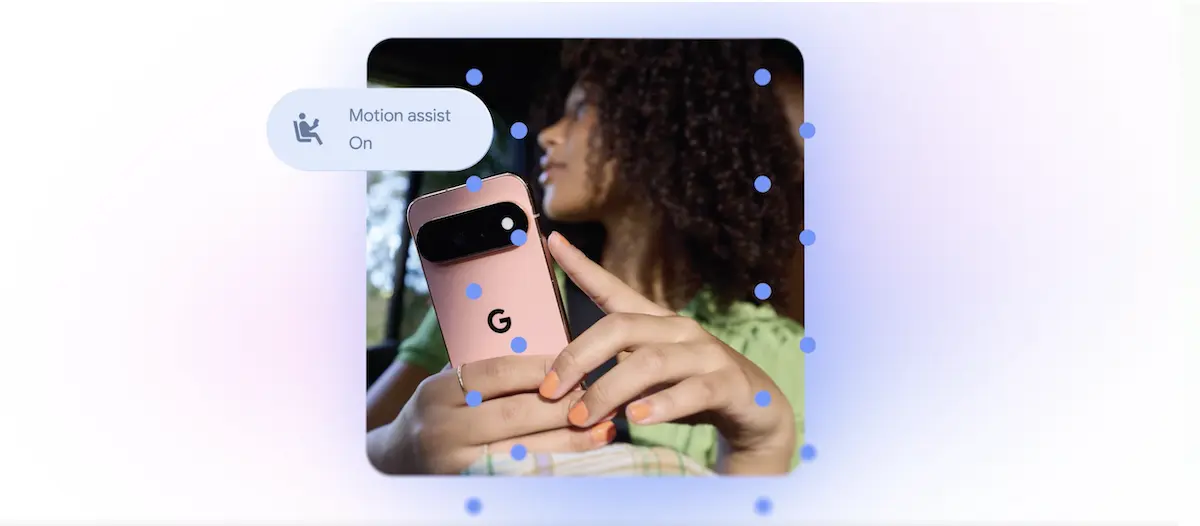
One of the most notable additions is Motion Assist, a system-level feature engineered to alleviate the symptoms of motion sickness (kinetosis) for users reading or interacting with their phones inside moving vehicles.
The Problem: Motion sickness occurs when there is a sensory mismatch between the vestibular system (which feels the vehicle’s physical movement) and the ocular system (which focuses on a static screen, signaling to the brain that the body is stationary).
The Android Solution: Motion Assist projects a dynamic bubble overlay onto the screen. This visual layer responds in real-time to the vehicle’s acceleration, braking, and turning by shifting in the opposite direction of the motion. This visual feedback bridges the sensory gap, reducing nausea and eye strain.
Implementation & Availability: Unlike simpler implementations, Google allows users to add Motion Assist to their Quick Settings panel for rapid activation. Users can fully customize the overlay’s shape, color, and transparency to prevent it from obstructing critical on-screen content. This feature is exclusively available to devices running Android 17.
2. Guided Vision: Multi-Modal AI for the Visually Impaired
For blind and low-vision users, Google has introduced Guided Vision, an assistive technology that pairs the device’s physical camera with the multimodal analytical capabilities of Gemini.
Core Functionality: Guided Vision acts as an intelligent pair of eyes. By pointing the camera at their surroundings, users can ask Gemini to read small print on grocery labels, decipher menus in dimly lit restaurants, or locate specific household objects.
Real-Time Haptic & Voice Guidance: To resolve the common issue of users misaligning their cameras, Guided Vision provides real-time, step-by-step auditory feedback. The system instructs the user to "pan left," "tilt up," or "center the object" to ensure the AI captures a clear image for analysis.
Backward Compatibility: In a significant move for global accessibility, Guided Vision is backward compatible with devices running Android 9 and newer, provided the user resides in a region where Gemini service is active.
3. Find Hub’s "Remembered Items": Cognitive Offloading via Gemini
Addressing the universal problem of misplaced personal belongings, Google has updated its Find Hub with a new "Remembered Items" section. This feature turns Gemini into a personal, searchable repository for physical items.
Natural Language Logging: Users can verbally or textually log the location of important items. For example, telling Gemini, "I put my spare passport in the top drawer of the guest bedroom cabinet," prompts the system to parse, categorize, and store this spatial data.
Multi-Modal Verification: To ensure precision, users can snap and attach a photo of the item in its storage location, providing visual context that Gemini can reference later.
On-Demand Retrieval: When searching for the item weeks or months later, a simple query to Gemini retrieves the stored note and associated image, reducing cognitive load and saving time.
4. Google Keep Integration in Google Messages
To improve productivity and reduce app-switching, Google has deeply integrated its note-taking application, Google Keep, directly into Google Messages.
Collaborative Workspace: Users can now open, edit, and share Keep notes—such as shared grocery lists, travel itineraries, or collaborative brainstorming sheets—directly within an active RCS (Rich Communication Services) conversation.
Seamless Syncing: Any changes made to the note within the chat interface sync instantly to the standalone Google Keep app, ensuring all participants have access to the most up-to-date information.
5. Google Messages Personalization
Finally, Google has introduced a suite of aesthetic upgrades to Google Messages, closing the gap with rival messaging platforms like WhatsApp and Apple’s iMessage.
Granular Customization: Users can customize individual chat threads with unique background images, custom photos, and specific color palettes.
Dynamic Bubbles: The text bubbles within these customized chats automatically adjust their hue and contrast to match the chosen background, maintaining readability while offering a personalized messaging experience.
Supporting Context & Market Dynamics
The features introduced in this drop highlight the fierce, ongoing product-parity war between Google and Apple.
Feature Category
Android Solution (Sept. 2026)
iOS Equivalent
Market Context / Strategic Advantage
Kinetosis Mitigation
Motion Assist (Android 17)
Vehicle Motion Cues (iOS 18, 2024)
Apple pioneered this space with edge-of-screen dot patterns. Google’s solution offers greater visual customization (bubbles, color, transparency).
Visual Accessibility
Guided Vision (Android 9+)
Point and Speak / Magnifier
Google leverages its proprietary Gemini LLM, offering superior contextual understanding and conversational feedback compared to traditional OCR.
Chat Customization
Custom Messages Backgrounds
iMessage Backgrounds / WhatsApp
Google is working to make Google Messages as visually appealing as its competitors to drive global RCS adoption.
The Accessibility Landscape
Google’s decision to make Guided Vision compatible all the way back to Android 9 (released in 2018) is a highly strategic move. While Apple boasts deep hardware-software integration, its accessibility features are often locked behind newer, premium hardware. By optimizing Gemini-based vision tools for legacy Android versions, Google is bringing advanced AI utility to budget and mid-range devices globally, particularly in emerging markets where older Android devices remain dominant.
Official Statements and Corporate Positioning
In its official blog post, Google framed these updates as a step forward in making technology more equitable and personal:
"Our goal is to build an operating system that adapts to you, rather than forcing you to adapt to it. With these new updates, we are harnessing the power of Gemini to solve real-world challenges—whether that’s helping a visually impaired user navigate a new environment, reducing transit discomfort, or simply making your daily digital conversations feel more like home."
Industry analysts note that Google’s messaging heavily emphasizes practical, everyday utility. By focusing on tangible quality-of-life improvements—like motion sickness reduction and memory tracking—Google is attempting to demystify generative AI, shifting the public perception of LLMs from novelty chatbots to indispensable daily tools.
Future Outlook: The Autonomous OS
This latest feature drop offers a clear look at the future trajectory of the Android operating system. As we move deeper into the late 2020s, the traditional boundary between the "operating system" and "artificial intelligence" is rapidly dissolving.
With Android 17, Google is laying the groundwork for an OS that operates proactively rather than reactively. Features like Motion Assist, which automatically sense physical environmental changes, and Gemini’s "Remembered Items," which construct a personal database of the physical world, point to a future where your smartphone acts as an ambient cognitive partner.
As Apple continues to roll out its own Apple Intelligence suite, Google’s ability to deploy rapid, server-and-device-side AI updates across a highly fragmented hardware ecosystem will be the ultimate test of its platform’s long-term viability. For now, the September 2026 update successfully keeps Android at the cutting edge of mobile innovation.