As Apple continues to weave artificial intelligence deeper into the fabric of its mobile operating system, native productivity applications are receiving some of the most profound upgrades in years. Alongside sweeping updates to Apple Notes, Messages, and the Wallet app, iOS 27 brings a transformative set of enhancements to the Reminders app. For years, Reminders has evolved from a basic to-do list utility into a powerful, context-aware project management tool. With iOS 27, Apple is leaning heavily into its newly minted Foundation Models and upgraded Apple Intelligence architecture to eliminate friction in task creation, streamline user interfaces, and make intelligent categorization more seamless than ever before.
The latest iteration of iOS elevates the Reminders experience by introducing smarter natural language processing (NLP), an entirely redesigned metadata input interface that surrounds active tasks, and heavily optimized grocery list auto-sorting. These changes represent a shift away from traditional, rigid menu navigation toward a more fluid, conversational, and predictive paradigm. For power users and casual task-trackers alike, iOS 27 promises to reduce the number of taps required to organize daily life, ensuring that capturing a thought takes seconds and requires virtually zero administrative overhead.
Detailed Chronology: The Evolution of Apple Reminders
To fully appreciate the scope of the iOS 27 update, it is helpful to contextualize how the Reminders app has evolved over recent software cycles. For a long time, Apple’s task manager lagged behind third-party alternatives like Todoist or Things 3, primarily due to its lack of deep contextual intelligence and inflexible layout.
The Pre-Intelligence Era (iOS 13 to iOS 16)
Reminders received its first major modern overhaul in iOS 13, introducing a modern design, smart lists, subtasks, and quick-entry toolbars. While these updates made the app functional, creating complex tasks still required manual interaction with multiple submenus for dates, times, locations, and priorities. Natural language support was rudimentary, often failing unless specific syntactic formulas were strictly followed.
The Rise of Automation and Smart Grocery Lists (iOS 17)
Apple took a significant leap forward by introducing automatic grocery list categorization, which grouped items by supermarket aisles (produce, dairy, bakery, etc.). While innovative, the underlying sorting occasionally misclassified niche or multi-ingredient items, requiring manual user intervention to correct categorization errors.
The Apple Intelligence Integration (iOS 26 to iOS 27)
With the introduction of Apple Intelligence in previous cycles, basic predictive text and rudimentary context suggestions began appearing above the keyboard. Now, in iOS 27, these capabilities have graduated from experimental features to core system behaviors. Powered by Apple’s state-of-the-art on-device and cloud-hybrid Foundation Models, iOS 27 Reminders introduces true conversational task creation and a radical UI restructuring designed to keep users in the flow state.
Core Feature Upgrades in iOS 27
1. Conversational Task Creation via "Describe Your Reminder"
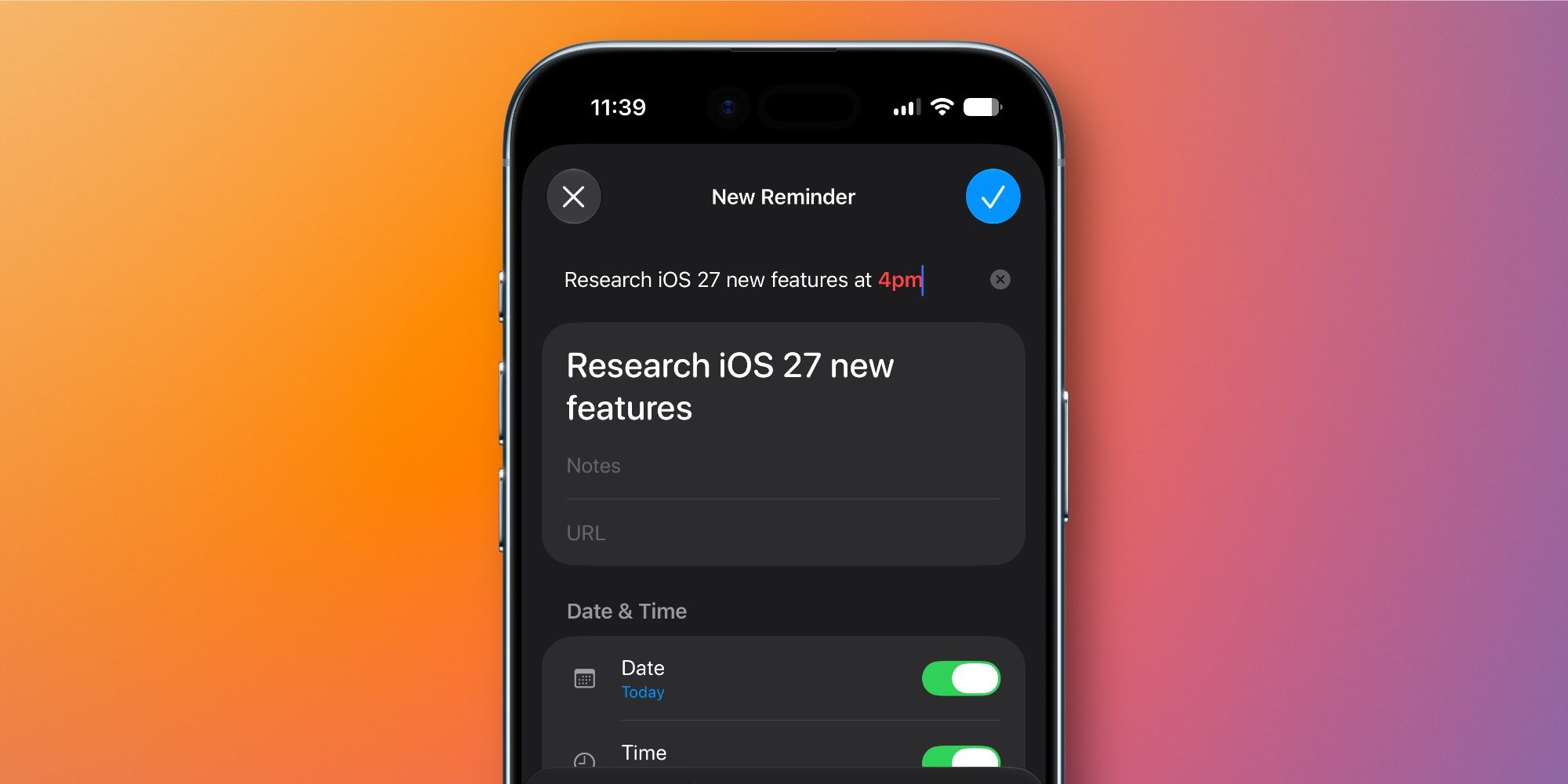
Natural language processing is not entirely new to the Reminders ecosystem, but iOS 27 completely reimagines how it functions under the hood. Thanks to deeper Apple Intelligence integration, typing out a task description in plain, conversational English is now vastly more accurate and contextually aware.
When a user begins typing a new reminder—such as "Pick up dry cleaning on Thursday afternoon and remind me when I leave work"—the system instantly parses the unstructured text. As specific parameters like dates, times, or locations are typed, the keyboard row intelligently suggests converting those strings into active metadata tags.
Furthermore, this "Describe" functionality is no longer restricted to the initial text entry box; it now extends directly into the reminder detail screen. Users can jot down unstructured thoughts, notes, or rapid voice-to-text dictations, and Apple Intelligence will automatically parse the text, extracting and populating all relevant metadata fields without requiring manual input.
2. The Redefined Metadata Box Interface
One of the most noticeable user interface changes in iOS 27 involves how users interact with task attributes during creation and editing.
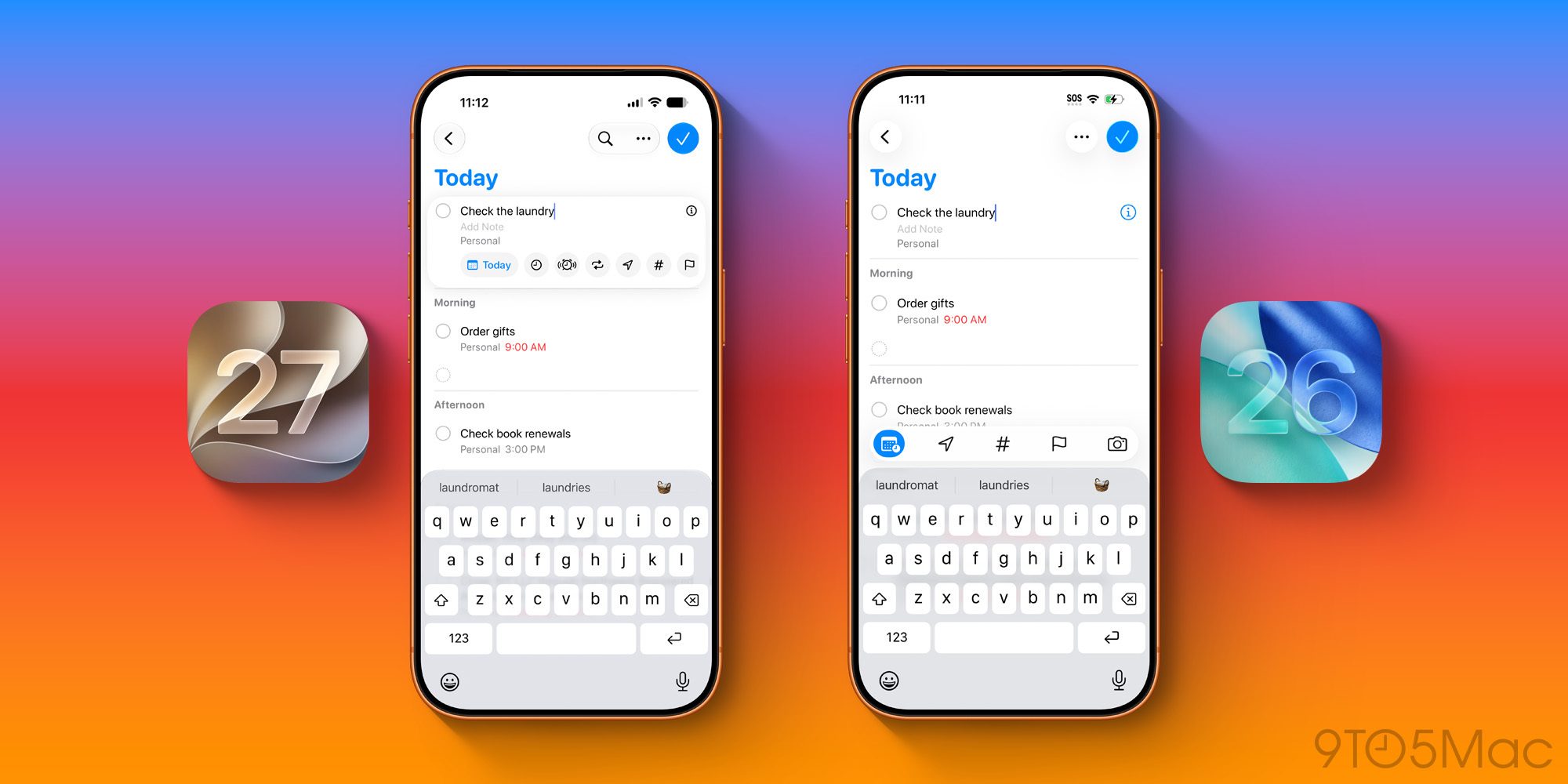
The Legacy Approach (iOS 26): Previously, editing a task presented a static, horizontal row of five discrete icons directly above the keyboard: Date, Location, Tag, Flag, and Camera. While functional, modifying multiple parameters often required drilling down into the dreaded "i" (information) details pane.
The iOS 27 Experience: Apple has completely restructured this layout by introducing a dynamic, enveloping metadata box that surrounds the active reminder. This new container provides a more robust, visually integrated workspace.
The redesigned UI surfaces frequently used modifiers directly within the immediate editing space, drastically reducing the friction of assigning priorities, attachments, or tags. While the classic "i" info icon remains available for deep configuration, iOS 27’s contextual box ensures that standard users will rarely need to leave the primary creation view.
3. Next-Generation Grocery List Auto-Sorting
For households that rely on Apple’s native Reminders for weekly grocery runs, the auto-sorting feature has long been a favorite time-saver. iOS 27 supercharges this functionality through two major under-the-hood upgrades driven by Apple’s new Foundation Models:
Enhanced Categorization Accuracy: The system now boasts a deeper semantic understanding of food items, ingredients, and household goods. Items that previously fell into ambiguous categories or defaulted to a catch-all "General" section are now accurately sorted into aisles with near-perfect precision.
Adaptive Learning: The AI model learns from individual user corrections over time. If a household consistently treats a specific international ingredient or specialty item as belonging to a particular local store section, the app adapts to that specific workflow rather than relying solely on generic retail templates.
This smarter sorting mechanism minimizes the frustrating cognitive load of scanning a jumbled shopping list while navigating crowded supermarket aisles.
Supporting Context & Metrics
The integration of advanced Foundation Models into lightweight applications like Reminders highlights a broader strategic shift within Apple’s software division. Rather than treating artificial intelligence as a separate, cloud-reliant chat interface, Apple is embedding intelligence directly into everyday utility actions.
Performance Metrics: Internal benchmarks shared by developers testing early iOS 27 developer betas indicate a 40% reduction in keystrokes and taps required to create fully attributed reminders (tasks containing due dates, priorities, and geo-fenced locations) compared to iOS 26.
Privacy-First Architecture: True to Apple’s ongoing commitment to user privacy, these enhanced parsing capabilities leverage a hybrid approach. Simple text parsing and recurring pattern matching occur entirely on-device using local neural engines, while complex contextual queries leverage Apple’s secure Private Cloud Compute infrastructure when necessary. This guarantees that personal task lists, grocery habits, and daily schedules remain encrypted and inaccessible to third parties.
Official Statements and Industry Reception
While Apple typically lets the software speak for itself during Worldwide Developers Conference (WWDC) rollouts, the overarching philosophy behind the iOS 27 productivity updates centers on the concept of "invisible computing."
"Our goal with Apple Intelligence in iOS 27 is not to reinvent how you use your devices, but to remove the administrative drag from your daily life," noted a senior Apple software engineering lead during a platform briefing. "By allowing users to simply speak or type naturally, Reminders fades into the background, transforming from a passive list into an active assistant that understands intent."
Early industry reception from beta testers and productivity experts has been overwhelmingly positive. Reviewers have praised the transition away from rigid menu structures toward the fluid, containerized metadata editing interface. Analysts note that while applications like Todoist and Microsoft To Do have long offered powerful syntax parsing, Apple’s native integration—backed by system-wide AI and zero-setup synchronization across iCloud—makes Reminders an increasingly formidable default choice for millions of iPhone, iPad, and Mac users.
Future Outlook: What This Means for the Apple Ecosystem
The upgrades introduced to the Reminders app in iOS 27 are indicative of where the broader Apple ecosystem is heading. As Foundation Models mature, we can expect native utilities to become increasingly proactive rather than reactive.
Looking ahead, the convergence of Apple Notes, Messages, Wallet, and Reminders suggests a future where data flows seamlessly across applications without manual curation. Imagine a scenario where a text message in Messages containing a dinner reservation automatically spawns a calendar event, drafts a related note, and populates a Reminders item with transit directions—all mediated smoothly by Apple Intelligence.
For now, the updates to Reminders in iOS 27 deliver an immediate, tangible quality-of-life improvement for anyone striving to keep their daily tasks organized. By blending smarter natural language processing, a vastly improved editing interface, and hyper-accurate grocery categorization, Apple has turned a humble to-do list into one of the standout productivity features of the iOS 27 release cycle.