Executive Overview
In a significant push to redefine how humans interact with the web, OpenAI has rolled out a major update to its official ChatGPT extension for Google Chrome. This release transitions the chatbot from a passive text-generation interface in a sidebar into an active, context-aware browser companion. By granting the AI the capability to inspect open tabs, read user history, and execute complex workflows directly within the browser ecosystem, OpenAI is positioning ChatGPT as a direct and formidable challenger to deeply integrated offerings like Google’s Gemini and Microsoft’s Copilot.
The timing of this update is strategic. Following the retirement of OpenAI’s experimental proprietary browser project, the company has pivoted decisively toward dominating the browser extension space. The newly enhanced tool bridges the gap between casual prompting and active web automation, offering two distinct operational modes: ChatGPT Chat for contextual synthesis and ChatGPT Work for multi-step browser automation.
Available across all pricing tiers and compatible with any Chromium-based browser—including Microsoft Edge, Brave, and Opera—this update democratizes advanced browser-agent capabilities. It signals a shift away from tab-switching and fragmented web research toward unified, AI-driven digital execution.
Detailed Chronology: The Evolution of OpenAI’s Browser Strategy
To understand the significance of this latest Chrome extension update, it is necessary to examine the trajectory of OpenAI’s browser integrations and product ecosystem over recent months.
The Experimental Browser Era
For some time, industry insiders speculated on OpenAI’s ambitions to build a standalone, purpose-built web browser designed specifically to run native large language models. Rumors swirled that the artificial intelligence giant sought to bypass traditional gatekeepers like Chrome and Safari entirely, creating a unified user interface where generative AI was woven into the foundational architecture of web navigation. However, building and maintaining a modern web browser from scratch is an extraordinarily capital-intensive endeavor fraught with security, rendering, and web-standard compatibility challenges.
Consequently, OpenAI officially sunset its standalone browser experiment on August 9, quietly pivoting away from a direct hardware-and-software application play. Instead, the company elected to double down on an ecosystem-agnostic approach, betting that users would prefer an AI assistant that lives inside the browsers they already use every day.
The Chrome Extension Pivot
Following the closure of its proprietary browser project, OpenAI immediately redirected its engineering resources toward upgrading its existing Chrome extension. The initial patches rolled out in mid-August were designed to make ChatGPT a more viable, feature-rich alternative to Google’s native Gemini integration. These early updates focused on stability, speed, and basic page-reading capabilities.
However, users still faced limitations: the extension could read individual pages upon request, but it lacked the holistic awareness of an active browsing session. It could not cross-reference multiple tabs simultaneously, nor could it execute actions on behalf of the user.
The October 2026 Breakthrough
The October 2026 update represents the culmination of this strategic pivot. Announced via official channels and social media, the upgraded extension brings the "full power of ChatGPT" directly into the browser viewport. By equipping the extension with tab-awareness, workflow automation (via ChatGPT Work), and persistent sidebar history, OpenAI has effectively transformed a simple search-and-chat interface into a functional digital assistant capable of navigating the web alongside the user.
Core Features and Capabilities of the Upgraded Extension
The updated ChatGPT extension introduces several groundbreaking features that fundamentally alter the user experience of web browsing and research.
1. Multi-Tab Awareness and Contextual Synthesis
One of the most friction-heavy aspects of modern web research is managing dozens of open tabs. Whether shopping for high-ticket items, comparing software subscriptions, or conducting academic research, users frequently find themselves manually jumping back and forth to synthesize information.
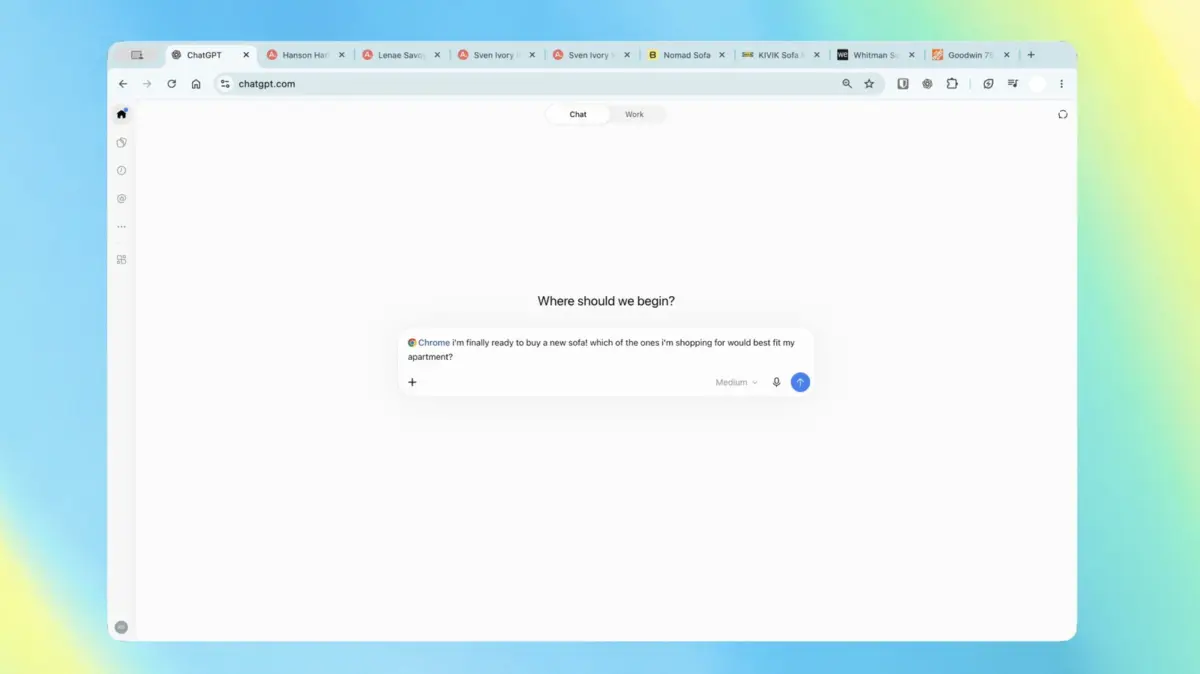
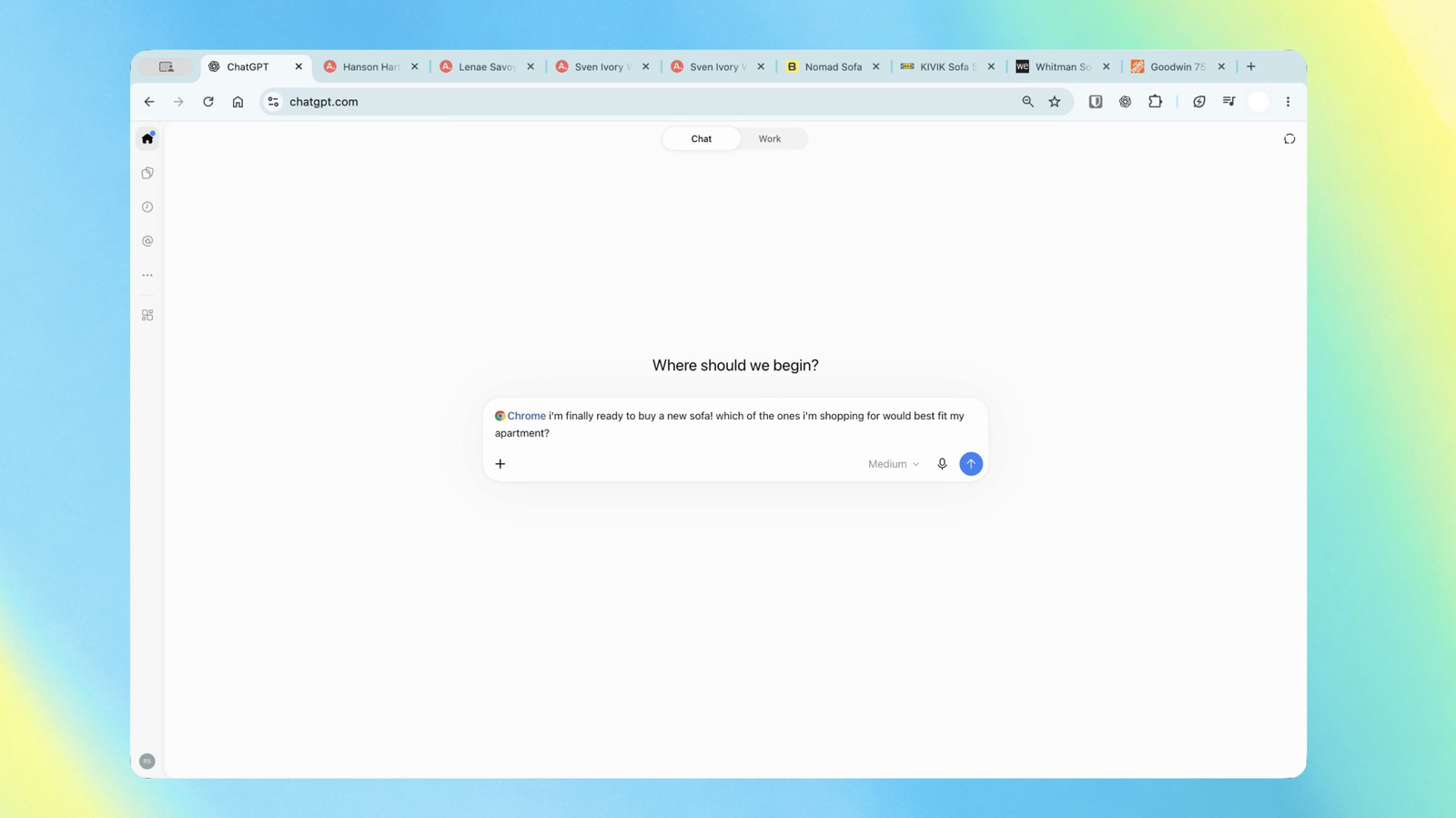
With the new update, users utilizing ChatGPT Chat can simply ask the assistant to evaluate their open browser tabs concurrently. For example:
- E-Commerce Comparison: A user shopping for furniture can open product pages for three different couches across separate tabs and prompt ChatGPT: "Compare these three options based on their dimensions, starting prices, estimated delivery times, and return policies." The AI immediately aggregates the disparate data points into a cohesive, structured comparison table without requiring the user to copy and paste text manually.
- Research and Document Review: Professionals reviewing technical documentation or competing service-level agreements (SLAs) can have the AI cross-reference terms across multiple tabs, summarizing key discrepancies or advantages in real time.
2. ChatGPT Work: Complex Multi-Step Browser Automation
While Chat focuses on information synthesis, ChatGPT Work is designed for execution. Targeted at complex, multi-step tasks, this agentic feature allows ChatGPT to interact with web pages on the user’s behalf.
Rather than merely suggesting text, the Work agent can autonomously perform actions such as filling out web forms, sending messages, organizing tabs, and updating external productivity tools. Illustrative use cases include:
- Administrative Onboarding: A user switching healthcare providers can ask ChatGPT to read the intake requirements, fill out a complex multi-page digital medical form, and subsequently parse the appointment date directly into their calendar application.
- Contract Analysis and Outreach: A business owner can direct ChatGPT to analyze competing contractor bids open across multiple tabs, select the option that best fits specific budgetary and timeline constraints, and draft a tailored email response to the chosen provider.
3. Persistent Sidebar Integration and Complete History
In previous iterations, using the extension often felt disconnected from the active web page, requiring users to look away or navigate through separate interfaces. The revamped Chrome sidebar now provides uninterrupted, native access to the user’s complete ChatGPT history.
Users can converse with the AI, recall past conversation threads, and initiate new tasks directly from the sidebar while remaining entirely focused on the website in front of them. This side-by-side workflow eliminates context switching, ensuring that the AI acts as a seamless overlay to the web rather than a destination site.
4. Broad Ecosystem Compatibility
A notable aspect of OpenAI’s recent release is its commitment to open standards within the browser market. While branded primarily as a Chrome extension, OpenAI has engineered the tool to be fully compatible with any Chromium-based browser.
This includes market leaders and privacy-focused alternatives alike, such as:
- Microsoft Edge
- Brave
- Opera
By supporting non-Chrome ecosystems running on the Chromium engine, OpenAI ensures that users who reject Google’s default browser for privacy or feature-set reasons are not locked out of the new AI capabilities. Furthermore, the extension is being made available across all subscription tiers—ranging from free accounts to enterprise-grade plans—democratizing access to advanced browser agents.
Supporting Context & Industry Metrics: The Battle for the Browser
OpenAI’s aggressive move into browser extension functionality does not occur in a vacuum. It represents the latest salvo in an escalating technological war for control of the digital user interface.
The Browser as the Ultimate AI Battleground
For decades, the web browser has been the primary operating system of the internet. Companies that control the browser control user attention, data pipelines, and search monetization.
- Google’s Hegemony: Google commands the global browser market share through Chrome, embedding Gemini deeply into its core infrastructure, search results, and workspace tools. Google’s advantage has traditionally lay in its ability to access user history, context, and intent natively.
- Microsoft’s Copilot Strategy: Microsoft has aggressively leveraged its ownership of the Windows operating system and the Edge browser to position Copilot as an omnipresent productivity layer, integrating AI directly into sidebars, document editors, and web apps.
- OpenAI’s Independent Play: Without a dominant native operating system or a proprietary web browser of its own, OpenAI faced a strategic vulnerability. By enhancing its browser extension, OpenAI effectively builds a "browser-within-a-browser" layer. This bypasses the need to convince users to switch default browsers while still capturing critical workflow engagement.
Market Adoption and User Friction Metrics
Industry analysts note that user retention in AI applications heavily correlates with friction reduction. According to recent digital product usage studies, users abandon AI workflows when forced to execute more than three context switches (e.g., copying text from a browser, opening an LLM web app, pasting text, generating an answer, and copying it back to a form).
By keeping the user inside their active browser tab and automating data transfer between pages, OpenAI’s updated extension directly addresses these friction points. Early telemetry data suggests that browser-integrated AI assistants experience significantly higher daily active use (DAU) rates compared to standalone chat interfaces, as they embed themselves organically into routine digital chores.
Privacy, Security, and Ethical Considerations
Granting a large language model the ability to read all open browser tabs, review user history, and execute automated actions on web forms introduces profound data privacy and security challenges. As enterprises and individual consumers alike grapple with these updates, questions surrounding data governance have taken center stage.
The Scrutiny of Tab-Level Surveillance
The concept of an AI assistant continuously parsing the contents of open browser tabs raises immediate red flags for privacy advocates. Web tabs frequently contain highly sensitive information, including:
- Online banking dashboards containing account balances and transaction histories.
- Private communication channels, including corporate Slack instances, personal emails, and messaging apps.
- Protected health information (PHI) within patient portals.
- Proprietary corporate documents, source code, and internal enterprise wikis.
If an AI extension has blanket permission to look at "open tabs," users must trust that the underlying algorithms—and the cloud infrastructure processing the data—are filtering out sensitive information securely. OpenAI has historically maintained that enterprise data submitted via paid enterprise tiers is not used to train underlying foundation models, but consumer-tier privacy policies require careful auditing by users who handle sensitive data.
The Risks of Agentic Automation
Beyond data privacy, the introduction of agentic capabilities via ChatGPT Work introduces operational risks. When an AI is given the authority to fill out web forms, send messages, and schedule calendar entries autonomously, the potential for "hallucination-driven errors" increases.
For instance, if an automated agent misinterprets a contractual obligation on a supplier’s website or populates an incorrect monetary figure into a digital tax or medical form, the real-world consequences can be severe. Security researchers emphasize that users must maintain a "human-in-the-loop" verification step for any action involving financial transactions, legal agreements, or personal identity verification.
Future Outlook: What’s Next for Browser-Based AI Agents?
The release of the upgraded ChatGPT extension is merely a stepping stone toward a broader industry transformation: the rise of autonomous web agents.
Toward Fully Autonomous Web Navigation
As foundational models grow increasingly multimodal and agentic, the distinction between "chatting with an AI" and "having an AI do your computer work" is rapidly dissolving. Future iterations of browser extensions are expected to move beyond simple tab inspection and form-filling toward fully autonomous multi-site workflows.
Imagine directing an AI assistant to: "Find the cheapest direct flight to Tokyo for next month, book the hotel that matches my preferences from my past travel history, clear my calendar for those dates, and email my manager the itinerary." In such a scenario, the browser extension ceases to be a mere assistant and becomes a primary digital proxy.
Industry Convergence and Regulatory Scrutiny
As OpenAI, Google, and Microsoft race to embed autonomous agents deeper into consumer browsing habits, regulatory bodies in the European Union and the United States are expected to scrutinize these developments closely. Antitrust regulators are likely to monitor whether platform owners (like Google blocking or favoring extensions) attempt to stifle third-party AI integration in favor of their proprietary models. Simultaneously, data protection authorities will demand granular, transparent controls over what data browser-based AIs are permitted to ingest and store.
Conclusion
OpenAI’s updated ChatGPT extension marks a defining moment in the evolution of consumer artificial intelligence. By successfully bridging the gap between passive chat interfaces and active browser automation, OpenAI has ensured that its technology remains omnipresent regardless of which underlying browser a user prefers.
While valid questions regarding privacy, security, and agentic reliability remain, the utility of a context-aware, multi-tab-capable AI companion is undeniable. For millions of knowledge workers, researchers, and everyday internet users, the browser will never be the same again.