Executive Overview
For nearly eight years, building custom blocks for the WordPress block editor has meant diving headfirst into the JavaScript ecosystem. Developers looking to extend the Gutenberg editor were required to master React, configure complex Webpack or Babel build pipelines, wrestle with NPM package management, and maintain dual-registration systems—declaring their blocks once in PHP and once in JavaScript. For traditional backend developers, hobbyists, and agencies steeped in procedural and object-oriented PHP, this created a formidable barrier to entry, frequently stalling the adoption of modern block-based themes.
The release of WordPress 7.0 radically alters this landscape. Seven and a half years after the Gutenberg block architecture first arrived in Core, WordPress has introduced a streamlined, PHP-only block registration system. By leveraging a simple configuration flag ('autoRegister' => true), developers can now register, render, and manage custom blocks using strictly PHP.
While this breakthrough does not replace the rich, highly interactive, JavaScript-driven block experiences required for complex web applications, it provides a monumental win for a specific, highly requested use case: migrating legacy PHP codebases, widgets, and shortcodes into modern block themes. This comprehensive analysis explores how PHP-only blocks work, examines their technical architecture, details their limitations, and illustrates why this long-awaited feature marks a watershed moment for WordPress developer experience.

Detailed Chronology: The Journey to PHP-Only Blocks
To understand the significance of WordPress 7.0’s PHP-only block registration, it is helpful to retrace the timeline of the Gutenberg editor and its evolving developer ergonomics.
The Gutenberg Era Begins (Late 2018)
When WordPress 5.0 introduced the block editor in December 2018, it fundamentally shifted the platform from a traditional content management system to a modern publishing engine. However, the architectural foundation relied heavily on client-side JavaScript. Creating a custom block demanded a deep understanding of ESNext, JSX, and the @wordpress/create-block scaffolding tool.
The Friction of Dual Registration (2019–2024)
As block themes gained traction, developers faced an arduous workflow. A standard custom block required a block.json metadata file, a PHP file to register the block type via register_block_type(), a JavaScript file containing the registerBlockType client-side definition, and an associated build pipeline to transpile code. For developers managing older, highly customized classic themes, migrating to the block editor often meant completely rewriting years of stable, functioning PHP logic in JavaScript. Consequently, many agencies and solo developers remained anchored to classic themes out of economic and operational necessity.

The WordPress 7.0 Paradigm Shift (2026)
Recognizing the friction inherent in modernizing legacy environments, the WordPress Core team prioritized developer ergonomics in version 7.0. By introducing server-side auto-registration capabilities, WordPress bridged the gap between legacy PHP backends and the modern block editor. Developers could finally bypass the JavaScript toolchain entirely for straightforward server-rendered components, slashing the time and cost required to transition classic sites to full-site editing architectures.
Technical Mechanics: How PHP-Only Blocks Operate
Under traditional development paradigms, registering a WordPress block required defining it twice: once on the server via PHP and once in the client-side JavaScript bundle. WordPress 7.0 eliminates the client-side requirement by allowing the server to dynamically generate the necessary JavaScript wrappers, client-side registrations, and editor previews based entirely on PHP parameters.
Registering a Basic Block Using Only PHP
Building a fundamental "Hello World" block requires only a standard PHP function hooked into the init action, augmented by the new 'autoRegister' => true support flag:

function css_tricks_hello_world_block()
  register_block_type(
    'css-tricks/hello-world',
      [
        'title' => 'Hello World',
        'render_callback' => function ()
          return sprintf(
            '<div %s>Hello World!</div>',
            get_block_wrapper_attributes()
          );
        ,
        'supports' => [
          'autoRegister' => true,
        ],
      ]
  );

add_action('init', 'css_tricks_hello_world_block');
In this implementation, the autoRegister flag instructs WordPress to automatically synthesize the client-side registration required for the block editor. The block integrates seamlessly into the editor inserter, functioning as a fully native block without requiring a single line of JavaScript or a compilation step.
Injecting Attributes and Sidebar Controls
Attributes allow users to customize a block’s appearance and behavior. Traditionally, building block controls required designing custom user interface components in React. With PHP-only registration, developers simply define the attributes array during block registration, and WordPress automatically generates the corresponding input controls within the block’s Settings sidebar:
function css_tricks_hello_world_block()
  register_block_type(
    'css-tricks/hello-world',
    [
      'title' => 'Hello World',
      'render_callback' => function ($attributes)
        return sprintf(
          '<div %s>%s</div>',
          get_block_wrapper_attributes(),
          esc_html($attributes['greeting'])
        );
      ,
      'supports' => [
        'autoRegister' => true,
      ],
      'attributes' => [
        'greeting' => [
          'type' => 'string',
          'default' => 'Hello World!',
        ],
      ],
    ]
  );

add_action('init', 'css_tricks_hello_world_block');
This code establishes a greeting string attribute with a default value. WordPress reads this configuration and dynamically renders a functional text input field inside the editor’s block settings sidebar, binding user edits directly to the block attribute without custom JavaScript components.

Architecture and Limitations: What PHP-െന്ന് Cannot Do
While the simplicity of PHP-only blocks is compelling, developers must understand their structural constraints to avoid architectural missteps. These limitations are baked into the fundamental design of server-rendered asynchronous blocks and are unlikely to change in future iterations.
1. No Direct DOM Interactions or In-Block Previews
Because blocks rendered this way rely on asynchronous PHP execution via REST API endpoints, they do not participate in the single-page JavaScript application powering the rest of the editor. Consequently:
- No In-Block Editing: You cannot build rich text inline editing or direct canvas manipulation inside the block preview. All user interactions are restricted to the auto-generated controls in the Settings sidebar.
- No DOM Manipulation Libraries: If your block relies on JavaScript libraries (such as initializing a slider or carousel by binding to DOM nodes), the editor authoring experience will break. Because the editor preview markup is fetched asynchronously and replaced on every re-render, event listeners and DOM references become immediately disconnected.
2. Isolation from Fresh Client-Side Data
The WordPress block editor manages post data in a client-side JavaScript store prior to saving. PHP-only blocks bypass this store, querying the database directly when rendering. If a user modifies the post title, excerpt, or custom fields within the editor, a PHP-rendered block displaying that data will continue to show stale database values until the post is explicitly saved and the page is reloaded. This renders PHP-only blocks unsuitable for dynamic elements dependent on live, unsaved editor state changes.

3. Stateless REST API and Post Context Gaps
On the frontend, blocks render within The Loop, preserving global states such as $post. However, REST API endpoints are inherently stateless. When the block editor requests a preview render, the editor component frequently fails to pass the active post ID parameter to the REST endpoint. As a result, standard template tags or functions requiring post context (get_post_meta(), the_title()) may fail or return incorrect data in the editor canvas unless explicit workarounds are implemented.
4. Restricted Attribute Types and Editing Interfaces
WordPress 7.0 currently supports only three attribute types for PHP-only blocks: strings, numbers, and booleans. These map to four fundamental UI elements: text inputs, number inputs, checkboxes, and basic dropdowns.
- Advanced controls—such as media uploaders, rich text editors, date pickers, or color palettes—are missing from the PHP configuration API.
- Dropdowns do not currently support keyed arrays (associative arrays separating labels from stored values), forcing developers to store visible slugs or names directly into block markup, which can break functionality if categories or terms are renamed.
The Killer Use Case: Migrating Legacy PHP Code
Despite these limitations, PHP-only registered blocks serve a vital, transformative purpose: migrating legacy PHP codebases into modern block themes.

Breaking the Block Theme Adoption Barrier
For years, the high cost of rewriting custom widgets, shortcodes, and procedural template functions into React-based blocks prevented countless developers from adopting full-site editing. Agencies with massive libraries of custom PHP modules found themselves financially constrained from rebuilding working features simply to satisfy the architectural requirements of block themes.
PHP-only registration completely removes this roadblock. Developers can now take existing server-side components—such as custom headers, legacy widgets, advertising injectors, or specialized metadata displays—and wrap them in a server-side rendered block in a matter of hours.
+-----------------------------------------------------------------+
|                      Legacy PHP Codebase                        |
+-----------------------------------------------------------------+
                                 │
                                 ▼
+-----------------------------------------------------------------+
|        WordPress 7.0 PHP-Only Block Registration API            |
|                   ('autoRegister' => true)                      |
+-----------------------------------------------------------------+
                                 │
         ┌───────────────────────┴───────────────────────┐
         ▼                                               ▼
+-------------------------+                     +-------------------------+
|     Frontend Render     |                     |     Editor Preview      |
|  (Full Fidelity, Exact  |                     |  (Server-Rendered via   |
|   Legacy Functionality) |                     |   REST API Fallback)    |
+-------------------------+                     +-------------------------+
As long as the block renders correctly on the frontend and provides a functional enough representation in the editor, pixel-perfection in the backend administrative canvas becomes secondary. This pragmatic approach drastically lowers the barrier to entry for full-site editing migration.

Practical Implementation Patterns & Workarounds
Experienced developers experimenting with PHP-only block registration have established several valuable design patterns to navigate current platform limitations.
Detecting Editor vs. Frontend Rendering Contexts
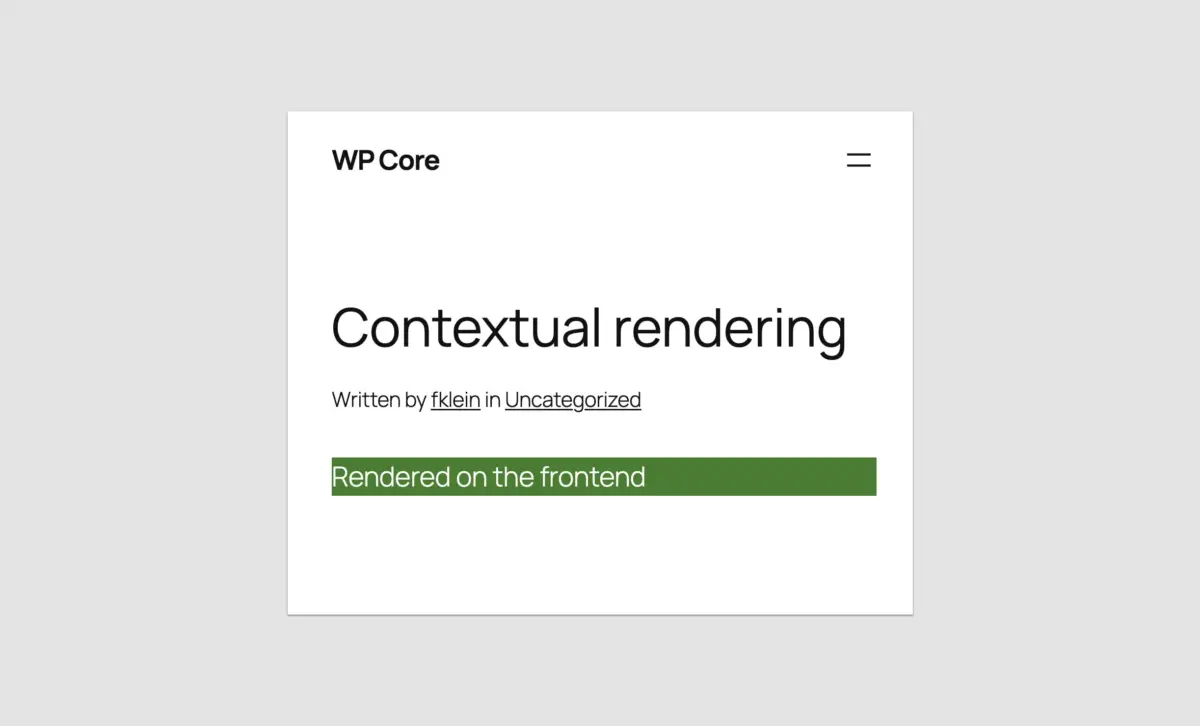
Because standard conditional functions like is_admin() do not evaluate correctly during REST API block renderer requests, developers can leverage wp_is_rest_endpoint() to differentiate between frontend displays and editor previews:
function css_tricks_php_only_detecting_editor_render()
  register_block_type(
    'css-tricks/php-only-detecting-editor-render',
    [
      'title' => 'PHP-Only Detecting Editor Render',
      'render_callback' => function ()
        if ( wp_is_rest_endpoint() && str_contains( $GLOBALS['wp']->query_vars['rest_route'] ?? '', 'v2/block-renderer/' ) )
           $frontend = false;
         else
           $frontend = true;


        $bgcolor = $frontend ? 'green' : 'blue';

        return sprintf(
          '<div %s>%s</div>',
          get_block_wrapper_attributes( ['style' => "color: #fff; background-color: $bgcolor;"] ),
          $frontend ? 'Rendered on the frontend' : 'Rendered in the editor'
        );
      ,
      'supports' => [
        'autoRegister' => true,
      ]
    ]
  );

add_action('init', 'css_tricks_php_only_detecting_editor_render');
Accessing the Current Post ID in the Editor
To work around the lack of native post context in REST-rendered previews when editing existing posts, developers can parse the URL query string during block initialization and store the ID as a local attribute:

function css_tricks_php_only_post_title_block()
  register_block_type(
    'css-tricks/php-only-post-title',
    [
      'title' => 'PHP-Only Post Title',
      'render_callback' => function ($attributes)
        $post_id = is_int( get_the_ID() ) ? get_the_ID() : $attributes['postId'];

        if ( $post_id === 0 )
          return sprintf(
            '<div %s>Please save the post and reload the page.</div>',
            get_block_wrapper_attributes()
          );


        return sprintf(
          '<div %s>%s</div>',
          get_block_wrapper_attributes(),
          get_the_title( $post_id )
        );
      ,
      'supports' => [
        'autoRegister' => true,
      ],
      'attributes' => [
        'postId' => [
          'type' => 'integer',
          'default' => isset( $_GET['post'] ) ? absint( $_GET['post'] ) : 0,
          'role' => 'local'
        ],
      ]
    ]
  );

add_action('init', 'css_tricks_php_only_post_title_block');
Enqueuing Styles and Scripts Optimally
WordPress allows developers to optimize performance by enqueuing stylesheets and front-end scripts conditionally—loading assets only when the registered block is present on the active page:
function css_tricks_hello_world_block()
  wp_register_style(
    'css-tricks-hello-world',
    plugins_url( 'style.css', __FILE__ ),
    [],
    filemtime( plugin_dir_path( __FILE__ ) . 'style.css' )
  );

  wp_register_script(
    'css-tricks-hello-world-js',
    plugins_url( 'script.js', __FILE__ ),
    [],
    filemtime( plugin_dir_path( __FILE__ ) . 'script.js' ),
    true
  );

  register_block_type(
    'css-tricks/hello-world',
    [
      'title' => 'Hello World',
      'render_callback' => function ()
        return sprintf(
          '<div %s>Hello World!</div>',
          get_block_wrapper_attributes()
        );
      ,
      'supports' => [
        'autoRegister' => true,
        'color' => [
          'background' => true,
          'text' => true,
        ],
      ],
      'style' => 'css-tricks-hello-world',
      'view_script' => 'css-tricks-hello-world-js',
    ]
  );

add_action('init', 'css_tricks_hello_world_block');
Future Outlook & Industry Impact
The introduction of PHP-only block registration in WordPress 7.0 signals a maturing philosophy within the WordPress Core engineering team. For years, the community debated whether pushing WordPress toward a JavaScript-heavy, decoupled architecture alienated the massive global pool of traditional PHP developers.
By providing a bridge for server-rendered components, WordPress has demonstrated a pragmatic commitment to backward compatibility and developer experience. While interactive, application-grade blocks will undoubtedly remain in the domain of React and modern JavaScript build tools, routine development, legacy modernization, and enterprise migrations have been profoundly streamlined.
As WordPress 7.1 and subsequent minor releases continue to refine iframed editor stability and block API standards, PHP-only blocks will secure their place as an indispensable utility tool. For agencies and developers holding out on block theme adoption due to technical debt, WordPress 7.0 removes the ultimate hurdle, opening the door to modern publishing workflows without sacrificing years of tested PHP architecture.