Executive Overview
Meta-owned messaging giant WhatsApp is expanding its functional footprint by developing a comprehensive, optional in-app browser capable of opening any web link shared within its chat interface. Building upon previous iterations that allowed limited, HTTPS-secured business link views, code discovered in recent TestFlight builds indicates that users will soon enjoy a completely integrated browsing experience without having to jump back and forth between third-party applications like Safari, Google Chrome, or default mobile web clients.
For years, WhatsApp has maintained a streamlined philosophy centered primarily on secure messaging, requiring users to exit the platform whenever a friend, family member, or colleague shared a URL. While this preserved simplicity, it fragmented the user experience (UX) and slowed down multitasking. The introduction of an optional in-app browser represents a calculated shift in product strategy.
Crucially, however, WhatsApp is designing this feature with privacy at the forefront. According to code analysis and early reports from industry insider publication WABetaInfo, the browser will be entirely toggleable, meaning users who prefer opening links in their device’s native browser can easily opt out. Furthermore, early architectural disclosures indicate that WhatsApp’s end-to-end encryption will remain untarnished, and the platform will not track or monitor the specific links users choose to open. This report explores the chronological development of the feature, the privacy mechanics involved, user data controls, and what this means for the future of mobile messaging ecosystems.
Detailed Chronology: From Limited Business Trials to Universal Integration
The evolution of WhatsApp’s in-app browsing capabilities has been a slow, measured burn rather than a sudden overhaul. To understand where the feature stands today, it is essential to trace its development roadmap over the past few years.
The Initial Phase: Business-Specific Trials
In May of the previous year, industry watchers at WABetaInfo first spotted experimental code within WhatsApp beta packages pointing toward a specialized viewing tool. At the time, the functionality was strictly constrained. It was designed solely to allow users to view specific HTTPS-secured business sites directly within the application confines.
This initial implementation was pragmatic. When users interacted with a catalog link or a verified business profile, WhatsApp offered a streamlined way to view merchandise or support pages. However, if a user wanted the full desktop or native browser experience, they had to navigate to a three-dot drop-down menu and manually select the option to open the URL in their default browser. While useful for commercial interactions, it fell short of a universal solution for the billions of casual URLs exchanged on the platform daily—ranging from news articles and YouTube videos to personal blogs and social media posts.
The Shift Toward Universal Support
Fast forward to the latest TestFlight builds evaluated by beta sleuths, and the scope of the feature has expanded dramatically. WhatsApp is no longer targeting just business pages; developers are laying the groundwork for a universal in-app browser capable of rendering any web link sent or received within a chat screen.

Although the feature has not yet rolled out broadly to public beta testers, code strings and user interface (UI) assets extracted from the iOS builds reveal a polished, user-centric implementation. Rather than forcing the new browser upon its user base—a move that often draws swift backlash from privacy advocates and power users alike—WhatsApp has opted for a granular configuration paradigm.
The Implementation Mechanism
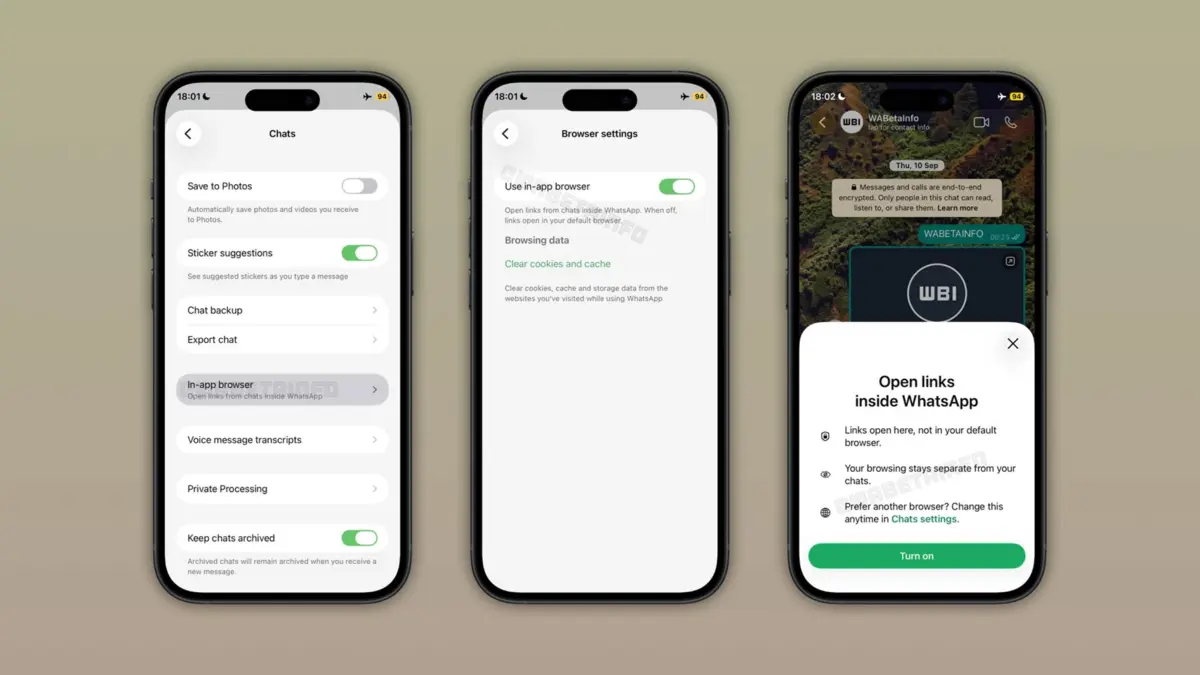
Based on screenshots and documentation uncovered in the recent beta builds, enabling the feature will be straightforward:
- Navigate to Settings > Chats.
- Locate the newly introduced toggle labeled “In-app browser.”
- Switch the toggle on to enable direct in-chat link rendering.
Upon enabling the feature for the first time, users will be greeted by an informative bottom sheet. This UI element explicitly explains how the capability works, reassuring users that they can browse web content without leaving WhatsApp while retaining the absolute freedom to restore their system’s default browser at any given moment.
Supporting Context & Metrics: Why an In-App Browser Matters
To fully appreciate the significance of WhatsApp’s upcoming feature, one must look at the broader landscape of mobile communication apps and user behavior metrics.
The Cost of Context Switching
In modern digital interaction, "context switching"—the cognitive cost of jumping between multiple applications to complete a single task—is a major friction point. Statista and various mobile UX research groups note that the average smartphone user switches between apps dozens of times an hour. When a user receives a link in a messaging app, the traditional workflow involves:
- Tapping the link.
- Waiting for the operating system to spin up a heavy external browser (such as Safari or Chrome).
- Loading the webpage.
- Consuming the content.
- Manually switching back to the messaging app via the app switcher.
While this process takes mere seconds, multiplied across hundreds of links per week, it introduces measurable friction. Competitors like Telegram, WeChat, and Facebook Messenger have long since integrated proprietary in-app browsers to keep users anchored within their respective ecosystems for as long as possible. By adopting this approach, WhatsApp is closing a feature gap that has persisted for over a decade.
Data Management and Local Cache Controls
One of the primary concerns users traditionally hold regarding in-app browsers is the accumulation of digital debris—cookies, cache files, and site data that bloat local storage and track browsing habits.
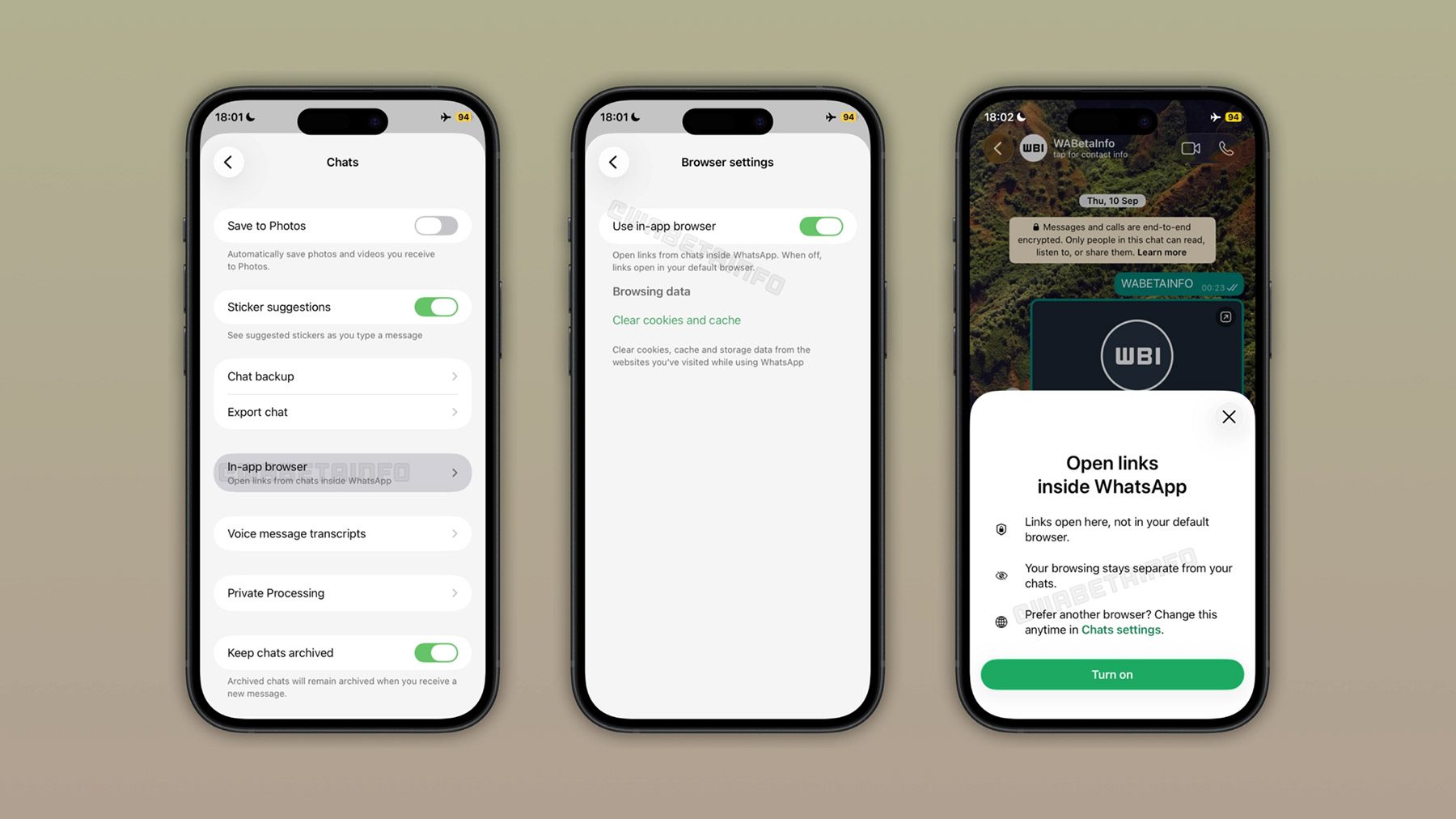
WhatsApp appears to have anticipated this critique. Alongside the master toggle in the chat settings menu, the development builds include dedicated data-management tools. Users will have explicit control over their browsing residue, with options to clear cookies, cached website assets, and other residual browsing data directly from the settings panel. This ensures that privacy-conscious individuals can easily wipe their browsing slates clean, mirroring the robust data hygiene controls found in standalone web browsers.
Official Statements and Privacy Safeguards
In the realm of messaging apps—particularly those owned by Meta—privacy is always the elephant in the room. Given historical controversies surrounding data sharing between Facebook, Instagram, and WhatsApp, any new feature that touches web traffic immediately triggers intense scrutiny from cybersecurity experts and privacy advocates.
Preserving End-to-End Encryption
WhatsApp’s core value proposition has long been its implementation of the Signal Protocol for end-to-end encryption (E2EE). Messages, media, voice notes, and calls are encrypted in transit such that neither WhatsApp nor any third party can intercept them.
The introduction of an in-app browser does not compromise this cryptographic architecture. According to analytical breakdowns from WABetaInfo, WhatsApp cannot see links shared in conversations, nor can it track which specific links individual users open.
Because the links are embedded inside end-to-end encrypted chats, the platform’s servers lack the decryption keys required to inspect the message content. When a user taps a link, the in-app browser renders the destination page locally on the device using system-level web rendering components (such as WebKit on iOS), operating in a sandboxed environment isolated from the messaging database.
The Opt-In Philosophy
By making the in-app browser strictly optional, WhatsApp sidesteps a major potential pitfall. Forced proprietary browsers are frequently criticized for trapping users in closed gardens where ad trackers, scripts, and proprietary metrics can be harvested.
By allowing users to toggle the feature off and seamlessly revert to their default browser of choice, WhatsApp demonstrates a rare user-first concession. If a user prefers the advanced password-management, extension-support, or syncing capabilities of desktop-linked browsers like Safari or Chrome, they are entirely free to bypass WhatsApp’s native renderer altogether.

Future Outlook: What Lies Ahead for WhatsApp’s Ecosystem
As WhatsApp transitions from a pure messaging utility into an all-encompassing communication and commerce hub, the introduction of a universal in-app browser acts as a foundational building block for future capabilities.
Paving the Way for Mini-Apps and Rich Content
Look at super-apps like WeChat in Asia or Telegram globally, and you will see that in-app browsers are rarely just for viewing static web pages. They serve as the foundational runtime environments for mini-apps, interactive web-views, secure payment checkouts, and rich media integrations.
While WhatsApp has not officially announced plans to launch a full-fledged mini-app ecosystem, having a robust, controllable, and secure in-app browser opens up immense possibilities for business automation, customer service checkouts, and interactive media consumption directly within chats.
Rollout Timeline and What to Expect Next
As of now, the in-app browser feature remains strictly confined to internal development and TestFlight configuration strings. Historically, features spotted at this stage undergo weeks—or sometimes months—of internal stress-testing before graduating to the closed beta channel, followed eventually by a phased public rollout.
For users eager to test the feature, keeping an eye on upcoming TestFlight updates for iOS and equivalent beta channels on Android will be essential. When the feature finally drops, it will likely arrive as a server-side activation tied to a stable app update.
Conclusion
WhatsApp’s decision to develop an optional, privacy-respecting in-app browser represents a mature evolution of its platform. By balancing the user demand for seamless, uninterrupted multitasking with stringent privacy guarantees and user-controlled data management, WhatsApp is modernizing its user experience without sacrificing the trust of its massive global audience. Whether you choose to embrace the new in-app renderer for its speed and convenience or stick with your tried-and-true default browser via the simple settings toggle, this forthcoming update marks a notable milestone in the ongoing maturation of the world’s most popular messaging network.