Executive Overview
For decades, the native Phone app on the smartphone has remained one of the most stubbornly traditional utility tools in consumer technology. While messaging, photography, and browser applications underwent radical transformations, the core function of placing and receiving voice calls remained largely untouched. It was treated as a mechanical necessity—a digital conduit tethered to a legacy interface.
However, Apple’s recent software engineering trajectory signals a profound shift. Starting with iOS 26 and culminating in the upcoming release of iOS 27, Cupertino has systematically dismantled the notion that the Phone app is a stagnant utility. By integrating advanced machine learning, proactive context identification, and robust automated filtering, Apple is turning the humble dialer into an intelligent communication hub.
This transformation addresses three of the most universally frustrating friction points in modern telecommunication: endless hold times, the constant barrage of spam and robocalls, and the frantic scramble to locate confirmation numbers, order IDs, or flight itineraries while pinned to a corporate support line.
This article explores the evolution of the iOS Phone app, breaking down the mechanics of currently available features like Hold Assist and Call Screening, while offering an exclusive deep dive into the upcoming Call Context feature arriving with iOS 27.
Detailed Chronology: The Evolution of Smart Calling in iOS
To understand where the iPhone’s communication tools are heading, it is necessary to examine the incremental rollout of features that have fundamentally altered how users interact with voice calls over consecutive iOS generations.
iOS 26: Laying the Groundwork for Intelligent Interception
When Apple introduced iOS 26, the company acknowledged a fundamental truth of modern life: talking on the phone with businesses is often an exercise in patience and frustration. To combat this, Apple engineers deployed two foundational capabilities designed to put the user back in control of their time: Hold Assist and Call Screening.
1. Hold Assist: Eliminating the Agony of Waiting
Before Hold Assist, being placed on hold meant anchoring yourself to the phone, zoning out to compressed classical music, and waiting indefinitely for a live agent to return.
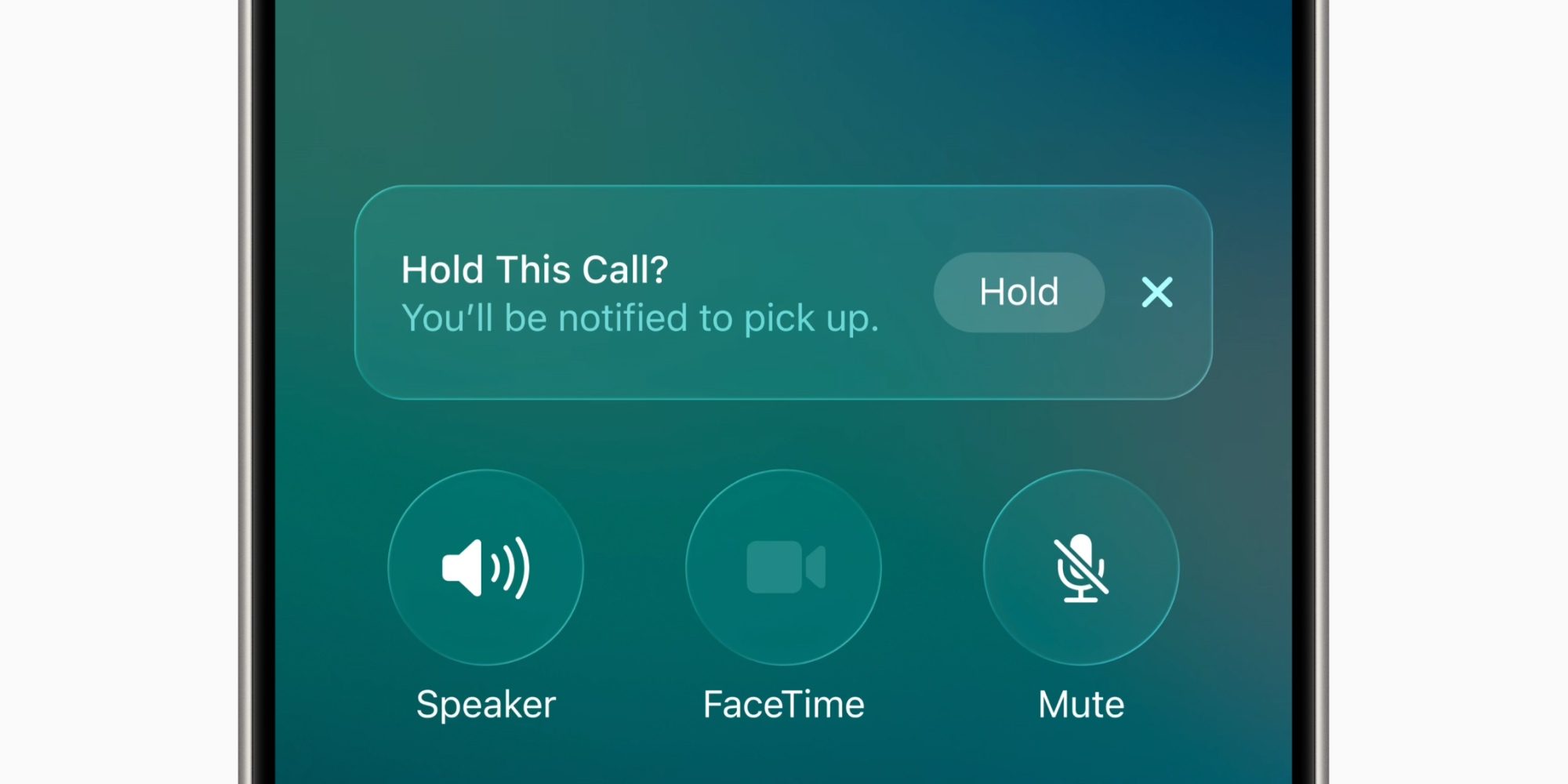
- How it Works: Powered by on-device audio processing, Hold Assist monitors the cadence and nature of the audio stream during an active call. When it detects that you have been placed on hold—identifying standard hold prompts or music loops—it triggers an unobtrusive pop-up on the iPhone display.
- User Intervention: By tapping the prompt, users can safely set their phone down or switch to other applications. The system continues to monitor the line in the background.
- The Notification Loop: Once a human voice is detected returning to the conversation, the iPhone immediately fires a high-priority push notification and vibration alert, signaling that it is time to pick the phone back up.
- Activation Path: Users can enable this feature by navigating to Settings > Apps > Phone and toggling on Hold Assist Detection.
2. Call Screening: A Shield Against the Spam Epidemic
Robocalls and phishing attempts have turned the telephone into a hostile environment. Silence is often the only defense, leading users to miss legitimate calls from unknown numbers (such as a delivery driver, a medical clinic, or a local service provider).
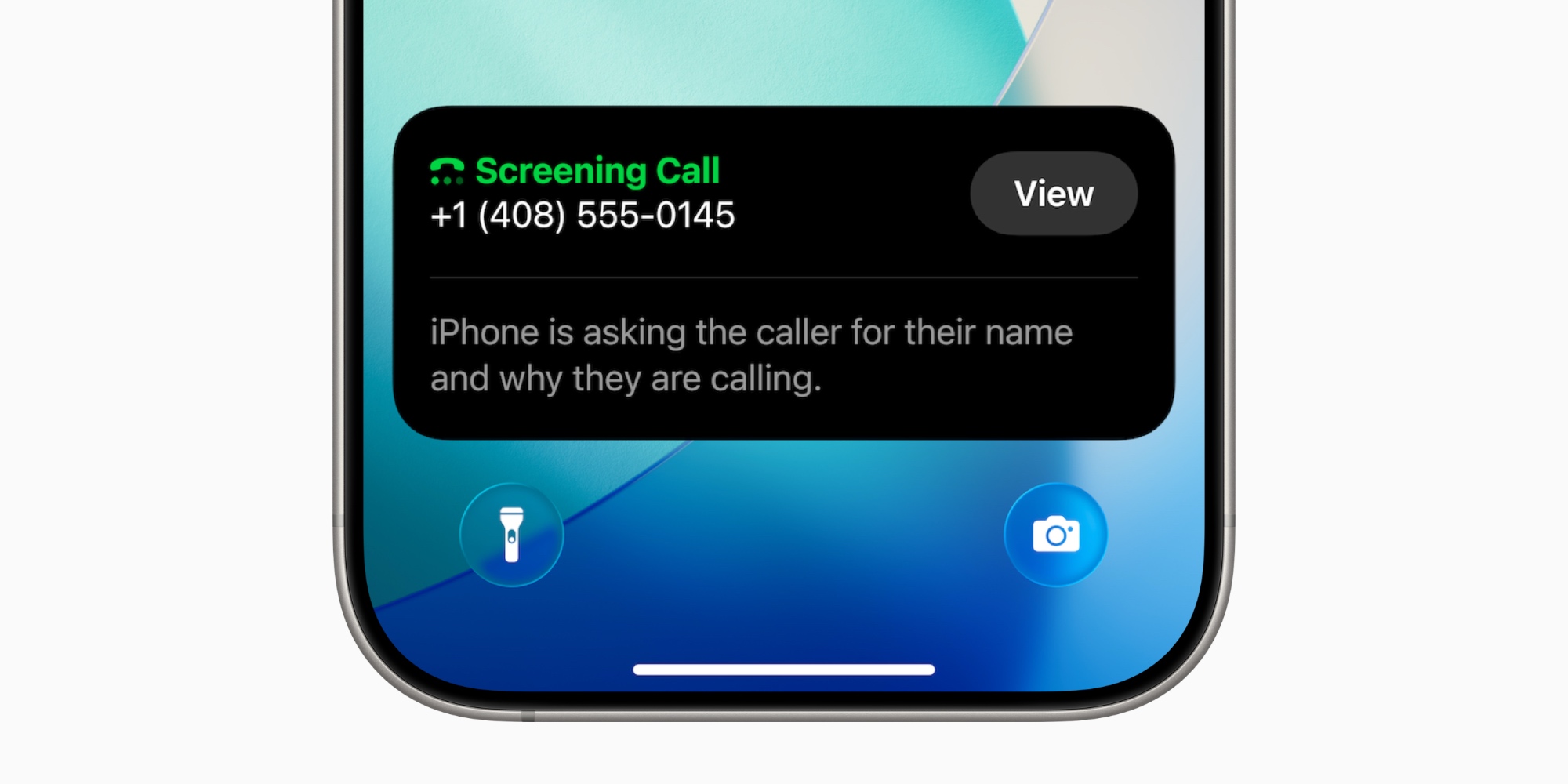
- How it Works: Call Screening acts as an intelligent intermediary. When an incoming call originates from a number not saved in the user’s contacts, the system automatically intercepts the call before the phone rings aloud.
- Automated Inquiry: The phone prompts the caller to state their name and the explicit reason for their call.
- Real-Time Transcription: As the caller speaks, iOS transcribes their response in real-time, displaying the text directly on the user’s Lock Screen.
- Decision Matrix: Armed with context, the user can choose to accept the call, decline it, or send the caller straight to voicemail without ever exposing their live line to potential scammers.
- Activation Path: Found within the same system menu under Settings > Apps > Phone.
iOS 27: The Arrival of Proactive Call Context
Building upon the infrastructure laid by iOS 26, the upcoming release of iOS 27—currently moving through developer and public beta cycles ahead of its wider public deployment in September—introduces the next major leap in communication intelligence: Call Context.
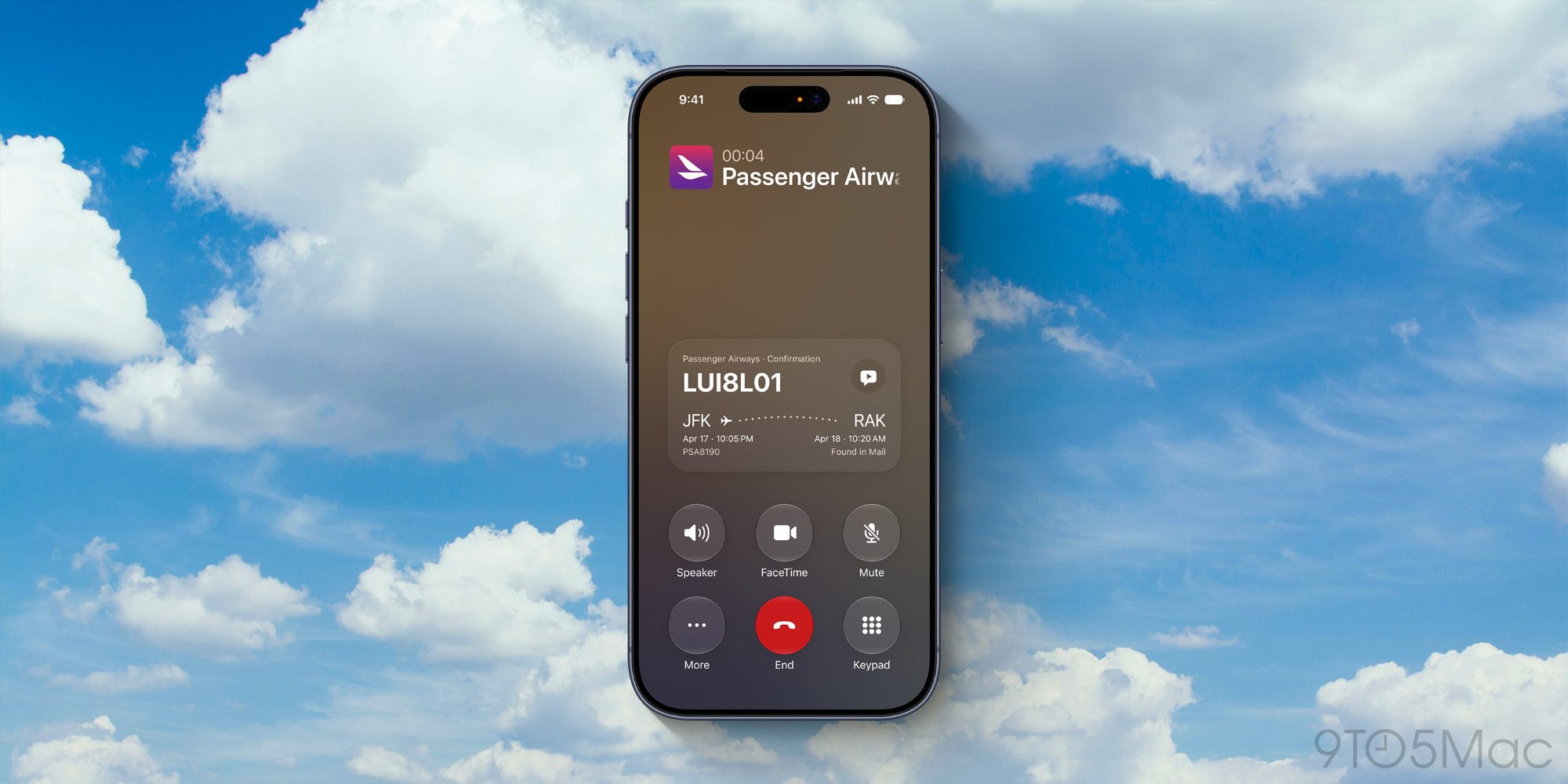
Powered by advanced on-device processing capabilities, Call Context bridges the gap between fragmented personal data silos (such as Apple Mail, Messages, and Calendar) and active voice communication. When a user initiates an outgoing call to a registered business or organization, the system proactively scans local metadata to unearth the exact documents required for the conversation.
- Real-World Scenarios:
- Airlines: If a user dials an airline customer service line to modify a delayed itinerary, Call Context pulls the flight confirmation code directly from a recent email in Apple Mail and pins it to the active call screen.
- Retail & E-commerce: If calling a retailer regarding a lost package, the app instantly surfaces the relevant order number, tracking details, and shipping address.
- Privacy-First Architecture: Maintaining Apple’s stringent privacy commitments, Call Context operates entirely on-device. The system assesses who is being called to surface relevant local data, but it does not record, stream, or analyze the actual spoken contents of the conversation to third-party servers.
- Hardware Requirements: Due to the intensive on-device machine learning requirements needed to process contextual data streams seamlessly during an active call, Call Context requires an iPhone 15 Pro or a newer device.
Supporting Context & Metrics: The Human Cost of Phone Frustration
The motivation behind Apple’s sudden focus on telephony is rooted in hard data. Consumer behavior analytics over the past five years reveal a profound cultural aversion to traditional voice calls, largely driven by inefficiency, spam, and poor customer service architectures.
The Metrics of Modern Telephony
- The Spam Surge: According to global telecommunication security reports, consumers receive billions of unwanted robocalls every month. In North America alone, estimates suggest that the average mobile user is targeted by multiple spam calls daily. Without automated screening tools, users are forced to either ignore all unknown numbers—risking missed opportunities—or risk falling victim to sophisticated social engineering scams.
- The Hold Time Penalty: Studies on consumer service interactions indicate that the average American spends upwards of 40 to 60 hours per year trapped on corporate hold lines. Forcing individuals to actively police these lines is an inefficient use of time. Features like Hold Assist recover substantial fractions of this wasted productivity.
- The "Phone Anxiety" Phenomenon: Modern demographics—particularly younger generations—exhibit high levels of stress associated with unexpected phone calls. By automating the screening process and providing contextual data before a conversation begins, software mitigates the cognitive load and anxiety of handling unknown or high-stakes business calls.
Official Statements and Industry Insights
While Apple traditionally lets its feature announcements speak for themselves during Worldwide Developers Conference (WWDC) keynotes and software release cycles, user experience researchers and platform architects have offered clear insight into the philosophy guiding these updates.
In promotional briefs accompanying the rollout of iOS system utilities, Apple’s software engineering team emphasizes a core mandate: minimizing digital friction.
"The telephone should serve as a direct bridge to human connection or necessary business resolution, not an obstacle course of hold music, spam filters, and information hunts," noted a software product lead familiar with the iOS ecosystem. "By utilizing on-device intelligence to screen interlopers, guard your time on hold, and surface the exact document you need right when you dial, we are restoring utility to an app that has long been overdue for a modern overhaul."
Industry analysts have similarly lauded the pragmatic nature of these updates. Unlike speculative hardware shifts or aesthetic interface redesigns, features like Hold Assist, Call Screening, and Call Context solve persistent, daily annoyances faced by hundreds of millions of smartphone owners globally.
Future Outlook: Where Does the Phone App Go From Here?
As we look past the imminent September deployment of iOS 27, the roadmap for voice communication on mobile devices points toward even deeper integration with ambient computing and generative intelligence.
1. Conversational AI Intermediaries
The natural evolution of Hold Assist is not merely alerting the user when a human agent returns, but potentially having an on-device assistant handle the tedious initial phase of the hold loop entirely. Imagine a future where your iPhone waits on hold, navigates automated Interactive Voice Response (IVR) tree menus ("Press 1 for billing, Press 2 for technical support"), and only transfers the live call to your ear once a real representative is on the line.
2. Cross-Platform Unified Context
While iOS 27 leverages Mail and local apps for Call Context, future iterations may expand to securely parse third-party app data—such as airline apps, ride-sharing receipts, and banking ledgers—providing a comprehensive, universal dossier for every business interaction initiated from your device.
3. Enhanced Post-Call Synthesis
With the expansion of audio transcription tools, future phone applications will likely offer instant, privacy-vetted summaries of long customer service calls, automatically generating actionable bullet points (e.g., "Refund approved of $45.99, reference ticket #8892, expected by Friday"), removing the need for users to frantically scribble notes while speaking.
Wrap-Up
For many users, the native Phone app remains a reluctant necessity—an interface opened only when web portals fail and digital chat bots hit a dead end. However, the cumulative weight of Apple’s recent software updates has fundamentally changed the dynamic.

Tools like Hold Assist reclaim lost hours from automated music loops, while Call Screening builds a formidable wall against the daily deluge of scam and spam callers, preserving user peace of mind. Looking ahead, Call Context in iOS 27 promises to eliminate the frantic scramble for order numbers and confirmation codes, ensuring that when you finally do make that dreaded call to customer service, you are armed with everything you need right on your screen.
These additions prove that even the most mature, traditional corners of our mobile operating systems can still evolve in ways that genuinely improve daily life.
What are your favorite features in the iOS Phone app? Do you rely on Call Screening to dodge spam, or are you looking forward to testing Call Context in iOS 27? Let us know your thoughts in the comments below.