Executive Overview
The evolution of consumer finance and daily organization has converged into a singular, pocket-sized utility: the digital wallet. For hundreds of millions of iPhone users globally, Apple Wallet has transitioned from a novel convenience into an indispensable infrastructure piece. It manages everything from daily credit and debit card transactions via Apple Pay to transit passes, event tickets, state-issued identification cards, and boarding passes.
Yet, like any sophisticated software ecosystem tightly bound to hardware, secure enclaves, and financial networks, Apple Wallet is not entirely immune to friction. Whether a user is facing a sudden transaction decline at a retail checkout counter, struggling to provision a newly reissued credit card, or attempting to load an incompatible third-party loyalty pass, technical glitches can disrupt daily workflows.
This comprehensive guide delivers an authoritative, deeply detailed examination of the most common Apple Wallet failures. By synthesizing diagnostic steps, security protocols, software dependencies, and regional restrictions, this report offers a definitive playbook for restoring your digital wallet to optimal performance.
Detailed Chronology: Step-by-Step Diagnostic & Resolution Workflows
When Apple Wallet encounters anomalies—such as error prompts indicating that a service is temporarily unavailable or transactions failing to clear—users must approach troubleshooting methodically. Resolving these issues requires moving from basic card re-provisioning up to system-level device and account audits.
Phase 1: Card Re-Provisioning and Basic Resets
The most frequent point of failure in Apple Wallet involves individual payment cards randomly refusing to process transactions. This behavior typically occurs because a card has expired, been reported lost or stolen, or been automatically reissued by a financial institution with updated security credentials, leaving the digital token in Wallet out of sync with the issuing bank.
- Isolate the Troubling Card: Open the Apple Wallet application on your iPhone and tap on the specific card generating the error code or declining payments.
- Access Card Parameters: Tap the three-dot menu icon (or the information icon depending on the specific iOS iteration) in the upper-right corner, then select Card Details.
- Purge the Outdated Token: Scroll to the bottom of the menu and select Remove Card. This deletes the corrupted digital token from your device’s Secure Element.
- Re-add the Financial Instrument: Return to the Wallet home screen, tap the Plus (+) icon in the top-right corner, select Debit or Credit Card, and follow the on-screen prompts.
Note: Re-provisioning a card frequently requires fresh authorization from your bank or card issuer, which may manifest as an automated SMS verification code, an in-app confirmation prompt, or a direct telephone verification call. Furthermore, users should verify that their specific financial institution maintains active, native support for Apple Pay.
Phase 2: Software Ecosystem and Regional Verification
If card re-provisioning fails to resolve transaction errors, the root cause often traces back to outdated operating system software or misconfigured regional settings.
- Executing an iOS Update: Outdated software versions can introduce compatibility bugs between the Wallet app, local carrier settings, and banking APIs. Users should routinely navigate to Settings > General > Software Update to ensure their devices run the latest stable build of iOS, which frequently incorporates security patches and feature expansions for digital passes.
- Auditing Regional Parameters: Apple Pay and Apple Cash features are heavily restricted by geographic jurisdiction and local regulatory frameworks. Users who frequently travel or have recently relocated must verify their device configurations. Navigate to Settings > General > Language & Region to ensure that the designated Region accurately reflects your current physical and financial jurisdiction. Cross-referencing Apple’s official regional support documentation ensures that your bank and current location fully support the attempted transactions.
Phase 3: Hardware Security and Two-Factor Authentication Audits
Apple Wallet relies on the highest tiers of device security to safeguard sensitive financial data. If foundational authentication layers are misconfigured, Apple Wallet features may be silently disabled or restricted.
- Biometric and Passcode Verification: Biometric authorization via Face ID or Touch ID is a mandatory prerequisite for contactless payment execution. Users experiencing blocks on transactions should navigate to Settings > Face ID & Passcode (or Touch ID & Passcode) and verify that the toggle for Contactless & Payments is explicitly enabled.
- Apple Account Security: Protecting the digital wallet requires robust account-level security. Every user should enforce two-factor authentication (2FA) on their Apple Account. To verify or activate this safeguard, sign into the official Apple Account management portal and follow the multi-factor setup protocols to secure your personal data infrastructure.
Supporting Context & Metrics: The Architecture of Digital Transactions
To fully appreciate why Apple Wallet occasionally falters, it is necessary to understand the underlying architecture powering contactless transactions. Apple Pay does not store actual credit or debit card numbers on the device or on Apple servers. Instead, it assigns a unique Device Account Number, which is encrypted and securely stored in the Secure Element—a certified, isolated chip designed to keep financial data safe from the rest of the operating system.
When a transaction occurs:
- The Secure Element communicates directly with the point-of-sale terminal using Near Field Communication (NFC).
- A dynamic, single-use security code (cryptogram) is generated for that specific transaction.
- The transaction is routed through the standard payment rails (Visa, Mastercard, American Express, etc.) to the issuing bank for authorization.
When this chain breaks down—whether due to a dropped network handshake, an expired security token, or a server-side outage at the financial institution—the user experiences a declined transaction.
Managing Incompatible Passes and Third-Party Solutions
Beyond financial cards, users frequently store transit passes, gym memberships, boarding passes, and event tickets in Apple Wallet. However, not all third-party vendors natively support Apple Wallet architecture.
Historically, users faced with a digital ticket lacking an "Add to Apple Wallet" button had to rely on specialized third-party utility applications—such as IntoWallet—to ingest a standard QR code or barcode and convert it into a compatible .pkpass file format. Modern iterations of iOS have streamlined this workflow by integrating native pass-generation tools directly into the operating system, dramatically reducing friction for users digitizing legacy paper tickets or proprietary membership cards.
Official Statements and Industry Perspective
Industry analysts and consumer advocacy groups frequently highlight the dual nature of digital wallets: while they offer unprecedented convenience and superior physical security compared to traditional leather wallets, they introduce a dependency on continuous digital infrastructure.
According to consumer technology security advisories, users must maintain contingency protocols for moments when digital systems fail. Security experts emphasize that digital wallets are fundamentally software-hardware hybrids dependent on uninterrupted power supplies, active cellular or Wi-Fi data streams, and healthy backend server infrastructure.
Apple routinely updates its developer and consumer guidelines to reflect best practices for digital credential management. In official documentation addressing system reliability, Apple underscores that temporary service degradation can originate outside the user’s device. When local troubleshooting fails to restore functionality, the issue frequently resides upstream within cloud synchronization networks or banking transaction gateways.
Future Outlook: The Next Generation of Digital Identification and Wallet Utility
As we look toward the future of mobile computing and personal identification, the scope of Apple Wallet is expanding far beyond simple credit card storage and transit ticketing.
The Rise of Digital State IDs and Driver’s Licenses
Governments and transportation authorities globally are collaborating with technology leaders to transition physical identification cards into secure digital formats. Several U.S. states already permit residents to add their state-issued driver’s licenses and state IDs directly to Apple Wallet. These digital credentials can be presented at select Transportation Security Administration (TSA) airport checkpoints and participating retail venues.
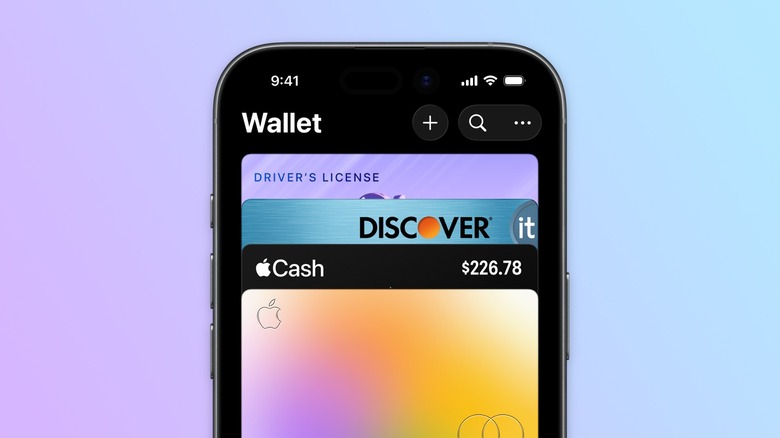
The security architecture powering digital IDs relies on advanced cryptography that shares only the specific information requested by an authority (e.g., verifying that a user is over 21 without revealing their exact birthdate or home address), representing a massive leap forward in digital privacy.
Anticipated System Enhancements and Infrastructural Stability
Future iterations of iOS and watchOS will continue to refine the underlying APIs connecting third-party pass issuers, financial institutions, and the Apple Secure Element. Anticipated developments include:
- Faster Re-Tokenization: Streamlining how banks push updated security tokens to devices, reducing instances of expired cards failing silently in the background.
- Universal Pass Standards: Expanding native support for a broader array of international transit networks and decentralized ticketing protocols without the need for auxiliary conversion apps.
- Enhanced Offline Capabilities: Expanding the operational window for transit passes and digital keys even when an iPhone’s battery reaches critical reserve levels or cellular data is entirely unavailable.
Conclusion: Best Practices for Uninterrupted Wallet Usage
To ensure maximum reliability when navigating the digital landscape, iPhone users should adhere to a proactive maintenance routine:
- Keep iOS Updated: Regularly install system software patches to benefit from the latest security protocols and bug fixes affecting the Wallet app.
- Monitor Financial Cards: Be proactive when credit or debit cards approach their expiration dates, anticipating the need to re-add reissued cards to the Wallet app.
- Verify System Status: In the event of a sudden, widespread transaction failure, consult Apple’s System Status page to check for active cloud infrastructure outages.
- Maintain Physical Backups: Despite the ubiquity of digital payments, always carry at least one traditional physical payment card or form of identification as an analog contingency during travel or critical outings.
By understanding the mechanisms governing Apple Wallet, mastering its diagnostic reset procedures, and maintaining proactive device hygiene, users can harness the full power of the digital wallet while insulating themselves against unexpected technical disruptions.