For nearly a decade and a half, the physical interactions governing Apple’s mobile operating systems have remained remarkably consistent. Since the debut of Notification Center in iOS 5 back in 2011, pulling down from the top-center edge of an iPhone or iPad screen has served as the universal digital gesture for checking incoming alerts, missed calls, and app updates. It is a gesture embedded into the muscle memory of over a billion active users worldwide—a reflexive, thoughtless motion performed dozens of times a day.
With the upcoming commercial release of iOS 27 and iPadOS 27, arriving on September 14 following an extensive summer developer and public beta testing cycle, Apple is upending that foundational interaction. In a bold, calculated move to prioritize its heavily upgraded, context-aware Siri AI ecosystem, the Cupertino tech giant is reallocating the prime real estate of the top-edge swipe. Swiping down from the center of the display will no longer summon Notification Center for users who enable the new Siri AI features. Instead, that precious downward arc now invokes the system’s new conversational artificial intelligence interface.
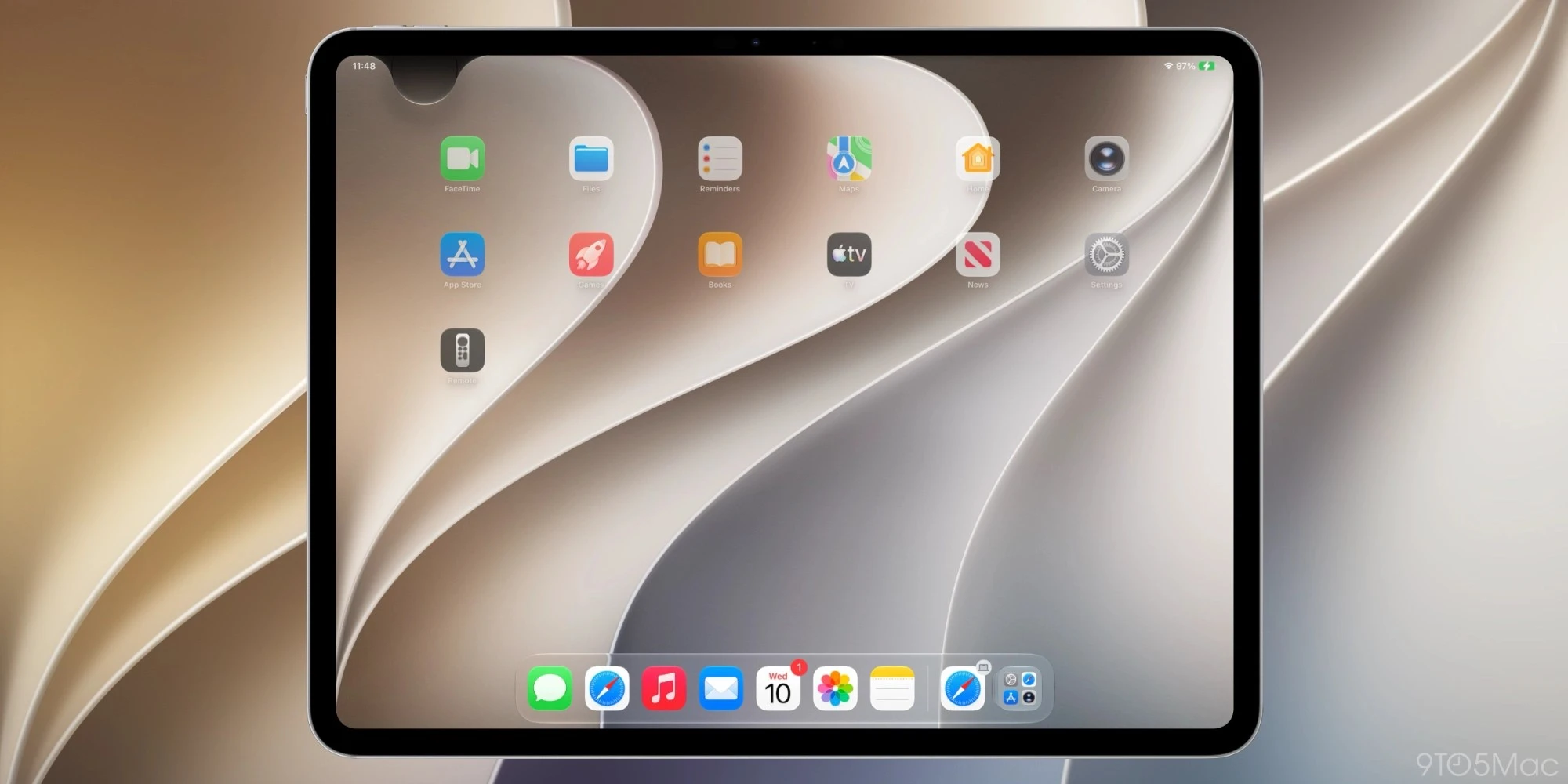
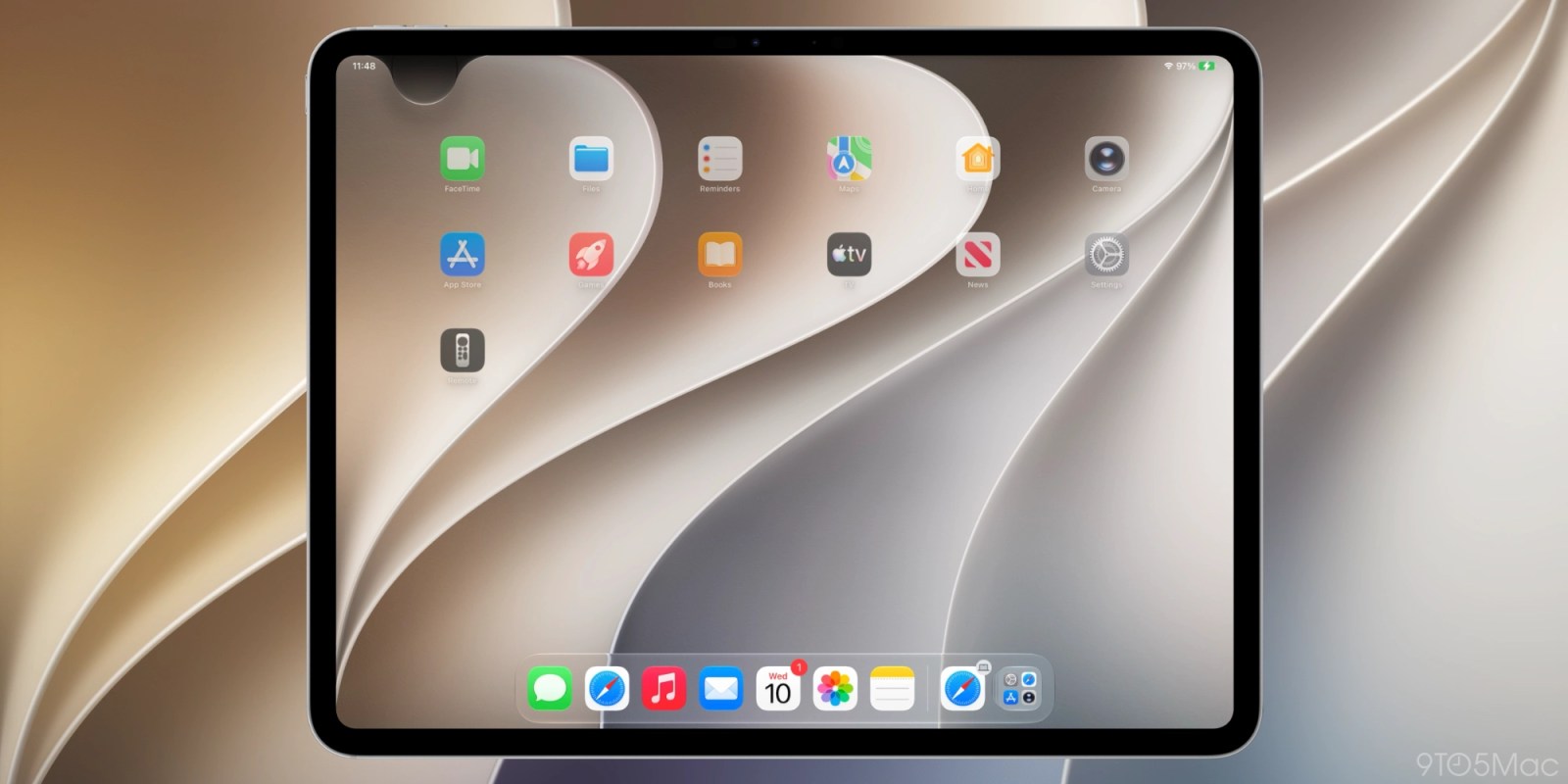
This shift relegates the traditional Notification Center to the top-left corner of the display, neatly mirroring the top-right placement of Control Center that was introduced with the edge-to-edge design of the iPhone X years ago. While Apple has continuously refined the layout across successive beta builds to ensure a balanced interface—establishing clear regional boundaries for notifications, system controls, and AI triggers—the transition represents one of the most disruptive UI overhauls in modern mobile software history.
As developers and early adopters finish putting the final touches on their workflows ahead of the September 14 rollout, the tech community is left grappling with a profound design philosophy question: When an operating system’s core interface is fundamentally reorganized to serve artificial intelligence, how long does it take for human habit to adapt, and what are the usability tradeoffs along the way?
DETAILED CHRONOLOGY: FROM iOS 5 TO THE iOS 27 REVOLUTION
To truly understand the weight of the iOS 27 gesture overhaul, it is necessary to trace the evolutionary arc of Apple’s interface paradigms over the past fifteen years.
The Foundation of Chronological Alerts (2011)
When Apple introduced iOS 5 at WWDC in June 2011—released later that autumn alongside the iPhone 4S—the mobile industry was struggling with a fragmented approach to app notifications. Prior versions of iOS relied on intrusive, modal pop-up alerts that interrupted whatever task a user was performing. iOS 5 changed the landscape permanently by establishing Notification Center, a unified, chronological repository accessed by dragging a finger downward from the very top bezel of the screen.
This interaction model quickly became the gold standard of mobile user experience design. Whether utilizing an early 3.5-inch Retina display or a massive modern tablet, users knew instinctively that the top edge belonged to their notifications.
The First Major Disruption: The iPhone X (2017)
The next seismic shift to top-edge gestures occurred with the removal of the physical Home button and the introduction of the iPhone X. To accommodate the sensor housing (the "notch"), Apple split the top edge swipe responsibilities. Swiping down from the top-right corner became the designated shortcut for Control Center—moving away from the historic bottom-up swipe introduced in iOS 7—while the top-left and center regions continued to handle Notification Center.
This division persisted for nearly a decade, cementing a mental map where the right side meant quick settings (Wi-Fi, Bluetooth, brightness) and the center-to-left meant notifications.
The Siri AI Era and the Beta Iterations of Summer 2026
Fast forward to the summer of 2026. Apple’s long-anticipated push into advanced, deeply integrated artificial intelligence reached its zenith with the unveiling of iOS 27. Designed from the ground up to place contextual intelligence at the user’s fingertips, the operating system required a hyper-accessible shortcut to summon Siri AI instantly from anywhere within the OS.
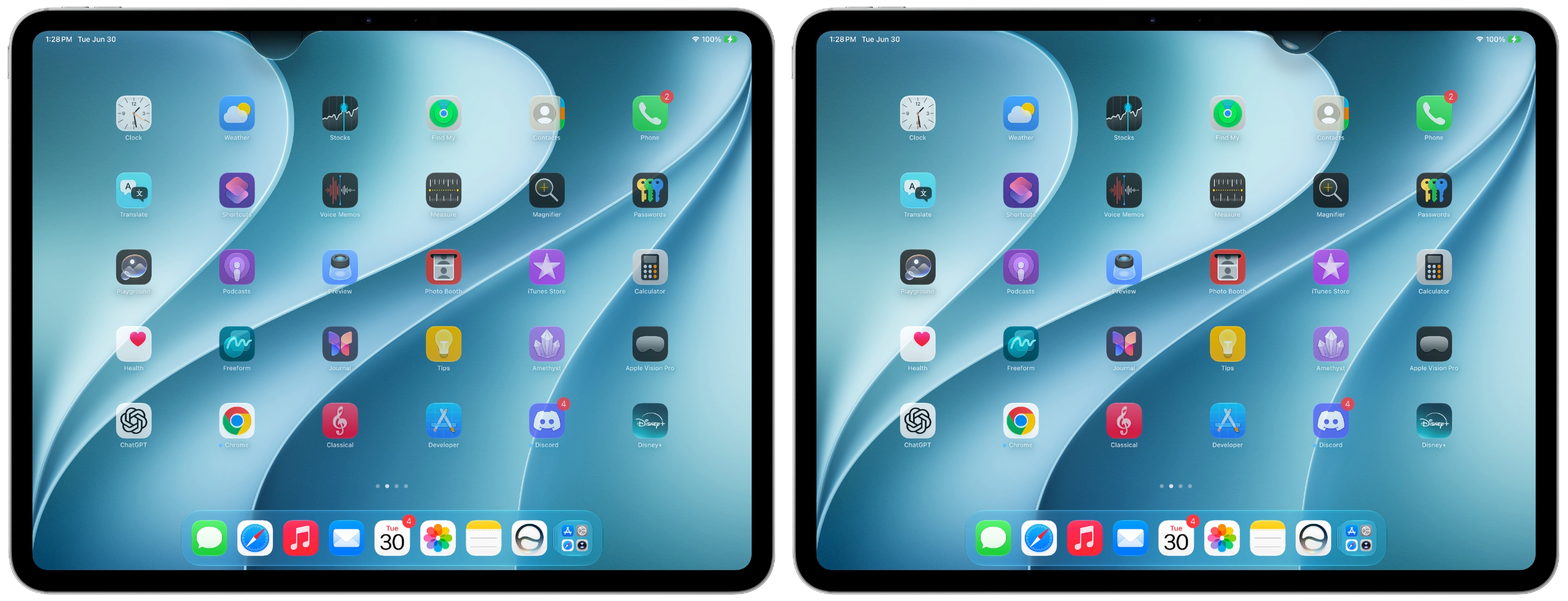
During the initial developer beta releases (Beta 1), Apple’s implementation was aggressively single-minded. The entire top edge—save for minute exceptions—seemed engineered to capture user intent for Siri AI. On the iPadOS 27 platform in particular, the expanse above the Home screen app grid was heavily dominated by the AI invocation trigger. In fact, early testers quickly noted that if a user disabled the display of the AM/PM clock or the calendar date in the status bar, the physical surface area dedicated to opening Notification Center actually shrank, pushed into an almost aggressively narrow corner.
Recognizing the ergonomic friction this caused, Apple’s Human Interface Design team refined the approach in iPadOS 27 Beta 2. The update established a far more balanced, uniform tripartite layout along the top edge of the screen:
Top-Left Region: Dedicated exclusively to Notification Center (spanning roughly the width of two standard app columns).
Top-Right Region: Retaining its long-standing role as the gateway to Control Center.
The Center Expanse: Reserved entirely for invoking the new Siri AI experience.
Despite these structural compromises in Beta 2, the core reality remains unchanged for millions of users: the center swipe is permanently lost to artificial intelligence.
SUPPORTING CONTEXT & METRICS: USABILITY, MUSCLE MEMORY, AND INTERFACE ARCHITECTURE
The decision to repurpose the most intuitive gesture on a mobile device is not taken lightly by any software vendor, least of all Apple, which has historically guarded its Human Interface Guidelines with religious fervor. However, internal metrics and modern usage trends tell a compelling story of shifting priorities.
The Anatomy of Muscle Memory
Psychologists and UI researchers define muscle memory (procedural memory) as a form of implicit memory that enables individuals to perform tasks with little conscious thought through repetitive practice. For over fifteen years, the human brain has associated the physical act of pulling down the dead-center top of an iPhone or iPad screen with the retrieval of missed communications.
Frequency of Interaction: Statistics show that the average smartphone user checks their notification shade anywhere from 40 to 80 times per day. Multiplying this by 15 years yields hundreds of thousands of repetitions.
The Error Rate During Transition: Early telemetry and anecdotal testing from the iOS 27 developer community indicate a remarkably high initial "miss rate." Users attempting to check a breaking news alert or calendar reminder routinely find themselves accidentally launching the Siri AI interface instead.
Cognitive Load: The friction of retraining procedural memory introduces temporary cognitive load, forcing users to consciously override an ingrained physical habit—a phenomenon UI designers generally seek to avoid unless the functional payoff is exceptionally high.
Spatial Distribution on Modern Displays
To grasp how Apple managed this spatial real estate crunch, one must examine the geometry of contemporary iOS devices.
Screen Region
Pre-iOS 27 Behavior
iOS 27 & iPadOS 27 Behavior
Top-Left Edge
Notification Center (Shared with Center)
Dedicated Notification Center (Animated arrival from top-left)
Top-Center Edge
Notification Center
Siri AI Invocation
Top-Right Edge
Control Center
Control Center (Maintained)
By shrinking the physical entry point for Notification Center and funneling it into the top-left corner, Apple is deliberately encouraging users to adapt to a smaller, more localized interactive footprint. When summoned, notifications now fluidly animate outward from that top-left anchor point, visually training the user’s eye and hand toward the new geographic reality.
OFFICIAL PERSPECTIVES AND INDUSTRY REACTION
The reaction to Apple’s calculated gamble has been predictably polarized, pitting the virtues of next-generation artificial intelligence against the sanctity of established ergonomic design.
The Apple Design Rationale
While Apple’s software engineering leads rarely comment publicly on unreleased features outside of their WWDC keynote presentations, the underlying philosophy of iOS 27 is clear: conversational artificial intelligence is no longer an ancillary app or a secondary feature; it is the primary operating system orchestrator.
By dedicating the most natural, effortless physical gesture—a straight, natural downward pull from the exact center of the screen—to Siri AI, Apple is signaling that invoking intelligence should be as frictionless as checking the time or viewing a text message. The company’s willingness to disrupt 15 years of muscle memory underscores an institutional belief that the utility of the new Siri AI system vastly outweighs the short-term discomfort of retraining user habits.
Developer and Critic Consensus
Independent developers, tech journalists, and power users who have lived with the iOS 27 betas for months offer a nuanced view.
On one hand, early reviews of the new Siri AI engine are overwhelmingly positive. Testers report that the AI’s contextual awareness, speed, and cross-app command capabilities represent a generational leap forward from legacy iterations of Siri. Hearing seasoned tech critics admit that "Siri is actually good now" has been one of the defining narratives of the 27 beta cycle.
On the other hand, the lack of customization options remains a frequent point of contention. Unlike other experimental features that Apple hedges with a toggle switch in the Settings app, there is currently no toggle to reverse the top-edge swipe behavior. Users who might prefer to keep the center swipe tied to Notification Center and invoke Siri via a physical side-button press or a wake word are out of luck. As one prominent beta tester noted:
"After months of using the new behavior, I’m certain I’d toggle it off if there were a setting to do so. Since there’s no option to disable invoking Siri from the top-middle swipe down, the only thing to do is build new muscle memory around avoiding the center."
FUTURE OUTLOOK: WHAT HAPPENS AFTER SEPTEMBER 14?
As the calendar ticks down to the official public release of iOS 27 and iPadOS 27 on Monday, September 14 (expected to roll out globally around 10:00 AM Pacific Time / 1:00 Eastern Time), the tech world stands on the brink of a massive behavioral transition.
The Macro Impact on Mobile UI Design
Apple’s move may well trigger a broader industry trend. As smartphone manufacturers increasingly pivot their operating systems toward on-device artificial intelligence agents, physical screen real estate will become fiercely contested territory. If Apple successfully forces its user base to surrender the top-center edge to AI, competing ecosystems—such as Android OEMs—may feel emboldened to radically reimagine their own notification shades and gesture shortcuts in favor of AI-first interfaces.
Recommendations for Users Preparing for the Update
For everyday users preparing to install iOS 27 on September 14, a brief adjustment period should be anticipated. To minimize frustration during the transition:
Conscious Practice: For the first few days, deliberately aim your finger toward the upper-left corner of your iPhone or iPad display whenever you intend to check your notifications.
Embrace the AI: Lean into the new center-swipe gesture to test the capabilities of the upgraded Siri AI system. You may find that the speed of summoning conversational help justifies the loss of prime real estate.
Explore Alternative Triggers: Remember that Siri AI can still be invoked through traditional voice commands and hardware shortcuts, providing alternative pathways if your thumb simply refuses to break old habits.
Ultimately, iOS 27 represents a pivotal moment in Apple’s software history. By boldly sacrificing a 15-year-old interface convention at the altar of artificial intelligence, Apple is betting that the future of computing belongs to those who make AI as effortless to reach as a text message notification. Whether consumers embrace this new posture or clamor for a toggle switch remains one of the most fascinating human-computer interaction stories to watch unfold this autumn.