Executive Overview
The evolution of wearable technology has long been defined by a tug-of-war between convenience and capability. For years, smartwatches served primarily as notification mirrors—glorified vibrating screens that alerted users to incoming text messages, emails, and calendar events, but forced them to reach into their pockets for any meaningful interaction. Nowhere was this friction more pronounced than on the Apple Watch when interacting with third-party messaging applications.
Among these, WhatsApp—the world’s dominant cross-platform messaging service boasting over two billion active users—historically offered a deeply restricted experience on wrist-based wearables. For the vast majority of its existence on watchOS, WhatsApp lacked a dedicated native application. Users were entirely tethered to Apple’s system notification framework, which permitted basic reading and rudimentary voice or text dictation replies, but fell drastically short of a robust messaging environment.
That paradigm shifted dramatically late last year when Meta released a dedicated, full-featured WhatsApp application designed natively for watchOS. Delivering call notifications, complete chat histories, voice message playback, and preliminary emoji reactions, the standalone app was widely hailed as a watershed moment for Apple Watch users. However, this initial release came with a stubborn vestige of traditional smartwatch limitations: emoji reactions were tightly bottlenecked. Users were restricted to a meager selection of six preset emojis directly on their wrists, forcing anyone who wanted to express a more nuanced emotion, humor, or precise reaction to pull out their iPhone.
Today, that final tether to the handheld device is being systematically severed. According to reliable platform trackers at WABetaInfo, WhatsApp is officially rolling out support for the full, unbridled catalog of system emojis available on watchOS. This update marks a significant leap forward in user-interface design for wrist-based communication, empowering users to search, browse, and deploy hundreds of expressive icons directly from their wrists. As this feature gradually populates global devices, it signals a deeper maturation of wearable apps, proving that smartwatches are increasingly shedding their status as mere companion accessories to become fully realized, independent computing nodes.
Detailed Chronology: The Road to Wrist-Bound Freedom
To truly understand the significance of this latest feature expansion, one must trace the rocky and deliberate evolution of WhatsApp’s presence on the Apple Watch ecosystem.
The Wilderness Years: Notification-Dependent Messaging
For the first decade of the Apple Watch’s commercial life, Meta took a remarkably conservative approach to watchOS development. While competitors like Telegram and various independent clients experimented with native wearable apps, WhatsApp remained glaringly absent from the App Store for watchOS.
During this extended period, users relied entirely on the Apple Watch’s system-level notification API. When a WhatsApp message landed on an iPhone, the notification mirror would push the text to the wrist. Users could tap "Reply," utilizing watchOS’s built-in Scribble feature, voice dictation, or Apple’s standard smart replies. While functional for emergencies or brief acknowledgments, this setup was notoriously fragile. Media files failed to load properly, chat threads could not be browsed historically, and long conversations quickly became chaotic and impossible to navigate.
The Breakthrough: The Native watchOS App Launch
The tide turned late last year when Meta engineers finally delivered what the Apple Watch community had been clamoring for: a native, optimized watchOS application. Built to take advantage of modern watchOS architecture, the app brought unprecedented capabilities to the wrist:
- Standalone Chat History: Users could finally scroll through recent conversations without needing their iPhone nearby, provided the watch maintained an active cellular or Wi-Fi connection.
- Voice Message Support: The ability to listen to incoming audio notes directly through the watch speaker or connected AirPods transformed asynchronous communication on the go.
- Call Notifications: Real-time alerts for incoming WhatsApp voice and video calls allowed users to accept or decline communications seamlessly from their wrist.
- Initial Emoji Reactions: In a nod to modern chat culture, the app introduced emoji reactions, allowing users to react instantly to individual messages.
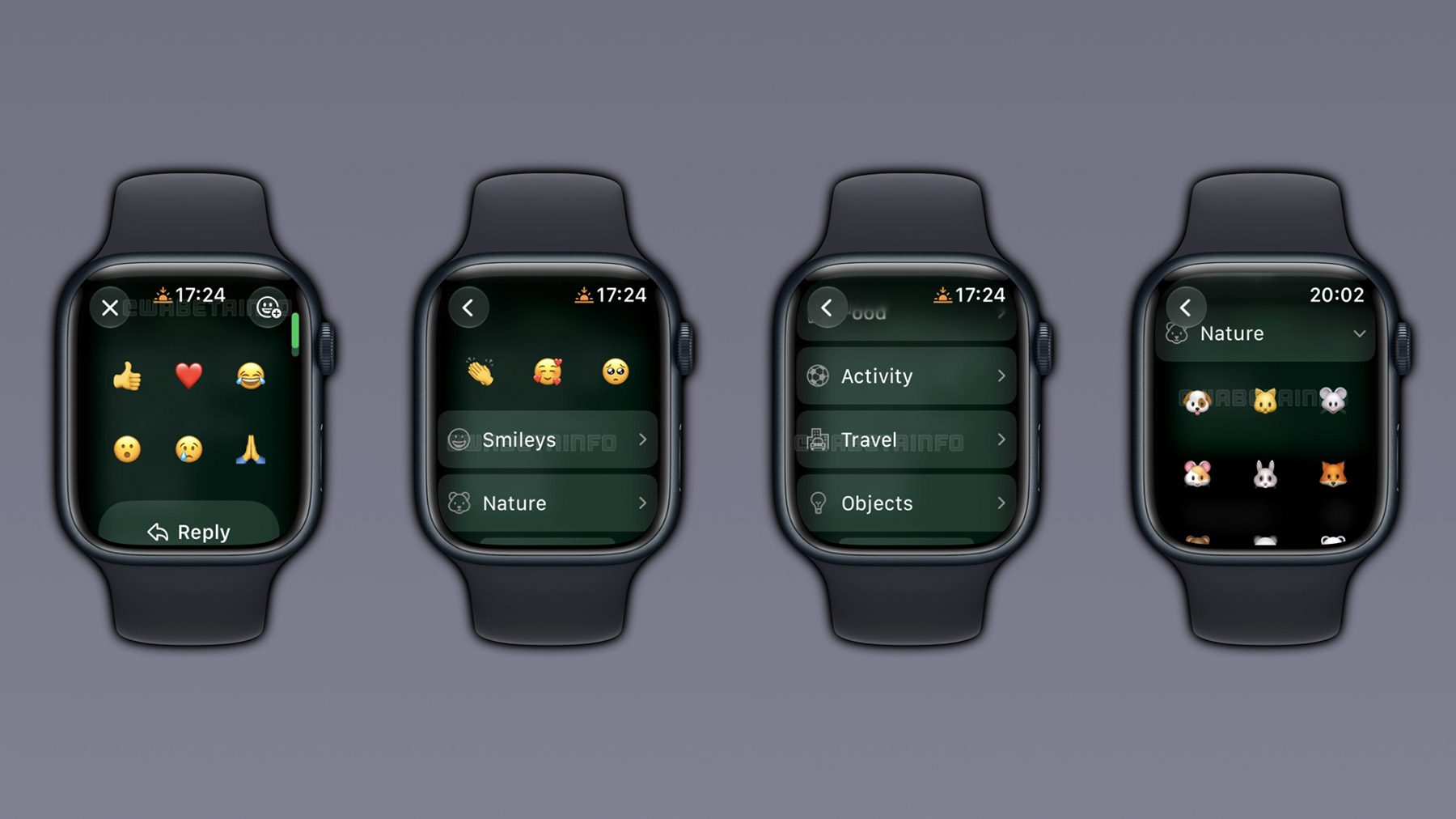
Yet, this monumental release was not without its compromises. In the interest of interface simplicity and performance optimization—crucial metrics for battery-conscious wearable devices—the development team imposed a rigid constraint on emoji reactions. Users tapping and holding a chat bubble were presented with a static carousel of only six standard, highly universal emojis (typically the thumbs-up, heart, laughing face, surprised face, crying face, and folded hands). For any reaction outside this corporate-approved sextet, the user was forced to abandon their wrist and retrieve their iPhone.
The Current Expansion: Full watchOS Emoji Integration
The current rollout, breaking globally via server-side updates and app enhancements monitored closely by WABetaInfo, directly addresses this limitation. By integrating the complete watchOS system emoji library into the WhatsApp interface, Meta is bridging the gap between desktop/mobile messaging experiences and wearable computing.
Rather than upending the user interface, the update refines it. Users still execute the familiar gesture—tapping and holding a message bubble—which initially surfaces the trusted six default reactions for rapid, zero-friction choices. However, a newly introduced expansion option now allows users to dive deeper into a comprehensive, categorized emoji picker. This structural evolution represents a masterclass in UI/UX compromise, satisfying both the speed-oriented user and the expression-oriented user within a tiny, circular or rectangular screen real estate.
Supporting Context & Metrics: The Anatomy of Wearable Communication
The transition of messaging apps to smartwatches is not merely a lifestyle convenience; it is a response to massive shifts in how consumers interact with personal technology. Examining the underlying data reveals why investments in watchOS software development are accelerating across the tech sector.
The Rise of Wearable Computing and Independent Connectivity
According to recent market analysis from firms like Counterpoint Research and IDC, the global smartwatch market has stabilized into a mature, high-value ecosystem, with Apple commanding a dominant share of the premium tier through the Apple Watch lineup. Crucially, the penetration of cellular-enabled (LTE) Apple Watch models has surged over the past three years.
This hardware shift—away from pure Bluetooth tethering toward independent cellular independence—has fundamentally altered user expectations. Consumers going for a run, attending a meeting, or stepping out for a quick errand without their iPhone now expect their wrist devices to function as complete communication hubs. A messaging app that requires an iPhone nearby to unlock its full feature set quickly feels antiquated to a user paying for a cellular watch plan.
Emoji Culture and Conversational Nuance
Emojis have long ceased to be decorative novelties; they are now foundational elements of digital semiotics. Linguistic studies indicate that emoji usage profoundly alters the tone of text-based communication, serving as digital Kinesics (body language) that helps convey sarcasm, warmth, irony, or empathy that plain text often fails to project.
Limiting a messaging platform on a major ecosystem to six emojis effectively flattens conversational nuance. In modern discourse, using the incorrect emoji—or being forced to use a generic substitute because a specific one is unavailable—can alter interpersonal dynamics. By unlocking the full system emoji catalog, WhatsApp is acknowledging that users demand the same emotional granularity on their wrists as they do on their 6-inch smartphone screens or 27-inch desktop monitors.
Technical Constraints of watchOS App Design
Developing for watchOS presents severe engineering hurdles compared to iOS or macOS development:
- Thermal Management: Small processors in wearable devices generate localized heat quickly. Intensive UI rendering or heavy list-scrolling can trigger thermal throttling or drain batteries within hours.
- Battery Preservation: The Apple Watch battery architecture is designed to yield roughly 18 hours of mixed-use life. Apps that consume excessive CPU cycles or continuously poll network connections face immediate user backlash.
- Screen Real Estate: Displaying hundreds of complex vector graphics (emojis) on a screen measuring less than two inches requires intelligent caching, categorization, and rendering strategies to prevent lag or app crashes.
The fact that Meta has successfully integrated the complete system emoji library without sacrificing app performance speaks volumes about the optimization of modern watchOS frameworks and the engineering maturity of the WhatsApp mobile team.

Official Statements and Technical Implementation Details
While Meta typically deploys minor functional updates through quiet background patches and server-side switches rather than grandiose press conferences, the mechanics of the new emoji picker have been meticulously documented by platform verification groups.
How the New Emoji Picker Operates
According to comprehensive technical breakdowns provided by WABetaInfo, the implementation of the expanded emoji library adheres closely to native Apple Human Interface Guidelines (HIG) while maintaining WhatsApp’s cross-platform visual identity:
- Categorized Architecture: Emojis within the watchOS app are systematically sorted into eight distinct system categories:
- Smileys & Emotion
- Animals & Nature
- Food & Drink
- Activity
- Travel & Places
- Objects
- Symbols
- Flags
- Dynamic Navigation: Users can effortlessly scroll vertically through these categories or tap specific category icons to jump directly to a desired section.
- Recents Integration: To minimize search friction on a small screen, the top of the expanded picker prominently features a dynamically updated "Recently Used" row, ensuring that favorite or frequently deployed reactions are perpetually a single tap away.
- Retained Speed: The traditional long-press menu continues to display the six preset reactions instantly, ensuring that casual thumbs-up or heart acknowledgments do not suffer an extra tap penalty.
The Staged Rollout Strategy
As is standard practice for Meta’s engineering teams across WhatsApp, Instagram, and Facebook Messenger, major feature updates rarely hit all two billion global users simultaneously. Instead, features are deployed via controlled, phased rollouts.
Initial reports indicate that the expanded emoji reactions are currently reaching users running the latest versions of WhatsApp for iOS and the companion watchOS app. However, because the activation is managed server-side, some users may find that the feature takes several days or even a couple of weeks to populate on their specific devices. Experts recommend ensuring both the iPhone and Apple Watch applications are updated to their most recent respective versions via the App Store to expedite receipt of the feature.
Future Outlook: What Next for WhatsApp on Wearables?
The integration of full emoji support on the Apple Watch is a major milestone, but it also raises intriguing questions about the future roadmap of messaging on wearable form factors. As hardware capabilities expand—featuring brighter, more energy-efficient OLED displays, faster silicon, and advanced sensors—the boundaries of what a smartwatch app can achieve continue to blur.
Anticipated Features on the Horizon
With basic chat history, voice playback, call handling, and comprehensive emoji reactions now firmly established on watchOS, developers and users alike are looking toward the next frontier of wrist-based messaging features:

- Stickers and GIFs: While emojis are now fully supported, animated stickers and GIFs remain absent from the watchOS app experience due to rendering and bandwidth constraints. Solving this efficiently could be the next major usability hurdle.
- Media Viewing: Currently, viewing high-resolution incoming photos or playing videos directly within the WhatsApp watchOS app is severely limited. Future iterations may incorporate compressed image rendering to allow visual media consumption without unlocking an iPhone.
- Voice Transcription: While listening to audio notes is fully supported, automated, on-device transcription of incoming voice messages directly on the watch screen would be a massive productivity win for users in quiet environments or meetings.
The Broader Implications for Competitors
Meta’s aggressive refinement of its watchOS app places intense pressure on rival messaging platforms. While Apple’s native iMessage remains deeply integrated into the operating system, cross-platform giants like WhatsApp and Telegram are proving that platform-agnostic apps can deliver an equally polished, native-feeling experience on Apple hardware.
Ultimately, this competitive drive benefits the consumer. The days of smartwatches serving as passive notification tickers are rapidly drawing to a close. By empowering users to express complex emotions, react with infinite precision, and manage rich media streams entirely from their wrists, WhatsApp’s latest update represents a vital step forward in the ongoing maturation of wearable technology. The iPhone in the pocket is no longer a mandatory tool for keeping up with the conversation—it is rapidly becoming optional.