
Executive Overview
Apple has officially rolled out the release candidate—the Golden Gate build—of macOS 27 to the general public, following an extensive multi-month beta testing phase. While the headline feature capturing industry-wide attention is the radical overhaul of Siri powered by next-generation conversational AI, the true heartbeat of this major operating system update lies elsewhere. macOS 27 aggressively weaves Apple Intelligence into the fabric of native macOS apps, fundamentally redefining how users interact with their machines.
From advanced photo editing tools that bend reality to natural language shortcut generation and context-aware file management in Finder, this release marks a turning point. Apple is no longer treating artificial intelligence as a flashy, standalone feature; instead, it is embedding intelligence deeply into the core user experience across all Apple Silicon-powered Macs.
This comprehensive report breaks down the architectural shifts, native app enhancements, productivity breakthroughs, and the broader strategic implications of macOS 27 Golden Gate.

Detailed Chronology: From WWDC Teases to the Golden Gate Release
The journey toward macOS 27 began months ago at Apple’s Worldwide Developers Conference (WWDC), where executives first outlined a unified vision for ambient, privacy-focused machine learning across iOS, iPadOS, and macOS.
- Early Summer: Apple pushed the initial developer betas of macOS 27, giving third-party developers their first taste of the new system APIs, including natural language extension creation frameworks and advanced Finder hooks.
- Late Summer: Public beta builds invited millions of everyday users into the testing ecosystem. Feedback poured in regarding battery optimization, memory management under heavy neural processing loads, and UI responsiveness.
- September (Present Day): Apple declared the software stable, dropping the macOS 27 Golden Gate build. This milestone version serves as the final candidate sent to production lines and made available via the software update mechanism for all compatible Apple Silicon Macs.
Throughout this timeline, the development focus remained laser-focused on reducing friction. Apple engineers sought to eliminate the steep learning curves traditionally associated with heavy automation and complex photo retouching by replacing manual controls with conversational, intent-aware prompts.
Deep Dive: Apple Intelligence Across Native Mac Apps
Apple’s multi-layered approach to artificial intelligence relies on contextual awareness—processing data locally on device hardware using specialized Neural Engines while securely querying cloud models for heavier tasks. In macOS 27, this architecture shines brightest inside the applications Mac users rely on every day.
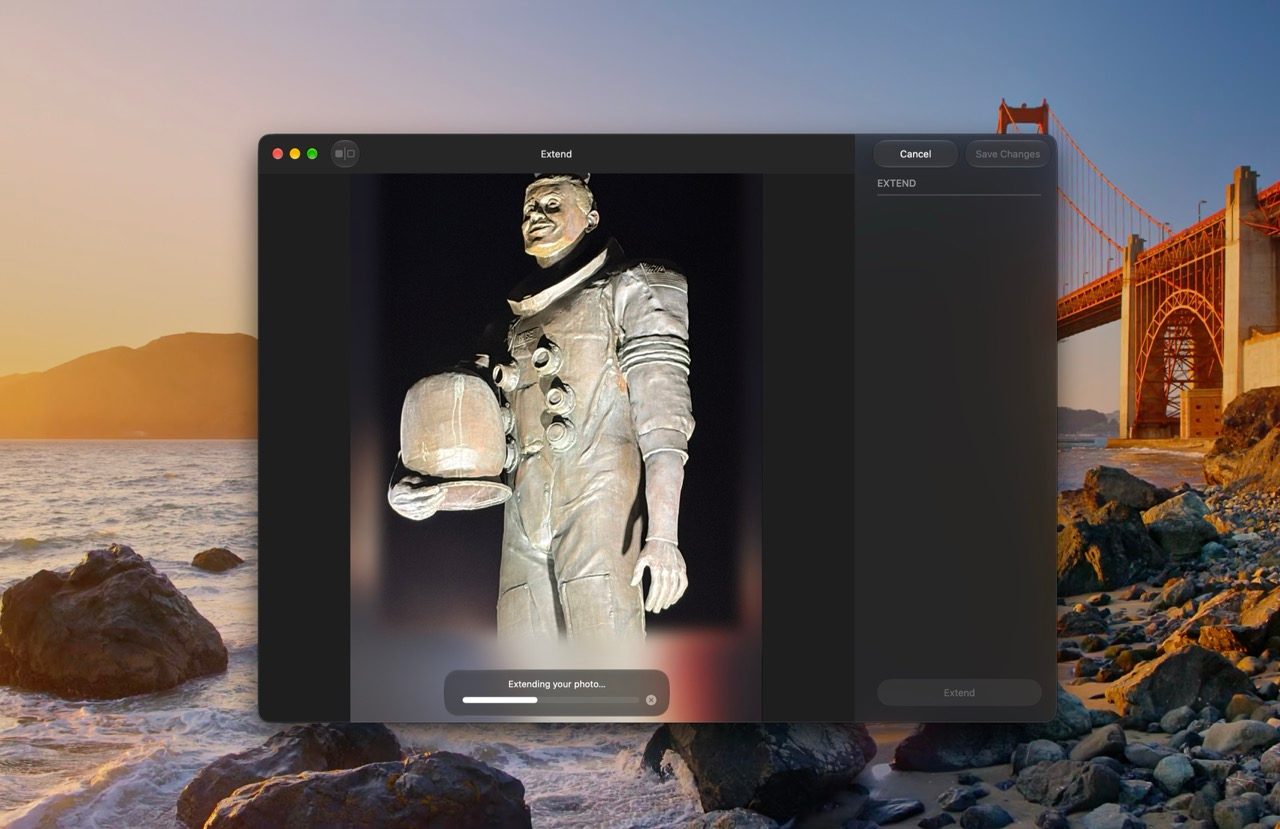
1. Photos: Redefining Digital Imaging
The native Photos app on macOS has received its most significant capability upgrade in years. No longer confined to basic cropping, color correction, and red-eye reduction, the Photos app in macOS 27 introduces three transformative AI-driven tools:
- Spatial Reframing: This feature allows users to fundamentally alter the perspective and spatial depth of an image after it has been captured. By extrapolating depth data and contextual surroundings, the system reconstructs the scene from alternative angles without sacrificing resolution or introducing unnatural artifacts.
- Extend: Similar to generative fill technologies seen in professional design suites, the Extend tool lets users expand an image seamlessly beyond its original borders. Whether you need to fit a square photo into a widescreen layout or add breathing room to a tight portrait, the Neural Engine generates matching textures, lighting, and background details.
- Advanced Clean Up: Building on earlier iterations, the new Clean Up tool leverages smarter object recognition to effortlessly eradicate photobombers, power lines, or distracting clutter from backgrounds, filling in the erased spaces with pixel-perfect accuracy.
2. Safari: The Intelligent Browser
Safari has evolved from a simple web-surfing utility into an active research and productivity assistant. macOS 27 introduces three standout features designed to streamline how users navigate the modern web:
- Automatic Tab Grouping: As digital clutter accumulates across dozens of open tabs, Safari now autonomously categorizes and groups your tabs by topics and projects in real time, reducing cognitive overload.
- Notify Me: A game-changer for online shopping and research, this feature dispatches native push notifications when specific content updates occur on a monitored website. Whether you are tracking sudden price drops on big-ticket electronics or waiting for a sold-out garment to restock, Safari watches the page so you don’t have to.
- Describe an Extension: Perhaps the most innovative feature for power users, Describe an Extension removes the barrier of coding entirely. Users can generate custom, fully functional Safari extensions simply by writing out a natural language prompt explaining what they want the extension to do—such as automatically highlighting specific keywords or modifying a site’s CSS stylesheet on the fly.
3. Shortcuts: Conversational Automation
For years, the Shortcuts app has served as the premier automation engine for macOS, yet its learning curve often deterred casual users. macOS 27 democratizes automation through conversational creation.

Instead of manually dragging and dropping individual actions, conditional loops, and variables, users can now type or speak a plain-English description of the workflow they want to build. The system parses the intent, builds the shortcut, and presents it for review. If adjustments are needed, users can continuously iterate on the workflow using conversational follow-up prompts, dramatically lowering the barrier to entry for complex system automation.
4. Finder: Context-Aware File Management
Even the humble Finder—the foundational bedrock of the macOS interface—has been upgraded with intelligence. When organizing digital archives, users frequently grapple with naming conventions for folders and documents.
In macOS 27, when creating a new folder or saving a file, the system analyzes the underlying contents of the document or media files within. It then suggests intelligent, highly descriptive file and folder names based on context, helping maintain pristine digital hygiene with zero manual effort.
Supporting Context & Metrics
The release of macOS 27 Golden Gate arrives at a pivotal moment in personal computing history. Industry analysts note several key trends surrounding this deployment:
- Hardware Compatibility: In a move that underscores Apple’s complete departure from Intel architecture, macOS 27 is supported exclusively on Apple Silicon-powered Macs (M-series chips). Older Intel-based Macs have officially reached the end of their OS upgrade lifecycle, ensuring that all users running macOS 27 have access to the dedicated Neural Engine hardware required to run on-device machine learning models efficiently.
- System Performance & Optimization: Early benchmarks of the Golden Gate build indicate robust memory management. Because many Apple Intelligence tasks run natively on the unified memory architecture of M-series chips, background resource throttling remains minimal compared to early third-party AI implementations.
- Ecosystem Synergy: macOS 27 arrives alongside matching software updates across the Apple ecosystem, ensuring seamless continuity features—such as cross-device clipboard history, unified notifications, and shared context graphs—operate smoothly between the Mac, iPhone, and iPad.
Official Statements and Industry Reception
Industry reactions to the macOS 27 Golden Gate release have been overwhelmingly positive, particularly regarding Apple’s pragmatic approach to UI integration.
Tech analysts have praised the company for avoiding gimmicks in favor of utility. During recent briefings, software engineering leads at Apple emphasized that the guiding philosophy behind macOS 27 was "invisible empowerment."

"We didn’t want to build an operating system that constantly reminds you that an AI is working," noted a senior software engineering representative. "Our goal was to solve everyday friction points—naming files, cleaning up photos, organizing research, building automations—by letting the software understand what the user wants naturally and intuitively."
Early reviews from early-adopter developers and beta testers echo these sentiments, highlighting stability improvements in the Golden Gate build and noting that features like Describe an Extension and Spatial Reframing feel native rather than bolted-on.
Future Outlook
As macOS 27 Golden Gate transitions into general availability, the tech landscape braces for what comes next. By establishing a baseline of deeply integrated, on-device intelligence across its entire Mac lineup, Apple has set a new benchmark for operating system design.

Looking ahead, developers expect Apple to open up even more granular APIs in subsequent minor point releases (such as macOS 27.1 and 27.2), allowing third-party application developers to tap into the same natural language parsing, contextual Finder hooks, and automated shortcut generation that power Apple’s native software suite.
For everyday users, macOS 27 is more than just a yearly update; it represents a fundamental shift in how personal computers assist us in our daily workflows. Whether you are an automated power user leveraging conversational shortcuts or a casual browser seeking a cleaner, more organized digital life, macOS 27 Golden Gate delivers a faster, smarter, and infinitely more capable Mac experience right out of the box.