Executive Overview
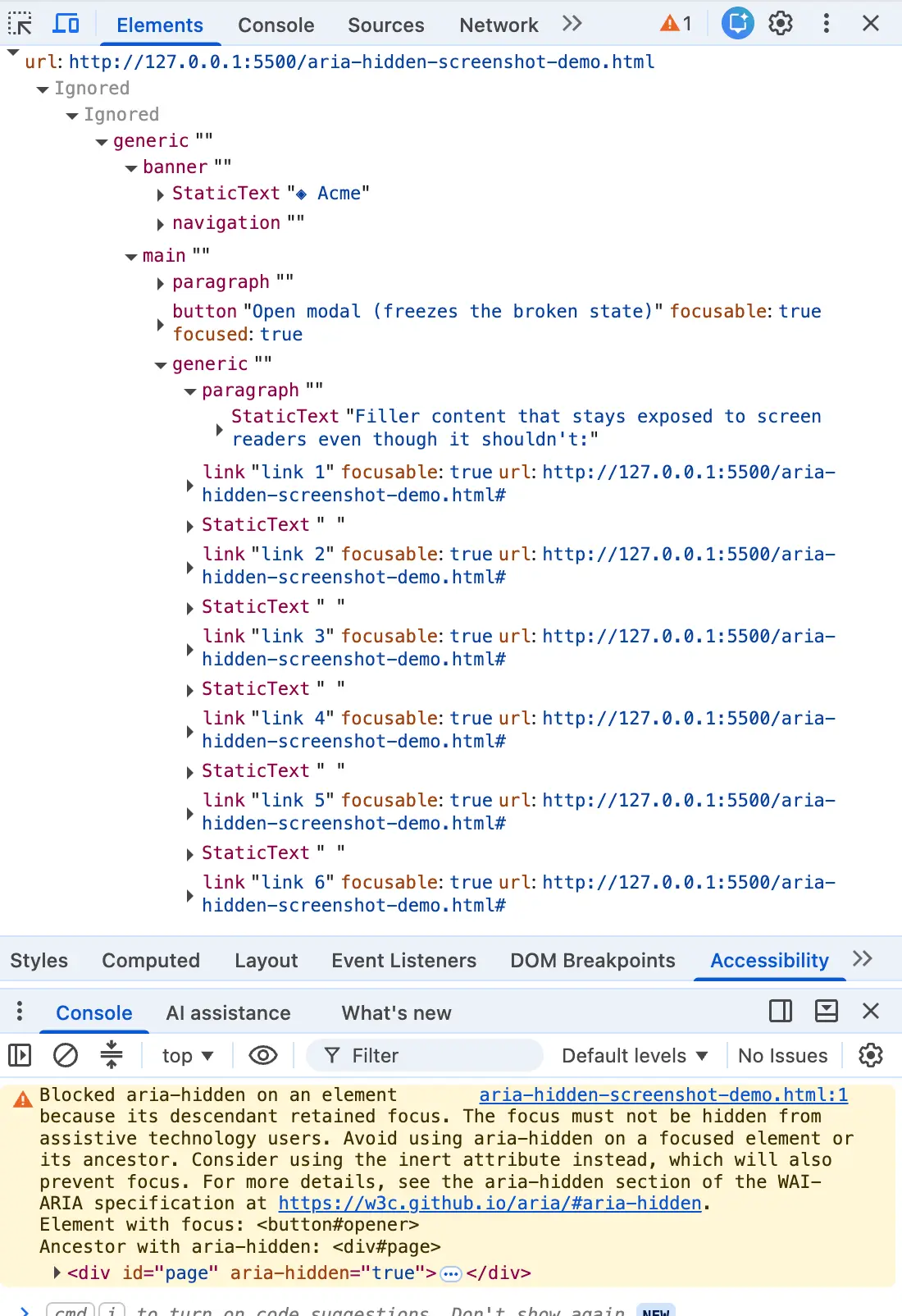
You closed a modal, and the browser console flashed that particular shade of angry mustard. Highlighting the message and dropping it into a search box, you found yourself dropped into a forum alongside half the front-end internet. Whether your stack runs on Angular, Bootstrap, Ionic, or phpMyAdmin, this exact string pops up identically.
The top search results universally bury the most critical truth: the warning is correct. There is a real person on the other side of that log—someone using a screen reader whose focus is about to drop into an invisible hole in your page.
The most common fixes rank high precisely because they quiet the console. They offer the blur() one-liner, the setTimeout wrapper around the close event, or the trick of yanking the aria-hidden attribute off entirely. Each one quiets your logging infrastructure while quietly harming the user the browser was trying to protect. If you have already shipped one of these band-aids, you are in enormous company. You were failed by your search results, not by your own carelessness.
Detailed Chronology: How the "Ghost Focus" Crisis Evolved
To understand how millions of web applications arrived at this architectural impasse, we must trace the collision course between modern component design, asynchronous rendering schedulers, and browser accessibility tree repair logic.
The Anatomy of the Warning
The warning is not Chrome nagging you about a style-guide nicety. It is the browser overruling your application. When a modal opens or closes, developers frequently use aria-hidden="true" on background wrappers to keep screen readers from wandering off into inactive parts of the document. However, aria-hidden pulls content out of the accessibility tree, not out of the keyboard focus order.
Two different systems—focus management and assistive technology mapping—operate independently with nothing keeping them in sync. Consequently, an element can be fully focusable and completely imperceptible at the exact same time. The instant the Tab key lands on it, you create ghost focus: the screen reader fires a focus event for a node it was explicitly told does not exist, looks it up, finds nothing, and stays completely silent.
Left alone, aria-hidden over a focused control strips away the labels while keeping the focus intact—the worst of both worlds. Chromium began patching this behavioral paradox in earnest across two distinct waves, clustering around Chrome 127 in mid-2024 (the open-time variant) and Chrome 131 in late 2024 (the close-time "retained focus" variant).
The Four Manifestations of the Bug
Every broken implementation ends up in the same place: focus sitting inside a region that just went hidden. But they arrive via four distinct mechanical pathways:
- The Close-Time Race (Hidden Mid-Goodbye): You click close. The dialog begins a 200ms CSS fade-out. During this transition, focus is still parked on the close button, which sits inside the overlay the library just marked hidden. Focus hasn’t moved because the cleanup code hasn’t executed yet.
- The Open-Time Inversion (The Trigger Left Behind): The overlay opens, and the background is marked
aria-hidden="true". However, the trigger button the user just clicked lives in that background, holding focus for a fraction of a second before the focus trap pulls it into the dialog. - Nested Composition Turf Wars: You open a
<dialog>and place a<select>or popover inside it. Both components ship the same "hide others" logic. Under React 19’s updated unmount timing, when the inner select tears down, focus momentarily drops to<body>, causing the parent dialog to re-hide itself with the user’s focus trapped inside. - Focus Leaving the Page: The user performs an Alt+Tab or switches browser tabs while an overlay is open, stranding an
aria-hiddenstate on teardown without live focus to reconcile against.
Supporting Context & Metrics: The Cost of Folk Remedies
When engineers encounter a wall of red or yellow console warnings during a release crunch, they routinely reach for folk remedies that suppress the warning at the expense of user experience.

The blur() Fallback
// The internet's favorite one-liner
element.addEventListener('hide.bs.modal', () =>
  document.activeElement.blur();
);
Calling blur() with nothing after it drops focus to <body>—the DOM equivalent of ejecting a passenger in the middle of a highway. The warning clears because there is no longer a focused element inside the hidden subtree. For a mouse user, this is invisible. For a screen reader user, the reader goes silent, and the very next Tab press restarts from the top of the entire document, directly violating WCAG 2.4.3 (Focus Order).
Timing Hacks and Attribute Stripping
- The
setTimeoutShim: Relying on a timer bets that the paint cycle will finish before the focus call runs. Under heavy CPU load, on cheap mobile hardware, or under concurrent rendering engines, this fails intermittently, creating unpredictable behavior that will never reproduce locally on a developer’s machine. - Stripping
aria-hidden: Removing the attribute or using aMutationObserverto yank it off silences the warning by rendering the background fully interactable while a modal is open, completely breaking the modal contract.
Official Statements and Standards Direction
Industry standards bodies and browser engine maintainers have increasingly closed the loop on these ambiguities. As documented in ARIA Working Group Issue #2422, accessibility engineers have systematically evaluated browser heuristic algorithms that override developer markup when focus state conflicts with assistive trees.
Browser vendors argue that shipping silent fixes allows broken code to persist indefinitely because browser-led repair is indistinguishable from correct code from the developer’s seat. Loud console logging is uncomfortable, but it is honest.
Concurrently, major framework ecosystems are shifting architecture to eliminate these manual orchestration races. Bootstrap 6 has moved away from manual attribute toggling by embracing native <dialog> elements and the top layer, rendering manual inert and aria-hidden management obsolete. Similarly, modern primitives in libraries like React Aria utilize layout-effect timing to synchronize focus handling natively.
The Correct Architecture: The Four-Step Teardown Contract
To satisfy both the browser’s accessibility requirements and the user’s navigational continuity, your teardown logic must execute in an unyielding order: focus must leave a closing region before that region becomes hidden or inert.
The Vanilla Reference Implementation
class ModalController
  #trigger = null;
  #background = null;

  open(dialog, backgroundElement)
    this.#trigger = document.activeElement;
    this.#background = backgroundElement;
    this.#background.setAttribute('inert', '');
    dialog.hidden = false;
    dialog.querySelector('[autofocus], button, [href], input')?.focus();


  close(dialog)
By storing the return target on open, un-inerting the background first, restoring focus to the trigger synchronously, and then applying inert to the fading shell during its transition, you eliminate ghost focus entirely.
Future Outlook
The front-end landscape is steadily shedding the brittle DOM gymnastics of the 2010s. The definitive long-term solution to this class of bug is the widespread adoption of the native HTML <dialog> element and the browser’s native Top Layer.
When you invoke .showModal() on a native dialog, the browser automatically handles backdrop painting, document-wide inertness, and focus management natively. It removes the need for wrapper divs, manual aria-hidden toggling, and complex asynchronous transition accounting.
Until your codebase can fully migrate to native dialog primitives, however, treating console accessibility warnings as non-negotiable architectural alerts is essential. A clean console was never the goal; a seamless, barrier-free experience for every user navigating your application is. When the browser warns you that an element is focused inside a hidden region, listen to it—because on the other side of that screen reader, a real user is depending on your code to keep them oriented in the room.