Executive Overview
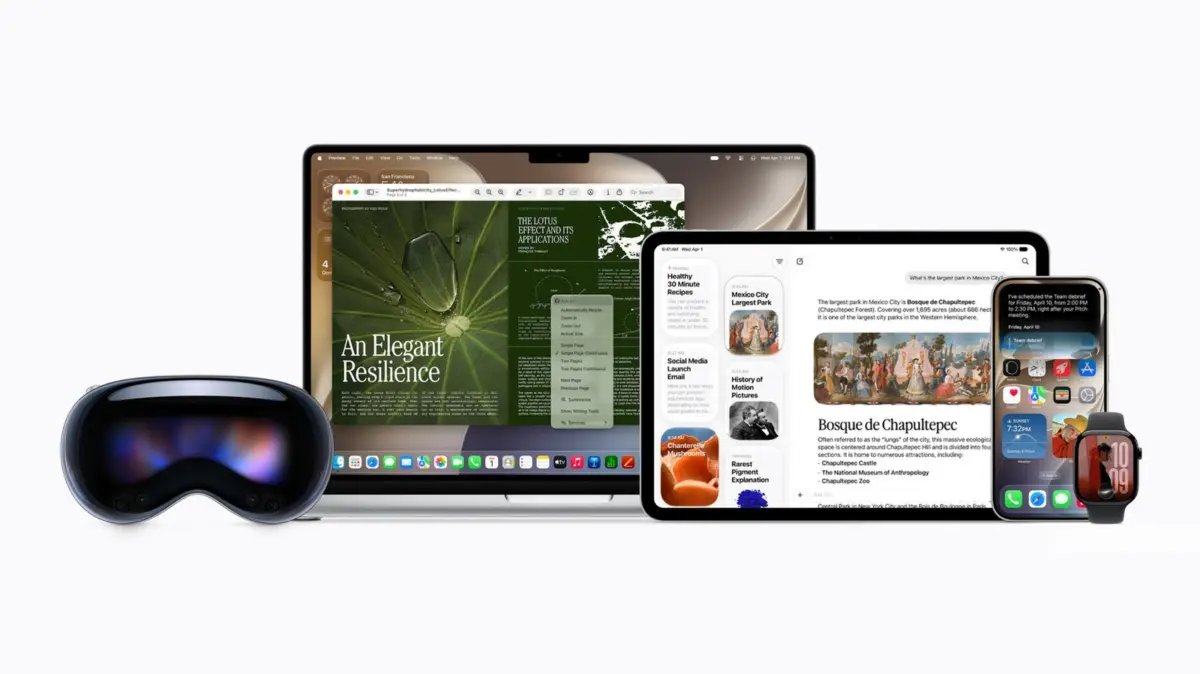
The arrival of Apple’s redesigned digital assistant—powered by advanced artificial intelligence models and rolled out alongside major operating system updates like iOS 27—marks a massive leap forward in consumer technology. Hailed by early testers as a dramatic improvement over its predecessor, the new Siri is smarter, more conversational, and deeply integrated into the fabric of Apple’s device ecosystem. By leveraging vast amounts of user data, it can synthesize information across native and third-party applications to deliver context-aware, highly personalized responses.
However, this sophisticated leap in functionality introduces a nuanced and pressing privacy dilemma. To perform its advanced duties, Siri AI requires unprecedented access to personal data, indexed from your emails, messages, notes, and various other apps via Apple’s App Intents framework. While Apple utilizes on-device processing and its state-of-the-art Private Cloud Compute (PCC) infrastructure to safeguard user privacy—pledging not to store requests on remote servers—many users remain uneasy about the breadth of information harvested by modern AI systems.
This comprehensive guide explores the mechanics of Siri AI’s data harvesting, examines its underlying architecture, and provides a step-by-step masterclass on how you can audit, restrict, and completely customize your privacy boundaries across your iPhone, iPad, and Mac.
Detailed Chronology: The Evolution of Siri and the Integration of Apple Intelligence
To understand why privacy concerns have intensified with the release of the latest operating systems, it is essential to trace how Siri has transformed from a basic voice-command tool into a deeply integrated neural assistant.
Phase 1: The Early Years and Localized Queries (2011–2019)
When Apple first introduced Siri as a standalone app in 2011 before integrating it deeply into iOS 5, its capabilities were rudimentary. Responses were largely rule-based, pulling data from structured web APIs (like Wolfram Alpha or Yelp) or performing simple device-level actions such as setting timers or placing phone calls. Privacy concerns during this era were minimal because data collection was localized, and Siri possessed virtually no contextual awareness of a user’s personal file system or messaging habits.
Phase 2: Predictive Intelligence and Proactive Suggestions (2020–2023)
As machine learning matured, Apple began integrating localized predictive features, such as Siri Suggestions and Spotlight indexing. Devices started analyzing usage patterns to anticipate what apps users might want to open or who they might want to message. While this laid the groundwork for personalization, processing remained heavily siloed on-device, reassuring privacy-conscious consumers that their personal information was not leaving their hardware.
Phase 3: The Generative AI Boom and the Partnership with Google (2024–Present)
The landscape shifted dramatically with the generative AI revolution. To compete with multimodal assistants from OpenAI, Google, and Microsoft, Apple needed to upgrade Siri from a simple command-line interface to a true contextual assistant capable of parsing complex natural language and unstructured personal data.
This evolution culminated in the rollout of iOS 27 and the introduction of Apple Intelligence. Partnering with industry leaders—including leveraging underlying technologies associated with Google’s large language models—Apple re-architected Siri to run on a hybrid model combining local neural processing units (NPUs) with remote cloud clusters. This necessitated the creation of the App Intents framework, giving Siri sweeping indexing powers across both native and third-party apps. Consequently, the debate surrounding data collection, server offloading, and user consent reached an all-time high.
Supporting Context & Metrics: Understanding App Intents and Private Cloud Compute
To effectively manage your privacy settings, it is crucial to understand how Siri AI interacts with your device and the infrastructure designed to protect it.
The Mechanism: App Intents and Spotlight Unification
Under previous operating systems, Siri operated in relative isolation from your document history and app interactions unless explicitly invoked. Under the new AI architecture, Spotlight and Siri have been unified under a single interface.
The core driver of this integration is App Intents. This developer framework allows software creators to expose the internal contents of their applications to Apple Intelligence. If a developer builds App Intents support into their app, Siri and Spotlight can index everything from recipes in a cooking app to financial transactions in a budgeting app. When you ask Siri a question, it casts a wide net across these indexed repositories to construct an answer.
The Safeguard: Private Cloud Compute (PCC)
When on-device processing power is insufficient to handle complex generative queries, Siri AI offloads the workload to Apple’s Private Cloud Compute (PCC) infrastructure. Apple has gone to great lengths to market PCC as a breakthrough in secure cloud AI, asserting that:
- Data sent to PCC servers is encrypted in transit and inaccessible to Apple employees.
- The servers do not permanently store user data or interaction logs once a request has been fulfilled.
- Independent security researchers are given access to verify these cryptographic guarantees.
Despite these advanced safeguards, many users operate under a zero-trust philosophy regarding cloud-based AI. For those who prefer complete control over their personal data footprints, Apple provides granular toggles to disable, restrict, or modify these data-sharing mechanisms.
Step-by-Step Instructions: How to Limit Siri AI’s Data Access
If you prefer to enjoy the benefits of modern Apple devices without giving an AI assistant open access to your personal files and applications, you can systematically restrict its indexing capabilities.
1. Restricting Siri AI’s Access to App Content
Because developers choose whether to allow iOS Spotlight to index their app data, you must manually intervene to prevent Siri from harvesting content from specific applications.
- Open the Settings app on your iPhone, iPad, or Mac.
- Scroll down and tap on Siri & Search (or Apple Intelligence & Siri, depending on your exact OS build).
- Select the specific app whose data you wish to protect from Siri’s indexing engine.
- Locate the toggle labeled Show Content in Search and switch it off.
Once disabled, Siri will no longer pull information from that application, even if you explicitly ask it to do so. For example, if you disable indexing for the Messages app and later ask Siri to summarize a text thread from a colleague, the assistant will inform you that it cannot locate those messages.
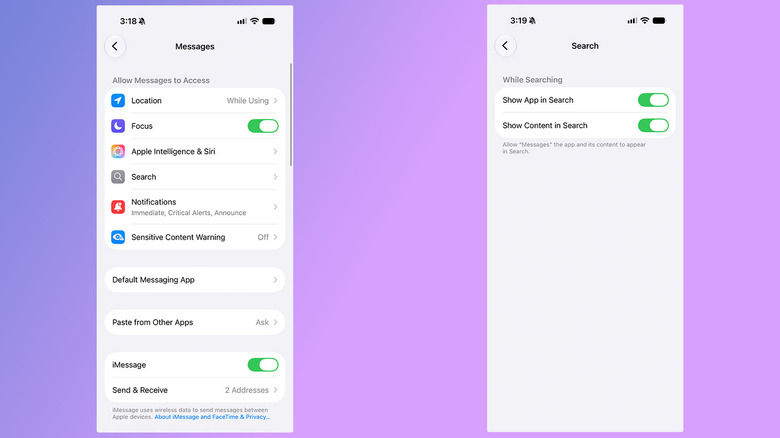
Note on App Settings: Within the individual app settings menus, you may also see toggles for "Suggest App" and "Learn from this App." These do not grant Siri access to your private data contents; rather, they control app recommendations and usage frequency tracking within the Spotlight search shade. You can safely leave these enabled unless you want to alter your interface layout.
2. Managing On-Screen Awareness
Siri AI features an ad-hoc contextual capability known as on-screen awareness, which allows the assistant to read the contents of screenshots and active images to help you summarize articles, troubleshoot errors, or improve accessibility. However, utilizing this feature may route screenshots containing sensitive visual data to Apple’s PCC servers.
- To minimize accidental data transmission, be mindful of what is on your screen when invoking visual queries, or refrain from using screenshot-based AI prompts altogether if you maintain strict security protocols.
3. Disabling Siri Training and Data Sharing
By default, Apple states it does not use your interactions with Siri to train future machine learning models. However, during the initial setup of a new device or software update, it is easy to accidentally opt into data-sharing programs that contribute your voice recordings and transcripts to Apple’s improvement pipeline.
To verify and shut off this data contribution:
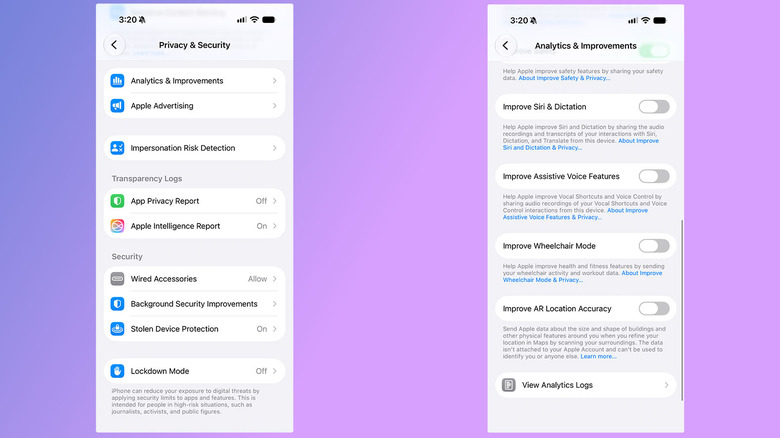
- Open the Settings app.
- Navigate to Privacy & Security.
- Scroll down and tap on Analytics & Improvements.
- Ensure that Improve Siri & Dictation is toggled off. This ensures your audio files and machine transcripts are never retained for model refinement.
4. Reverting to Classic Siri or Disabling the Assistant Entirely
If you find the new AI-driven architecture too intrusive, you can scale back its capabilities or revert to a more traditional, localized interaction model.
- Reverting via Screen Time: Surprisingly, the option to downgrade or restrict advanced Siri capabilities is often managed through parental control vectors. Navigate to Settings > Screen Time > Content & Privacy Restrictions, and adjust the allowed features to limit AI-based deep integrations while retaining basic system commands.
- Disabling Siri Completely:
- Go to Settings.
- Tap Siri & Search.
- Turn off Listen for "Siri" and Press Side Button for Siri.
- Confirm your choice to disable the assistant entirely across your device.
Future Outlook: The Balancing Act Between Personalization and Privacy
The release of iOS 27 and Siri AI represents a watershed moment for consumer electronics. As tech giants race toward a future defined by hyper-personalized, ambient computing, the tension between utility and privacy will only intensify.
For Apple, the challenge moving forward will be maintaining consumer trust. While innovations like Private Cloud Compute and on-device neural processing set a high industry standard for data protection, the sheer volume of personal information required to make an AI assistant truly useful will continue to make privacy advocates uneasy.
In the coming years, we can expect regulatory bodies to scrutinize how companies index app data, utilize third-party language models, and handle cloud offloading. For the everyday user, the best defense remains proactive management. By understanding how frameworks like App Intents operate and taking advantage of Apple’s granular privacy controls, you can tailor your device experience to strike the ideal balance between modern artificial intelligence and absolute data sovereignty.