Executive Overview
In the modern landscape of consumer electronics, navigating display specifications often feels less like an exercise in technical literacy and more like decoding an impenetrable alphabet soup. Whether shopping for a high-end television, a pocket-sized smartphone, a competitive gaming monitor, or a professional workstation, consumers are constantly bombarded by a dizzying array of terms: HD, FHD, 2K, QHD, WQHD, UHD, 4K, and 5K.
At its foundational level, screen resolution is deceptively simple: it is the total count of individual pixels—arranged in columns and rows—that comprise a digital image or display panel. Yet, the terminology used by manufacturers has evolved into a complex marketing lexicon. Umbrella terms frequently encompass varying pixel counts, fluid definitions change depending on whether the application is cinematic production, home theater viewing, mobile computing, or high-performance gaming, and interchangeable acronyms mask the subtle distinctions that can drastically impact user experience.
This article cuts through the marketing fog to investigate what these display resolutions truly mean. By breaking down the technical definitions, exploring real-world hardware demands, and examining when and where each resolution excels, we provide an authoritative roadmap to help you determine which pixel count is best suited for your specific workflow, entertainment habits, and hardware ecosystem.
Detailed Chronology and Technical Evolution of Display Resolutions
To fully understand the current display hierarchy, it is necessary to examine how resolutions have evolved alongside processing power, transmission bandwidth, and manufacturing capabilities over the past three decades.
The Standard Definition to High Definition Era (Late 1990s – Late 2000s)
Before the advent of widespread digital displays, consumer television standards were anchored by analog formats like NTSC and PAL, which delivered standard definition (SD) imagery. As computing power and display tech transitioned from bulky cathode-ray tube (CRT) monitors to flat-panel liquid-crystal displays (LCDs), the industry standardized around 720p HD (1,280 x 720 pixels) and quickly followed up with 1080p Full HD (FHD at 1,920 x 1,080 pixels).
During this era, 1080p became the gold standard for home entertainment, early digital streaming, and console gaming. It offered a reliable pixel grid that matched the 16:9 widescreen aspect ratio quickly becoming ubiquitous across media formats. However, as silicon architecture matured, consumer demand pushed hardware engineers to explore higher pixel densities, setting the stage for the modern era of high-resolution panels.
The Rise of 2K, QHD, and WQHD (2010s)
As smartphone screens shrank in physical size while packing more visual data, and desktop monitors grew wider and more immersive, the industry introduced intermediate steps between 1080p and ultra-high-definition screens. This brought about terms like 2K, Quad High Definition (QHD), and Wide Quad High Definition (WQHD).
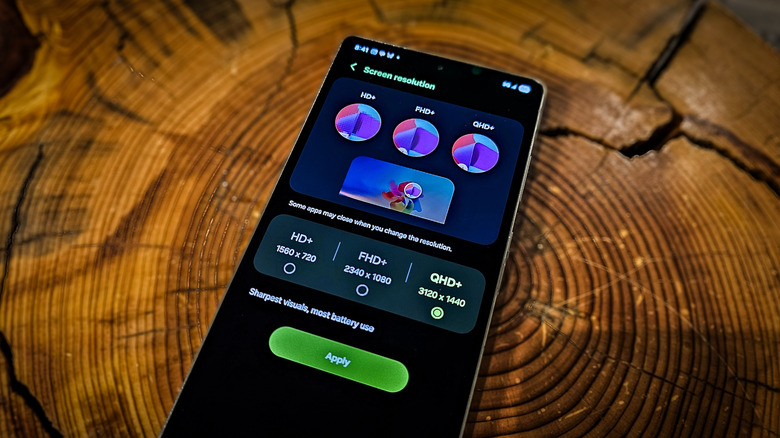
Technically speaking, QHD and WQHD both refer to a resolution of 2,560 x 1,440 pixels. While QHD serves as a broad descriptor, WQHD specifically denotes the widescreen 16:9 variant tailored for computer monitors and modern smartphones. This resolution effectively doubles the horizontal and vertical pixel counts of standard 720p, hence the term "Quad" HD.
The 4K and Ultra High Definition Revolution (Mid 2010s – Present)
The introduction of 4K marked a monumental shift in consumer viewing habits. However, it also introduced the industry’s most notorious naming discrepancy. While true cinematic 4K—governed by the Digital Cinema Initiatives (DCI)—resolves at 4,096 x 2,160 pixels to accommodate wide theatrical screens, consumer televisions and monitors adopted UHD (Ultra High Definition) at 3,840 x 2,160 pixels.
Despite not hitting the literal 4,000-pixel horizontal threshold, UHD was universally marketed as "4K" because it quadruples the total pixel count of a standard 1080p panel. Over the last decade, this format has migrated from luxury cinemas and expensive specialty displays into living rooms, streaming platforms, and mainstream gaming rigs.
The 5K Professional Horizon (Late 2010s – Present)
As content creators began shooting, editing, and distributing native 4K video, editors required display interfaces that could show a full 4K video frame at 100% scale while simultaneously providing enough surrounding screen real estate for editing toolbars, timelines, and software menus. This necessity birthed 5K displays, which measure 5,120 x 2,880 pixels (5K UHD) or 5,120 x 2,160 pixels (5K Ultrawide). Today, 5K remains firmly anchored in the professional creative sector, serving as the benchmark for high-end color grading, photo retouching, and video production.
Supporting Context and Metrics: Decoding the Alphabet Soup
Navigating display terminology requires looking past the catchy acronyms and examining the hard metrics. Below is a breakdown of the primary resolutions currently dominating the market, their exact pixel dimensions, and their ideal use cases.
| Resolution Term | Exact Pixel Dimensions (Width x Height) | Aspect Ratio | Primary Industry Use Case |
|---|---|---|---|
| 720p (HD) | 1,280 x 720 | 16:9 | Budget mobile devices, legacy content |
| 1080p (FHD) | 1,920 x 1,080 | 16:9 | Budget gaming laptops, office monitors, standard streaming |
| 1440p / QHD / WQHD | 2,560 x 1,440 | 16:9 | Mainstream PC gaming, productivity monitors, flagship smartphones |
| UWQHD | 3,440 x 1,440 | 21:9 | Immersive ultrawide gaming, multi-window office work |
| 4K UHD | 3,840 x 2,160 | 16:9 | 4K Blu-ray, home theater, high-end console & PC gaming |
| DCI 4K | 4,096 x 2,160 | ~1.9:1 | Professional cinematic projection and filmmaking |
| 5K UHD | 5,120 x 2,880 | 16:9 | Professional photo/video editing, high-end creative workstations |
The 2K Sweet Spot: Efficiency Meets Performance
For both PC gamers and mobile users, 2K (1440p) represents a vital "sweet spot." In the mobile space, outfitting a smartphone with a 4K display often proves counterproductive; the marginal visual gains over a crisp 2K screen are completely undermined by the catastrophic drain on battery life.
Similarly, in desktop computing, 4K gaming remains an expensive endeavor requiring a top-tier graphics card. Conversely, 2K monitors strike an optimal balance. They offer significantly sharper text rendering and asset detail than 1080p while remaining light enough to be driven smoothly by mid-range and high-end GPUs. Furthermore, expanding into ultrawide territory via UWQHD (3,440 x 1,440) opens up expansive workspace horizons without demanding the massive computational horsepower required to render 4K gaming at high frame rates.
The 4K Paradigm: Cinema and High-End Enthusiast Hardware
When scaling up to 4K, consumer expectations shift toward absolute visual fidelity. In the home theater environment, 4K UHD is the standard for physical media (such as 4K Ultra HD Blu-ray discs) and premium streaming services.
For PC enthusiasts, 4K represents the bleeding edge of home entertainment. However, rendering millions of additional pixels requires immense GPU horsepower. Only flagship consumer graphics cards—such as NVIDIA’s GeForce RTX 50-series or equivalent high-performance hardware—can reliably push modern, graphically demanding video games at high refresh rates in native 4K without sacrificing visual settings.
5K: The Specialist’s Choice
While 4K dominates living rooms, 5K belongs on the desks of professional creators. A 5K display provides the exact pixel-for-pixel real estate needed to playback native 4K video footage at 100% scale inside editing suites like Adobe Premiere Pro or DaVinci Resolve, leaving ample room around the video canvas for audio meters, timelines, and effect panels.
Iconic hardware options, such as the Apple Studio Display XDR or high-end Dell UltraSharp and LG FineGear panels, cater directly to this demographic. While some niche 5K gaming monitors exist—such as ultrawide OLED variants—they remain prohibitively expensive and largely impractical for gaming due to the extreme graphics hardware required to power them.
Official Industry Perspectives and Standards Bodies
The fragmentation of display terminology is largely driven by a disconnect between consumer electronics manufacturers, PC hardware developers, and professional cinema standards organizations.
Standards bodies like the Digital Cinema Initiatives (DCI) maintain rigid definitions for professional filmmaking. To the film industry, "4K" is not a loose marketing buzzword; it is a strict physical measurement of 4,096 horizontal pixels designed to fit digital projection screens in commercial movie theaters.
Conversely, consumer electronics associations and major panel manufacturers (such as Samsung, LG, and Sony) adopted the Ultra HD (UHD) standard—3,840 x 2,160—because it maps cleanly onto the mathematical progression of the 16:9 widescreen standard established by 1080p high definition.
In the computing sphere, organizations like the VESA (Video Electronics Standards Association) focus heavily on interface bandwidth, display stream compression (DSC), and refresh rate capabilities rather than consumer-facing acronyms. As display panels push beyond 4K into 5K and ultra-high refresh rates, industry leaders emphasize that raw pixel count is only one variable in an equation that must also account for color accuracy, dynamic range (HDR), backlight technology (OLED, Mini-LED), and response times.
Future Outlook: Beyond the Pixel Count
As the display industry marches forward, the ongoing obsession with raw pixel counts is beginning to take a backseat to qualitative technological advancements. While manufacturers will undoubtedly continue refining 4K and 8K panels for specialized large-format displays, the immediate future of consumer and professional displays lies in underlying panel engineering.
The Shift Toward Advanced Panel Technologies
Future hardware developments will likely focus less on whether a monitor is 2K or 4K, and more on how those pixels are illuminated and refreshed. The rapid proliferation of OLED (Organic Light Emitting Diode) and Mini-LED backlighting technologies is transforming visual fidelity. These panels offer true blacks, infinite contrast ratios, and quantum dot color enhancements that often provide a more dramatic visual upgrade than simply jumping to a higher resolution tier.
High Refresh Rates and Variable Rate Shading
For gamers, the pursuit of higher resolutions is increasingly balanced against the demand for ultra-high refresh rates (1440p at 240Hz or higher) and advanced motion-handling features. Technologies like AI-driven upscaling (such as NVIDIA DLSS, AMD FSR, and Apple’s MetalFX) are bridging the gap between hardware limitations and resolution demands. By rendering games at a lower internal resolution and intelligently upscaling them to 4K or 5K via machine learning, users can enjoy the crisp visual fidelity of ultra-high resolutions without suffering the devastating performance penalties traditionally associated with them.
Conclusion: Choosing What Is Best For You
Ultimately, the "best" resolution is not the highest one available on a spec sheet; it is the one that aligns harmoniously with your hardware ecosystem, budget, and use case.
- Choose 1080p if you are operating on a strict budget or running lightweight office tasks on a compact laptop.
- Choose 2K / QHD / WQHD if you are a mainstream PC gamer or looking for the ultimate sweet spot between visual sharpness, multitasking space, and hardware efficiency.
- Choose 4K UHD if you have a home theater setup, love consuming physical 4K media, or possess a high-end gaming PC capable of driving ultra-HD frame rates.
- Choose 5K only if you are a professional content creator, photo editor, or video producer who specifically requires native 4K canvas workspace alongside active software toolbars.
By cutting through the marketing noise and understanding the underlying metrics, you can make an informed investment in display technology that serves your digital life efficiently for years to come.