Executive Overview
In the rapidly evolving landscape of cybersecurity, the speed and accuracy of vulnerability discovery can mean the difference between proactive remediation and catastrophic breach. For decades, security operations teams, penetration testers, and bug bounty hunters relied on custom, ad-hoc scripting to verify individual vulnerabilities—a process that was notoriously difficult to scale, prone to human error, and slow to adapt to zero-day disclosures.
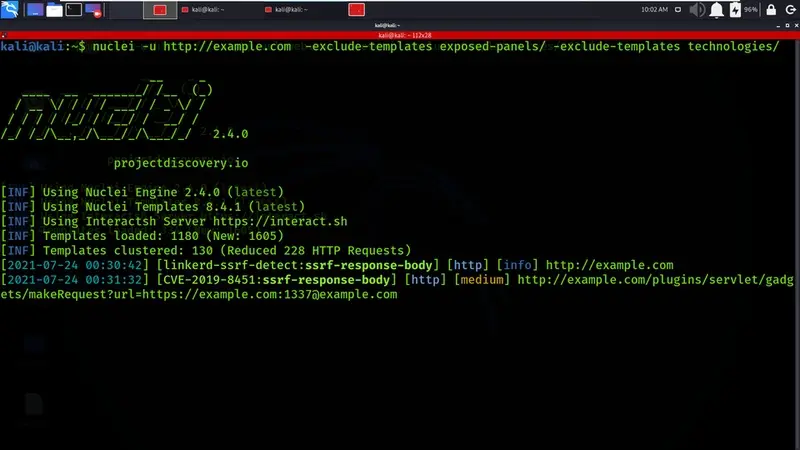
Enter Nuclei, a lightning-fast, template-based vulnerability scanner developed by ProjectDiscovery. Nuclei has fundamentally redefined how security professionals approach automated vulnerability assessment. By decoupling the scanning engine from the detection logic, Nuclei allows security practitioners to utilize simple, human-readable YAML templates to define vulnerability signatures. This architecture has fostered a massive open-source community that continuously contributes thousands of detection rules, covering everything from critical Common Vulnerabilities and Exposures (CVEs) and complex misconfigurations to exposed administrative panels and dangerous default credentials.
Boasting over 11,000 community-vetted templates in its official repository—including precise detection coverage for nearly 1,500 known exploited vulnerabilities—Nuclei successfully bridges the operational gap between broad asset discovery and targeted, high-impact exploitation.
This comprehensive guide serves as an authoritative reference manual for security practitioners. Below, we examine twenty practical, production-ready Nuclei commands, detailing their functional mechanics, operational contexts, and strategic deployment methodologies to elevate your next security assessment.
Detailed Chronology: The Evolution of Template-Based Scanning
To fully appreciate the utility of Nuclei, it is vital to understand the technological trajectory that led to its creation. In the early days of web application assessment, scanners operated as monolithic applications. Adding a new vulnerability check required modifying core source code, compiling binaries, and managing brittle dependencies. While tools like Nessus and OpenVAS revolutionized network vulnerability scanning, and custom Python or Bash scripts filled the gaps for web apps, these methods suffered from severe maintenance overhead.
As the threat landscape shifted toward rapid cloud deployments and continuous integration/continuous delivery (CI/CD) pipelines, the need for a modular, extensible scanner became paramount. ProjectDiscovery conceptualized Nuclei to address these specific bottlenecks:

- The Modular Paradigm Shift: By separating the execution engine (written in Go for maximum concurrency and performance) from the signatures (YAML templates), developers and security researchers could publish detection mechanisms independently of software release cycles.
- Crowdsourced Intelligence: The establishment of the
nuclei-templatesrepository transformed vulnerability reporting. When a new CVE drops, security researchers often write, test, and push a Nuclei template within hours, granting the global security community immediate defensive visibility. - Refining the Signal-to-Noise Ratio: Early scanners were plagued by false positives. Nuclei introduced sophisticated matching capabilities—supporting status codes, regex, word matches, and even complex DSL (Domain Specific Language) expressions—ensuring that findings are accurate and actionable.
Supporting Context & Metrics: The Anatomy of Nuclei
Before diving into individual commands, it is crucial to understand the foundational pillars that make Nuclei an industry standard:
- Speed and Concurrency: Leveraging Go’s goroutines, Nuclei can execute thousands of requests per second across diverse targets without exhausting local system resources.
- OAST Integration (Interactsh): Many modern vulnerabilities (such as blind SSRF, blind XSS, or out-of-band RCE) do not return immediate feedback in HTTP response bodies. Nuclei integrates seamlessly with Interactsh, ProjectDiscovery’s out-of-band application security testing (OAST) server, allowing testers to detect asynchronous vulnerabilities reliably.
- Technology-Aware Profiling: Rather than hammering every target with every available template, modern iterations of Nuclei feature automatic technology-stack fingerprinting, slashing scan times by only executing tests relevant to the detected stack.
20 Essential Nuclei Commands for Comprehensive Assessments
1. Basic Target Scan
nuclei -u https://example.com- What it does: The
-uflag directs Nuclei to target a single URL. Upon its initial execution, the scanner automatically fetches and caches the latest community templates from the official repository. By default, running this command without filters subjects the target to every available template in the library. - When to use it: Ideal for quick, highly thorough spot-checks of a single web application where time is not a primary constraint.
2. Scan Multiple Targets from a File
nuclei -l targets.txt- What it does: The
-lflag instructs Nuclei to ingest a flat file containing a list of targets (one entry per line). These entries can range from full URLs and IP addresses to complex CIDR blocks. - When to use it: Essential during large-scale external surface discovery, network-wide audits, or when processing the output of asset enumeration tools like
subfinderoramass.
3. Silent Mode for Clean Output
nuclei -u https://example.com -silent- What it does: The
-silentflag suppresses ASCII banners, version information, and real-time progress indicators, outputting strictly the positive vulnerability findings. - When to use it: Mandatory when chaining Nuclei inside complex shell scripts, cron jobs, or automated CI/CD security pipelines where extraneous stdout data would break downstream parsers.
4. Filter by Severity
nuclei -u https://example.com -s critical,high- What it does: The
-sflag acts as a strict severity filter. Valid parameters includeinfo,low,medium,high,critical, andunknown. - When to use it: When performing triage assessments where management or stakeholders require immediate visibility only into severe, exploitable vulnerabilities rather than informational headers or low-risk flags.
5. Exclude Severity Levels
nuclei -u https://example.com -es info- What it does: Operating as the inverse of the severity filter, the
-es(exclude severity) flag omits specified categories. Excludinginfostrips out non-threatening disclosures, drastically reducing output clutter. - When to use it: When you want a broad scan but wish to eliminate operational noise caused by informational banners and version disclosures.
6. Run Specific Template Categories
nuclei -u https://example.com -t http/cves/ -t ssl- What it does: The
-tflag allows operators to manually define target template directories or specific sub-paths. Here, the scan is constrained strictly to known CVEs and SSL/TLS configuration checks. - When to use it: When scoping an assessment around a specific compliance framework (e.g., encryption standards) or focusing entirely on known software vulnerabilities.
7. Run a Single CVE Template
nuclei -u https://example.com -t cves/2021/CVE-2021-44228.yaml- What it does: Directs the engine to execute precisely one template file—in this case, the signature for the infamous Log4Shell vulnerability.
- When to use it: When an emergency patch-validation check is required across assets after a high-profile zero-day disclosure.
8. Filter Templates by Tags
nuclei -u https://example.com -tags cve,rce- What it does: The
-tagsflag scans exclusively for templates bearing specific keyword tags (e.g.,xss,sqli,rce,misconfig). - When to use it: When performing targeted vulnerability research classes—such as testing an application exclusively for injection flaws.
9. Exclude Templates by Tags
nuclei -u https://example.com -etags dos- What it does: The
-etagsflag drops templates matching specified tags. Excluding thedostag prevents denial-of-service checks from executing. - When to use it: Absolutely vital when conducting authorized testing against fragile production environments where stability and uptime are non-negotiable.
10. Automatic Technology-Aware Scanning
nuclei -u https://example.com -as- What it does: The
-as(automatic scan) flag triggers an intelligent fingerprinting phase (similar to Wappalyzer) before testing begins, loading only templates applicable to the discovered stack. - When to use it: To drastically accelerate scan completion times and minimize unnecessary network traffic when auditing heterogeneous web architectures.
11. Rate Limit Requests
nuclei -u https://example.com -rl 50- What it does: The
-rlflag enforces a strict global ceiling on requests transmitted per second. - When to use it: When engaging targets protected by aggressive Web Application Firewalls (WAFs) or rate-limiting appliances that would otherwise block or tarpit your scanner.
12. Control Template Concurrency
nuclei -u https://example.com -c 20 -bs 20- What it does: The
-cflag dictates template concurrency (parallel templates), while-bsconfigures bulk size (parallel hosts per template). - When to use it: When hardware resource constraints require tuning, or when you need predictable, throttled network performance across unstable connections.
13. Save Results in JSONL Format
nuclei -l targets.txt -jsonl -o results.jsonl- What it does: The
-jsonlflag formats output into JSON Lines, which is then written to disk via-o. - When to use it: Whenever scan results must be ingested into Security Information and Event Management (SIEM) platforms, custom dashboards, or database backends.
14. Save Results to Plain Text
nuclei -u https://example.com -o vulns.txt- What it does: Directs human-readable vulnerability output into a standard flat text file. Note that Nuclei overwrites existing files by default.
- When to use it: For quick record-keeping during ad-hoc penetration testing engagements.
15. Disable Interactsh for Non-OAST Scans
nuclei -u https://example.com -ni- What it does: The
-ni(no-interaction) flag disables external OAST polling interactions via Interactsh. - When to use it: When evaluating isolated internal networks with strict egress filtering where external DNS/HTTP callbacks are impossible.
16. Exclude Specific Hosts from Scanning
nuclei -l targets.txt -exclude-hosts 192.168.1.1,internal.example.com- What it does: Explicitly skips defined IP addresses, hostnames, or CIDR blocks ingested from a target list.
- When to use it: When dynamic scope adjustments require carving out sensitive or third-party assets mid-engagement.
17. Resume an Interrupted Scan
nuclei -list targets.txt -resume scan-state.cfg- What it does: Serializes scan progress into a configuration file, allowing seamless recovery if a scan is aborted due to network failure or system reboot.
- When to use it: When executing massive, multi-day enterprise-grade infrastructure audits.
18. Update Templates
nuclei -update-templates- What it does: Queries the official GitHub repository and pulls down the latest template updates and security signatures.
- When to use it: As a mandatory precursor routine before launching any serious security assessment.
19. Validate Custom Templates
nuclei -validate -t /path/to/template.yaml- What it does: Parses local YAML files for syntactic correctness, schema compliance, and matcher logic without firing network requests.
- When to use it: When developing custom vulnerability checks or contributing new templates to the open-source community.
20. Enable Statistics Display
nuclei -u https://example.com -stats- What it does: Renders a live, periodic terminal dashboard displaying metrics such as elapsed time, requests dispatched, and active templates.
- When to use it: To maintain operational visibility during long-running, multi-target enterprise security scans.
Official Statements and Industry Adoption
Security leaders across the globe have widely embraced template-based scanning as an essential component of modern DevSecOps lifecycles. According to recent whitepapers from prominent vulnerability research organizations, the shift toward community-driven, open-source detection templates has reduced the "time-to-detection" window for emerging threats from weeks to mere hours.
ProjectDiscovery emphasizes that Nuclei was built with collaboration at its core: "Security is a community effort. By empowering engineers and researchers to write lightweight, shareable checks in YAML, we remove the friction of proprietary tooling and ensure that defensive intelligence scales as fast as modern infrastructure."
Future Outlook
As application architectures transition further toward cloud-native microservices, serverless computing, and edge processing, traditional vulnerability scanners are increasingly rendered obsolete by their sheer rigidity. Nuclei’s modular design positions it uniquely for the future of automated security.
Upcoming developments within the ProjectDiscovery ecosystem point toward deeper integration with AI-driven template generation, enhanced protocol support, and tighter orchestration within continuous deployment pipelines. For security professionals, mastering Nuclei and its command-line switches is no longer an optional skill—it is a fundamental competency required to navigate the hyper-dynamic threat landscape of the 21st century.