Executive Overview
For years, the standard playbook for web design has mandated a tri-state toggle for dark and light modes. Developers and UI/UX designers routinely crowd navigation bars and header menus with icons or dropdowns offering three distinct choices: Light, Dark, and System Default. The underlying assumption has always been that maximum user control equates to superior user experience.
However, a recent debate ignited within the web development community by prominent developer and standards expert Lea Verou is challenging this conventional wisdom. Verou argues that the ubiquitous three-state dark mode toggle is an unnecessary cognitive burden. Instead, she champions a streamlined, two-state mechanism that elegantly manages system defaults and user overrides without cluttering the interface.
This deep dive examines Verou’s proposals, the ensuing community debate across platforms like Bluesky, and the broader implications for modern web design. By stripping away redundant interface elements, developers can reduce cognitive friction, respect user intent, and deliver cleaner, more intentional user experiences. As the digital landscape increasingly prioritizes minimalism and functional efficiency, the conversation around something as seemingly trivial as a theme toggle offers a fascinating lens into the future of human-computer interaction.
Detailed Chronology: How the Debate Unfolded
The discourse began when Lea Verou published a comprehensive technical analysis on her blog titled Dark Mode Toggles, subsequently amplifying her thoughts through social channels, including Bluesky. Her thesis was direct: web applications and content sites can effectively express all three necessary states (light, dark, and system matching) using a refined two-state control, rendering the explicit "System" option redundant in persistent headers.
The Spark: Verou’s Initial Critique
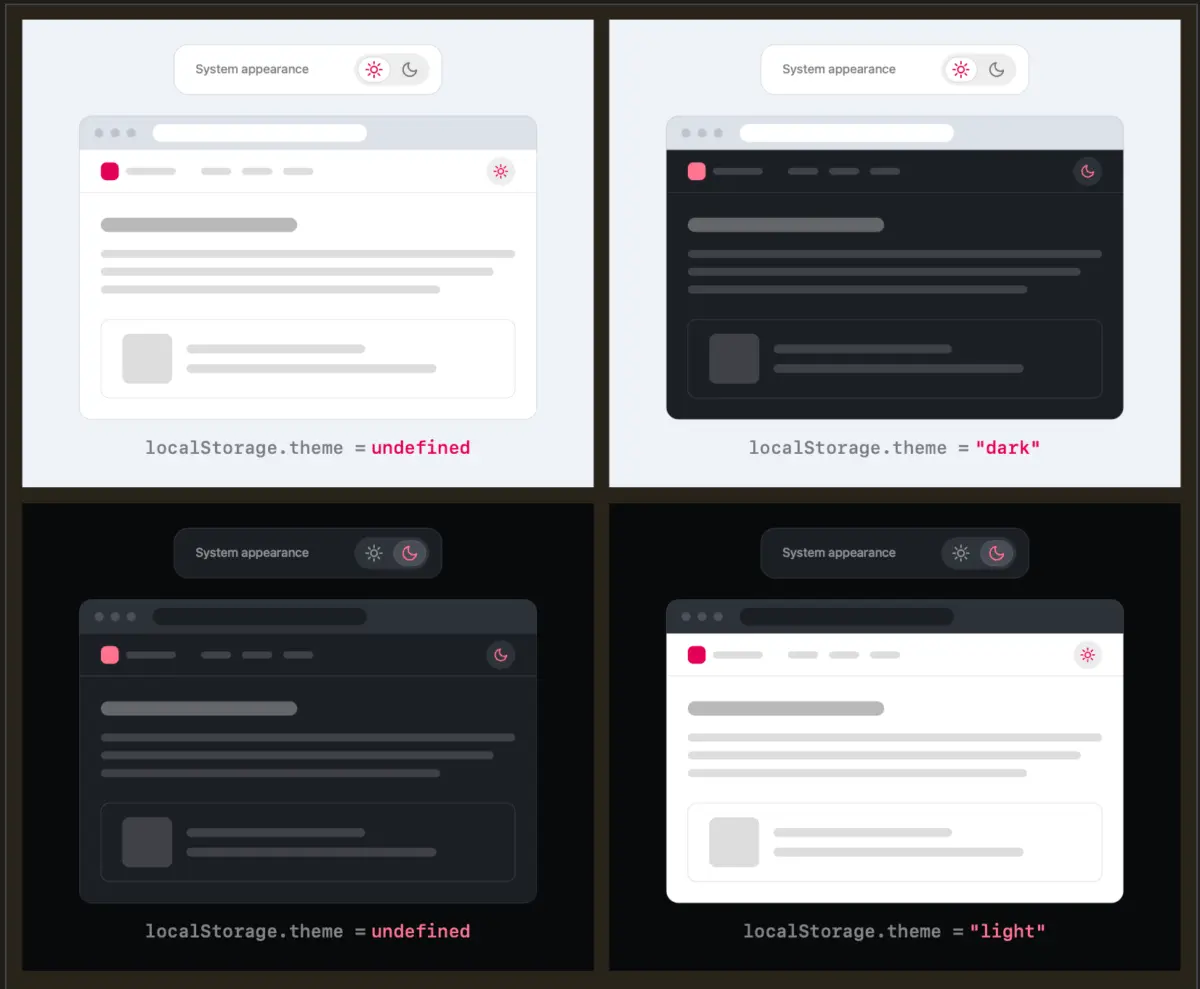
Verou’s argument hinges on the mechanics of user intent and state persistence. In a traditional tri-state menu, users are forced to consciously select between Light, Dark, and System. Verou argues that when a website loads, it should inherently default to the user’s operating system (OS) preference via CSS media queries (prefers-color-scheme).
If a user wishes to deviate from that system setting, they should be given a simple override mechanism—a toggle that shifts the state. Once activated, that specific preference is saved locally (via localStorage) for future sessions.
The core realization is profound: a user only needs to apply an override the first time the system setting and their personal preference diverge. For instance, if a user prefers a dark website even when their OS is in light mode during the day, a single click overrides the system setting. Once stored, the interface honors that choice seamlessly, eliminating the need for a dedicated "System" label taking up precious real estate in the navigation bar.
The Community Reaction and Bluesky Discourse
Verou’s initial post quickly rippled through the frontend development community, sparking rich technical discussions. Developers weighed in on edge cases, such as what happens when a user toggles back and forth through states, or how localStorage handles undefined fallback states when reverting to system preferences.
Commenters quickly pointed out that theme switching is rarely a primary user intent. When a visitor lands on a content site, their goal is to read an article, purchase a product, or find information—not fiddle with color palettes. Persistent UI elements dedicated to secondary actions introduce unnecessary visual noise.
Further enriching the conversation, developer Chris Coleman highlighted a deeper systemic issue in browser design:
"All I ever wanted was for my OS to be dark, not every website I look at. It was a huge leap by the browser vendors to tie all web content to that system preference. Anyway, I think the light/dark preference should be in the browser, and what you propose seems perfectly in line with that."
This perspective reframed the debate, suggesting that while OS-level preference synchronization is powerful, it creates friction when users want granular control over individual web environments.
The Follow-Up: Refining the Guidance
Responding to the wave of feedback, Verou published a follow-up blog post summarizing the insights and clarifying the boundaries of her recommendation. She emphasized that her guidance targets persistent UI elements—those permanently fixed in a site’s header or main navigation.
Crucially, Verou acknowledged that tri-state controls still hold value in specific contexts, such as deep settings panels or dedicated account preferences pages. However, for primary, ever-present navigation bars, the two-state pattern—or ideally, no toggle at all—emerges as the superior design standard.
Supporting Context & Metrics: The Cost of Interface Clutter
To understand why a seemingly minor UI component like a theme toggle matters, one must examine the psychological principles governing digital interfaces. Every interactive element introduced to a screen extracts a cognitive tax from the user.
Cognitive Load and Hick’s Law
Hick’s Law dictates that the time and effort required to make a decision increase logarithmically with the number and complexity of choices available. In web design, adding a tri-state dropdown or a multi-icon segmented control forces the human brain to process extra variables.
- Tri-State Control: Requires evaluating three options (Light, Dark, System), processing their current states, and predicting the outcome of clicking each.
- Two-State Control: Presents a binary choice or a direct action (e.g., clicking a sun/moon icon to switch to the alternative mode).
While the difference in milliseconds might seem negligible, the cumulative effect of micro-decisions across thousands of websites contributes to digital fatigue. By reducing the UI to its absolute functional necessities, designers respect the user’s cognitive bandwidth.

The Real Estate Dilemma
In modern responsive design, screen real estate—especially in mobile and desktop navigation bars—is fiercely contested. Every pixel dedicated to utility icons (search bars, language selectors, profile avatars, and theme switches) is a pixel stolen from primary branding or core navigation links.
Eliminating the "System" label or condensing a three-icon button group into a clean, contextual toggle frees up valuable layout space. This minimalism aligns with broader design movements that favor content-first architectures over chrome-heavy interfaces.
Technical Implementation Mechanics
From a technical standpoint, implementing Verou’s two-state recommendation is remarkably straightforward and relies on established web standards:
- Initial Load: The browser checks the CSS media query
prefers-color-scheme: dark. The page renders accordingly without requiring JavaScript execution, preventing flash-of-unstyled-content (FOUC) issues. - User Override: When the user clicks the toggle, JavaScript applies a class or data attribute (e.g.,
data-theme="dark") to the root HTML element and saves the state tolocalStorage. - Subsequent Visits: Inline scripts check
localStoragebefore the page renders, applying the saved override immediately and falling back to the CSS media query if no override exists.
// Conceptual snippet for checking and applying theme preferences
const storedTheme = localStorage.getItem('theme-override');
const systemPrefersDark = window.matchMedia('(prefers-color-scheme: dark)').matches;

if (storedTheme)
    document.documentElement.setAttribute('data-theme', storedTheme);
 else if (systemPrefersDark)
    document.documentElement.setAttribute('data-theme', 'dark');
This architecture ensures that the system preference remains the foundational baseline, while user agency is honored instantly through minimal state tracking.
Official Perspectives & Expert Analysis
The debate surrounding dark mode toggles highlights a growing maturity in the web design discipline. For years, digital products suffered from feature bloat, where every conceivable user preference was given a dedicated UI control "just in case." Today, industry leaders are pushing back in favor of intentional friction reduction.
The Philosophy of Invisible UI
Industry standard-bearers have long argued that the best interface is often no interface at all. When applied to dark mode, this philosophy suggests that a website should ideally adapt automatically to the user’s environment without requiring manual intervention.
When manual intervention is required—because the user’s personal preference diverges from their system settings—the mechanism should be as frictionless as possible. Verou’s analysis underscores that labeling a state explicitly as "System" in a persistent header is an artifact of developer-centric thinking rather than user-centric design. Users do not think in terms of system architectures; they think in terms of visual comfort ("Is this screen too bright or too dark right now?").
When Are Tri-State Controls Still Appropriate?
To maintain a balanced and authoritative view, it is crucial to recognize the exceptions outlined by Verou and supported by UX researchers. Tri-state controls are not universally bad; rather, their context of use dictates their validity.
Verou identifies specific scenarios where a three-state control remains justified:
- Dedicated Settings Panels: Deep within an application’s preferences or account settings page, where users expect granular configuration options and comprehensive control dashboards.
- Complex Multi-Platform Environments: Software suites (such as design tools, IDEs, or enterprise dashboards) where workspace themes decouple entirely from operating system behaviors, and users frequently test designs across multiple color schemes.
However, for public-facing content websites, blogs, documentation sites, and marketing pages, these deep configuration models are entirely disproportionate to user needs.
Future Outlook: Where Web UI/UX Design Is Headed
As we look toward the future of frontend development and interface design, the conversation sparked by Lea Verou serves as a harbinger of broader design refinements.
1. The Death of Redundant UI Chrome
We are entering an era of radical simplification. As users grow increasingly fatigued by cluttered interfaces, design systems are actively auditing persistent navigation bars to remove non-essential controls. Expect to see more sites dropping visible theme toggles entirely, relying instead on robust CSS media queries, or replacing bulky dropdown menus with elegant, single-action toggle buttons.
2. Smarter Browser-Level Preferences
As noted by community contributors during the Bluesky discourse, browser vendors may eventually take a more active role in managing content-specific color overrides. If browsers evolve to let users set persistent global preferences for web content independently of OS-level themes, the burden on individual websites to provide complex toggle UI will diminish even further.
3. Context-Aware and Adaptive Interfaces
Looking further ahead, machine learning and advanced sensor integration will likely push interfaces toward true contextual adaptability. Rather than relying on static light/dark toggles or even manual OS switches, future web apps may dynamically adjust contrast, luminance, and color profiles based on ambient room lighting, time of day, and biometric engagement metrics—all while operating entirely beneath the surface of conscious user interaction.
Conclusion
Lea Verou’s critique of the tri-state dark mode toggle is much more than a niche debate about buttons and icons. It represents a philosophical shift toward minimalist, user-centric engineering. By stripping away redundant labels like "System" from persistent navigation menus and trusting clever two-state overrides backed by system defaults, designers can reduce cognitive load, respect user intent, and build cleaner, more harmonious digital experiences.
As the web continues to evolve, the guiding principle remains clear: less interface, more experience.