Executive Overview
When Apple officially pulled the curtain back on its next-generation Mac Studio lineup, featuring the bleeding-edge M5 Max and M5 Ultra chips, initial consumer reaction was overwhelmingly positive. Most notably, tech enthusiasts and professional creatives breathed a sigh of relief upon discovering that the entry-level price point for the base M5 Max Mac Studio remained steadfastly locked at $2,499—matching its predecessor, the M4 Max, dollar for dollar. In an economic climate characterized by persistent component inflation and rising costs across the consumer electronics sector, keeping the baseline barrier to entry flat felt like a major win for prosumers.
However, as is so often the case with Apple’s meticulously crafted online configuration portal, the devil is firmly in the details.
A closer, more investigative look at the custom-build options—first brought to light by prominent tech commentator John Gruber of Daring Fireball—reveals a subtle yet costly pricing trap. Prospective buyers looking to scale up the graphical capabilities of their M5 Max Mac Studio by upgrading the GPU will find themselves face-to-face with a unexpected $300 surcharge. Far from a straightforward $300 component add-on as explicitly indicated by the user interface, selecting the higher-tier GPU tier forces an automatic, bundled memory upgrade that doubles the actual financial impact to a cool $600.
This deep-dive analysis examines the mechanics of Apple’s configuration workflow, the implications of tied hardware tiers, historical precedents in Apple’s pricing psychology, and what this means for power users mapping out their next workstation investment.
Detailed Chronology: How the Discovery Unfolded
The story of the $300 GPU "gotcha" began within hours of Apple’s late-August product drop. As tech journalists, analysts, and hardware reviewers rushed to parse the specifications, pricing matrices, and performance metrics of the newly announced Mac Mini and Mac Studio refreshes, discrepancies quickly emerged between perceived costs and actual checkout totals.
Step 1: The Initial Allure of the Base Model
On paper, the announcement of the M5 Max Mac Studio was designed to impress. Apple positioned the machine as an uncompromising creative powerhouse. The base configuration ships with an 18-core CPU and a robust 32-core GPU, paired with 32GB of unified memory. For standard video editors, music producers, and 3D generalists, the $2,499 price tag represented exceptional value per dollar, keeping parity with the previous generation.
Step 2: Customization and the Grand Illusion
Naturally, many professional workloads demand performance headroom well beyond the baseline specifications. Users visiting Apple’s online store to customize their machine are greeted by a modular selection interface.
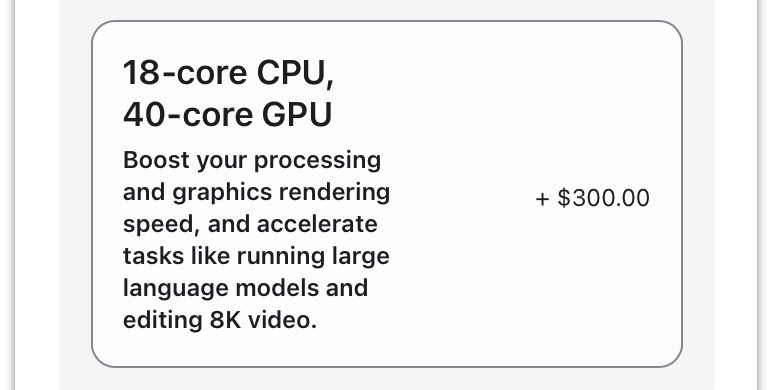
The baseline Mac Studio lists an explicit upgrade path: moving from the stock 32-core GPU to the beefier 40-core GPU. Adjacent to this option, Apple’s interface clearly displays a clear-cut price tag: an additional $300. To a buyer carefully budgeting their hardware expenditure, this appears to be a modest, linear upgrade fee for an extra eight GPU cores.
Step 3: The Gruber Revelation
While compiling a comprehensive breakdown of configurations and real-world pricing structures for the new Mac Mini and Mac Studio models, John Gruber encountered the hitch that would soon ripple across the tech community.
Upon selecting the 40-core GPU option, Gruber noticed that the total system price jumped not by the advertised $300, but by a staggering $600. Upon closer inspection of the configuration summary, a vital change had occurred behind the scenes without explicit, prominent warning: the system’s unified memory had automatically leaped from 32GB to 48GB.
Step 4: The Fine Print
Apple does not leave users completely in the dark, but the notification mechanism borders on obfuscation. Rather than displaying an unambiguous warning pop-up or forcing the user to manually select a compatible memory tier, the configurator quietly applies a blanket prompt near the top of the page:
"Based on your new selection, other parts of your configuration have been updated. Please review the changes."
For a buyer moving quickly through the ordering process, or one assuming that component upgrades remain modular and independent, this passive text notification is easily missed, resulting in a sudden, unpleasant surprise at the final checkout screen.
Supporting Context & Metrics: Silicon Architecture and Pricing Psychology
To fully understand why Apple ties these components together, one must examine the engineering reality of Apple Silicon, alongside the company’s masterclass in tiered hardware pricing strategies.
The Unified Memory Architecture (UMA) Constraint
Unlike traditional PC architecture—where the Central Processing Unit (CPU) and Graphics Processing Unit (GPU) maintain separate physical pools of VRAM and system RAM—Apple Silicon relies entirely on a Unified Memory Architecture.
In an M-series chip, the memory controller, CPU cores, GPU cores, and Neural Engine all sit on the same silicon die (or silicon package, in the case of Max and Ultra variants) and access a shared pool of high-bandwidth memory via a wide memory bus.
Because the GPU cores share this ultra-fast memory bus directly with the CPU, scaling up the core count of the GPU demands significantly higher memory bandwidth and capacity to prevent bottlenecks. While technically a 32-core GPU can function with 32GB of RAM, Apple’s engineering parameters dictate that pushing the silicon to a 40-core configuration requires a baseline floor of 48GB of unified memory to maintain optimal throughput and thermal/power efficiencies.
The Illusion of Modular Upgrades
While there are legitimate engineering justifications for pairing higher GPU core counts with increased memory pools, the presentation of this dependency on Apple’s website is where consumer advocates raise ethical questions.
In traditional retail and custom PC building, hardware dependencies are flagged explicitly. If a motherboard requires faster RAM to support a high-end processor, the configurator typically forces the user to make an explicit, conscious choice between compatible tiers.
Apple’s approach, conversely, utilizes a single-click trigger where upgrading A automatically forces B, while pricing A as if it were a standalone modification. By advertising the GPU upgrade as a $300 line item, the interface primes the consumer to expect a $300 incremental cost. Masking the mandatory $300 memory bump behind a passive notification effectively doubles the cost of the GPU tier upgrade, altering the psychological calculus of the purchase.
| Configuration Component | Advertised Cost | Actual Forced Cost | Cumulative Price Impact |
|---|---|---|---|
| Base M5 Max Studio | $2,499 | $2,499 | $2,499 |
| GPU Upgrade (Visual) | +$300 | — | $2,499 |
| Memory Upgrade (Forced) | — | +$300 | $2,799 |
| Total Realized Cost | $300 | $600 | $3099 |
Official Statements and Industry Reactions
As news of the $300 configuration gotcha spread across forums like Reddit, Hacker News, and professional production channels, industry response was swift.
Tech journalists have long criticized Apple’s aggressive pricing models for RAM and internal storage upgrades—frequently charging hundreds of dollars for memory increments that cost a fraction of that in the open market. However, bundling upgrades under the guise of an independent component modification marks a distinct escalation in UI-driven friction.
Apple has yet to issue a formal press release or statement addressing the criticism of the Mac Studio configuration workflow, which aligns with the company’s historical posture regarding online store feedback. Historically, Cupertino views its configuration tooltips as legally and functionally sufficient, prioritizing a streamlined aesthetic over explicit hand-holding for power users.
Independent consumer rights advocates, however, argue that such interface designs border on dark patterns—user interface design choices carefully crafted to trick users into making decisions they might not otherwise make. When a professional buyer budgets for a $2,800 machine based on initial menu selections, discovering an uninvited $300 charge at the eleventh hour damages consumer trust.

Future Outlook: What This Means for Consumers and Prosumers
As Apple continues to iterate on its proprietary silicon lineup—pushing from the M1 through to the newly minted M5 generation—the integration between silicon design and hardware packaging will only tighten.
1. The Death of Modular Customization
The era of dropping individual, highly granular component upgrades into a workstation is officially dead. In the Apple Silicon ecosystem, everything is system-on-chip (SoC). As performance ceilings rise, thermal and bandwidth realities will increasingly force Apple to bundle specifications together. Consumers must expect that future iterations of the Mac Studio and Mac Pro will feature even more rigid hardware dependencies.
2. The Need for Greater Transparency
In response to widespread coverage by outlets like Daring Fireball and 9to5Mac, there is mounting pressure on Apple to refine its online store UI. Simple fixes—such as displaying combined package pricing upfront (e.g., "40-Core GPU / 48GB Memory Upgrade: $600") or implementing a mandatory confirmation modal that explicitly itemizes the forced secondary upgrade—would go a long way toward eliminating consumer frustration.
3. Advice for Potential Buyers
For creative professionals, developers, and data scientists eyeing the new M5 Max Mac Studio, the primary takeaway is clear: Never trust the initial line-item pricing in Apple’s configurator.
Before committing to a build, buyers must meticulously review the final summary panel to ensure that upgrading one component hasn’t covertly triggered a cascading upgrade in another. When evaluating the total cost of ownership for an M5 Max workstation, always calculate your budget based on the bundled reality of Apple’s tightly integrated hardware tiers, rather than the initial, deceptive component add-on prices displayed on the surface.
Ultimately, while the M5 Max Mac Studio remains a formidable, class-leading desktop workstation, navigating its purchase requires a keen eye and a healthy dose of skepticism toward the glossy sheen of Apple’s online checkout portal.