
Executive Overview
The landscape of mobile computing has long been defined by rigid physical boundaries. For nearly two decades, the smartphone industry has iterated on a familiar template: a single, flat glass slab interacting with capacitive touch inputs, separated entirely from the traditional desktop experience. While remote desktop applications have existed for years—bridging the gap between pocket-sized screens and heavy desktop processing units—their utility has always been constrained by ergonomic limitations. Typing on a virtual keyboard while attempting to view an entire desktop operating system on a tiny handheld display has historically been an exercise in frustration, relegated to emergency fixes rather than productive workflows.
However, hardware innovation is once again forcing a software renaissance. The introduction of foldable and dual-screen form factors—typified by devices like the unconventional iPhone Duo—has provided developers with a novel canvas. Seizing upon this architectural shift, Edovia has released version 5.10.6 of its acclaimed remote desktop application, Screens. This latest update introduces a feature explicitly tailored to the unique geometry of foldable hardware: Laptop Mode.
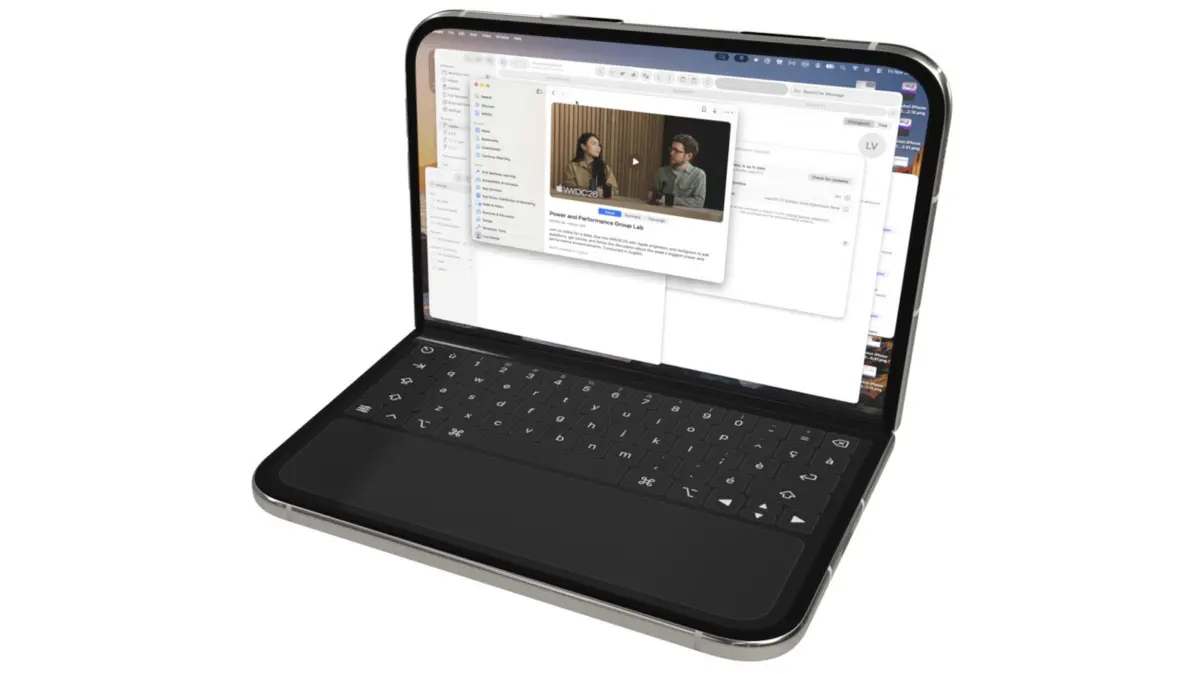
By recognizing when the iPhone Duo is placed in a partially open, clamshell configuration, Screens 5.10.6 dynamically alters its interface. The top half of the display transforms into a remote desktop viewport, while the bottom half converts into a functional software keyboard complete with an integrated trackpad. This clever software engineering effectively shrinks a macOS, Windows, or Linux desktop environment into a device small enough to fit in the palm of your hand, realizing the nostalgic sci-fi dream of the ultra-portable pocket laptop.
Yet, this development represents more than just a clever party trick for power users. It highlights a critical inflection point in mobile software design. As hardware manufacturers push the boundaries of industrial design with folding and multi-pane displays, software developers are tasked with rethinking decades-old paradigms of human-computer interaction (HCI). While Edovia has successfully unlocked a creative workflow for its remote desktop app, other tech giants are finding the transition considerably more arduous. The juxtaposition between Edovia’s agile adaptation and broader industry warnings regarding form-factor optimization underscores the growing pains of a rapidly shifting mobile ecosystem.
Detailed Chronology: The Evolution of Screens and the Foldable Leap
To understand the significance of the Screens 5.10.6 update, one must first trace the evolutionary trajectory of both Edovia’s flagship remote access tool and the broader hardware ecosystem that eventually made Laptop Mode possible.
The Foundation of Edovia Screens
Edovia built its reputation on empowering users to access their desktop environments from anywhere in the world. Long before the era of mainstream cloud computing, Screens established itself as a reliable, secure, and fluid VNC and Screen Sharing client for Apple ecosystems. Over the years, the application expanded its reach beyond macOS and iOS, eventually adding support for iPads, other Macs, and even cutting-edge spatial computing hardware like the Apple Vision Pro.
Throughout these iterations, the core interaction model remained tethered to the constraints of the host hardware. On an iPhone, using Screens meant viewing a compressed desktop environment on a vertical screen while summoning a standard iOS software keyboard that invariably obscured half of the visual workspace. Navigating required awkward pinches, pans, and taps, turning precise cursor control into a cumbersome chore.
The Hardware Shift: Enter the iPhone Duo
The calculus of mobile ergonomics changed dramatically with the conceptualization and eventual release of the iPhone Duo. Breaking away from the monolithic glass slate design that dominated the 2010s and early 2020s, the iPhone Duo introduced a flexible, multi-pane configuration that allowed users to fold the device dynamically.
Such hardware paradigm shifts rarely arrive with fully formed software ecosystems. When a new form factor emerges, it frequently outpaces the applications designed to run on it. Early adopters of unconventional mobile hardware are routinely subjected to stretched UI elements, letterboxing, and poorly mapped touch targets.
The Release of Screens 5.10.6
Recognizing the untapped potential of the iPhone Duo’s clamshell configuration, Edovia’s engineering team began developing an interface capable of exploiting the device’s physical hinge. The result of this R&D effort culminated in the rollout of Screens version 5.10.6.
Announced via the official Edovia development blog and detailed across major tech publications, the update introduced the long-awaited "Laptop Mode." Rather than treating the iPhone Duo as a standard smartphone, the application’s codebase was updated to interface directly with the device’s hinge-state sensors.
When a user folds the iPhone Duo halfway—resting it on a flat surface in a classic laptop posture—Screens intercepts this physical state change. Within milliseconds, the application reconfigures its layout:
- The Upper Display Pane: Dedicated entirely to rendering the remote desktop stream, preserving a wide aspect ratio optimized for viewing operating system windows, file explorers, and application interfaces.
- The Lower Display Pane: Transformed instantly into a specialized command center, featuring an ergonomic software keyboard and a dedicated multi-gesture trackpad area.
This transition occurs seamlessly, requiring no manual menu navigation from the user. It represents a masterclass in context-aware software design, turning a passive hardware constraint (a bent screen) into an active functional advantage.
Supporting Context & Metrics: Usability, Ergonomics, and Engineering Challenges
While the novelty of an "itty-bitty MacBook" is immediately captivating, evaluating the true utility of Screens 5.10.6 requires a rigorous examination of software engineering, human ergonomics, and the inherent limitations of micro-computing.
Decoding the Interface: Keyboard and Trackpad Integration
Designing a usable keyboard for the bottom half of a folded smartphone screen is no small feat. Physical keyboards rely on tactile feedback—key travel, actuation force, and spatial separation—to allow for touch-typing. Software keyboards on sub-compact displays possess none of these advantages.
To mitigate these hurdles, Edovia’s Laptop Mode incorporates several sophisticated input mechanisms:
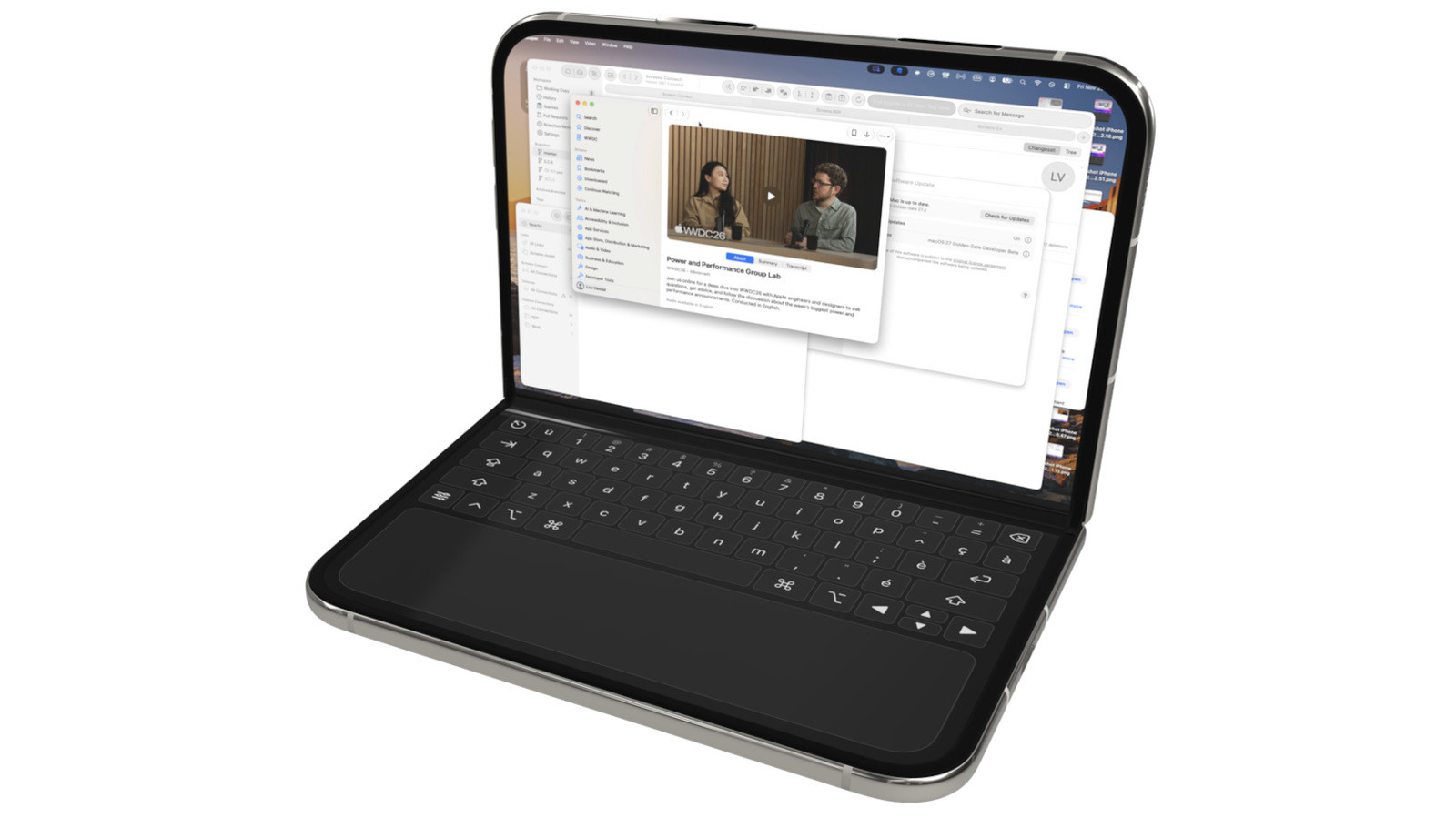
- Multi-Language Support: Recognizing the global user base of remote desktop clients, the virtual keyboard scales seamlessly across linguistic layouts, ensuring special characters and localized punctuation remain accessible.
- iPad-Style Flick Gestures: Borrowing one of the most beloved software innovations from iPadOS, users can swipe down on individual keys to instantly trigger alternative characters (such as numbers and symbols) without needing to toggle between secondary keyboard layers. This drastically reduces the number of taps required to execute common terminal commands or write complex strings of code.
- Gesture-Enabled Trackpad: The lower pane’s trackpad area is not merely a static mouse pointer; it is fully integrated with Screens’ proprietary gesture engine. Users can execute multi-finger scrolls, right-clicks, and window-dragging actions natively on the glass surface.
The Real-World Utility Threshold
Is typing on a half-screen iPhone Duo a viable replacement for a physical Magic Keyboard and a 14-inch laptop? Decidedly not. Ergonomic analysts and veteran remote workers point out several unavoidable constraints:
- Visual Real Estate: Rendering a full desktop operating system on the upper half of a folded phone screen results in exceptionally small text rendering. While macOS and Windows scaling helps, high-resolution desktop UI elements can become difficult to parse for extended periods.
- Typing Speed and Fatigue: Without tactile feedback, typing lengthy documents or executing extensive debugging sessions on a micro-keyboard inevitably leads to increased error rates and thumb fatigue.
However, Edovia never marketed Laptop Mode as a primary workstation replacement. Instead, Screens 5.10.6 targets the "in a pinch" use case. For system administrators needing to execute a quick terminal command while away from their desks, stock traders checking a desktop-bound platform on the go, or remote workers retrieving a forgotten file from a home rig, the ability to prop up an iPhone Duo and access a fully functioning desktop environment within seconds is nothing short of revolutionary.
Official Statements and Industry Reactions
The release of Screens 5.10.6 has sparked wider conversations within the tech industry regarding how application developers must adapt to the proliferation of non-traditional mobile hardware.
Edovia’s Vision for Context-Aware Computing
In technical documentation accompanying the update, Edovia’s development team emphasized the importance of designing for hardware intent. The goal was never to force legacy mobile paradigms onto new form factors, but rather to listen to what the device itself is suggesting. By allowing the physical posture of the phone to dictate software behavior, Edovia hopes to set a standard for how productivity apps should handle foldable screens.
In an official statement published on the Edovia blog, representatives noted:
"The iPhone Duo presents a fascinating paradox: it is pocket-sized, yet it begs to be used like a desktop. With Screens 5.10.6, we wanted to bridge that chasm. By treating the lower half of the device as an intentional input deck, we’ve turned an exciting piece of hardware into a genuinely productive remote workstation companion."
The Contrasting View: Industry Challenges in Form-Factor Design
Not all software companies are finding the transition to folding and multi-pane hardware to be frictionless. While Edovia’s minimalist, utility-driven interface adapted smoothly to the iPhone Duo, media-heavy and consumer-facing applications face monumental design hurdles.
Highlighting the complexity of developing for these new devices, Instagram Head Adam Mosseri recently made headlines when he discussed the realities of optimizing mainstream social media apps for the iPhone Duo architecture. In candid remarks, Mosseri admitted that designing Instagram to feel natural and immersive on the device’s unconventional display configuration is "pretty challenging."
Unlike a remote desktop app—which fundamentally relies on scalable windows, distinct viewing panes, and a mouse-and-keyboard metaphor—social media feeds, immersive video players, and algorithmic content delivery systems must be entirely re-architected to make sense across folding boundaries. A split screen can easily break a photo grid, disrupt vertical video aspect ratios, or create awkward dead zones in user interface navigation.
The divergence between Edovia’s triumphant update and Meta’s cautionary design notes illustrates a critical truth about the current mobile landscape: productivity and utility apps are uniquely positioned to benefit from foldable hardware early on, whereas media-consumption platforms require deep, structural redesigns to achieve the same level of harmony.
Future Outlook: The Road Ahead for Micro-Workstations
As we look toward the horizon of mobile computing, the release of Screens 5.10.6 serves as a bellwether for what is possible when agile third-party developers lean into hardware innovation.
The Rise of Pocket Productivity
The intersection of high-speed 5G connectivity, ultra-low-latency remote desktop protocols, and innovative hardware form factors is giving rise to a new category of computing: the Pocket Workstation. Users no longer need to carry heavy laptops for emergency administrative tasks. By pairing a folding smartphone with advanced client applications like Screens, the computing power of a high-end desktop rig can be summoned from a device that slips easily into a jeans pocket.
What’s Next for Screens and Foldable Software?
As hardware manufacturers continue to refine folding hinges, increase battery efficiencies, and expand display resolutions, applications like Screens will undoubtedly evolve. Future iterations of Laptop Mode could introduce customizable software keyboard layouts, haptic feedback simulations that mimic physical keys using advanced linear actuators, and deeper integration with external accessories.
Furthermore, Edovia’s success is likely to inspire other productivity developers—ranging from text editors and code compilers to spreadsheet utilities and CAD viewers—to explore how the iPhone Duo and similar devices can be leveraged for serious work.
Conclusion
Edovia has proven that limitations can spark profound creativity. By transforming the lower half of the iPhone Duo into a precision input deck and reserving the upper half for a crisp remote desktop stream, Screens 5.10.6 has turned an unconventional piece of hardware into an itty-bitty MacBook. While designing for folding displays remains a formidable challenge for giants like Instagram, nimble developers are showing the world exactly how the future of mobile productivity is meant to be written—one keystroke at a time.