Executive Overview
The landscape of personal productivity is undergoing a seismic shift. While artificial intelligence chatbots initially captured the public imagination through their ability to answer trivia, write poetry, and draft basic emails, their utility has rapidly matured far beyond simple conversational interfaces. Today, platforms like Google’s Gemini are transitioning from reactive query-responders to proactive, agentic assistants capable of seamlessly orchestrating complex, multi-step workflows.
For everyday users and busy professionals alike, the true value of modern generative AI lies in automation—the elimination of tedious, repetitive chores that consume valuable cognitive bandwidth. By integrating Gemini with core productivity suites such as Google Calendar, Gmail, Google Drive, and Google Maps, users can delegate routine housekeeping tasks. Whether it is auditing your daily commute for potential travel bottlenecks, curating a bespoke morning news briefing on a niche industry, mapping out weekend culinary adventures, or deploying customized "skills" to maintain strict editorial guidelines, Gemini offers a robust toolkit for streamlined living.
Furthermore, the introduction of advanced tiers like Google AI Pro and Ultra—alongside agentic capabilities such as Gemini Spark—allows these systems to operate autonomously, even when the user’s devices are powered down. This comprehensive guide explores five clever, practical ways to leverage Gemini to automate your daily life, transforming your AI assistant from a novelty into an indispensable digital chief of staff.
Detailed Chronology: The Evolution of Gemini from Chatbot to Agentic Assistant
To understand how Gemini has achieved this level of functional integration, it is helpful to trace the technological roadmap that brought Google’s flagship AI to its current state.
- Phase 1: The Conversational Foundation (Late 2022 – 2023)
Google launched its foundational large language models to compete directly in the conversational space. Initially designed to process natural language queries, translate text, and generate basic code, these early iterations required direct, manual prompts for every single action. Users had to initiate a session, type their request, wait for the response, and manually copy-paste or execute the resulting data. - Phase 2: Workspace Integration and Personalization (2024)
Recognizing that siloed AI tools limit user adoption, Google began deeply integrating Gemini into its broader ecosystem. Free and paid users alike gained the ability to connect Gemini to personal data silos like Gmail, Google Docs, and Google Drive. This phase introduced "Gems"—custom instructions designed to maintain context and tone across separate chats—marking the first major step toward personalized automation. - Phase 3: Scheduled Actions and Advanced Automations (Late 2024 – Early 2025)
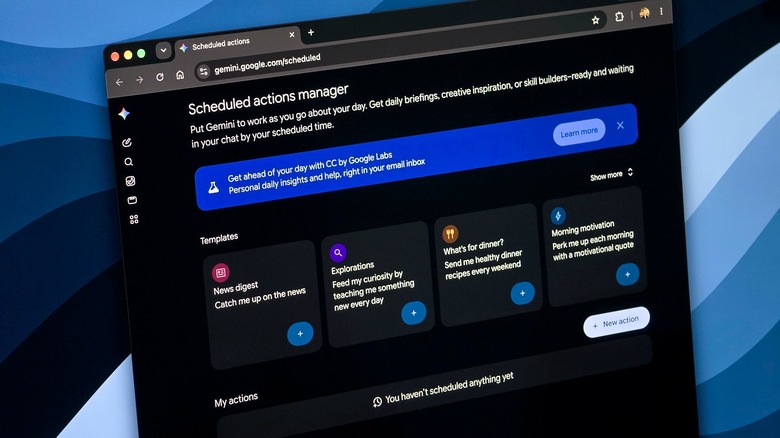
Google expanded Gemini’s operational scope by rolling out scheduled actions. Instead of waiting for a manual prompt, users could instruct Gemini to run specific tasks autonomously at designated times, such as every morning at 7:30 AM. This transformed Gemini from a synchronous tool into an asynchronous assistant. - Phase 4: The Agentic Era and Gemini Spark (Present)
The most recent milestone is the arrival of agentic AI capabilities, spearheaded by features like Gemini Spark for AI Pro and Ultra subscribers. Operating continuously in the background—even when smartphones and laptops are turned off—Spark can parse entire inboxes, synthesize communications, draft to-do lists, and populate calendars. Concurrently, Google began replacing Gems with "Skills," streamlining how users deploy repeatable instruction sets via simple commands or symbols.
Supporting Context & Metrics: The Shift Toward Autonomous Productivity
The push toward AI-driven automation is not merely a feature-driven trend; it is a direct response to modern cognitive overload. According to contemporary workplace productivity studies, knowledge workers spend upwards of 20% to 30% of their working hours searching for information, managing schedules, and processing low-value email correspondence.
Google’s recent platform updates aim to reclaim these lost hours by shifting the burden of routine organization onto machine intelligence. However, utilizing these tools effectively requires an understanding of both their immense power and their operational guardrails:
- The 10-Action Threshold: Currently, standard scheduled actions within Gemini are capped at a maximum of 10 active tasks per user. This limitation necessitates strategic prioritization, encouraging users to select only their most critical daily or weekly automations.
- Ecosystem Connectivity: Features like automated calendar-to-map checks and inbox deep-scans rely heavily on cross-application permissions. These integrations are typically disabled by default for privacy reasons, requiring manual activation within user settings.
- Agentic Independence vs. Oversight: While advanced features like Gemini Spark can operate autonomously while devices are powered down, Google has engineered critical safety checks into the architecture. Spark is programmed to pause and confirm with the user before executing high-impact actions—such as deleting files or sending external communications—mitigating the risk of catastrophic automated errors.
5 Clever Ways to Automate Everyday Tasks with Gemini
1. Check Your Day for Travel Trouble
Managing a packed schedule involving multiple physical locations can quickly become a logistical nightmare. While traditional calendar apps tell you where you need to be and when, they rarely account for the friction of moving between those points.
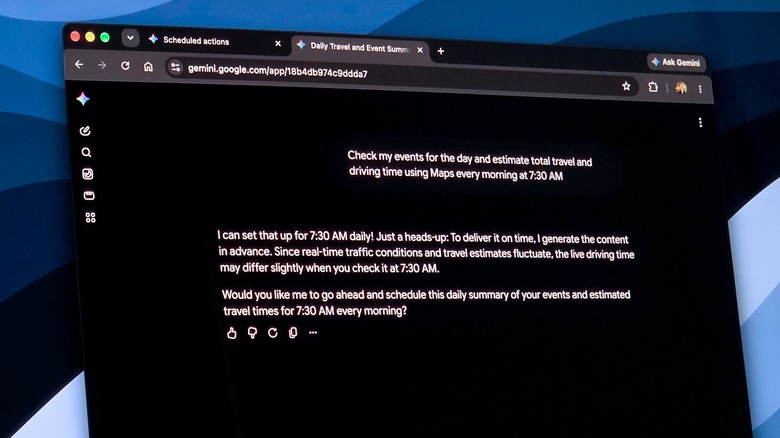
Gemini bridges this gap by cross-referencing your daily commitments with Google Maps. By setting up a recurring scheduled action, you can have your AI assistant evaluate your itinerary before your day even begins.
- Example Prompt: "Check my events for the day and estimate total travel and driving time using Maps every morning at 7:30 AM."
- Pro-Tip: Ensure your Calendar and Maps apps are properly linked to your Gemini account. Keep in mind that because scheduled actions generate responses based on data captured at the exact moment of execution, they may not reflect real-time traffic anomalies like sudden accidents. Always perform a quick visual check on Maps before walking out the door.
2. Get a Daily Briefing on the Latest News
Information overload is a constant challenge for professionals tracking industry trends, competitors, or specific public interests. Manually scouring news outlets, RSS feeds, and search engines every morning consumes precious time that could be spent on deep work.
Gemini can act as a personalized research analyst, performing targeted web searches at user-defined intervals and distilling the results into concise, actionable summaries.
- Example Prompt: "Every morning at 9 AM, search for the latest news about Apple and provide a five-bullet-point summary of the most important developments."
- Pro-Tip: Because you are limited to 10 simultaneous scheduled actions, reserve this feature for high-priority topics—such as mandatory compliance updates, major client news, or essential market research. Once the briefing is complete, Gemini will send a direct notification to your device.
3. Plan the Weekend Before It Starts
Balancing work and personal life often leaves little energy for weekend planning. Finding novel restaurants, local cafes, or weekend activities typically requires disjointed searches across review sites and mapping applications.
By granting Gemini access to your general location, you can automate your weekend leisure planning. The AI can curate fresh culinary and recreational itineraries every week without requiring redundant prompting.
- Example Prompt: "Every Friday morning, plan my weekend with different ideas for unique cafes and restaurants to visit near my location."
- Pro-Tip: Be mindful of location caching. If you are traveling away from your home base, scheduled actions will default to the geographical location that was active when the automation was initially configured rather than your current coordinates.
4. Turn Repeat Prompts into Skills
Consistency is paramount in professional communications, whether you are drafting weekly internal newsletters, writing client update reports, or formatting social media copy. In the past, maintaining brand guidelines required saving text snippets in separate documents and pasting them into chat interfaces repeatedly.
Gemini addresses this friction through Skills (which are replacing the older "Gems" feature). Skills allow you to define a permanent, complex set of instructions, stylistic preferences, and formatting rules that Gemini remembers across completely separate conversation threads.
- How to Use It: Create a designated skill containing your institutional brand guidelines, tone-of-voice parameters, and structural templates. Trigger the skill in your chat by typing a simple command (such as
/brandnewsletteror, rolling out soon,@brandnewsletter). Gemini will instantly apply those complex instructions to your new content generation task.
5. Let Spark Handle Your Inbox
For heavy email users, inbox management is often a full-time job in itself. The sheer volume of incoming messages makes it easy to miss critical deadlines, meeting requests, or action items buried in long threads.
For subscribers to Google AI Pro and Ultra, Gemini Spark serves as an always-on agentic assistant designed to take the friction out of email triage. Unlike standard chatbot queries that require your active presence, Spark operates continuously in the background, even when your laptop and smartphone are shut off.
- Capabilities: Spark can scan an entire week’s worth of incoming correspondence, synthesize the essential takeaways, construct an organized to-do list, and automatically populate your Google Calendar with pending appointments.
- Privacy and Setup: To utilize Spark, you must manually opt-in by toggling the integration switches for Gmail, Calendar, and Drive within your settings menu. Google has intentionally designed Spark to include a confirmation checkpoint for major decisions, ensuring that the AI never executes destructive actions—such as purging emails or deleting files—without explicit human authorization.
Official Statements and Industry Perspective
As generative artificial intelligence shifts from a consumer novelty into enterprise-grade workflow infrastructure, technology leaders emphasize the importance of balance between autonomy and safety.
Industry analysts point out that the integration of scheduled actions and background agents like Gemini Spark represents a critical evolution in human-computer interaction. By moving away from purely synchronous chat interfaces, companies like Google are redefining software utility.
Google’s engineering and product teams have repeatedly underscored that user agency remains paramount. While features like Gemini Spark are built to operate independently while devices are offline, the deliberate inclusion of permission gates and action-confirmation protocols ensures that users maintain absolute control over their digital environments. Furthermore, as regional rollouts continue to expand, Google aims to refine these capabilities to respect local data privacy regulations and infrastructural nuances across global markets.
Future Outlook
The trajectory of tools like Gemini points toward a future where digital assistants function less like search engines and more like autonomous digital colleagues. In the coming years, we can expect agentic AI systems to evolve beyond simple calendar checks and email summaries into cross-platform orchestrators capable of managing entire operational pipelines—from initial client outreach to final invoicing and project archiving.
As the cap on scheduled actions rises, and as natural language processing becomes even more attuned to contextual nuance, the boundary between manual computer navigation and automated delegation will continue to blur. For early adopters and forward-thinking professionals, mastering these initial automation techniques today provides a significant competitive advantage, laying the groundwork for a more efficient, less repetitive digital workday tomorrow.