
Executive Overview
In an era defined by rapid technological obsolescence, few household electronics enjoy as long an operational lifespan as the Wi-Fi router—and few are as frequently neglected. Consumers regularly upgrade their smartphones, smart televisions, and personal computers every few years, yet a router typically remains tucked away in a corner, quietly pumping data packets until it fails entirely or is discarded in favor of a newer standard like Wi-Fi 6 or Wi-Fi 7.
When the time finally comes to upgrade, the fate of the old hardware is almost universally the same: it is relegated to a drawer of forgotten electronics before ultimately ending up in a municipal e-waste stream or landfill. This disposal cycle is not only environmentally taxing, but it also represents a squandered opportunity. Because core networking fundamentals have remained largely unchanged for decades, an aging router retains substantial processing power and interface utility.
Far from being obsolete, an old router is, at its foundational level, a specialized low-power computer comprising a dedicated central processing unit, onboard memory, and multiple physical networking ports. Rather than tossing this capable hardware out, users can easily pivot these devices into new operational roles. From extending wireless coverage and serving as an impromptu network switch to hosting local file servers, establishing dedicated VPN gateways, or running advanced open-source custom firmware, an old router can be given a second lease on life. This comprehensive guide explores how to transform redundant hardware into high-value network assets, maximizing utility while minimizing technological waste.
Detailed Chronology and Technical Evolution of Home Networking
To understand why old routers remain useful, it is helpful to look back at how home networking has evolved over the past two decades. The trajectory of consumer routing equipment mirrors the broader history of microcomputing, transitioning from simple wired packet-forwarding boxes into complex, multi-band streaming hubs.
The Era of Wired Dominance and Single-Band 802.11g (Early 2000s)
At the turn of the millennium, home networking was primarily a wired affair governed by Fast Ethernet (100 Mbps) standards. When 802.11g wireless technology emerged, offering theoretical speeds up to 54 Mbps over the 2.4 GHz frequency band, routers began integrating rudimentary wireless access points. These early devices featured minimal RAM (often just 16MB) and low-clock-speed processors. Despite these limitations, they established the basic hardware template: a WAN port to connect to a broadband modem, a multi-port LAN switch for local devices, and an antenna-driven radio module.
The Gigabit Leap and the 802.11n / AC Revolutions (2010–2020)
As broadband speeds increased through the widespread deployment of fiber-optic and cable infrastructures, the internal architecture of routers had to adapt. The transition to Gigabit Ethernet ports (1000 Mbps) became standard, and the introduction of 802.11n brought dual-band capability (simultaneous 2.4 GHz and 5 GHz operations), beamforming, and multiple-input and multiple-output (MIMO) antenna arrays.
Routers manufactured during this decade frequently feature robust multi-core processors and significantly larger pools of RAM (ranging from 128MB to 512MB). Even though these units may lack the high-throughput multi-gigabit capabilities or advanced spatial stream management required by modern Wi-Fi 6 and Wi-Fi 7 devices, their physical hardware is more than powerful enough to handle specialized secondary network tasks.
The Modern Multi-Gigabit and Mesh Era (Present Day)
Today’s top-tier routers prioritize low latency, massive device density, orthogonal frequency-division multiple access (OFDMA), and seamless mesh integration across 2.4 GHz, 5 GHz, and 6 GHz bands. While primary networks demand these bleeding-edge specifications to handle high-bitrate streaming, cloud gaming, and smart-home saturation, secondary tasks—such as bridging an isolated garage office or hosting a network printer—do not require peak wireless performance. This performance gap creates the ideal ecosystem for hardware repurposing.
Supporting Context & Metrics: The Environmental and Economic Impact of E-Waste
The disposal of consumer electronics is one of the fastest-growing environmental crises globally. According to metrics compiled by international environmental agencies, millions of tons of electronic waste are generated annually, with small networking peripherals accounting for a surprisingly large percentage of discarded plastics, heavy metals, and circuit boards.
| Metric Category | Data Point / Estimate | Environmental/Economic Implication |
|---|---|---|
| Global E-Waste Generation | 50+ million metric tons annually | Rapid obsolescence cycles strain municipal recycling and hazardous waste processing facilities. |
| Average Router Lifespan | 3 to 5 years (Primary usage) | Hardware is often discarded due to shifting software support rather than physical component failure. |
| Average Retail Cost (Extenders/Switches) | $30 – $100 per unit | Repurposing existing hardware eliminates out-of-pocket expenses for single-purpose networking accessories. |
| Energy Footprint of Idle Routers | 5 to 15 Watts continuously | Low power draw makes running secondary nodes economically negligible (often under $10 annually per device). |
By keeping an aging router within a home network ecosystem, users directly reduce the demand for newly manufactured single-purpose peripherals, such as standalone wireless range extenders, unmanaged Ethernet switches, and dedicated print servers.
Practical Implementation: Five Ways to Repurpose Your Router
1. Turn Your Old Router into a Wi-Fi Repeater or Mesh Node
If your primary router struggles to punch through thick interior walls, concrete foundations, or multi-story layouts, an old router can be redeployed as a dedicated wireless access point or repeater. This eliminates the need to purchase commercial range extenders.
Implementation Strategies: Wired vs. Wireless Backhaul
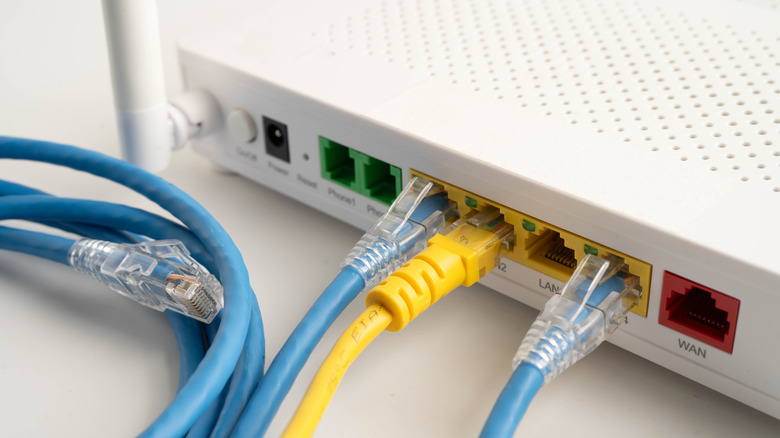
- Wired Access Point (Recommended): Run an Ethernet cable from a LAN port on your primary router to a LAN port on your secondary router. This configuration yields maximum speed, zero packet loss, and full bandwidth capabilities.
- Wireless Bridge / Repeater: If running physical cables through walls is impractical, configure the old router in WDS (Wireless Distribution System) bridging mode. Note that this wireless backhaul approach consumes a portion of the router’s wireless capacity to communicate with the primary router, resulting in lower real-world throughput for connected client devices.
Mitigating Wireless Interference
Broadcasting two competing Wi-Fi signals in close proximity causes co-channel interference and degrades network performance. To prevent this, assign distinct operating frequencies. Configure your old router to broadcast exclusively on the 2.4 GHz band—which excels at penetrating walls and physical obstacles—while restricting your modern primary router to manage the high-speed 5 GHz and 6 GHz bands.
2. Leverage LAN Ports for an Instant Network Switch
Modern home setups often outgrow their primary router’s physical port count. Smart televisions, desktop gaming rigs, network-attached storage (NAS) units, and streaming media players all demand stable, low-latency wired connections. Rather than buying an unmanaged Ethernet switch, your old router can fulfill this role entirely.
Setup Procedure:
- Access the old router’s administrative dashboard via a web browser.
- Disable the router’s internal DHCP (Dynamic Host Configuration Protocol) server. This prevents IP address conflicts with your primary router, which should remain the sole DHCP authority on the network.
- Disable advanced routing features such as the built-in firewall and NAT (Network Address Translation).
- Connect an Ethernet cable from a LAN port on your primary router to a LAN port on the secondary router. (Crucial warning: Never plug this uplink cable into the old router’s WAN port).
- Plug your wired client devices into the remaining open LAN ports on the old router. If you only require the device to function as a wired switch, disable all wireless broadcasting (Wi-Fi radios) on the secondary unit to eliminate unnecessary radio frequency congestion.
3. Create File and Print Servers for Wireless Convenience
Many consumer routers feature an integrated USB port—a feature frequently overlooked by users. By connecting peripheral hardware to these ports, you can establish rudimentary local network services without investing in expensive dedicated hardware.
Printer Sharing
Legacy printers that lack built-in Wi-Fi or Ethernet capabilities can be easily modernized. By connecting the printer via USB to your old router and enabling printer-sharing services within the router’s administrative firmware, any device connected to your home network can initiate wireless print jobs.
Network Storage (NAS) Functionality
Plugging an external hard drive or USB thumb drive into the router’s USB port turns the device into a basic network-attached storage server. Files stored on the drive become accessible across all computers, tablets, and mobile devices on the network. While a repurposed router lacks the advanced RAID data redundancy, fault tolerance, and high-speed data transfer rates of a dedicated enterprise NAS, it serves as an economical solution for sharing media libraries or backing up non-critical files.
4. Build a Dedicated VPN Router
Virtual Private Networks (VPNs) protect user privacy by encrypting internet traffic and routing it through remote servers. However, running a persistent VPN application on individual devices can drain battery life and add processing overhead to mobile devices and laptops.
By installing VPN client configurations directly onto an old router, you create a dedicated encrypted gateway.
- How it Works: The secondary router connects to your primary network in access point mode, but all traffic routed through its specific Wi-Fi SSID or wired ports is automatically encapsulated within the VPN tunnel.
- Use Cases: This setup is ideal for isolating specific devices—such as a smart TV streaming geo-restricted content or a guest network requiring heightened privacy—without forcing every device on your home network to route traffic through the VPN.
5. Install Custom Firmware for Maximum Flexibility
When manufacturer support ends, factory firmware ceases to receive security updates or feature additions. For advanced users, this limitation can be bypassed by flashing third-party, open-source operating systems onto the router.
Popular Open-Source Firmware Projects:
- OpenWRT: A highly modular, Linux-based operating system designed for embedded devices. It unlocks deep system-level control, enabling users to install specialized packages, configure granular firewall rules, and run local scripts.
- DD-WRT: A widely supported alternative firmware known for its user-friendly web interface and out-of-the-box feature parity with enterprise-grade networking equipment.
- FreshTomato: A fork of the classic Tomato firmware, celebrated for its clean graphical monitoring dashboards and real-time bandwidth utilization tracking.
While custom firmware unlocks immense potential, compatibility varies widely by hardware manufacturer and model revision. Users must consult project documentation meticulously to match exact processor architectures and flash memory sizes before attempting an installation.

Official Statements and Industry Perspective
Networking industry analysts and hardware manufacturers increasingly acknowledge the role of circular economy principles in consumer technology.
"The historical model of linear electronics consumption—buy, use, discard—is encountering both regulatory headwinds and shifting consumer values," notes Dr. Elena Vance, senior infrastructure analyst at the Global Technology Research Institute. "When consumers realize that an outdated router possesses the computing power of early enterprise servers, they begin to view home networking equipment not as disposable plastic, but as modular infrastructure. Empowering users with open firmware and documented bridging modes extends hardware lifecycles significantly and curtails e-waste growth."
Major networking manufacturers have also begun simplifying software bridging modes within their native smartphone applications, making it easier for non-technical users to repurpose legacy hardware into mesh nodes without delving into complex command-line configurations.
Future Outlook
As smart homes become increasingly saturated with Internet of Things (IoT) devices, the demand for segmented, secure, and robust home networks will only intensify. Future consumer routers will undoubtedly incorporate artificial intelligence for traffic optimization and native support for emerging communication protocols like Matter and Thread.
However, the foundational physics of radio frequency propagation and local packet switching will remain unchanged. An old router will continue to possess the exact physical capabilities required to bridge dead zones, switch wired Ethernet signals, and host localized services. By shifting our perspective—viewing aging networking equipment not as trash, but as a modular resource—consumers can build more resilient, secure, and environmentally sustainable home networks for years to come.