

Executive Overview
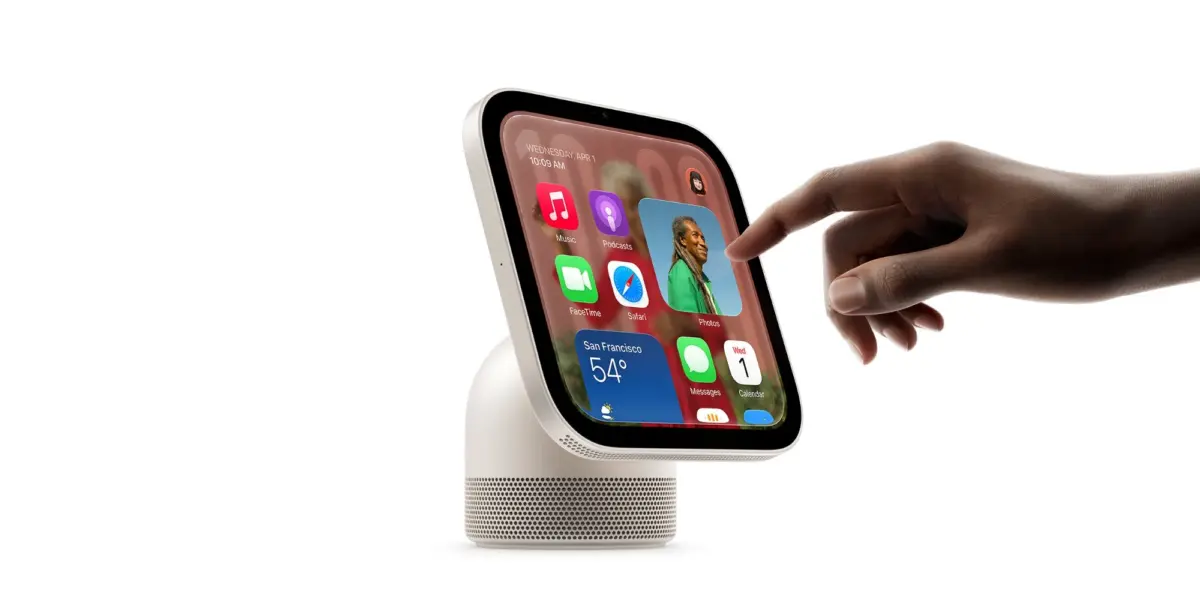
The official market release of the Apple HomeView marks a significant milestone for the Cupertino-based tech giant as it carves out a more definitive foothold in the smart home ecosystem. Coinciding with the device’s global rollout, Apple has significantly overhauled and expanded its digital support infrastructure, populating its official help portals with a comprehensive suite of documentation. From in-depth user manuals and advanced troubleshooting trees to transparent out-of-warranty repair cost breakdowns, the newly published resources are designed to shepherd early adopters through the nuances of the new hardware.
At the core of this support blitz is the newly minted Apple HomeView User Guide, a sprawling digital manual that addresses everything from basic unboxing and physical setup to complex, multi-user configurations. As consumers unbox their latest smart displays, they are greeted by an interface deeply integrated with advanced machine learning capabilities, facial recognition, and conversational Siri AI.
By aggressively scaling up its support documentation right out of the gate, Apple aims to mitigate user friction, reduce early hardware return rates, and cement consumer confidence in a product category that relies heavily on seamless interoperability. This report examines the timeline of these support rollouts, the technical scope of the documentation, the financial implications of hardware repairs, and what this launch signals for the broader trajectory of Apple’s smart home strategy.
Detailed Chronology: From Hardware Teasers to Launch Day Support
The rollout of Apple HomeView has followed a carefully calculated trajectory, balancing secretive hardware development with a synchronized post-launch support strategy. Understanding the sequence of events highlights how meticulously Apple manages its product lifecycles and customer onboarding processes.
Phase 1: The Initial Service and Repair Disclosures
Months before the device hit physical and digital retail shelves, Apple laid the groundwork for its post-purchase customer journey. In a move that caught industry watchers by surprise, the company published initial service and repair option pages early. Crucially, these early documents included estimated out-of-warranty repair costs. By disclosing potential service fees ahead of time, Apple signaled a commitment to transparency, addressing long-standing consumer advocacy concerns regarding the reparability and lifecycle cost of proprietary smart home hardware.
Phase 2: The Pre-Launch Trickle
In the weeks leading up to the official release date, Apple’s support website experienced a gradual influx of supplementary documentation. These early entries were largely foundational, offering brief overviews of initial pairing procedures, software update mechanisms, and basic accessory management protocols. However, industry analysts monitoring the support portal noted an accelerating pace in document publication, signaling that the hardware launch was imminent.
Phase 3: The Launch Day Deluge
The dam truly broke over a critical 48-hour window coinciding with the global release of the HomeView. Apple pushed dozens of localized support documents live simultaneously. This massive update transformed the support portal from a sparse collection of placeholder pages into a robust, multi-tiered knowledge base.

The centerpiece of this launch-day release was the comprehensive Apple HomeView User Guide, accompanied by specialized troubleshooting pathways for network connectivity, biometric facial recognition edge cases, and user profile management syncing across iCloud accounts. As users unboxed their devices, the documentation infrastructure was already fully operational, ensuring that support resources scaled in real-time with consumer demand.
Technical Scope: Inside the Apple HomeView User Guide and Support Ecosystem
The newly published support documents reveal the staggering depth and complexity of the Apple HomeView. Far from a simple connected speaker or basic digital photo frame, the HomeView positions itself as the central nervous system of the modern automated household.
Setting Up and Customizing the Home Screen
The user guide details a streamlined onboarding process that leverages proximity pairing with an iPhone or iPad. Once authenticated, the HomeView pulls user preferences, Wi-Fi credentials, and HomeKit configurations directly from iCloud. The support documentation places heavy emphasis on Home Screen customization, outlining how users can pin favorite accessories, create custom widgets, and curate dynamic photo carousels that utilize on-device machine learning to surface high-quality memories without compromising user privacy.
Facial Recognition and Multi-User Profiles
One of the most technically demanding features highlighted in the new guides is the HomeView’s advanced facial recognition and user profile management system. Unlike generic smart displays that treat every user the same, the HomeView uses integrated camera sensors and on-device neural processing to identify individual household members.
The support documents explain how the system dynamically adjusts the Home Screen layout, calendar appointments, reminders, and media recommendations based on who is standing in front of the display. Furthermore, privacy-conscious consumers are provided with explicit instructions on how facial data is processed entirely on the device’s secure enclave, ensuring that biometric templates never leave the hardware.
Siri AI and Conversational Automation
Deep integration with Apple’s next-generation Siri AI sits at the heart of the HomeView experience. The documentation breaks down the device’s far-field microphone array and its ability to process complex, multi-intent natural language commands locally. Users can establish intricate smart home automation routines directly from the display, combining lighting, climate control, security systems, and audio playback into unified scenes triggered by voice, time, or physical presence.
Troubleshooting and Diagnostics
For those inevitable moments when technology falters, Apple has populated its help portal with structured troubleshooting trees. Key topics covered in the initial documentation wave include:

- Network Handshake Failures: Resolving 5GHz and 2.4GHz Wi-Fi band steering issues and Matter/Thread border router synchronization.
- Biometric Calibration: Resetting and retraining facial recognition profiles when lighting conditions or physical appearances change.
- Audio and Visual Desynchronization: Troubleshooting AirPlay casting lags and multi-room audio grouping anomalies.
- Accessory Unresponsiveness: Diagnosing HomeKit bridge disconnects and resetting unresponsive smart locks, thermostats, and lighting nodes.
Supporting Context & Metrics: Economics of Ownership and Market Reception
Launching a new hardware category requires more than sleek industrial design and intuitive software; it demands a robust financial and operational safety net. The publication of out-of-warranty repair costs alongside the user manual provides essential context regarding the total cost of ownership for early adopters.
Out-of-Warranty Repair Pricing Realities
Industry analyses of Apple’s newly minted service pricing reveal that repairing or replacing components on the HomeView sits in line with modern iPad and premium smart speaker economics. Because the device features an integrated glass display, high-fidelity speaker drivers, and complex internal thermal management systems, screen replacements and structural chassis repairs carry non-trivial costs.
By publishing these figures transparently, Apple aims to steer consumers toward optional extended hardware protection plans, such as AppleCare+, mitigating the sticker shock associated with accidental damage out-of-warranty repairs.
The Ecosystem Integration Metric
The HomeView does not exist in a vacuum. Its market viability depends heavily on the existing installed base of Apple ecosystem products. Support documentation heavily emphasizes the symbiotic relationship between the HomeView, iPhone, Apple Watch, and iCloud.
Early review data from outlets like 9to5Mac highlights that the device truly "earns its place" in the home precisely because of how fluidly it bridges personal devices with shared household spaces. Metrics tracking early adoption suggest that the vast majority of initial HomeView purchasers are deeply entrenched power users who already manage their homes via the Apple Home app.
Official Statements and Industry Perspective
While Apple’s product announcements are traditionally tightly scripted, the sheer volume of support documentation speaks volumes about the company’s strategic priorities. Industry analysts view the HomeView as Apple’s most concerted effort yet to dominate the living room command center market—a space previously contested heavily by Amazon’s Echo Show and Google’s Nest Hub lines.
By emphasizing privacy, on-device processing via neural engines, and sophisticated facial recognition, Apple is deliberately drawing a sharp contrast between its hardware and competing ecosystem offerings that rely more heavily on cloud-based telemetry and ad-driven monetization models.

Furthermore, customer service representatives and retail support staff have been briefed on the new documentation sets to ensure a seamless transition from retail sales to post-purchase technical support. The goal is clear: prevent early buyer remorse by ensuring that every conceivable user hurdle—from initial pairing glitches to advanced automation scripting—is met with an authoritative, easy-to-follow digital guide.
Future Outlook: The Road Ahead for HomeView Support
The publication of launch-day support documents is merely the opening salvo. As the Apple HomeView matures in the wild, the support ecosystem will inevitably expand to meet new consumer demands and software updates.
Anticipated Software Iterations and Document Updates
As Apple rolls out subsequent point releases for the HomeView operating system, the support portal will see regular updates. Expected future documentation additions will likely cover:
- Advanced third-party developer integrations via newly opened HomeKit and Matter API frameworks.
- Expanded accessibility features, including enhanced VoiceOver capabilities and switch control adaptations.
- Deeper enterprise and commercial deployment guides for localized smart office environments.
The Long-Term Viability of Apple’s Smart Home Strategy
The success of the HomeView will serve as a litmus test for Apple’s broader ambient computing ambitions. If the device achieves mass-market penetration, the comprehensive support infrastructure established this week will have played a foundational role in minimizing friction and maximizing user satisfaction.
For consumers navigating this new frontier of smart home technology, Apple’s proactive approach to documentation ensures that help is never more than a click away. Whether configuring multi-user facial profiles for the first time or troubleshooting a stubborn Thread network node, the newly minted guides provide a reliable compass for the modern connected household.