In an era dominated by homogenous user interfaces and strict system locks, desktop software customization has largely felt like a relic of personal computing’s golden age. However, Copenhagen-based designer and iconographer Michael Flarup has introduced a utility aimed at disrupting this status quo. IconSwapper, a specialized utility for macOS, challenges the static boundaries of the Apple Dock by allowing users to overwrite standard application graphics with dynamic, real-time visual assets.
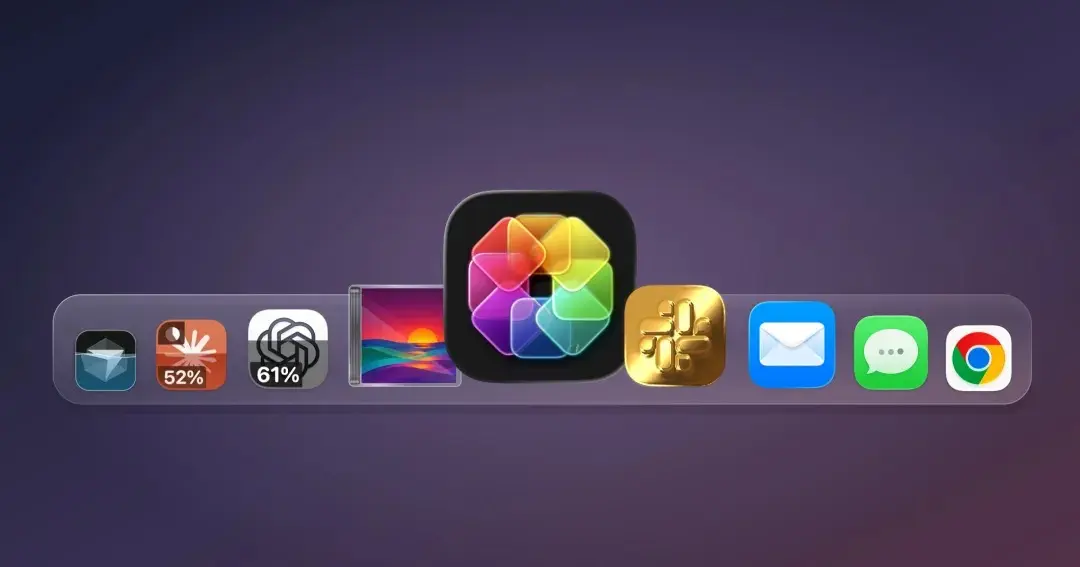
While the software provides extensive tools for stylistic re-skinning—ranging from retro shading to custom textures—its most compelling innovation lies in its ability to transform static icons into live telemetry dashboards. By hooking into real-time data feeds, IconSwapper allows users to monitor active compute resources, system events, and artificial intelligence usage limits directly from their app icons. As power users increasingly grapple with token caps, context window limits, and usage resets on generative AI platforms like ChatGPT, Claude, and Cursor, IconSwapper turns the macOS Dock into a unobtrusive, real-time status monitor.
The launch marks a technical and artistic milestone for macOS customization. By deploying custom real-time Metal graphics shaders to render graphics dynamically over system processes, Flarup has bypassed historical macOS architectural constraints without violating system integrity protocols. Priced at a $19 launch promotional tier (expanding to a $29 standard one-time purchase), IconSwapper bridges functional utility with digital craft, signalling a potential renaissance for personalized desktop software design.
Detailed Chronology & Technological Breakthroughs
The Evolution and Decline of Desktop Customization
To understand the technical achievement of IconSwapper, one must examine the modern history of macOS iconography. During the early Mac OS X era—defined by the vibrant, translucent Aqua interface—icon customization was a thriving subculture. Graphic designers crafted intricate, high-resolution .icns files, and utilities like CandyBar allowed users to restyle their entire operating system effortlessly.
However, as Apple prioritized security and brand uniformity over the past decade, system architecture tightened significantly:
System Integrity Protection (SIP): Introduced in macOS El Capitan, SIP locked down root directories, rendering global system asset replacement difficult and risky for the average user.
Flat Design Standardization: The aesthetic shift toward flat, unified iOS-style rounded squares (squircles) reduced visual variety across the desktop environment.
These protective measures made traditional icon swapping clunky, often requiring system reboots, terminal commands, or manual binary patches that broke with every minor OS update.
The Technical Eureka Moment: Real-Time Metal Shading
Flarup, who has designed icons professionally since the early 2000s and authored The App Icon Book, spent years researching how to bring real-time dynamic graphics to macOS without compromising system security or requiring SIP to be disabled.
The critical technical breakthrough occurred when Flarup abandoned the idea of altering file system assets directly. Instead of attempting to rewrite static icon binaries stored on disk, IconSwapper dynamically intercepts and renders graphic updates directly into the macOS Dock execution loop via Apple’s native low-level graphics framework, Metal.
"The breakthrough was figuring out how to send the Dock a bitmap for another running app and have it draw that frame itself," Flarup explained. "I spent a lot of time getting the artwork to follow the icon through all the little ways macOS moves it, from Dock magnification to the Command-Tab switcher. Once I had that working, I could make the icon react to whatever’s happening."
By delivering real-time frame buffers directly to the system rendering process, IconSwapper achieves high-framerate dynamic animations while seamlessly adhering to system-level transformations. Whether an app icon is bouncing during launch, expanding under Dock magnification, or cycling through the keyboard-driven Command-Tab application switcher, Flarup’s custom Metal renderer dynamically scales and moves the custom surface in perfect sync with the operating system’s native graphics compositor.
Supporting Context & Key Functionality Metrics
Managing "AI Rate-Limit Anxiety"
The primary modern operational challenge IconSwapper solves is the tracking of cloud-based generative AI usage limits. As software development, writing, and creative workflows increasingly integrate tools like OpenAI’s ChatGPT, Anthropic’s Claude, and Anysphere’s Cursor code editor, professionals face strict subscription tier caps and rolling hourly resets.
Historically, monitoring usage required navigating deep into browser-based settings menus, executing CLI commands, or deploying dedicated hardware tools like external desktop displays. IconSwapper eliminates this friction by translating live API rate-limit telemetry into intuitive, visual indicators embedded within the app icon itself.
+--------------------------------------------------------------------+
|                LIVE TELEMETRY MONITORING MATRIX                    |
+-------------------+------------------------------------------------+
| Target Platform   | Visual Telemetry Behavior                      |
+-------------------+------------------------------------------------+
| ChatGPT / Claude  | Ring progress fill & color shifts per API cap  |
| Cursor AI         | Token depletion burn-down gauge                |
| Safari Browser    | Active page-load ring & download status meter  |
| macOS Finder      | Eye pupil motion tracking active cursor        |
| Music / Spotify   | Real-time visualizers & artwork shader sweeps  |
+-------------------+------------------------------------------------+
Functional vs. Whimsical Capabilities
While the primary utility for technical professionals lies in monitoring resource caps, IconSwapper extends its dynamic engine to system utilities and entertainment applications:
Live Usage Indicators for AI:
Tracks rolling context window limits for ChatGPT, Claude, and Cursor.
Renders progress indicators, color-coded threshold warnings, and countdown resets directly onto the Dock icon canvas.
Displays subtle background ambient states while an AI model is actively generating responses ("thinking state").
System Tool Integrations:
Safari: Converts the iconic compass needle into a functional telemetry indicator that animates based on active page loads, web requests, and background file downloads.
Finder: Replaces the static two-tone smiling face asset with an interactive vector character whose pupil coordinates dynamically track mouse movements across the screen in real-time.
Music & Spotify: Incorporates low-overhead audio visualizers or dynamic color shifts derived from the currently playing album art.
Built-In Shader Library and Preset Assets:
Features real-time light simulation: Users dragging their mouse over a re-themed gold icon will see specularity and ray-traced reflections shift dynamically based on cursor vector mathematics.
Includes an extensive native gallery of alternative app icon graphics crafted by professional designers, along with a simple drag-and-drop workflow for importing custom PNG or vector graphics.
Official Statements & Developer Insights
Reflecting on the design philosophy driving the launch, Flarup emphasized that software utility should not come at the expense of playfulness and delight—elements he feels have been diminished by modern UI homogenization.
"That opens up a lot of fun ways to make your Mac feel like yours," Flarup stated. "I’ve always felt the software we use every day could be a little more fun and a lot more personal."
Flarup’s background deeply informs this project. Operating out of Copenhagen, Denmark, where he runs an independent creative studio, Flarup has been at the forefront of the app design community for over two decades. His passion for the medium culminated in his curation of The App Icon Book, a hard-bound art collection dedicated to preserving the craftsmanship behind digital icon design.
+-----------------------------------------------------------------------+
|                    DEVELOPER PROFILE: MICHAEL FLARUP                  |
+------------------+----------------------------------------------------+
| Base of Operation| Copenhagen, Denmark                                |
| Studio Focus     | Graphic Design, UI/UX, macOS Utility Engineering   |
| Notable Works    | IconSwapper, The App Icon Book, Mac iconography    |
| Core Philosophy  | Re-introducing craftsmanship & delight to software |
+------------------+----------------------------------------------------+
According to Flarup, IconSwapper is not merely a utility for power users seeking productivity metrics; it is an effort to democratize interface customization without requiring deep command-line knowledge or system risk. The software relies entirely on intuitive GUI toggles, sliding parameter adjustments, and preset selections, allowing non-technical users to apply complex graphic shaders instantly.
Future Outlook & Desktop Personalization Paradigm
Monetization and Distribution Strategy
IconSwapper enters the consumer software market under an independent, direct-to-consumer software distribution model. Departing from the software-as-a-service (SaaS) subscription model that currently dominates the consumer landscape, IconSwapper is offered as a perpetual software license:
The Ongoing Cat-and-Mouse Game with OS Architecture:
Because IconSwapper relies on clever runtime frame-buffer manipulation within the macOS Dock process rather than public, standardized Apple APIs, future system updates to macOS could alter Dock rendering pathways. Developers building deep-level utility enhancements must remain vigilant, constantly adjusting graphics hooks as Apple iterates on its desktop operating system.
The Rise of Micro-Telemetry UI:
As software workflows become heavily dependent on remote, asynchronous cloud infrastructure (API calls, server-side LLM inference, remote CI/CD builds), the demand for ambient, non-intrusive status indicators is rising. IconSwapper demonstrates that status monitors do not need to clutter menu bars or require secondary displays; existing UI elements can be repurposed to convey complex real-time telemetry.
A Renaissance for Interface Artistry:
By providing real-time Metal shaders, custom lighting parameters, and dynamic live data feeds to standard desktop graphics, IconSwapper signals a movement away from uniform, flat software interfaces. It suggests a future where desktop computing environments are once again expressive, customizable, and inherently personal.