Executive Overview
Seven and a half years after the Gutenberg block editor fundamentally shifted how content is built within WordPress Core, the platform has introduced a development pathway long thought impossible: creating and registering functional custom blocks using exclusively PHP.
Historically, building a custom block required a sophisticated understanding of JavaScript, React, Node.js packages, and complex build pipelines like Webpack or @wordpress/scripts. For developers entrenched in procedural PHP or classic theme development, this steep technical barrier transformed block adoption into a resource-heavy enterprise. WordPress 7.0 shatters this barrier with a single, elegant feature flag: 'autoRegister' => true.
By decoupling block development from mandatory client-side JavaScript architecture, WordPress has delivered a lifeline to legacy ecosystems. While purists may critique the functional limitations of server-side-rendered elements within a client-side application canvas, the strategic intent of this update is clear: to accelerate modern block theme adoption by removing the friction of legacy migrations. This feature report explores the architecture, pragmatic code applications, architectural limitations, and ultimate value proposition of PHP-only block registration in WordPress 7.0.

Detailed Chronology: The Evolution of Block Development
To understand the weight of WordPress 7.0’s new approach, one must look back at the trajectory of the block editor’s maturation:
- Late 2018 (WordPress 5.0): The Gutenberg project launches, introducing blocks to Core. Developers are forced to adapt to a dual-registration model—registering block metadata via PHP (
register_block_type) while building the UI using ESNext and JSX compiled through heavy build steps. - 2021–2023 (The Full Site Editing Era): WordPress pushes aggressively toward Block Themes (
theme.json), leaving classic theme developers stranded. Thousands of sites remain on legacy codebases because migrating custom loops, widget logic, and shortcodes into React blocks is cost-prohibitive. - 2024–2025 (Incremental DX Improvements): The core team attempts to smooth out developer experience (DX) via zero-configuration script packages, yet managing NPM dependencies and maintaining build pipelines remains a persistent hurdle for backend-focused agencies.
- 2026 (WordPress 7.0 Release): The introduction of PHP-only block registration via
autoRegister => true. For the first time, WordPress Core automatically generates client-side registration and editor previews directly from server-side PHP definitions.
The Anatomy of PHP-Only Block Registration
Under traditional paradigms, a custom block requires coordination across multiple files (block.json, index.js, edit.js, save.js, and PHP boilerplate). WordPress 7.0 condenses this overhead into standard, declarative PHP execution hooks.
The "Hello World" Standard
Registering a functioning block that integrates seamlessly into the WordPress editor interface requires minimal code:

function css_tricks_hello_world_block()
  register_block_type(
    'css-tricks/hello-world',
      [
        'title' => 'Hello World',
        'render_callback' => function ()
          return sprintf(
            '<div %s>Hello World!</div>',
            get_block_wrapper_attributes()
          );
        ,
        'supports' => [
          'autoRegister' => true,
        ],
      ]
  );

add_action('init', 'css_tricks_hello_world_block');
The linchpin here is the 'autoRegister' => true argument inside the supports array. When executed, WordPress intercepts this parameter and dynamically provisions the client-side JavaScript required to render the block inside the editor canvas, bypassing the need for an external compilation script.
Injecting Attributes Without React Controls
Extending blocks to accept user input typically demands custom React components for the sidebar inspector. With PHP-only blocks, developers simply define an attributes schema during registration, and WordPress automatically generates standard form elements (text inputs, numeric steppers, and toggles) in the block settings sidebar:
function css_tricks_hello_world_block()
  register_block_type(
    'css-tricks/hello-world',
    [
      'title' => 'Hello World',
      'render_callback' => function ($attributes)
        return sprintf(
          '<div %s>%s</div>',
          get_block_wrapper_attributes(),
          esc_html($attributes['greeting'])
        );
      ,
      'supports' => [
        'autoRegister' => true,
      ],
      'attributes' => [
        'greeting' => [
          'type' => 'string',
          'default' => 'Hello World!',
        ],
      ],
    ]
  );

add_action('init', 'css_tricks_hello_world_block');
Architectural Limitations & Constraints
Despite its welcoming syntax, PHP-only registration comes with clear constraints driven by the underlying architecture of the block editor. Developers must carefully evaluate these limitations before committing to a development strategy.

1. Zero Direct Content Interactions in the Editor
Because editor previews for PHP-only blocks rely on asynchronous REST API queries to generate markup (/v2/block-renderer/), they do not live inside the single-page JavaScript application state. Consequently:
- You cannot build in-place, rich-text inline editing.
- You cannot attach direct client-side event listeners (e.g., initializing a slider library on a DOM node) because re-renders will instantly wipe out those bindings.
2. Disconnect from Fresh State Data
PHP blocks query the database directly during render calls. However, when a user updates post meta, titles, or excerpts dynamically inside the editor canvas, those changes exist solely within the client-side JavaScript data store until the post is explicitly saved. A PHP-only block rendering a post title will display stale database data until a full page reload occurs.
3. Missing Global Post Context in the REST API
Because the WordPress REST API is stateless, standard global context variables like $post are not automatically mapped when rendering block previews. Template tags relying on globals will fail unless developers manually parse environment tokens or pass parameters via local attributes.

4. Restricted Attribute and UI Types
WordPress 7.0 limits native PHP attribute types to strings, numbers, and booleans, mapping strictly to basic form controls. Advanced interfaces—such as media uploaders, nested inner blocks, date pickers, or keyed arrays (where a dropdown label differs from its stored database value)—are entirely unsupported.
The Killer Use Case: Migrating Legacy Codebases
Given these constraints, why introduce the feature at all? The answer lies in legacy theme modernization.
Thousands of enterprise websites remain trapped on classic WordPress themes not by choice, but because the cost of rewriting custom shortcodes, complex widgets, and PHP-driven template fragments into React blocks is economically unfeasible.

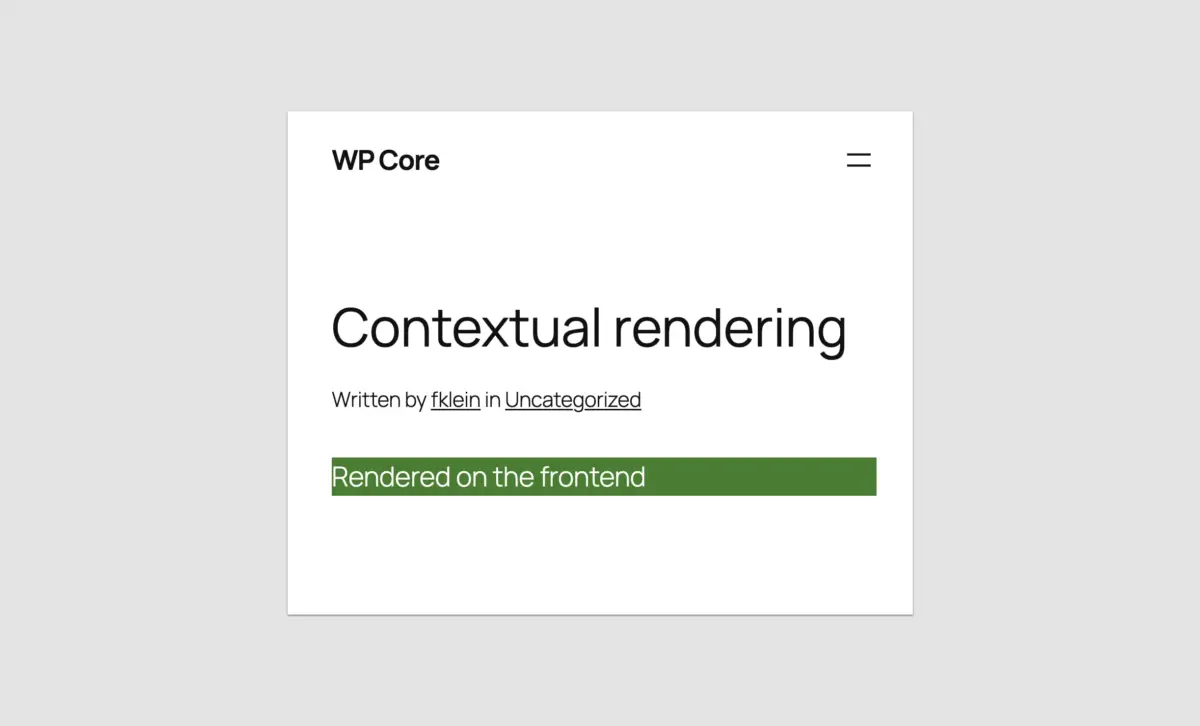
PHP-only blocks erase this technical debt. By wrapping legacy header inclusions, custom loop fragments, or proprietary shortcodes into an auto-registered server-side block, agencies can port classic sites to modern block themes in hours rather than weeks. Even if the editor preview is basic—or requires a designated placeholder—as long as the block renders accurately on the frontend, the migration objective is achieved.
Advanced Practical Implementation Patterns
For teams adopting this workflow, several native workarounds and optimization patterns help bridge the gap between backend code and the modern block editor.
Distinguishing Frontend vs. Editor Contexts
To serve distinct markups or debugging styles depending on whether a block is rendered inside the admin canvas or on the live frontend, developers can leverage wp_is_rest_endpoint() alongside query inspection:

function css_tricks_php_only_detecting_editor_render()
  register_block_type(
    'css-tricks/php-only-detecting-editor-render',
    [
      'title' => 'PHP-Only Detecting Editor Render',
      'render_callback' => function ()
        if ( wp_is_rest_endpoint() && str_contains( $GLOBALS['wp']->query_vars['rest_route'] ?? '', 'v2/block-renderer/' ) )
           $frontend = false;
         else
           $frontend = true;


        $bgcolor = $frontend ? 'green' : 'blue';

        return sprintf(
          '<div %s>%s</div>',
          get_block_wrapper_attributes( [ 'style' => "color: #fff; background-color: $bgcolor;" ] ),
          $frontend ? 'Rendered on the frontend' : 'Rendered in the editor'
         );
       ,
       'supports' => [
         'autoRegister' => true,
       ]
    ]
  );

add_action( 'init', 'css_tricks_php_only_detecting_editor_render' );
Accessing Post IDs via Local Attributes
To bypass the lack of post context in REST queries when editing an existing post, developers can capture the post query argument from the admin URL at initialization time and store it locally:
'attributes' => [
  'postId' => [
    'type' => 'integer',
    'default' => isset( $_GET['post'] ) ? absint( $_GET['post'] ) : 0,
    'role' => 'local'
  ],
]
Enqueuing Styles and Frontend Scripts
Performance remains a priority; WordPress ensures that stylesheets and view scripts registered via block declarations are only enqueued when the specific block is present on the page:
wp_register_style( 'css-tricks-hello-world', plugins_url( 'style.css', __FILE__ ), [], filemtime( plugin_dir_path( __FILE__ ) . 'style.css' ) );

register_block_type( 'css-tricks/hello-world', [
    'title' => 'Hello World',
    'render_callback' => function()  return '<div ' . get_block_wrapper_attributes() . '>Hello World!</div>'; ,
    'supports' => [ 'autoRegister' => true ],
    'style' => 'css-tricks-hello-world',
] );
Future Outlook & Industry Impact
Was a seven-and-a-half-year wait worth a PHP-only block registration mechanism?

If your goal is building highly interactive, dynamic, native-feeling UI components from scratch, the answer is an absolute no. React remains the undisputed king of complex block architecture within the WordPress ecosystem, and interactive modules demand client-side script execution.
However, if your metric is ecosystem velocity and institutional adoption, WordPress 7.0 marks a profound cultural shift. By lowering the barriers to entry, Core has acknowledged that developer experience (DX) must cater to backend engineers as much as JavaScript specialists.
For agencies managing large portfolios of legacy client sites, PHP-only registration removes the single greatest obstacle standing between classic architectures and modern block themes. The migration path is open, practical, and executed entirely with the tools developers have trusted for decades.