Executive Overview
For anyone who spent time in front of a Macintosh computer during the 1990s, the visual landscape of desktop computing was defined by a distinct brand of whimsy. Long before operating systems featured sleep modes or sleek, energy-saving black screens, computer displays were kept safe from phosphor burn-in by a cultural phenomenon: Berkeley Systems’ After Dark.
Whether it was the surreal, chrome-plated wanderlust of the "Flying Toasters," the hypnotic drifting of tropical fish, or the mesmerizing geometry of "Starry Night," After Dark was far more than a practical utility for protecting vintage cathode-ray tube (CRT) monitors. It was an early canvas for digital art, humor, and interactive computer personality.
However, as computing marched into the flat-panel, high-resolution era of modern macOS, these beloved artifacts of desktop nostalgia were largely left behind. Running original 68k-based After Dark modules on contemporary Apple Silicon hardware has traditionally required convoluted setups—juggling finicky, resource-heavy classic Mac OS emulators, tracking down elusive ROM files, or maintaining aging vintage hardware prone to capacitor failure.
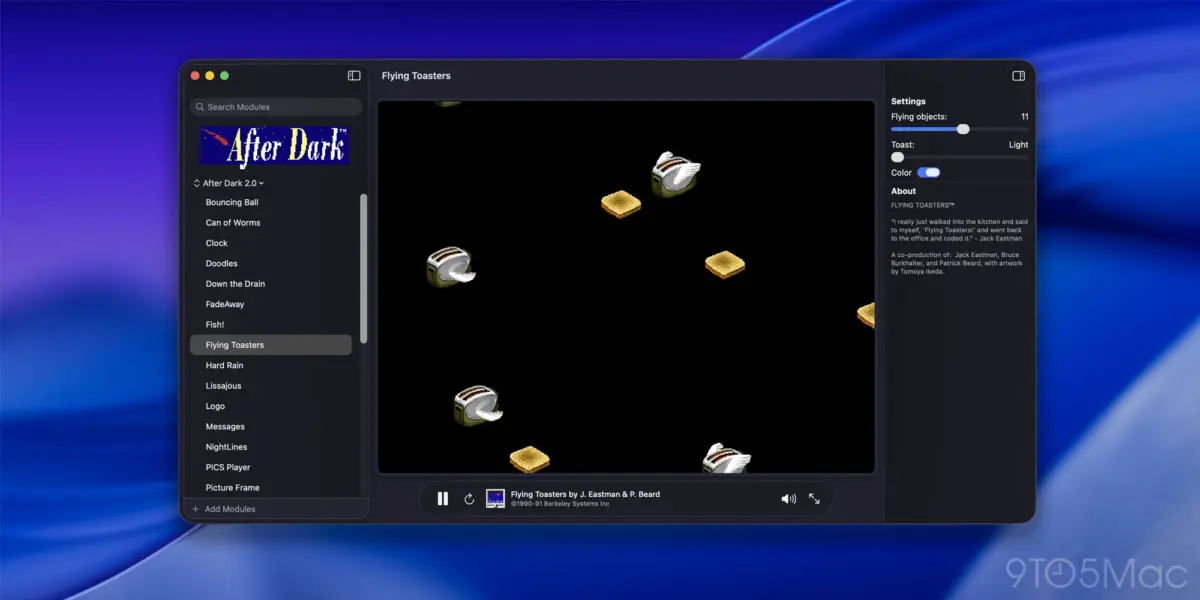
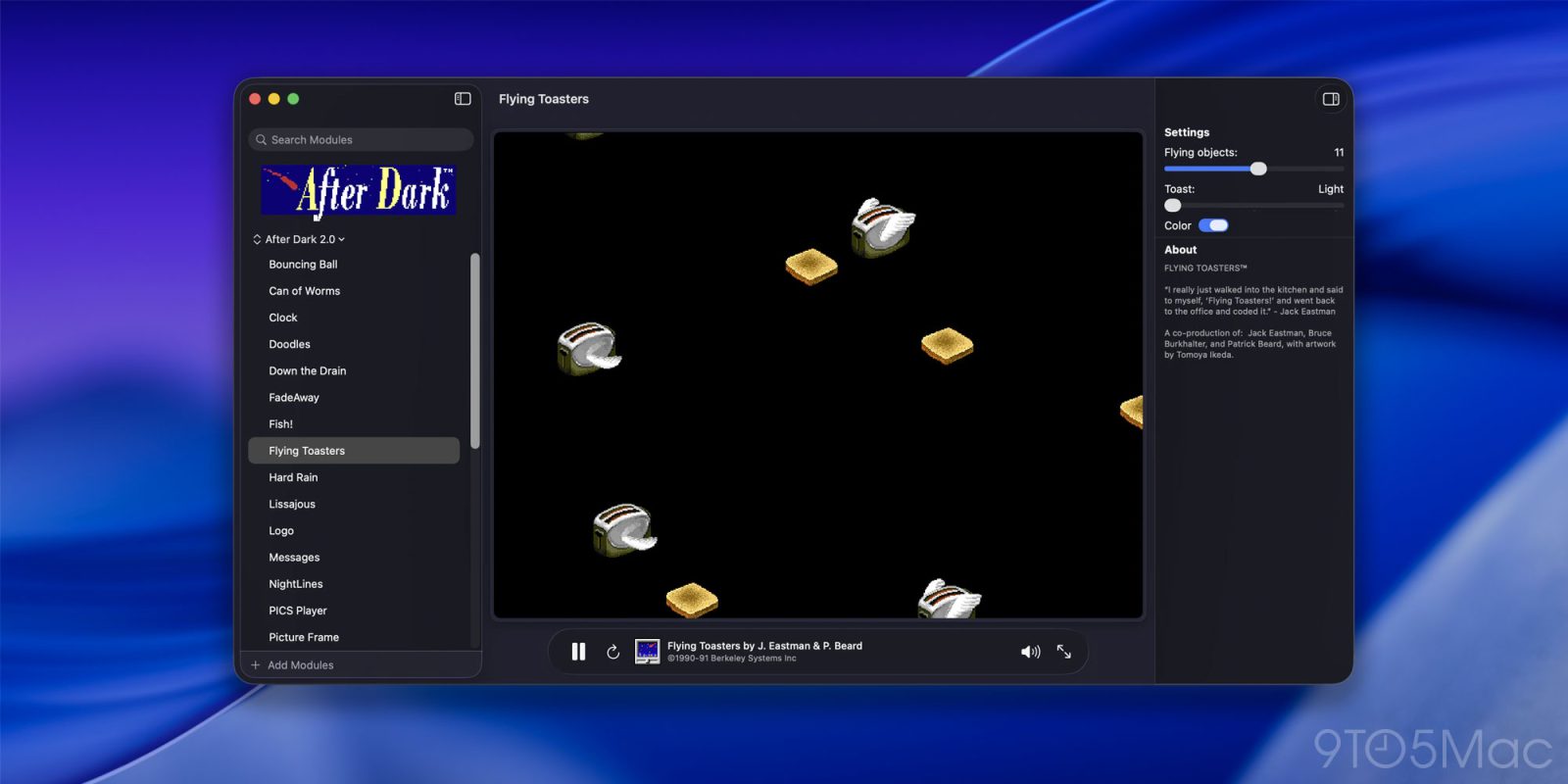
Enter Afterglow, an ingenious new software project developed by Jeff Halter and highlighted by Daring Fireball. Designed specifically as a dedicated, lightweight emulator for original 68k After Dark module code, Afterglow strips away the complexity of traditional emulation. It requires no classic operating system dependencies or proprietary ROMs, allowing users to run authentic 1990s screen savers natively on modern Macs. Complete with contemporary creature comforts such as CRT shaders, multi-module support, full-screen modes, and a native macOS screen saver integration, Afterglow bridges a multi-decade gap in personal computing history—transforming software preservation from a tedious technical chore into an effortless, delightful experience.
Detailed Chronology: From Berkeley Systems to Modern Emulation
To truly appreciate the engineering feat represented by Afterglow, it is essential to trace the historical arc of After Dark and the arduous journey enthusiasts have historically faced to keep these digital relics alive.
The Golden Age of Berkeley Systems (1989–1990s)
Released initially in 1989 by Berkeley Systems for the Macintosh (and later ported to Microsoft Windows), After Dark revolutionized a previously mundane utility category. While screen savers had existed primarily to prevent static images from etching themselves permanently into the sensitive phosphors of monochrome and early color CRT displays, Berkeley Systems infused the genre with personality, humor, and advanced graphics programming.
The software’s defining moment arrived with the inclusion of the "Flying Toasters" module, which featured chrome-winged toast floating serenely through a star-studded cosmos, accompanied by an optional slice of toast trailing multi-colored butter. The collection expanded rapidly with subsequent editions and add-on packs, such as More After Dark, which introduced classics like the space-combat game Lunatic Fringe. These animations were marvels of 68k assembly and C code, optimized to run within the strict RAM and CPU limitations of Macintosh LC, II, and Quadra systems.
The Dark Ages of Compatibility
As Apple transitioned architectures—moving from Motorola 68k chips to PowerPC, then to Intel x86, and finally to modern Apple Silicon (M-series chips)—legacy software was systematically orphaned. Classic Mac OS applications could no longer execute natively.
For decades, keeping After Dark alive meant diving deep into the world of retro-computing emulation. Enthusiasts relied on complex virtual machines like Basilisk II, SheepShaver, or older variants of SheepShaver running system software like System 7 or Mac OS 8.5.
Yet, this approach was fraught with friction. Configuring a classic Mac OS environment required acquiring legally gray Macintosh ROM files, managing disk image formats, and configuring virtual memory. Worse still, the physics and rendering speeds of After Dark modules were frequently tied directly to CPU clock cycles. Running original 68k code on a modern multi-gigahertz processor often caused modules to hyperventilate—animating at blinding, unplayable speeds—or break entirely due to memory management incompatibilities.
The Genesis of Afterglow
Recognizing these barriers, developer Jeff Halter set out to build a streamlined, purpose-built solution. Halter is no stranger to the delicate art of Macintosh software preservation; he previously developed Lunacy, a native Swift application that successfully brought the classic Lunatic Fringe game from More After Dark to modern macOS environments.
Building upon the philosophy established with Lunacy, Halter conceptualized Afterglow not as a general-purpose operating system emulator, but as a specialized sandbox designed solely to execute the binary code of original 68k After Dark modules. By cutting out the operating system middleman, Afterglow bypasses the need for ROMs, disk images, and complex virtual machine layers. The result is a clean, modern macOS app that treats classic code with surgical precision.
Supporting Context & Metrics: Under the Hood of Afterglow
Afterglow is far more than a simple file viewer; it is a sophisticated translation and execution layer wrapped in a polished, native macOS interface.
Architecture Without ROM Dependencies
The core technical achievement of Afterglow lies in its targeted emulation scope. Traditional emulators must simulate an entire hardware motherboard, including memory controllers, SCSI buses, and system ROMs, just to boot an operating system that can, in turn, run an application.

Afterglow takes a radically streamlined approach. By isolating the execution environment specifically to the runtime expectations of After Dark modules, the application implements a lightweight 68k emulation layer capable of handling the specific system calls, QuickDraw graphics routines, and event loops that third-party modules relied upon. This dramatically reduces resource overhead, ensuring that modern MacBooks—even those running on base-tier Apple Silicon chips—experience negligible battery drain or thermal impact while rendering vintage animations.
Modern Features for Vintage Code
While Afterglow preserves the authentic, un-remade 68k module binaries, it surrounds them with a suite of contemporary features designed for modern desktop workflows:
- Native macOS Screen Saver Integration: Unlike standalone player apps that require manual launching, Afterglow includes a modern macOS screen saver module. This allows users to set any imported After Dark module as their system screen saver, seamlessly integrating vintage animations into contemporary macOS security and display settings.
- CRT Shaders: To recreate the authentic aesthetic of 1990s displays, Afterglow features customizable CRT simulation shaders, replicating scanlines, phosphor glow, and screen curvature for users who prefer an authentic retro look over crisp flat-panel rendering.
- Module Controls & Randomizer: Users can cycle through vast libraries of modules using built-in playlist and randomizer features, preventing repetition and keeping workspaces endlessly entertaining.
- Advanced Inspection Tools: For retro-computing enthusiasts and developers, Afterglow includes a resource inspector and a DrawMorph editor, offering a fascinating window into how 1990s developers constructed vector and raster animations within tight constraints.
- 3D Box Art UI: The application’s interface nods respectfully to its physical retail software roots, presenting collections with tactile, nostalgic design elements.
Official Statements and Developer Perspective
In discussing the motivations driving the creation of Afterglow, Jeff Halter articulated a philosophy rooted firmly in digital archaeology and software stewardship. In notes published alongside the project’s release, Halter emphasized the cultural value embedded within these vintage screen savers:
"In the ’90s, Berkeley Systems’ After Dark screen savers brought Flying Toasters, Fish, and Starry Skylines to Macintosh screens everywhere. They served a practical purpose in preventing burn-in on CRT monitors, but also entertained, with animations that could be funny, surreal, beautiful — sometimes gross. They are works of art worth preserving."
Halter highlighted the practical hurdles that previously kept these works locked away from casual enjoyment:
"Running After Dark modules in the present day has involved fussy configuration of Mac OS emulators or vintage hardware. Even then, no single emulator or vintage computer can faithfully run every module: some animate too fast, some too slow."
By engineering Afterglow to sidestep these hurdles, Halter has successfully shifted the paradigm from frustrating emulation tinkering to plug-and-play preservation:

"Afterglow is an emulator built specifically for running After Dark modules — the original 68k module code, not a remake or port — with no dependencies on ROMs or classic Mac OS. Created in the spirit of software preservation, it makes After Dark easy to enjoy today and for years to come."
Future Outlook: The Ongoing Imperative of Software Preservation
Projects like Afterglow occupy a vital intersection in the modern computing landscape, addressing a growing crisis in digital heritage. As operating systems evolve at a breakneck pace and proprietary APIs are deprecated, vast swathes of digital culture risk permanent erasure. While museums and archives routinely preserve physical hardware, the sheer volume of software produced over the last forty years makes hardware maintenance an unsustainable long-term strategy.
Software emulation—particularly lightweight, targeted emulation of the kind pioneered by Afterglow and its predecessor Lunacy—offers a sustainable path forward. By isolating specific software runtimes from the broader obsolescence of their host operating systems, developers can keep cultural artifacts functional, accessible, and relevant to new generations of users.
For modern Mac users, Afterglow represents an irresistible invitation to step back in time. While the original commercial modules are not bundled directly with the application due to copyright considerations, the project provides clear guidance on sourcing and importing classic module files into the ecosystem.
As remote workers, developers, and creative professionals lock their MacBooks at the end of the workday, the sight of chrome-plated toasters drifting across modern, high-density Retina displays serves as a comforting reminder: while technology changes at lightning speed, the joy of playful digital art remains timeless.