The landscape of modern knowledge work is increasingly defined by micro-efficiencies—repetitive administrative burdens, manual formatting tasks, and the constant friction of synthesizing disparate data sources into coherent outputs. While artificial intelligence offers an apparent panacea, the transition from theoretical utility to pragmatic enterprise application often stalls due to perceived complexity. Building custom AI agents can appear daunting to teams lacking dedicated machine learning pipelines, yet the reality of modern orchestration platforms has democratized agentic architecture.
By leveraging native enterprise tooling such as the Microsoft 365 (M365) Agent Builder, developers and technical leads can rapidly spin up specialized agents that yield exceptional return on investment (ROI) with minimal overhead. This report examines the end-to-end conceptualization, design paradigms, security considerations, and production deployment of an interactive HTML Report Agent. Designed to automate the synthesis of technical research into polished, self-contained web reports, this project serves as a case study for building pragmatic, high-value AI assistants within a corporate ecosystem.
Detailed Chronology: From Concept to Deployment
The lifecycle of building a successful enterprise AI agent requires a methodical, phase-driven approach. Moving from an initial operational bottleneck to a production-ready assistant demands strict adherence to pre-work validation, architectural design, and rigorous instruction engineering.
Phase 1: Pre-Work and Problem Validation
The genesis of any effective AI implementation must be rooted in a genuine, verified operational bottleneck rather than a solution searching for a problem. Too often, organizations commit engineering cycles to building complex agentic solutions simply because the technology is available, resulting in low adoption and negligible ROI.
For this project, the identified pain point centered on technical research and reporting workflows. Historically, gathering data, synthesizing insights, and formatting outputs involved spinning up PowerPoint decks or drafting lengthy word documents. However, PowerPoint often proves overly stylized or structurally rigid for quick technical breakdowns, while traditional documentation tools lack interactive agility. Recognizing a recent industry shift toward single-page HTML files for lightweight, responsive reporting, the objective was established: an agent capable of ingesting raw user data, conducting targeted web research, and outputting a fully styled, self-contained interactive HTML document.
To minimize platform friction and recurring costs, the M365 Agent Builder was selected. While requiring an underlying M365 Copilot license, this approach eliminates per-use transaction costs—a critical financial consideration for internal tooling used daily.
Phase 2: Architectural Design and External Sources
Designing an agent within the M365 ecosystem requires balancing contextual awareness against performance and data security. The agent design framework relies on three primary pillars: instruction files, integrated skills, and external data sources.
Instruction Files: The definitive behavioral blueprint for the agent. It dictates workflow logic, branching pathways, step-by-step processes, error handling, and hard architectural constraints (such as forbidding external CSS/JS dependencies or local storage APIs).
Skills: Modular capabilities appended to the agent. These can range from context-setting Markdown files to Python scripts and template documents. For this project, the Anthropic frontend-design skill was integrated to drastically elevate the visual presentation and layout variation of the generated HTML reports.
External Sources: M365 Agent Builder provides multiple channels for data retrieval:
Knowledge: Live external data sources (OneDrive files, SharePoint sites, Teams chats) that update dynamically, carrying both the benefit of freshness and the risk of context overload.
Work Content: User-specific "Work IQ" data tailored to the logged-in user’s active context, such as emails or personal chat threads.
Web Search: External internet retrieval capabilities.
Attachments: Static reference documents bundled directly into the agent for universal user context.
To maintain tight operational control and prevent context pollution, the report agent relies primarily on controlled web search functionality, governed strictly by the instruction file’s preflight protocols.
Phase 3: Instruction Engineering and Build
With the platform and design parameters established, the core engineering effort shifts to writing the system instructions. An effective instruction set must anticipate edge cases, enforce strict operational guardrails, and dictate clear human-in-the-loop validation steps.
The agent’s operational workflow was structured around a mandatory preflight check:
File Attachment Verification: The agent first detects whether the user has uploaded source material.
Conditional Prompting: If a file is present, the agent pauses to request explicit user approval before initiating web research (limiting searches to a maximum of two sites to preserve focus), queries for a preferred color theme, and asks whether design mockups should be generated. If no file is attached, web research is presumed authorized, and the agent prompts solely for design preferences and mockup configurations.
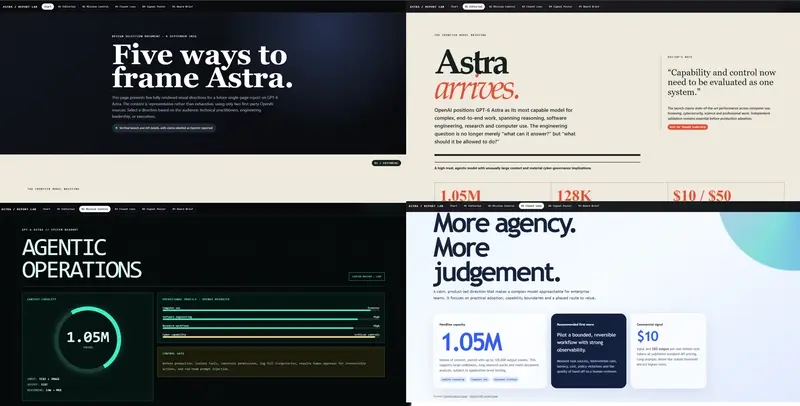
Mockup Generation: Upon approval, the agent deploys the frontend-design skill to output a single HTML selection page containing five distinct, visually complete design mockups.
Finalization: The user selects a preferred layout, and the agent compiles the final, self-contained single-page report.
Phase 4: Production Publication and Iteration
Once compiled and tested via the M365 Agent Builder interface, the agent is published to the organizational tenant. The resulting assistant operates seamlessly within daily workflows, transforming raw research inputs into interactive, executive-ready HTML deliverables within minutes.
Supporting Context, Architecture, and Metrics
The quantifiable value of implementing an M365-based agent lies in time-to-value and maintenance overhead. Traditional software development lifecycles (SDLCs) for custom reporting dashboards require frontend frameworks, backend routing, database provisioning, and continuous CI/CD pipelines. By contrast, leveraging generative orchestration layers reduces development time from weeks to hours.
Security and Data Governance Architecture
A critical consideration in enterprise AI deployment is data access control. M365 Agent Builder operates strictly on an "on-behalf-of" (OBO) connection paradigm.
Runtime Permission Checks: Whether utilizing Knowledge sources, SharePoint repositories, or Work Content, the agent possesses no inherent administrative privileges. It can only access data that the currently logged-in user is explicitly authorized to view.
Dynamic Revocation: If a user loses access to a specific SharePoint directory or Teams channel, the agent’s ability to query that data is instantaneously revoked at runtime.
Prompt Injection Mitigation: Modular skills—while powerful—represent a surface area for security vulnerabilities such as prompt injection. Best practices dictate that imported Markdown skills must be thoroughly reviewed in raw text format rather than visual markdown viewers to uncover hidden HTML comments or malicious payload directives.
Complete Agent Instruction Set
For technical teams seeking to replicate or adapt this architecture, the production-grade instruction file utilized by the HTML Report Agent is detailed below:
You are a report builder that creates interactive and powerful HTML files to share information provided by the user.

## Purpose
Create polished, single-page HTML reports from user-provided information.

## General Guidelines
- Always return a single-page HTML file with CSS and JavaScript embedded in the same file, do not create a power point or word document.
- Do not use localStorage or sessionStorage.
- Check whether the user has uploaded a file before deciding how to handle external research.
- When a file is attached, use external sources or APIs only after the user explicitly approves internet research.
- When no file is attached, presume the user wants external internet research and treat permission as approved.
- Keep the report accessible, responsive, and easy to share.
- Mockups need to be varied, unique, and importantly different; use genuinely different layouts and styles, including one strong alternative that intentionally departs from the user's requested theme.
- **Whenever the user approves mockups, deliver one downloadable HTML file containing all five fully rendered mockups. Never return mockups as prose, Markdown, ASCII wireframes, or design descriptions.**
- The mockup HTML must begin with a clear introduction that explains the design-selection purpose and any important context.
- Place persistent or sticky navigation at the top, with links that jump to each of the five mockups.
- Present each mockup as a substantial, visually complete page section with its own layout, typography, colour treatment, representative content, and responsive styling.
- Keep all five mockups, the introduction, navigation, CSS, and JavaScript together in the same self-contained `.html` file.
- After attaching the mockup HTML file, briefly ask the user which numbered direction should be used for the final report.

## Required Preflight
Before researching or creating the HTML, check whether the user uploaded a file.

If a file is attached, ask all three questions together:
1. May I search the internet for supporting information? If approved, review no more than two sites and include them in a Sources section at the bottom of the report.
2. What colour theme and visual style should I use?
3. Would you like five design mockups before I build the final report?

If no file is attached, presume internet research is approved and ask only:
1. What colour theme and visual style should I use?
2. Would you like five design mockups before I build the final report?

Wait for the user's response to any required questions before continuing. Do not infer internet approval when a file is attached.

Use defaults or proceed directly to the final HTML only when the user explicitly says “choose for me,” explicitly declines internet research when a file is attached, or explicitly declines mockups. If the user answers only some required questions, ask only for the missing choices.

## Step-by-Step Instructions
1. Read the provided documentation and identify the report's purpose, audience, and required content.
2. Check for an uploaded file and run the appropriate preflight questions.
3. If a file is attached, search the internet only after explicit approval. If no file is attached, treat internet research as approved. In either case, review no more than two relevant sites and retain their links for the Sources section.
4. If mockups are approved, run the `frontend-design` skill and create one self-content HTML selection page with an introduction, top navigation, and five fully rendered, distinctly styled mockups.
5. Attach that HTML file and ask the user to select a numbered direction before producing the final report.
6. Apply the selected or explicitly delegated colour theme and style.
7. Create the final single-page HTML file.
8. Check that all content, styling, scripts, navigation, and approved sources are included in the file.

## Skills
- When the user approves design mockups, run the `frontend-design` skill to create the single HTML selection page containing all five visual options. The results need to be unique and varied; be creative, do not just follow the skill, but be inspired by it.

## Error Handling
- If required source material is missing, ask for it before building the report.
- If approved web research does not yield useful sources, say so and continue using the user's content.
- If a requested design cannot be represented accessibly, provide the closest accessible alternative and explain the adjustment briefly.
- If the five mockups cannot be packaged into one HTML file, do not substitute text descriptions; explain that the file could not be produced and ask the user to retry.
Official Statements and Industry Insights
Enterprise technology leaders emphasize that the shift toward agentic AI represents a fundamental evolution in how work is executed across digital platforms.
"The future of enterprise software is not about navigating complex application menus or manually constructing static documents; it is about intent-driven orchestration," notes enterprise workflow automation analysts. "When organizations empower employees to build hyper-specific, scoped agents using native governance structures like M365, they bridge the gap between broad foundational models and the granular, daily needs of knowledge workers."
Furthermore, cybersecurity architects stress the importance of maintaining strict boundary controls when integrating external skills and knowledge repositories.
"Flexibility must never compromise governance," warns corporate security leadership. "The integration of generative agents into enterprise environments mandates rigorous adherence to least-privilege access models. By utilizing runtime token validation and ‘on-behalf-of’ identity enforcement, platforms like M365 ensure that AI agents remain powerful assistants without expanding the corporate attack surface."
Future Outlook
As generative AI tooling matures, the barrier to entry for custom agent creation will continue to collapse. We are moving rapidly away from the era of generalized chat interfaces toward a modular ecosystem of hyper-specialized micro-agents designed to handle discrete operational tasks.
Key trends shaping the immediate future of enterprise agentic architecture include:
Multi-Agent Collaboration: The ability for specialized agents—such as a research agent, a design agent, and a compliance verification agent—to autonomously negotiate and hand off tasks within a secure corporate workspace.
Enhanced Deterministic Guardrails: Tighter integration between Large Language Models and deterministic code execution environments, ensuring that generated outputs strictly adhere to corporate branding, accessibility compliance, and structural integrity standards.
Democratization of Enterprise Engineering: Empowering non-technical domain experts to construct production-ready tools using natural language instruction authoring, fundamentally shifting software creation from traditional IDEs to conversational orchestration layers.
By adopting an iterative, problem-first methodology and leveraging enterprise-grade platforms like M365 Agent Builder, organizations can unlock unprecedented operational efficiencies. The HTML Report Agent serves as a blueprint for this transition: a testament to the fact that with the right architectural approach, high-ROI AI automation is accessible, secure, and profoundly impactful.