In the contemporary landscape of software engineering, the convergence of robust cloud infrastructure, developer autonomy, and advanced NoSQL database paradigms defines the baseline for modern application development. For engineering students and enterprise architects alike, the challenge is rarely just about writing functional code; it is about designing end-to-end ecosystems that are reliable, secure, scalable, and completely automated from inception to production.
Recently, as part of the rigorous Database II curriculum at the Universidad Privada de Tacna’s Professional School of Systems Engineering, students faced a distinct architectural constraint: build and deploy a cloud-native NoSQL application while explicitly avoiding mainstream platforms like Redis, MongoDB, Neo4j, and Prometheus.
Rising to this challenge, student developers Yerry Maycol Tarqui Collatupa and Milton H. Flores Chino engineered an enterprise-grade, server-backed task management platform. Utilizing Azure Cosmos DB (SQL API) as the managed document store, an ASP.NET Core Minimal API (.NET 10) backend, Terraform for Infrastructure as Code (IaC), and GitHub Actions for CI/CD automation, the team delivered a zero-touch deployment pipeline. Every code push triggers an automated build, validation, infrastructure provisioning, application publication, and a live smoke-testing routine.
This comprehensive technical report explores the architectural decisions, data modeling strategies, infrastructure automation frameworks, and operational insights gained from developing and deploying this production-ready cloud application.
Detailed Chronology: From Academic Constraints to Cloud Deployment
The lifecycle of the project evolved through a structured sequence of architectural phases, moving from localized conceptualization to cloud-native orchestration.
Phase 1: Requirements Analysis and Technology Selection
Faced with strict constraints prohibiting Redis, MongoDB, Neo4j, and Prometheus, the development team evaluated alternative NoSQL storage engines supported by major cloud providers. Azure Cosmos DB (API NoSQL) emerged as the ideal candidate. As a globally distributed, multi-model managed document database service, it offers turnkey horizontal scaling, guaranteed low-latency read and write operations, and an attractive Free Tier suitable for academic and experimental prototypes.
For the presentation layer and backend execution engine, the team selected ASP.NET Core .NET 10 utilizing Minimal APIs. This combination bypasses the traditional boilerplate associated with heavy MVC controllers, reducing memory footprints and execution overhead—critical considerations for hosting applications within constrained cloud environments such as Azure App Service’s free tier (F1 plan).
Phase 2: Local Development and Domain Modeling
The core domain entity of the application is deceptively simple: a task item. However, designing this entity for a document database required a precise understanding of NoSQL partitioning and indexing strategies.
The team established a schema where each document encapsulates unique identifiers, titles, status markers, and timestamps. Local validation cycles were executed via lightweight local emulators and direct connection strings securely stored outside the source code repository.
Phase 3: Infrastructure Provisioning via Infrastructure as Code (IaC)
Rather than manually clicking through the Azure Portal—an anti-pattern prone to configuration drift and human error—the team codified the entire cloud environment using Terraform (version azurerm 4.x).
The infrastructure script was designed to dynamically provision:
A Resource Group acting as the logical boundary for all application assets.
An Azure Cosmos DB Account configured with Session consistency and Free Tier benefits enabled.
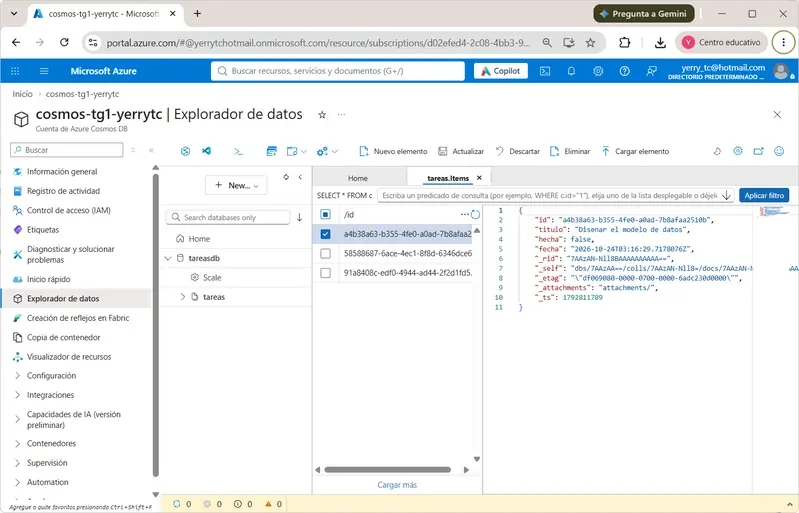
A SQL Database named tareasdb housing a container named tareas partitioned explicitly by /id.
An Azure Linux Web App configured natively for the .NET 10 runtime stack.
Automated environment variable binding, injecting the secure Cosmos DB primary keys and endpoints straight into the App Service configuration settings without manual intervention.
Phase 4: CI/CD Pipeline Construction and Smoke Testing
Automation was achieved by authoring modular YAML workflows within GitHub Actions. The deployment pipeline was bifurcated into continuous integration checks, infrastructure validation, and deployment publication.
To ensure post-deployment stability, the team engineered a robust smoke-test loop. Following the publication of the web artifact to Azure App Service, the CI/CD pipeline repeatedly queries the /health HTTP endpoint using a bash iteration loop with delay intervals. If the application fails to report an optimal health status within the allotted threshold, the deployment pipeline aborts and throws a fatal error, preventing corrupted or broken builds from serving production traffic.
Supporting Context & Metrics: Architectural Deep Dive
To fully comprehend the mechanics of this deployment, we must examine the specific components that constitute the system architecture.
Serves static assets (wwwroot/index.html), exposes RESTful endpoints, and executes business logic.
Document Database
Azure Cosmos DB
Manages database tareasdb, container tareas, utilizing /id as the partition key.
Infrastructure as Code
Terraform (azurerm 4.x)
Provisions cloud resources with remote state stored securely in Azure Storage.
CI/CD Automation
GitHub Actions
Handles continuous integration, Terraform execution, and application publishing.
Cloud Hosting
Azure App Service
Hosts the runtime container under a cost-effective Free Tier (F1 plan).
1. The NoSQL Data Model
In Azure Cosmos DB, every document must possess a unique id and a designated partition key. Because each task item within the application is independently accessed, created, updated, and deleted, the team designated the id field itself as the partition key path (/id). This guarantees an even distribution of data throughput across logical partitions, avoiding hot-spotting.
The C# data model is structured as follows:
public class Tarea

    public string Id  get; set;  = Guid.NewGuid().ToString();
    public string Titulo  get; set;  = "";
    public bool Hecha  get; set;
    public DateTime Fecha  get; set;  = DateTime.UtcNow;
When persisted within the Azure Cosmos DB storage engine, the resulting JSON document strictly adheres to standard NoSQL document specifications:
Communication with the database is mediated through the official Microsoft.Azure.Cosmos NuGet package. Upon application startup, the dependency injection pipeline evaluates environment variables to configure the CosmosClient, automatically ensuring that both the target database and container exist before accepting incoming web traffic:
var cfg = b.Configuration.GetSection("Cosmos");
var cli = new CosmosClient(cfg["Endpoint"], cfg["Key"], opt);
var db  = (await cli.CreateDatabaseIfNotExistsAsync(cfg["Database"] ?? "tareasdb")).Database;
var con = (await db.CreateContainerIfNotExistsAsync(cfg["Container"] ?? "tareas", "/id")).Container;
Data retrieval and creation operations leverage native asynchronous Cosmos DB iterators to ensure non-blocking input/output execution streams:
public async Task<List<Tarea>> Listar()

    var q = c.GetItemQueryIterator<Tarea>("SELECT * FROM c ORDER BY c.fecha DESC");
    var r = new List<Tarea>();
    while (q.HasMoreResults)
        r.AddRange(await q.ReadNextAsync());
    return r;


public async Task<Tarea> Crear(Tarea t) =>
    (await c.CreateItemAsync(t, new PartitionKey(t.Id))).Resource;
3. RESTful API Endpoints
The Minimal API framework exposes a clean, predictable HTTP interface consumed directly by the embedded frontend interface (wwwroot/index.html):
GET /health: Returns system telemetry, runtime status, and active document counts.
GET /api/tareas: Fetches the complete, chronologically sorted list of stored tasks.
POST /api/tareas: Accepts JSON payloads ( "titulo": "..." ) to instantiate new document records.
PUT /api/tareas/id: Modifies existing task states or textual descriptions.
DELETE /api/tareas/id: Purges specified documents from the database container.
4. Infrastructure Automation via Terraform
The Terraform configuration script (infra/main.tf) declares the precise state required by the cloud environment. By passing runtime secrets directly from the database resource outputs into the web application’s configuration map, configuration drift is eliminated:
The deployment script executed within GitHub Actions showcases advanced cloud orchestration techniques, including automated compilation, Azure login federation, web app publishing, and integrated validation polling:
- run: dotnet publish src/TareasApi/TareasApi.csproj -c Release -o publicar
- uses: azure/login@v2
  with:
    creds: $ secrets.AZURE_CREDENTIALS
- uses: azure/webapps-deploy@v3
  with:
    app-name: app-tg1-nosql-yerrytc
    package: publicar
- name: probar la aplicacion publicada
  run: |
    for i in 1 2 3 4 5 6 7 8 9 10; do
      if curl -fs https://app-tg1-nosql-yerrytc.azurewebsites.net/health; then exit 0; fi
      sleep 15
    done
    exit 1
Official Statements and Academic Reflections
Reflecting on the successful deployment of the project, the student engineering team emphasized the transformative nature of combining serverless NoSQL databases with modern infrastructure automation.
"Working within strict architectural constraints forced us to look beyond standard development habits," noted Yerry Maycol Tarqui Collatupa. "Choosing Azure Cosmos DB allowed us to experience true managed multi-model document storage without getting bogged down by raw database administration. Integrating Terraform with GitHub Actions taught us the true meaning of a modern DevOps lifecycle where infrastructure and code evolve in tandem."
Academic coordinators at the Universidad Privada de Tacna highlighted the project as a benchmark for practical systems engineering education. By bridging theoretical database concepts with enterprise cloud tooling, the assignment effectively prepared students for real-world software engineering challenges.
Future Outlook
As cloud-native architectures continue to mature, projects of this nature signal the direction of undergraduate engineering curricula. Future iterations of this platform could incorporate advanced cloud features, such as:
Global Distribution Replicas: Expanding the Cosmos DB account from a single region to multi-region writes to achieve ultra-low latency across international borders.
Managed Identity Integration: Replacing primary key connection strings with Azure Managed Identities and Role-Based Access Control (RBAC) to enhance security posture.
Observability Enhancements: Implementing distributed tracing and advanced telemetry monitoring to analyze performance bottlenecks under heavy transactional loads.
Through meticulous planning, disciplined execution, and adherence to modern DevOps principles, the team has delivered a resilient, scalable, and fully automated NoSQL application operating live in the cloud.
Activity Compliance and Credits
System Architecture & Development Team: Yerry Maycol Tarqui Collatupa and Milton H. Flores Chino
Academic Course: Database II
Institution: Professional School of Systems Engineering, Universidad Privada de Tacna (UPT)