
Executive Overview
Google has officially announced a pivotal update to its desktop ecosystem, deploying autonomous "computer use" capabilities to the native Gemini application on macOS. The feature enables the artificial intelligence model to perform complex, multi-step operations directly on a user’s computer—navigating native Mac applications, managing local file systems, and performing background web browsing on the user’s behalf.
This release represents a strategic transition in Google’s artificial intelligence paradigm: moving away from passive conversational interfaces toward active, agentic execution. Unlike traditional macro scripts or legacy automation software, Gemini’s desktop agent utilizes real-time visual interpretation and system interaction to complete workflows that previously required manual human intervention.
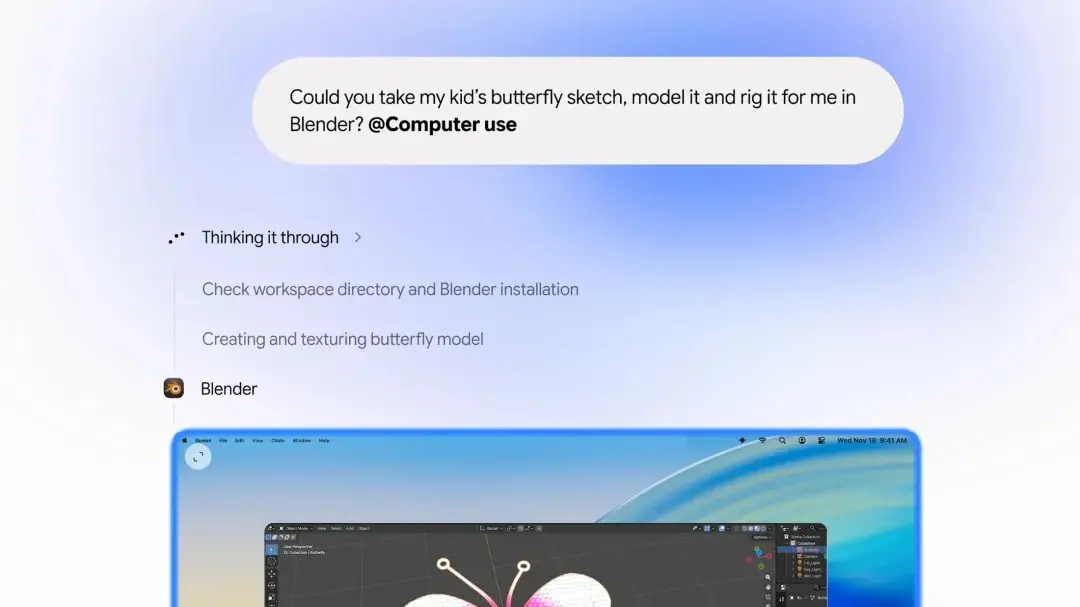
Crucially, Google’s implementation introduces a background execution engine. While the AI agent performs tasks, users maintain complete control over their hardware—their physical cursor and active display remain entirely unobstructed. The system operates via a live preview window embedded within the Gemini chat interface, incorporating mandatory human-in-the-loop safety checkpoints for sensitive operations.
The deployment is initially restricted to U.S. users operating in English and requires an active subscription to Google AI’s premium tiers (Plus, Pro, or Ultra). By entering the desktop agent space, Google directly confronts specialized offerings from competitors like Anthropic, OpenAI, and Meta, seeking to solidify Gemini’s role as an ubiquitous digital co-pilot across consumer and enterprise environments.
Detailed Chronology: Google’s Accelerated Agentic Strategy
The introduction of desktop computer use in macOS marks the latest milestone in Google’s rapid rollout of agentic technologies, following months of intense competitive pressure from rival AI labs.
+-------------------------------------------------------------------------------+
|                        GOOGLE'S AGENTIC EVOLUTION                             |
+-------------------------------------------------------------------------------+
|  September 2025     | Google reveals revamped "CC" AI agent designed for     |
|                     | household management and shared family organization.   |
+---------------------+---------------------------------------------------------+
|  Mid-November 2026  | Broader rollout of Gemini "Tasks," introducing in-app   |
|                     | transactional capabilities (purchases, bookings).       |
+---------------------+---------------------------------------------------------+
|  Late November 2026 | Launch of native "Computer Use" on macOS, granting OS-  |
|                     | level action, background processing, and local control.  |
+-------------------------------------------------------------------------------+
The Competitive Deficit
For much of the past year, market analysts categorized Google as trailing in desktop-native AI integration. Competitors recognized early that the ultimate value proposition of generative models lay not in generating text within a isolated browser tab, but in executing actions within native software environments:
- Anthropic set the baseline benchmark by introducing "Computer Use" API capabilities to its Claude 3.5 Sonnet model, allowing developers to point AI agents at virtual desktop displays.
- OpenAI systematically expanded desktop integration for ChatGPT, embedding deep operating system hooks to capture context and execute software commands.
- Meta invested heavily in background agent workflows designed to connect messaging, productivity, and desktop computing environments.
The Internal Progression
To counter these advances, Google initiated a multi-stage product strategy aimed at transforming Gemini from an informational query engine into an action-oriented agent.
- Project "CC" Initiative: Announced in September, this re-architected agent framework focused on context-aware, family-centric orchestration. Designed to cross-examine emails, shared calendars, household task lists, and messaging threads, "CC" served as Google’s sandbox for multi-domain data synthesis.
- Gemini "Tasks" Expansion: Earlier this month, Google expanded access to "Tasks"—an in-app feature enabling Gemini to manage transactional web actions. "Tasks" allowed the AI to execute linear workflows such as signing into third-party portals, completing e-commerce transactions, and coordinating calendar appointments.
- The macOS "Computer Use" Launch: The deployment of full desktop computer use bridges the gap between web-bound task execution and local operating system control, placing Gemini directly onto the desktop environment.
Technical Architecture and Operational Mechanics
Google’s desktop computer use model relies on a combination of visual recognition, OS-level input synthesis, and non-blocking background task rendering.
                                  +-----------------------+
                                  |     User Prompt       |
                                  +-----------+-----------+
                                              |
                                              v
                                  +-----------------------+
                                  |  Gemini Agent Engine  |
                                  +-----------+-----------+
                                              |
                        +---------------------+---------------------+
                        |                                           |
                        v                                           v
         +-----------------------------+             +-----------------------------+
         |     Background Execution    |             |        Foreground UI        |
         |  - Virtual Framebuffer      |             |  - Uninterrupted Workspace  |
         |  - Accessibility APIs       |             |  - Live Chat Preview Stream |
         |  - Local/Web Automation     |             |  - User Cursor Unhindered   |
         +--------------+--------------+             +--------------+--------------+
                        |                                           |
                        +---------------------+---------------------+
                                              |
                                              v
                                  +-----------------------+
                                  | Human Safety Check    |
                                  | (Pause/Stop/Approve)  |
                                  +-----------+-----------+
                                              |
                                              v
                                  +-----------------------+
                                  | Task Finalization     |
                                  +-----------------------+
Non-Blocking UI Architecture
Early iterations of computer-use automation by other providers often hijacked the user’s physical display and input peripherals. When the AI took control, the cursor would move across the screen autonomously, effectively locking the human user out of their device for the duration of the task.
Google has bypassed this hardware friction by implementing a non-blocking background orchestration layer. When Gemini executes a task on macOS:
- Background Processing: The agent interacts with native application interfaces, background browser instances, and system files without occupying the primary hardware cursor.
- Live Preview Streaming: The main Gemini desktop client displays a real-time visual stream of the agent’s activity. Users can observe the AI opening windows, parsing data, and navigating interfaces within a sandboxed window while continuing independent work on their main desktop workspace.
Core Automation Use Cases
Google has identified several key workflows optimized for Gemini’s initial macOS release, focusing predominantly on repetitive, data-heavy, and high-friction operational tasks:
- Cross-Application Data Synthesis: Extracting key performance metrics from web-based analytics dashboards, processing the data through local spreadsheet software, and auto-generating formatted presentation slides.
- Batch File System Operations: Sorting unstructured download directories, evaluating document metadata, and organizing files into structured folder hierarchies based on complex semantic criteria.
- Automated Web & Form Navigation: Filling out multi-page administrative forms, inputting standardized enterprise data across disparate software-as-a-service (SaaS) portals, and aggregating confirmations.
- Document Refactoring: Converting unstructured local text files or PDF archives into standardized corporate templates across third-party productivity suites.
Security, Governance, and Control Mechanisms
Granting an artificial intelligence access to native operating system controls introduces significant security and privacy implications. A rogue or hallucinating agent with system-level permissions could inadvertently delete critical local files, transmit sensitive data, or execute unauthorized transactions.
To mitigate these systemic risks, Google has embedded a safety control framework directly into the desktop client:
+-----------------------------------------------------------------------------------+
|                        GEMINI COMPUTER USE CONTROL FRAMEWORK                      |
+-----------------------------------------------------------------------------------+
| Interruption Hooks    | Users can instantly pause or terminate agent execution at |
|                       | any point during the workflow via a single click.          |
+-----------------------+-----------------------------------------------------------+
| Explicit Authorization | Critical actions—such as submitting financial data,       |
| Checkpoints           | altering system files, or sending communications—require  |
|                       | explicit user approval via pop-up confirmation prompts.   |
+-----------------------+-----------------------------------------------------------+
| Sandboxed Permissions | The app operates within macOS security parameters,       |
|                       | relying on explicit User Consent under Apple's            |
|                       | Accessibility and Screen Recording permission structures. |
+-----------------------------------------------------------------------------------+
Supporting Context & Market Dynamics
Google’s decision to prioritize macOS over Windows for the initial rollout of desktop computer use reflects critical shifts in software deployment strategies and target user demographics.
Subscription Tier Gatekeeping
The feature is locked behind Google’s premium consumer and enterprise tiers: Google AI Plus, Pro, and Ultra.
+-----------------------------------------------------------------------------------+
|                         DEPLOYMENT & HARDWARE PREREQUISITES                       |
+-----------------------------------------------------------------------------------+
| Platform Availability   | macOS (Gemini Native App)                               |
+-------------------------+---------------------------------------------------------+
| Regional Scope          | United States (Initial Launch)                          |
+-------------------------+---------------------------------------------------------+
| Supported Language      | English                                                 |
+-------------------------+---------------------------------------------------------+
| Required Subscriptions  | Google AI Plus, Google AI Pro, Google AI Ultra          |
+-----------------------------------------------------------------------------------+
By restricting autonomous agent features to paid accounts, Google accomplishes two goals:
- Compute Cost Recovery: Autonomous computer use requires high inference volume. Multi-step execution loops continuously feed desktop screenshots and DOM trees back into multimodal vision-language models (VLMs), incurring significantly higher compute costs than standard text generation.
- Monetization Acceleration: Offering tangible automation tools provides a strong incentive for power users, developers, and enterprise workers to upgrade from free tiers.
Platform Rivalry: The macOS Battleground
Launching first on macOS highlights an interesting competitive dynamic. While Google’s core desktop operating system competitor is Microsoft (with Windows 11 and Copilot+ integration), Apple’s macOS user base contains a dense concentration of high-value knowledge workers, developers, and creative professionals—the prime demographic for early AI adoption.
By establishing a native, background-capable agent on macOS, Google effectively establishes a presence on Apple’s hardware ecosystem before Apple’s own in-house intelligence infrastructure achieves comparable OS-wide autonomy.
Official Statements and Strategic Positioning
While Google’s official launch notes focused on productivity metrics, industry analysts view the announcement as a critical defensive maneuver designed to protect Google’s core search and productivity ecosystem.
In documentation accompanying the launch, Google framed the update around human empowerment and time recovery:
"Computer use allows Gemini to handle the operational friction of modern computing. By shifting tedious, multi-step actions to an background agentic workflow, users retain complete creative and analytical oversight while delegating administrative execution."
Market analysts point out that desktop agents represent a fundamental threat to traditional search revenue. If users rely on autonomous desktop agents to gather information, synthesize reports, and execute online purchases directly, traditional web browsing—and the ad ecosystems embedded within it—becomes secondary to background agent execution.
Google’s aggressive expansion into native desktop agents ensures that even as user behavior shifts from manual web browsing to autonomous execution, the underlying agent framework remains tied to Google’s model ecosystem.
Future Outlook: The Evolution of Autonomous Desktop Computing
The rollout of computer use in the Gemini macOS app is an initial step in a broader transition toward fully autonomous digital workspaces.
                                  +-----------------------+
                                  |  CURRENT STATE        |
                                  |  - macOS Only         |
                                  |  - US English         |
                                  |  - Manual Oversight   |
                                  +-----------+-----------+
                                              |
                                              v
                                  +-----------------------+
                                  |  NEAR-TERM EXPANSION  |
                                  |  - Windows Platform   |
                                  |  - Global Languages   |
                                  |  - Enterprise Controls|
                                  +-----------+-----------+
                                              |
                                              v
                                  +-----------------------+
                                  |  LONG-TERM HORIZON    |
                                  |  - Cross-Device Sync  |
                                  |  - Predictive Execution|
                                  |  - Zero-Touch Workflows|
                                  +-----------------------+
Multi-Platform Expansion
Though Google has not specified an exact release timeline for other operating systems, a Windows iteration is a logical necessity. To compete effectively against Microsoft’s deeply integrated Copilot infrastructure, Google will need to deliver identical background computer-use capabilities to Windows 11 environments. Furthermore, global market expansion will require local language adaptation for multimodal visual parsing.
Enterprise Governance Challenges
As desktop agents transition from simple file organizers to complex enterprise co-pilots, corporate IT departments will demand fine-grained policy management frameworks. Future enterprise updates will likely include:
- Centralized Data Loss Prevention (DLP): Preventing agents from reading or processing files flagged with restricted security classifications.
- Audit Trail Logging: Comprehensive event logs tracking every mouse click, keystroke, and background network request initiated by the AI agent for compliance auditing.
- Role-Based Execution Rules: Restricting an agent’s operational parameters based on corporate administrative hierarchies.
The Trajectory Toward Zero-Touch Workflows
The ultimate destination for agentic desktop interfaces is the transition from reactive execution (user prompts the agent to perform a task) to proactive workflow management. As Gemini continues to integrate context from local applications, browser habits, and communication tools like Project "CC," the system will increasingly anticipate organizational bottlenecks—pre-emptively organizing files, generating daily briefing decks, and executing routine administrative tasks before the user explicitly requests intervention.
With this macOS update, Google officially enters the next era of personal computing: one where the operating system is no longer merely an interface for human navigation, but a collaborative workplace shared with autonomous software agents.