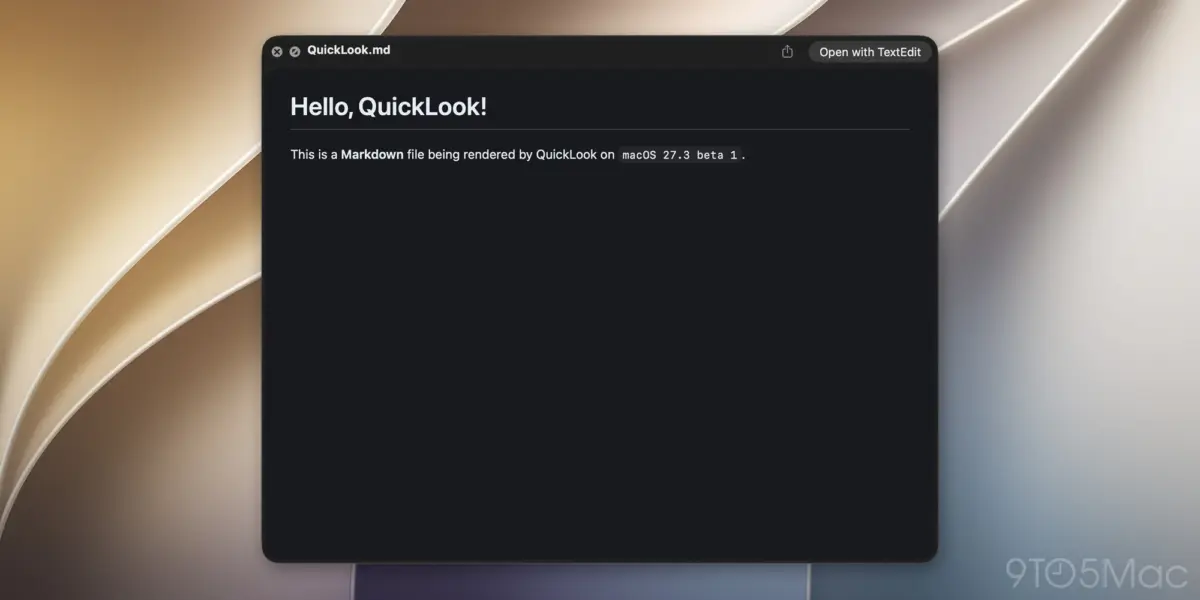
With the rollout of the macOS 27.3 beta 1, Apple has quietly introduced one of the most long-awaited and practical productivity enhancements for power users, developers, and writers in years: native, beautifully rendered Markdown previewing directly inside Quick Look.
For decades, pressing the spacebar on a .md file in the macOS Finder yielded a plain-text dump of raw syntax—hash symbols, asterisks, brackets, and raw code—forcing users to open dedicated text editors or markdown-rendering applications just to read a simple document. Starting with macOS 27.3, that friction disappears. Quick Look now parses and renders Markdown files on the fly, displaying typography, headers, lists, links, and code blocks with pristine native formatting.
While seemingly a minor quality-of-life update on paper, this feature reflects a much larger, strategic shift within Apple’s ecosystem. As Markdown has evolved from a niche web-publishing syntax created by John Gruber in 2004 into the universal lingua franca of modern software development, documentation, and—most importantly—artificial intelligence, Apple’s platforms have steadily deepened their native support. From advanced note-taking import/export workflows to the newly minted Siri AI app skills architecture, .md files have become the operational blueprint for the modern tech stack.
This comprehensive report breaks down the technical implications of Quick Look’s new Markdown capabilities, contextualizes Apple’s broader ecosystem alignment with the format, explores the symbiotic relationship between Markdown and next-generation AI agents, and examines what this means for the future of macOS productivity.
Detailed Chronology: The Evolution of macOS 27.3 Beta 1
The Release and Accompanying Ecosystem Updates
Apple released macOS 27.3 beta 1, bringing with it a suite of headline-grabbing system updates. Alongside the new Quick Look parser, the developer and public beta builds introduced major updates across the operating system:
Safari Enhancements: The default browser received advanced power-user capabilities, including native Vertical Tabs for heavy tab-management workflows and Adaptive Dark Mode rendering for web applications.
Expanded Siri AI Capabilities: Apple pushed deeper integration for its advanced machine learning agent framework, offering developers robust new APIs to build complex automation logic.
Granular Developer Tooling: Expanded debugging and execution frameworks designed to bridge third-party applications with system-level intelligence.
Despite these heavy-hitting AI and browser features, developer forums and social platforms quickly lit up over a much smaller, highly requested utility tweak: the transformation of how the Finder handles .md files.
From Raw Text to Rendered Output: How Quick Look Changed
Previously, invoking Quick Look on a Markdown document invoked the standard text-kit rendering engine, displaying the underlying syntax tags verbatim. Users reviewing README files in project directories, meeting notes, or documentation drafts were required to open apps like Typora, Obsidian, VS Code, or native text editors just to read content cleanly.
As of macOS 27.3 beta 1, the Quick Look daemon features an integrated Markdown parser that translates syntax into rich typographic elements instantly upon hitting the spacebar. Headers scale appropriately, bold and italic modifiers apply instantly, bullet points format into clean lists, and code blocks are presented with syntax-friendly styling.
According to early developer evaluations, the rendering engine is lightweight, lightning-fast, and respects system-wide Light and Dark Mode settings seamlessly. This minimizes context-switching, allowing developers and writers to audit document libraries at the speed of a keystroke.
Supporting Context & Metrics: The Rise, Reign, and Renaissance of Markdown
To fully appreciate why a Quick Look update for .md files is making waves across the Mac community, one must understand the cultural and technical weight of Markdown itself.
The Origins of a Plain-Text Revolution
Introduced in 2004 by John Gruber (in collaboration with Aaron Swartz), Markdown was designed as a text-to-HTML conversion tool for web writers. Gruber’s core philosophy was simple yet revolutionary:
"Markdown is a text-to-HTML conversion tool for web writers. Markdown allows you to write using an easy-to-read, easy-to-write plain text format, then convert it to structurally valid HTML."
By relying entirely on plain text (.txt), documents written in Markdown became future-proof, lightweight, and completely platform-agnostic. They required no proprietary file formats, heavy word processors, or complex databases. Over the last two decades, this philosophy turned Markdown into the de facto standard for:
Software Documentation: Virtually every major open-source repository on GitHub, GitLab, and Bitbucket relies on README.md files as its primary landing page.
Academic and Technical Publishing: Researchers and engineers use Markdown-based pipelines to write papers, manuals, and technical specs.
Personal Knowledge Management (PKM): Modern note-taking ecosystems—such as Obsidian, Logseq, and Bear—are built entirely around localized Markdown vaults.
Apple’s Gradual Embrace of the Format
For a long time, Apple’s native applications kept Markdown at arm’s length, favoring proprietary rich-text formats or RTF/HTML wrappers. However, user demand and shifting industry standards forced a pivot.
In recent years, Apple began integrating the format systematically across its software portfolio:
Apple Notes Integration: Apple introduced robust Markdown import and export capabilities within Notes, allowing users to move plain-text libraries in and out of the app without losing structural integrity.
Xcode and Developer Tools: Code editors across Apple’s ecosystem steadily improved syntax highlighting and native rendering for .md files.
macOS 27.3 Quick Look: The latest iteration bridges the final gap in the local file system, making Markdown files as natively readable in the Finder as JPEGs, PDFs, and plain text documents.
Official Statements and Industry Reaction
The tech community reacted swiftly to the inclusion of native Markdown previewing in macOS 27.3. Prominent developers, UI/UX designers, and power users took to platforms like X (formerly Twitter) and developer subreddits to celebrate the update.
Renowned Apple ecosystem expert and co-founder of MacStories, Federico Viticci, highlighted the update on X, drawing a direct line between the new Quick Look capabilities and Apple’s deeper push into AI agent workflows. Viticci pointed out that Apple’s newly introduced Siri AI app skills feature heavily leverages Markdown files—specifically structuring capabilities around SKILL.md files.
"Apple is quietly laying the groundwork for a Markdown-first OS experience," noted one prominent macOS developer on GitHub. "When your system instructions, notes, app skills, and documentation all live in .md files, making Quick Look natively render them isn’t just a nice-to-have UI tweak—it’s infrastructural hygiene."
Apple’s engineering teams have not published an exhaustive manifesto on the update, viewing it largely as a pragmatic enhancement to the Cocoa and Quick Look plugin architecture. However, developer documentation accompanying the macOS 27.3 beta indicates that the system-level text rendering pipeline has been optimized to handle lightweight markup parsing with zero perceptible performance overhead.
The AI Connection: Why .md Files Matter More Than Ever in 2026
While human writers and programmers have relied on Markdown for years, an unexpected new consumer has driven its explosive recent growth: Artificial Intelligence.
The Universal Prompt and Context Language
Modern Large Language Models (LLMs), autonomous agents, and local AI runtimes do not read proprietary binary formats or complex rich-text documents effectively. They operate best on structured, token-efficient, plain-text data. As a result, Markdown has become the primary format used to feed instructions, prompt histories, system contexts, and memory logs to AI agents.
In macOS 27.3, Apple’s expansion of Siri AI app skills relies directly on this paradigm. Developers building advanced capabilities for Siri can now supply instruction sets and operational parameters inside Markdown-based configuration files, such as SKILL.md.
These files allow developers to write human-readable, easily version-controlled text instructions that guide Siri on how to interact with deep app functions, parse custom user queries, and execute multi-step workflows.
Quick Look as an AI Auditor’s Best Friend
Because developers, data scientists, and advanced Mac users are increasingly managing directories filled with AI configuration files, prompt templates, and agent logs, the ability to instantly inspect them without opening an editor is a massive time-saver.
Imagine managing a local directory of dozens of AI system prompts and skill definitions. In macOS 27.3, auditing these files is as simple as pressing the spacebar down a column of .md documents in the Finder. The formatted preview allows users to instantly verify headings, code snippets, and instruction boundaries without muddying their workspace with multiple open windows.
Future Outlook: What macOS 27.3 Signals for the Mac Ecosystem
The integration of native Markdown rendering into Quick Look is more than a welcomed patch note—it is a clear indicator of where Apple’s desktop operating system is heading.
Deeper System-Wide Plain-Text Interoperability: As macOS continues to cater to power users, developers, and AI-driven workflows, expect to see further native support for plain-text standards across Spotlight, Finder extensions, and system metadata search.
Enhanced Siri and Developer Tooling: With Markdown acting as the syntax bridge between human developers and machine learning agents, Apple is likely to expand its documentation frameworks, encouraging an ecosystem where app capabilities are defined by simple, transparent, text-based standards.
The Maturation of macOS as a Developer Powerhouse: Over the past several releases, Apple has actively worked to win back hardcore developers and technical professionals who rely on cross-platform workflows. Features like Quick Look Markdown support prove that Apple is listening closely to micro-feedback from the developer community.
Conclusion
For the average Mac user, pressing the spacebar to view a document and seeing a clean, beautifully formatted page instead of raw code may seem like a modest upgrade. But for the engineers, writers, researchers, and AI builders navigating the modern digital landscape, macOS 27.3 represents a thoughtful, highly practical refinement. By bridging the gap between raw syntax and rich presentation right inside the Finder, Apple has made the Mac a more cohesive, efficient home for the Markdown-powered world.