

Executive Overview
Every spring, millions of homeowners and landscaping professionals face a frustrating mathematical ritual: calculating the exact volume of mulch, topsoil, or gravel required for a project. Traditionally, this process has relied on rough approximations, educated guesswork, and mental math performed in the aisles of local home improvement centers. The inherent friction of these calculations stems from a disjointed unit-of-measurement ecosystem. Gardens are measured in linear feet and square footage, bagged products are sold in cubic feet, and bulk delivery trucks deal exclusively in cubic yards.
When these manual conversions fail, the consequences are both inconvenient and costly. Over-purchasing leaves unsightly piles of decaying organic matter or unwanted dirt taking up space in driveways, while under-purchasing results in frustrating mid-project delays and secondary trips to the hardware store.
This article investigates how modern web developers and tech-savvy gardeners are bridging the gap between physical landscaping and digital automation. By leveraging lightweight client-side JavaScript, developers can transform a historically frustrating arithmetic chore into an instant, automated operation. We will examine the underlying mathematics of volume estimation, analyze a production-ready JavaScript function designed to handle these conversions accurately, explore the common pitfalls of landscape measurement, and look at how serverless, client-side tools are redefining utility software for everyday consumers.
Detailed Chronology: The Evolution of Landscape Estimation
To understand why calculating mulch volume remains a persistent annoyance, it helps to examine how the landscaping and retail industries arrived at their current measurement standards.
The Era of Analog Estimation (Pre-2000s)
For decades, landscape estimation was purely analog. Homeowners relied on pamphlet guides provided by nurseries, often featuring overly simplified conversion charts. The standard advice was to measure the length and width of a flower bed in feet, multiply them to find the square footage, and then consult a confusing grid that tried to equate square feet to cubic yards.
Because these guides had to cater to the lowest common denominator of math literacy, they were heavily generalized. They rarely accounted for irregular bed shapes, soil compaction, or the variance between standard bag sizes. Consumers were routinely advised to "add 10% for settling," a vague instruction that led many to buy entirely too much material.
The Rise of Static Web Calculators (Early 2000s – 2010s)
With the advent of consumer-facing web browsers and simple HTML forms, landscape supply companies began putting static calculators on their websites. However, these early tools were notoriously clunky. Built using server-side languages like PHP or early ASP, every calculation required a full page reload. If a user wanted to adjust the depth of the mulch from 2 inches to 3 inches to see how it affected the price, they had to re-enter all their dimensions and wait for the server to refresh. Furthermore, these tools were often proprietary, locked inside the ecosystems of specific retail chains designed to upsell the user rather than provide pure utility.
The Modern Client-Side JavaScript Revolution (Present Day)
Today, the paradigm has shifted entirely toward client-side execution. Modern JavaScript engines running directly within the browser allow for instantaneous calculations without network round-trips. Consumers no longer need to rely on vendor-locked web pages; instead, developers are building lightweight, privacy-focused web utilities that run entirely on the user’s device. The script we will examine in this article represents the pinnacle of this shift: a compact, highly optimized function that strips away corporate bloat and solves a physical world problem using pure, native programming logic.
Supporting Context & Metrics: The Mathematics of Mulch
Before diving into the code, it is critical to understand the underlying mathematics that govern volumetric conversions in landscaping. A failure in any of these three core conversion steps leads directly to miscalculated project costs.
1. Calculating Square Footage (Area)
The foundation of any landscaping calculation is the two-dimensional footprint of the garden bed. For rectangular beds, this is a simple multiplication of length ($L$) and width ($W$):
$$textArea = L times W$$
Measured in square feet ($textft^2$).
2. Converting Depth to Feet
Mulch and topsoil depths are almost universally measured in inches (commonly 2 to 4 inches for mulch, and 4 to 6 inches for topsoil). Because length and width are measured in feet, depth must be converted into a fractional foot before volume can be calculated. This is achieved by dividing the depth in inches by 12:
$$textDepthtextft = fractextDepthtextin12$$
3. Determining Cubic Feet
Volume is calculated by multiplying the area by the fractional depth. This yields total cubic feet ($textft^3$):
$$textVolumetextft^3 = textArea times textDepthtextft$$
4. Bridging the Retail Gap: Bags vs. Bulk
Here is where most consumers make mistakes. Retailers sell mulch in two primary formats:
- Bagged Products: Typically sold in volumes of 2 cubic feet per bag. To find the number of bags needed, one must divide the total cubic feet by 2 and always round up to the nearest whole integer (since hardware stores do not sell fractional bags).
- Bulk Products: Sold by the cubic yard. Because a yard is 3 feet by 3 feet by 3 feet, a single cubic yard equals $3 times 3 times 3 = 27$ cubic feet. Therefore, total cubic feet must be divided by 27:
$$textCubic Yards = fractextVolume_textft^327$$
The JavaScript Solution: Writing the Calculation Engine
To eliminate the guesswork, we can encapsulate these mathematical principles into a clean, reusable JavaScript function. This function accepts three parameters (lengthFt, widthFt, and depthInches), processes the conversions, and returns an object containing all the vital metrics a landscaper needs.
function calculateMulch(lengthFt, widthFt, depthInches)
  // 1. Calculate total surface area in square feet
  const area = lengthFt * widthFt;

  // 2. Convert depth from inches to fractional feet
  const depthFt = depthInches / 12;

  // 3. Calculate total volume in cubic feet
  const cubicFeet = area * depthFt;

  // 4. Calculate bags needed (assuming standard 2 cubic feet per bag) - rounded up
  const bagsNeeded = Math.ceil(cubicFeet / 2);

  // 5. Calculate bulk volume in Cubic Yards (rounded to 2 decimal places)
  const cubicYards = Number((cubicFeet / 27).toFixed(2));

  // Return a structured object containing all calculated metrics
  return
    area,
    cubicFeet: Number(cubicFeet.toFixed(2)),
    bagsNeeded,
    cubicYards
  ;


// Example Execution: Evaluating a 10-foot by 5-foot garden bed at 3 inches deep
const result = calculateMulch(10, 5, 3);
console.log(`You need $result.bagsNeeded bags or $result.cubicYards cubic yards.`);
// Output: You need 7 bags or 0.46 cubic yards.
Breaking Down the Code
Math.ceil(): Crucial for the bag calculation. If a project requires 6.1 bags of mulch, a hardware store will not sell you 0.1 of a bag.Math.ceil()forces the number upward to 7, ensuring you never run short..toFixed(2)andNumber(): Floating-point arithmetic in JavaScript can sometimes result in long decimal strings (e.g.,0.4629629629629629). Wrapping the result intoFixed(2)and casting it back viaNumber()ensures clean, readable data output suitable for UI display.
Common Gotchas and Real-World Variances
While the JavaScript function provides a mathematically perfect output, real-world landscaping projects are rarely uniform. Developers and gardeners must account for several physical variables that pure code cannot automatically detect:
- Irregular Shapes: Most garden beds are not perfect rectangles. Curves, tree rings, and L-shapes require the user to mentally (or programmatically) break the yard down into smaller geometric rectangles or triangles, calculate each separately, and sum the results.
- Bag Size Discrepancies: While 2 cubic feet is the industry standard for premium mulch bags, economy brands frequently package their mulch in 1.5 cubic feet or even 1 cubic foot bags. Hardcoding a division by
2in a production application should ideally be made dynamic by allowing the user to select their bag size. - Compaction and Settling: Freshly laid mulch is airy. Over the course of several weeks—accelerated by rain and foot traffic—organic mulch compresses. Professional landscapers generally recommend adding a 5% to 10% buffer to bulk orders to account for settling and uneven ground grading.
- Existing Ground Cover: If a bed already has 1 inch of old mulch remaining and you want a fresh 3-inch layer, you only need to calculate for the additional depth required, rather than starting from bare dirt.
The Visual Way: Client-Side Utilities for Everyone
Not every gardener wants to open up a browser console to execute JavaScript functions before heading to the nursery. To bridge the gap between developer tooling and consumer usability, developers have begun publishing lightweight, client-side web utilities.
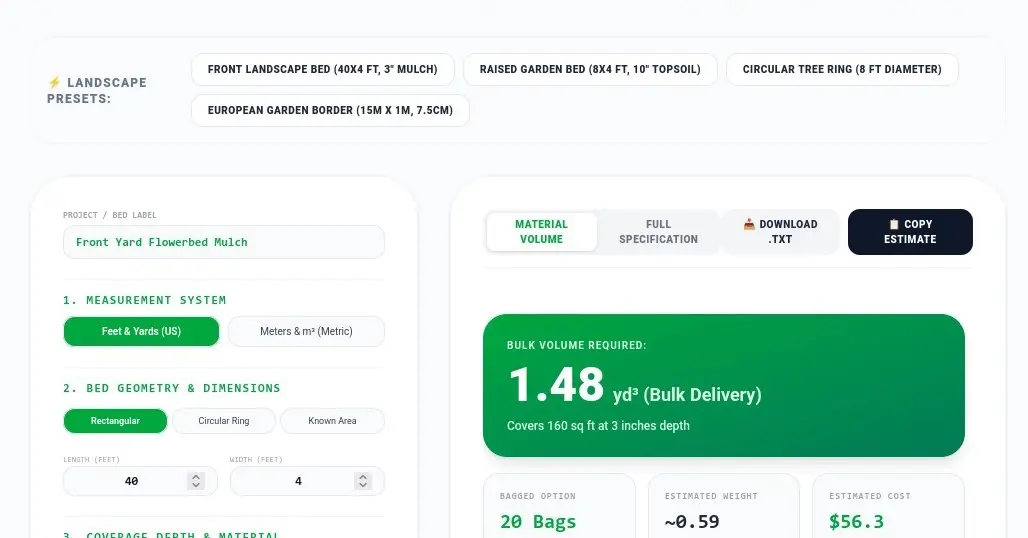
A prime example of this philosophy is the publicly available Mulch & Topsoil Yardage Calculator (accessible at tools.kandz.me/mulch-topsoil-yardage-calculator). Built entirely with vanilla client-side technologies, this tool processes user inputs instantly in the browser.
Crucially, modern privacy-first tools of this nature operate 100% client-side. No user data, garden dimensions, or location metrics are uploaded to external servers or harvested for targeted advertising. It represents a return to the core ethos of the early web: small, fast, highly specific utilities designed to solve a singular human problem efficiently.
Future Outlook
As web technologies continue to evolve, the integration of physical world measurement tools and digital code will only deepen. We are already seeing the early adoption of WebXR (Extended Reality) and device camera APIs that allow smartphones to scan the perimeter of a garden bed, automatically measure length and width via LiDAR sensors, and pass those dimensions directly into client-side JavaScript calculation engines.
Furthermore, the rise of Progressive Web Apps (PWAs) means tools like the mulch calculator can be installed directly onto a mobile device’s home screen, functioning seamlessly offline while the user stands ankle-deep in dirt at an outdoor nursery.
Ultimately, whether you are a software engineer building complex landscape management software or a homeowner trying to spruce up your front yard on a Saturday morning, the intersection of programming logic and everyday tasks proves that code is not just for digital spaces—it is a powerful tool for shaping the physical world around us.
Have you ever miscalculated a landscaping project and ended up with mountains of leftover mulch? How did you solve it? Share your stories in the comments below.