Executive Overview
In an era where messaging applications are increasingly judged not merely by their utility and end-to-end encryption standards, but by their aesthetic flexibility and user-experience personalization, Meta-owned WhatsApp is making a definitive move to close the gap with its competitors. Following weeks of speculative anticipation and code-level discoveries unearthed by industry trackers, WhatsApp has officially begun rolling out a robust, highly anticipated chat themes feature for iPhone users.
This update represents one of the most substantial visual overhauls applied to the messaging platform’s core interface in recent memory. Moving away from the rigidly uniform chat screens that have defined the application for well over a decade, the new rollout introduces five distinct aesthetic categories: Featured, Nature, Live, Minimal, and Doodle. Among these, the inclusion of slowly animated, motion-based backgrounds marks a technological and design milestone for the application, signaling a shift toward more immersive micro-interactions.
However, as is customary for Meta’s calculated deployment strategies, the rollout is entering a phased release cycle. While select users running the latest versions of WhatsApp for iOS are already greeted with the new design gallery, others must wait as the feature propagates through the server-side update pipeline. This report provides an in-depth examination of the new chat themes, exploring the design philosophies behind the animated wallpapers, the automatic chat-bubble color assignment system, and what this visual refresh means for the future of mobile messaging interfaces.
Detailed Chronology: From Code Snippets to Public Rollout
The journey of WhatsApp’s chat themes update offers a fascinating glimpse into modern software development and the vigilant ecosystem of beta-testers and data-miners who track it.
The Genesis: Code-Level Discovery
Just two weeks prior to the public rollout, analytical sleuths at WABetaInfo—the premier publication for unreleased WhatsApp features—first identified concrete references to an overhauled theme gallery nestled within the application’s iOS code. Analysts parsing through internal packages discovered structural frameworks dedicated to handling dynamic wallpaper categories, hinting that Meta was preparing to move past simple static background changes and solid-color toggles.
For years, WhatsApp users seeking personalization were limited to choosing a static photograph from their camera roll, selecting from a modest library of standard solid colors, or reverting to the iconic, nostalgic "Doodle" background. While these options sufficed for basic functional customization, they left the platform looking remarkably sterile compared to platforms like Telegram, which has long boasted deeply customizable themes, animated stickers, and complex background effects.
The Rapid Transition to Production
The transition from hidden code strings to user-facing production builds happened at an accelerated pace. Typically, features spotted in early development phases remain locked behind experimental flags for months. In this instance, however, Meta’s engineering teams expedited the deployment pipeline, pushing the feature directly to early adopters and public beta channels before initiating a broader, phased release cycle for the stable iOS application.
According to widespread user reports and verification from beta-tracking channels, the update arrives silently via server-side activation coupled with client-side app updates. Users who find themselves among the initial wave of recipients are greeted with a redesigned appearance menu, unlocking access to the five core visual categories that fundamentally alter how conversations are framed on the platform.
Deconstructing the Categories: A Deep Dive into WhatsApp’s New Design Arsenal
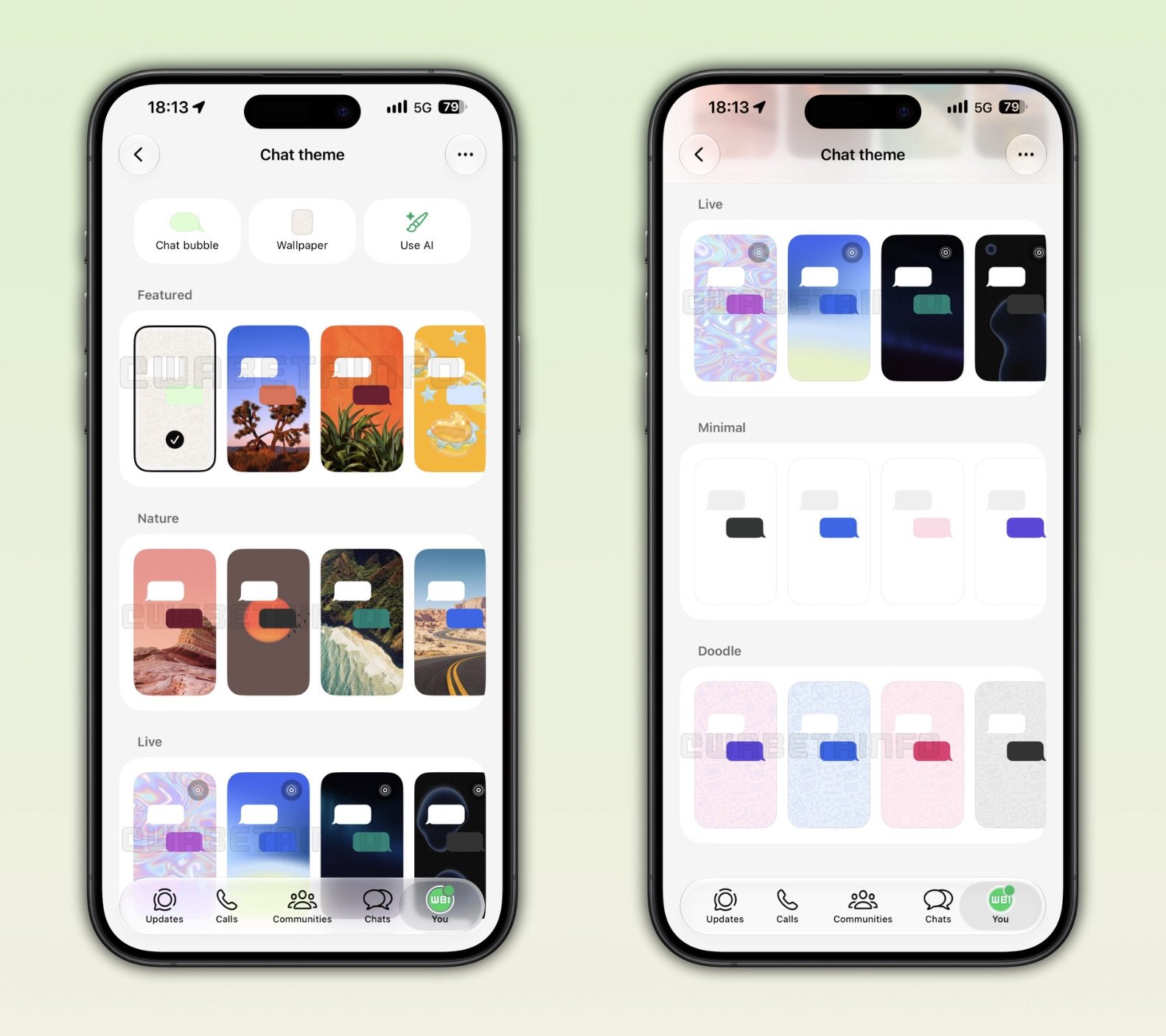
The newly introduced chat theme architecture is divided into five curated categories. Each category serves a specific psychological and aesthetic purpose, catering to different user preferences ranging from sleek minimalism to dynamic motion.
+-----------------------------------------------------------------+
                 WHATSAPP CHAT THEMES (iOS)
+-------------------+---------------------------------------------+
| Category          | Core Design Attribute                       |
+-------------------+---------------------------------------------+
| 1. Featured       | Curated selection of top platform designs   |
| 2. Nature         | Outdoor landscapes and organic imagery      |
| 3. Live           | Slow-moving, subtle animated backgrounds    |
| 4. Minimal        | Clean, adaptive solid white/dark screens    |
| 5. Doodle         | Classic iconic patterned wallpaper          |
+-------------------+---------------------------------------------+
1. Featured
The Featured category acts as the premier showroom for WhatsApp’s design evolution. Curated directly by WhatsApp’s internal visual design team, this section aggregates what the platform considers its finest and most harmonious themes. It serves as a shortcut for users who want an elevated aesthetic without browsing through exhaustive sub-libraries. Importantly, the Featured section also acts as a bridge, frequently highlighting standout options drawn from other categories—including top-tier animated live wallpapers.
2. Nature
For users seeking tranquility or an escape from the digital monotony of urban life, the Nature category offers a curated collection of outdoor landscapes and organic imagery. These themes bring sweeping vistas, lush forests, serene bodies of water, and botanical elements directly to the chat screen. The color palettes associated with this category are intentionally muted to ensure that high-contrast readability is never compromised by complex photographic backdrops.
3. Live: The Crown Jewel of the Update
Undoubtedly the most technically and aesthetically ambitious addition in this rollout is the Live category. Designed to inject subtle vitality into everyday messaging, this section features wallpapers that move slowly in the background.
Distinguishing these animated wallpapers from standard static images requires a keen eye: WhatsApp marks these themes with a discrete "Live" icon positioned in the top-right corner of their respective gallery thumbnails. This tagging system ensures users can instantly recognize motion-based backgrounds even when they are cross-listed within the Featured category.
Engineering Motion Without Distraction
Creating animated backgrounds for a messaging app presents a major UX hazard: distraction. A poorly optimized animation with high frame rates, vibrant color shifts, or rapid movements can quickly pull a user’s eye away from incoming text, leading to reading fatigue or frustration.
Meta’s design and engineering teams addressed this challenge through deliberate constraint. The animations within the Live category are intentionally kept glacial—moving just enough to impart a dynamic, breathing feel to the background without crossing into hyperactivity. This calculated pacing serves a dual purpose:
- Cognitive Load Reduction: It ensures users can focus entirely on reading and composing messages without visual interference.
- Accessibility Compliance: It prevents sensory overload and visual discomfort for users with specific neurological or accessibility needs, such as vestibular disorders that can be triggered by rapid screen motion.
As WABetaInfo aptly points out, this restraint is not a technical limitation imposed by the iOS operating system, but rather a deliberate, mature design choice prioritizing user comfort above eye-catching gimmicks.
4. Minimal
At the opposite end of the spectrum from the dynamic Live wallpapers lies the Minimal category. Catering to purists and power users who prefer an unadulterated, distraction-free environment, Minimal strips away complex graphics entirely.
When a user selects a Minimal theme, the application applies a clean, unadorned solid background to the chat screen. True to modern interface standards, this background is adaptive: it renders as a crisp, clean white in light mode, and transitions into an OLED-friendly dark surface when the device switches to dark mode. This category is expected to be exceptionally popular among enterprise users and individuals who manage high volumes of professional conversations.
5. Doodle
No WhatsApp visual overhaul would be complete without paying homage to the platform’s heritage. The Doodle category preserves the classic, globally recognized wallpaper featuring subtle, interlocking chat-themed vector icons. By retaining this iconic pattern, WhatsApp ensures that users who cherish the platform’s historical identity can maintain their familiar visual anchor while benefiting from the updated underlying theme engine.
Intelligent Color Harmony: Automatic Chat Bubble Assignment
A common pitfall in messaging app customization is the clash between a vibrant wallpaper and the chat bubbles containing user text. Historically, users who changed their chat backgrounds often found themselves trapped in a frustrating game of trial and error—adjusting text colors, struggling with contrast ratios, or finding that an otherwise beautiful background rendered incoming messages entirely illegible.
WhatsApp has engineered a seamless solution to this problem through intelligent automation. According to platform implementation details, WhatsApp automatically assigns a complementary chat bubble color based on the specific theme selected by the user.
This automated color-pairing system relies on algorithmic color extraction and contrast mapping. When a user selects a theme from the Nature, Live, Featured, or Doodle categories, the application analyzes the dominant hues and luminance levels of the background. It then dynamically generates or assigns chat bubble shades that maintain optimal contrast ratios against the backdrop.
This ensures two critical outcomes:
- Accessibility Standards: Text remains exceptionally legible, meeting or exceeding standard contrast guidelines for digital interfaces.
- Design Cohesion: The overall visual presentation looks professionally designed rather than haphazardly assembled by the end user.
For power users who prefer fine-tuned control, the system still allows for granular adjustments, but the intelligent defaults remove the friction that typically deters casual users from personalizing their applications.

Supporting Context & Metrics: The Evolution of Meta’s Ecosystem Design
To understand the significance of the chat themes update, one must view it within the broader strategic context of Meta’s cross-platform product evolution. WhatsApp, despite boasting over two billion monthly active users worldwide, has historically lagged behind competitors like Telegram, LINE, and WeChat in terms of UI customization.
For years, WhatsApp’s design philosophy was rooted in functional minimalism and strict global consistency. The rationale was clear: cross-platform reliability, low bandwidth consumption, and instant familiarity across diverse demographics (from tech-savvy urban youth to rural elderly populations) took precedence over aesthetic flair.
However, user demographics and expectations have shifted dramatically. As younger generations—Gen Z and Gen Alpha—dominate digital communication trends, visual expression has become a core component of messaging. Features like custom themes, dynamic backgrounds, and personalized aesthetics are no longer viewed as superfluous bloatware; they are baseline expectations for modern social software.
Furthermore, Meta’s parallel efforts to unify its messaging infrastructure—integrating cross-app communication frameworks between Messenger, Instagram, and WhatsApp where permissible—have naturally cross-pollinated design concepts. Instagram and Messenger have featured robust chat themes, gradient bubbles, and animated backdrops for years. Bringing these capabilities to WhatsApp represents a harmonization of Meta’s product family, offering a more contemporary user experience across its entire social graph.
Official Statements & Industry Reception
While Meta’s public relations apparatus often rolls out features incrementally without exhaustive press fanfare, the insider community and beta-testing networks have offered extensive commentary on the strategic importance of the update.
Industry analysts note that while chat themes may seem like a superficial cosmetic upgrade on the surface, they play a vital psychological role in user retention and brand affinity. In the hyper-competitive landscape of global messaging, applications that allow users to curate their personal digital spaces enjoy higher emotional engagement. When a user spends hours a day staring at a messaging interface, the ability to customize that environment—shifting from a serene forest landscape to a subtle, breathing live wallpaper—transforms the app from a utilitarian utility tool into a personalized canvas.
Initial feedback from the beta community on platforms like X (formerly Twitter), Reddit, and specialized tech forums has been overwhelmingly positive, particularly regarding the restraint shown in the Live wallpaper category. Early testers have praised WhatsApp for avoiding the flashing, high-velocity animations that plague lesser apps, commending the engineering team for prioritizing readability and eye health over sensory overload.
Future Outlook: What Lies Ahead for WhatsApp Customization?
The rollout of chat themes and animated backgrounds for iOS users is unlikely to be the terminus of WhatsApp’s interface modernization; rather, it serves as a foundational building block for future visual enhancements.

1. Expansion to Android and Desktop Clients
As with the vast majority of WhatsApp feature deployments, the initial rollout to iOS serves as a proving ground. Once stability metrics are verified and server-side scaling is optimized, the chat themes engine is expected to propagate rapidly to the Android ecosystem, as well as WhatsApp’s desktop applications for macOS and Windows. Ensuring cross-platform parity for custom themes will be essential, especially for users who seamlessly switch between mobile devices and desktop workstations throughout their workday.
2. Granular Per-Chat Customization
Currently, the focus of the rollout centers on applying themes globally or across specific system parameters. However, industry insiders speculate that future iterations could introduce per-chat customization. Imagine setting a serene Nature live wallpaper for family group chats while applying a sleek Minimal dark theme for professional client conversations. Such granular control would elevate WhatsApp’s personalization suite to industry-leading standards.
3. Third-Party Theme Ecosystems and Creator Monetization?
Looking further down the horizon, analysts ponder whether Meta might eventually open the chat themes architecture to third-party designers, creators, or brand partnerships. While WhatsApp has traditionally maintained tight control over its ecosystem to preserve security and performance standards, the introduction of curated theme categories opens fascinating commercial possibilities. Branded live wallpapers tied to movie releases, musical artists, or global events could represent a lucrative engagement vector for the platform.
Conclusion
WhatsApp’s introduction of dynamic chat themes and animated backgrounds for iOS users marks a mature, thoughtful evolution of the world’s most popular messaging platform. By balancing aesthetic ambition with rigorous UX discipline—ensuring that live wallpapers move slowly enough to prevent distraction and implementing intelligent color harmony for chat bubbles—Meta has delivered a feature that feels both modern and deeply polished.
As the phased rollout continues to expand across the global user base, the days of the uniform, static WhatsApp interface are officially coming to an end. Whether users opt for the serene landscapes of the Nature category, the subtle motion of the Live wallpapers, or the crisp clarity of the Minimal theme, WhatsApp is empowering its community to make their digital conversations truly their own.
Do you have early access to the new chat themes on your iPhone? Which category is your favorite—the subtle motion of Live wallpapers or the clean simplicity of Minimal? Let us know your thoughts and experiences in the comments below.