Executive Overview
In the fast-paced ecosystem of modern cloud engineering, iteration speed is the ultimate currency. Developers, platform engineers, and automated AI agents alike constantly push the boundaries of how quickly applications can be conceptualized, tested, and shipped. However, a persistent bottleneck has long plagued Infrastructure-as-Code (IaC) workflows: the stabilization check.
Traditionally, declarative infrastructure services like AWS CloudFormation have prioritized absolute certainty. Every time a template is deployed, updated, or torn down, the service meticulously verifies that every single resource has finished initializing and can successfully handle traffic before declaring the operation complete. While crucial for risk-averse production rollouts, this meticulousness often introduces frustrating latency—sometimes stretching simple test updates to minutes, and complex deletions to half an hour.
Recognizing the evolving needs of modern development teams—particularly those embracing rapid prototyping, microservice iteration, and AI-assisted infrastructure generation—Amazon Web Services (AWS) has announced a paradigm shift. AWS CloudFormation Express mode is a brand-new deployment mode designed to drastically accelerate infrastructure provisioning workflows. By fundamentally altering when a deployment completes rather than how resources are provisioned, Express mode cuts deployment and iteration times by up to 4x.
Available immediately across all commercial AWS regions at no additional cost, Express mode allows developers to bypass prolonged stabilization checks, facilitating sub-minute feedback loops that match the speed of modern software engineering. Whether working through the AWS Management Console, the AWS Command Line Interface (CLI), the AWS Cloud Development Kit (CDK), or leveraging autonomous AI development tools, engineers can now tap into a streamlined deployment pipeline that removes unnecessary friction without requiring a single alteration to existing templates.
Detailed Chronology: Understanding the Need for Speed
To fully appreciate the significance of AWS CloudFormation Express mode, one must examine the operational mechanics of traditional cloud infrastructure provisioning and the historical challenges developers have faced during iterative design phases.
The Traditional Stabilization Bottleneck
For years, AWS CloudFormation has operated on a strict, safety-first paradigm known internally as Standard mode. When an engineer submits a CloudFormation stack template, the service parses the declarative code, translates it into API calls, and dispatches instructions to underlying AWS resource providers.
Once resource configurations are successfully applied, Standard mode initiates a rigorous series of stabilization checks. These checks actively poll the newly created or updated resources to confirm their operational status. For example, if a deployment includes an Elastic Load Balancer (ELB) and an Auto Scaling group, CloudFormation waits until instances pass health checks and the load balancer is fully primed to accept external traffic before marking the stack update as complete.
In production environments, this behavior is non-negotiable. It prevents premature traffic routing to half-baked architectures and safeguards against cascading failures. However, during early-stage development, unit testing, or incremental stack building, these stabilization checks translate into dead time. Developers find themselves staring at loading screens, waiting for background resource initialization processes to report back—processes whose completion status is often irrelevant to the immediate task of testing syntactic correctness or resource interdependencies.
The Microservices and AI Revolution
The friction introduced by Standard mode became acutely pronounced with the rise of two major technological trends:
- High-Velocity Microservice Architectures: Modern applications are frequently broken down into dozens of discrete, interconnected services. Developers iterate rapidly on individual components—such as adding a Lambda function, adjusting an SQS queue, or modifying an IAM role—re-deploying stacks dozens of times a day.
- AI-Assisted Infrastructure Development: The proliferation of Large Language Models (LLMs) and specialized AI coding agents (such as Kiro and various MCP-enabled toolkits) has enabled engineers to generate and modify IaC templates via natural language prompts. These AI tools thrive on rapid, sub-minute feedback loops. If an AI agent has to wait three to five minutes—or up to 30 minutes for complex network interface deletions—to validate a single incremental code change, the development velocity grinds to a crawl.
AWS CloudFormation Express mode was conceived as a direct response to this operational friction. By re-architecting the completion criteria of a deployment, AWS has bridged the gap between declarative safety and imperative agility.
Supporting Context & Metrics: How Express Mode Works
Under the hood, Express mode does not change the fundamental way AWS provisions infrastructure. The underlying cloud primitives are still deployed with the exact same security boundaries, resource configurations, and API integrity as before. Instead, Express mode redefines the lifecycle contract between the developer and the deployment engine.
Decoupling Configuration from Stabilization
When Express mode is invoked, CloudFormation completes the deployment stack run the moment resource configurations are successfully applied by the AWS control plane. It does not wait around for extended stabilization checks to clear.
Crucially, this does not mean resources are abandoned in an unstable state. Resources continue becoming operational in the background, guided by AWS’s robust asynchronous resource providers. Furthermore, Express mode introduces intelligent, built-in resilience: if dependent resources encounter transient provisioning failures or timing discrepancies as they stabilize within the same stack, CloudFormation automatically retries them in the background without requiring manual developer intervention.
Quantifiable Performance Gains
The performance improvements delivered by Express mode are dramatic, shifting developer wait times from minutes down to seconds. AWS benchmarks highlight stark contrasts across common cloud operations:
- Amazon SQS with Dead Letter Queues (DLQ): Deploying an Amazon SQS queue coupled with a DLQ traditionally takes approximately 64 seconds in Standard mode as stabilization checks confirm plumbing and linkages. With Express mode, the deployment completes in up to 10 seconds.
- AWS Lambda Function Deletions: Tearing down complex serverless architectures—specifically AWS Lambda functions tied to Elastic Network Interfaces (ENIs)—has historically been a notorious time-sink. Standard mode teardowns frequently range from 20 to 30 minutes as the underlying network plumbing unbinds and cleans up. Benchmarks show that Express mode executes these deletions in up to 10 seconds.
Flexibility and Tooling Integration
Express mode has been designed for seamless integration across the entire AWS tooling landscape. Developers are not forced to learn new paradigms or rewrite their templates.
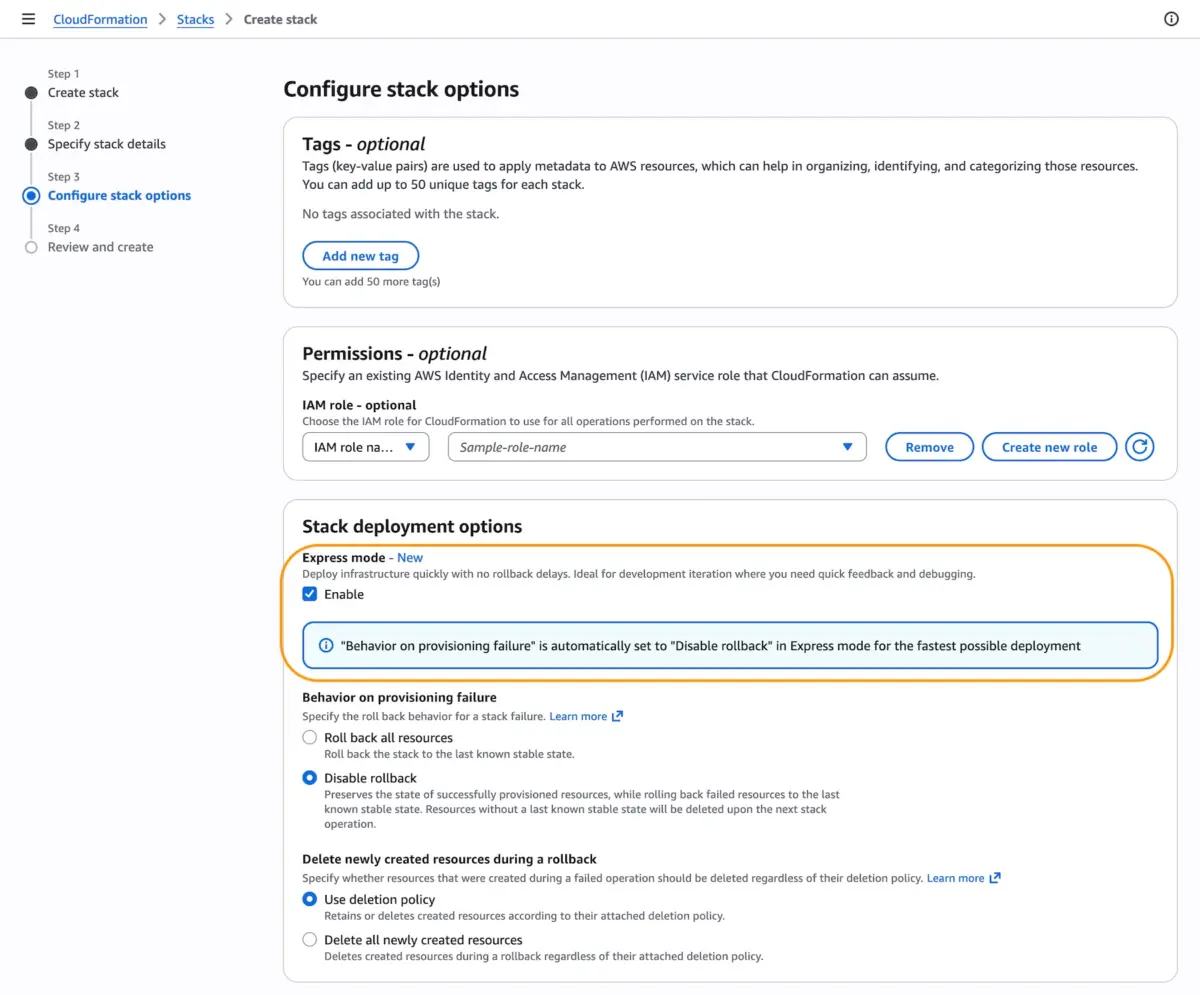
- AWS Management Console: When creating or updating a stack, engineers can simply navigate to Stack deployment options and toggle Express mode to "Enable."
- AWS CLI and SDKs: By passing the
--deployment-configparameter set toEXPRESSduringcreate-stack,update-stack, ordelete-stackoperations, automation scripts instantly leverage the speed boost. - AWS Cloud Development Kit (CDK): Developers writing infrastructure in TypeScript, Python, or other CDK-supported languages can invoke Express mode natively via the command line using
cdk deploy --express. - Nested Stacks and Change Sets: Express mode is fully compatible with advanced CloudFormation features. If enabled on a parent stack, all nested stacks automatically inherit Express mode behavior, ensuring consistent iteration speeds across modular architectures.
Technical Deep Dive: Implementation and Code Examples
Adopting Express mode requires minimal overhead, but developers must understand its default configuration regarding error handling and rollbacks to tailor the feature safely to their specific pipelines.
Managing Rollbacks and Safety Controls
By default, Express mode disables stack rollback (disableRollback: true). In traditional CloudFormation, if a resource fails stabilization, the entire stack automatically rolls back to its previous known state—a process that itself consumes considerable time. Because Express mode bypasses stabilization checks to maximize iteration speed, disabling rollbacks by default prevents premature tear-downs caused by transient timing issues.
For local development and rapid prototyping, this is ideal. However, for production-grade environments where strict consistency is required, engineers can explicitly re-enable rollbacks by adjusting the configuration payload, or they can pair Express mode with independent monitoring and cleanup mechanisms.
Example 1: Basic CLI Stack Creation
To create a new application stack using the AWS CLI with Express mode enabled, execute the following command:
aws cloudformation create-stack
   --stack-name my-app
   --template-body file://template.yaml
   --deployment-config '"mode": "EXPRESS", "disableRollback": true'
Example 2: Iterative Microservice Development Workflow
One of the most powerful use cases for Express mode is incremental, component-by-component infrastructure building. The following multi-step workflow demonstrates how an engineer—or an autonomous AI coding assistant—can rapidly build up a microservice stack in seconds per iteration:

# Iteration 1: Deploy IAM role foundation
aws cloudformation create-stack
   --stack-name my-microservice
   --template-body file://iteration1-iam.yaml
   --deployment-config '"mode": "EXPRESS"'
   --capabilities CAPABILITY_IAM
   --role-arn arn:aws:iam::123456789012:role/CloudFormationDeployRole

# Iteration 2: Add Lambda compute layer
aws cloudformation update-stack
   --stack-name my-microservice
   --template-body file://iteration2-lambda.yaml
   --deployment-config '"mode": "EXPRESS"'
   --capabilities CAPABILITY_IAM
   --role-arn arn:aws:iam::123456789012:role/CloudFormationDeployRole

# Iteration 3: Integrate SQS queue and event source mapping
aws cloudformation update-stack
   --stack-name my-microservice
   --template-body file://iteration3-sqs.yaml
   --deployment-config '"mode": "EXPRESS"'
   --capabilities CAPABILITY_IAM
   --role-arn arn:aws:iam::123456789012:role/CloudFormationDeployRole
By executing these updates back-to-back without waiting for deep stabilization checks between minor iterations, developers can validate their template syntax and resource assembly in a fraction of the traditional time.
Official Statements and Industry Impact
The release of CloudFormation Express mode underscores AWS’s broader commitment to developer experience (DevEx) and the acceleration of cloud engineering workflows.
Industry analysts and early enterprise adopters have praised the feature for addressing one of the most persistent hidden costs of cloud development: developer wait time. In large-scale engineering organizations, cumulative minutes spent waiting for CI/CD pipelines and IaC deployments to stabilize translate into thousands of hours of lost productivity annually. By collapsing these feedback loops into sub-minute intervals, AWS is enabling a more fluid, exploratory style of infrastructure engineering.
Furthermore, the timing of Express mode aligns perfectly with the explosion of generative AI tooling in software development. As AI agents take on increasingly complex infrastructure-generation tasks, they require rapid feedback to self-correct syntax errors, missing IAM permissions, or misconfigured resource properties. Express mode provides the high-frequency execution environment required for AI agents to reason, test, and refine cloud architectures at machine speed.
Future Outlook: The Next Wave of Infrastructure Agility
AWS CloudFormation Express mode represents a fundamental evolution in how declarative infrastructure engines balance safety with speed. By granting developers explicit control over the deployment lifecycle contract, AWS has dismantled the binary choice between high-safety/slow-speed and low-safety/fast-speed development.
Looking ahead, the community expects further integrations between Express mode and AI-driven development toolkits. The recent introduction of tools like the AWS Model Context Protocol (MCP) Server—which allows AI agents to query documentation, verify regional API availability, and troubleshoot deployments directly—combined with Express mode’s lightning-fast provisioning, signals a future where infrastructure deployment feels as instantaneous as local code compilation.
Getting Started Today
AWS CloudFormation Express mode is available today across all AWS commercial regions at no additional cost. Developers and platform teams can immediately integrate the feature into their workflows via the AWS Console, CLI, SDKs, and CDK.
For those looking to explore regional capabilities, consult the AWS Capabilities by Region dashboard or utilize the AWS MCP Server plugins to streamline API navigation and troubleshooting. To dive deeper into best practices, visit the official AWS CloudFormation documentation, and share feedback and deployment success stories via the AWS re:Post community channels.