

Executive Overview
In the modern landscape of software engineering, infrastructure management, and creative production, operating system tribalism has long been the norm. The tech ecosystem is often viewed through a binary lens: you are either a committed open-source advocate riding the bleeding edge of the Linux kernel, or you are firmly entrenched in the proprietary, highly polished walled garden of Apple’s ecosystem.
For many developers and system administrators, crossing this ideological divide feels like an act of betrayal. Linux—with its radical transparency, limitless customization, and foundational role in powering the global internet—is frequently held up as the ultimate computing paradigm. To praise macOS while identifying as a Linux loyalist can seem paradoxical.
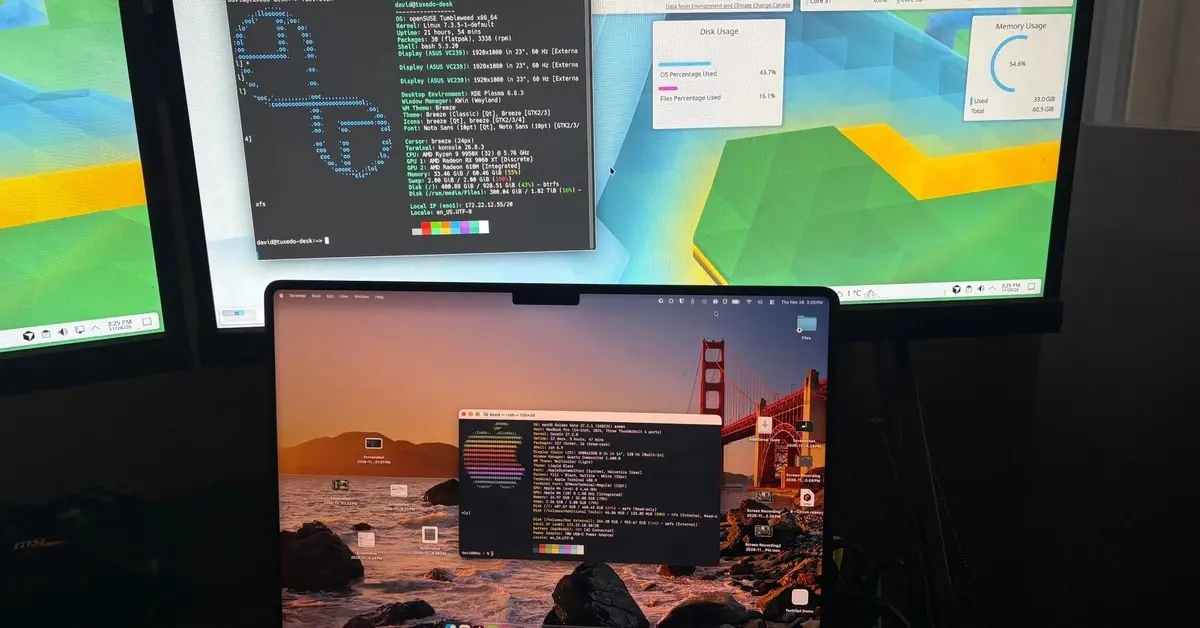
However, a closer examination of modern power users reveals a more nuanced reality. Consider the daily workflow of a software developer, homelab administrator, and electronic music producer who runs openSUSE with KDE Plasma on a custom-built desktop rig. Despite a deep, foundational preference for the open-source philosophy, this same professional turns to macOS as a secondary operating system.
This is not a story of compromise, but rather of pragmatic appreciation. macOS shares a rich, under-the-hood lineage with Unix-like systems, offering a native development environment that feels instantly familiar to anyone accustomed to the command line. At the same time, it provides out-of-the-box hardware integration, a frictionless audio production stack, and mobile ecosystem interoperability that alleviates the friction points often found in desktop Linux environments.
This article explores the coexistence of these two powerful platforms, dissecting the architectural overlaps, the specific workflows that favor Apple’s hardware, and the persistent philosophical frustrations that keep Linux securely in the primary position.
Detailed Chronology and Technical Evolution: The Convergence of Unix and Darwin
To understand why a Linux user can feel immediately at home on a MacBook, one must look past the graphical user interface (GUI) and examine the foundational architecture of both operating systems. While Linux is an independent, monolithic-modular kernel implementation that grew out of the GNU philosophy, macOS is built upon Darwin—an open-source Unix operating system core released by Apple in 2000.
Darwin draws heavily from two primary historical lineages:
- Mach technology, originally developed at Carnegie Mellon University, which provides a flexible microkernel-based foundation for inter-process communication and virtual memory management.
- BSD (Berkeley Software Distribution) derivatives, which supply robust networking stacks, file system architectures, and core userland utilities.
This architectural lineage means that beneath the polished veneer of Aqua and Cocoa, macOS is fundamentally a certified Unix system. When a developer opens the Terminal application on a Mac, they are interacting with a POSIX-compliant environment that respects traditional Unix file hierarchy conventions, process controls, and permission models.
Architectural Comparison: Linux vs. macOS
| Component | Linux Ecosystem | macOS Ecosystem |
|---|---|---|
| Kernel | Monolithic Linux Kernel | XNU (X is Not Unix), combining Mach and BSD |
| User Directory Structure | Typically /home/[username] |
Typically /Users/[username] |
| Service & Daemon Management | systemd (dominant across major distros) |
launchd |
| Command-Line Utilities | GNU Coreutils (coreutils, grep, sed) |
Primarily BSD-derived core utilities |
| Default File System | Ext4, Btrfs, XFS, ZFS (Distro-dependent) | Apple File System (APFS) |
Historically, the divergence between GNU tools (found on Linux) and BSD tools (found on macOS) caused minor friction for power users. Command-line flags for utilities like grep, sed, or date often behaved slightly differently on BSD. However, modern package managers and the ubiquity of cross-platform runtimes have largely bridged this gap.
For a developer transitioning between openSUSE and macOS, the fundamental mental model remains identical: processes run, permissions dictate access, Secure Shell (SSH) tunnels connect to remote servers, and version control systems like Git operate with zero friction. The knowledge accumulated over years of managing Linux servers does not become obsolete the moment a user opens an Apple laptop; instead, it ports over with remarkable fidelity.
Supporting Context and Metrics: Development Environments and the Homebrew Revolution
For software engineers, the efficacy of an operating system is largely defined by its terminal emulator and package management capabilities. Historically, Windows users required complex compatibility layers or virtual machines—such as the Windows Subsystem for Linux (WSL)—to achieve a native Unix development workflow. macOS, by virtue of its BSD heritage, bypassed this hurdle entirely.
Yet, native macOS lacked a robust, centralized package manager capable of rivaling Debian’s apt, Fedora’s dnf, or openSUSE’s zypper. Apple’s ecosystem prioritized sandboxed App Store applications, which historically frustrated developers who needed to compile software from source, manage multiple versions of programming runtimes, or install command-line utilities quickly.
The Homebrew Paradigm Shift
The introduction and maturation of Homebrew fundamentally transformed the macOS development landscape. While Homebrew does not manage the underlying operating system kernel or system-level daemons in the manner of apt or pacman, it acts as a highly efficient third-party package manager for developer tools and desktop applications.
Installing complex runtimes, such as Node.js, requires nothing more than a familiar command:
brew install nodeSimilarly, developers can manage graphical applications, browsers, and productivity tools using Homebrew Casks, eliminating the manual process of downloading .dmg files, mounting disk images, and dragging applications to the Applications folder:
brew install --cask firefoxMaintaining an up-to-date software stack mirrors the workflow of rolling-release or point-release Linux distributions:
brew update
brew upgrade
Beyond general software development, mobile engineers face unique hardware and software constraints. Developing applications for iOS, iPadOS, and macOS requires access to Xcode and the native iOS Simulator—tools that are strictly exclusive to the Apple ecosystem. For a developer working on cross-platform mobile frameworks or native Apple applications, maintaining a Mac is not merely a preference; it is a professional requirement.
Official Statements and Industry Workflows: Audio Production and the Multimedia Stack
While software development highlights the similarities between Linux and macOS, multimedia production—specifically electronic music composition—throws their differences into sharp relief.
The Audio Production Dilemma: Linux vs. macOS
In the realm of professional digital audio workstation (DAW) software, commercial availability heavily favors macOS and Windows. Industry-standard applications, such as Reason Studios’ Reason (a preferred DAW for many hybrid developers and producers), lack native Linux ports. Furthermore, the commercial plugin market (VST3, AU, AAX) is heavily weighted toward macOS and Windows, leaving Linux producers reliant on native LV2 plugins or compatibility layers like yabridge.
Beyond software availability lies the intricate architecture of audio routing and device management. Historically, setting up a professional, low-latency audio environment on Linux was a notoriously complex endeavor involving multiple competing or complementary subsystems:
- ALSA (Advanced Linux Sound Architecture): The kernel-level framework interfacing directly with sound card hardware.
- OSS (Open Sound System): An older sound card driver architecture largely superseded by ALSA.
- JACK Audio Connection Kit: A professional, low-latency sound server designed for real-time audio routing between applications.
- PulseAudio: The mainstream sound server handling everyday desktop audio (browsers, media players, system notifications).
While JACK offered unmatched routing flexibility for power users, getting it to coexist peacefully with PulseAudio for everyday desktop tasks required significant configuration overhead.
The advent of PipeWire has dramatically modernized the Linux audio stack. PipeWire provides a unified multimedia infrastructure that handles both low-latency professional audio (acting as a drop-in replacement for JACK) and standard consumer audio (replacing PulseAudio), while communicating seamlessly with ALSA devices. Linux audio is undeniably in a healthier, more cohesive state than it was a decade ago.
The Simplicity of Core Audio
Despite these modern advancements in Linux audio, macOS retains a distinct ergonomic advantage for creators who prioritize plug-and-play simplicity. Apple’s Core Audio and Core MIDI frameworks are built directly into the operating system kernel and system architecture from the ground up.
Features like the native Audio MIDI Setup utility allow producers to aggregate multiple audio interfaces, route multi-channel hardware, and achieve ultra-low latencies without editing configuration files or troubleshooting daemon conflicts. As many electronic music producers note: When sitting down in the studio, the goal is to produce music, not to troubleshoot the underlying audio stack. macOS minimizes administrative distraction in creative environments.
Future Outlook: The Apple Ecosystem and Hardware Engineering
An ongoing debate within the open-source community centers on device interoperability and proprietary ecosystems. For a user committed to Linux, relying on closed-source hardware and mobile operating systems (such as iOS) might seem contradictory. However, the pragmatic realities of modern consumer technology often override ideological purism.
The Power of Continuity
The deep hardware and software integration between macOS and iOS—collectively known as Continuity—offers functional conveniences that are difficult to replicate purely through open-source third-party tools on Linux:
- Universal Clipboard: Seamlessly copying text or images on an iPhone and instantly pasting them onto a MacBook desktop.
- AirDrop: Instantaneous, high-speed local file transfers without reliance on external cloud services or network shares.
- Continuity Camera: Utilizing the high-quality rear camera of an iPhone as a wireless webcam for video conferencing on the Mac.
- Sidecar: Extending the macOS desktop workspace wirelessly to an iPad.
Individually, these features represent minor quality-of-life enhancements. Collectively, they create a frictionless computing environment where auxiliary devices enhance productivity rather than demanding constant management.
Apple Silicon and Laptop Engineering
While desktop computing favors modularity—where users can hand-select motherboard components, discrete graphics cards, and cooling systems—laptop computing prioritizes an entirely different set of metrics:
- Energy efficiency and thermal performance under load.
- Exceptional battery life supporting all-day mobile productivity.
- Premium build quality, keyboard ergonomics, and industry-leading trackpad responsiveness.
- High-density displays with precise color calibration.
Apple’s transition to its custom Apple Silicon architecture (M-series processors) fundamentally redefined the laptop landscape. By implementing a unified memory architecture and highly efficient ARM-based processing cores, MacBooks deliver sustained, high-performance computing while remaining virtually silent and drawing minimal power.
For a Linux enthusiast who values the absolute freedom of custom-built desktop towers, the engineering execution of Apple’s laptop hardware remains difficult to ignore.
Friction Points: What Still Frustrates Power Users About macOS
Despite its strengths, macOS is far from a utopian computing environment, particularly for users accustomed to the radical transparency of Linux.
- Overzealous Security Mechanisms: Features like Gatekeeper and strict application permission prompts frequently interrupt workflows. Furthermore, System Integrity Protection (SIP) restricts modifications to core system files and directories, even when executing commands with root/superuser privileges (
sudo). While these measures protect casual consumers from malware, they can feel restrictive to developers accustomed to total system ownership. - Lack of Deep UI Customization: Desktop environments like KDE Plasma on Linux allow users to modify nearly every pixel, window decoration, shortcut, and panel behavior. macOS offers a polished, opinionated user experience, but it forces users to conform to Apple’s vision of how a computer should be operated, offering limited native avenues for deep desktop personalization.
Conclusion: Coexistence in the Modern Workflow
Operating system preference does not have to be a zero-sum game. Being a passionate advocate for Linux and open-source software does not preclude recognizing the distinct strengths of proprietary or mixed-architecture platforms.
Linux remains the undisputed king of server infrastructure, custom desktop flexibility, and philosophical alignment with user freedom. It empowers individuals to dictate precisely how their machines operate down to the kernel module.
Yet, macOS occupies a vital secondary space. By combining a reliable Unix foundation, a familiar terminal and package management experience via Homebrew, professional audio capabilities, and industry-leading laptop hardware, Apple has crafted an operating system that serves as a powerful professional tool. For developers, creators, and engineers willing to cross ideological boundaries, utilizing both Linux and macOS offers the best of both worlds: absolute freedom where it matters most, and seamless productivity where it counts.