
Executive Overview
In the modern landscape of hybrid work, the digital workspace has inadvertently birthed a new form of micro-surveillance: the automated activity status. Applications like Microsoft Teams, Slack, and Zoom monitor employee engagement in real-time, instantly shifting a user’s status to yellow (“Away”) after a brief period of inactivity—often as short as five minutes. For millions of knowledge workers, stepping away to grab a coffee, answer the front door, or retrieve a document from the printer triggers an unwarranted transition to “Away,” forcing workers to continuously fiddle with their machines just to maintain the illusion of continuous presence.
To combat this minor yet persistent workplace annoyance, a vast ecosystem of third-party "keep-awake" utilities has emerged. Tools like caffeinate and Amphetamine on macOS, or PowerToys Awake on Windows, have become staples on corporate and personal laptops alike. Yet, as many users have frustratingly discovered, these tools frequently fail when it comes to Microsoft Teams. A user’s screen may remain brilliantly illuminated and the system fully awake, but Teams stubbornly defaults to yellow.
Why do these standard tools fall short? The root cause lies deep within operating system architecture. Operating systems do not treat "idle time" as a monolithic state; rather, they separate power management idle from input idle time. Standard keep-awake applications target only the former, issuing power assertions that prevent the display from sleeping and the system from entering hibernation. However, they completely ignore the raw input counter that applications like Teams query to determine true human engagement.
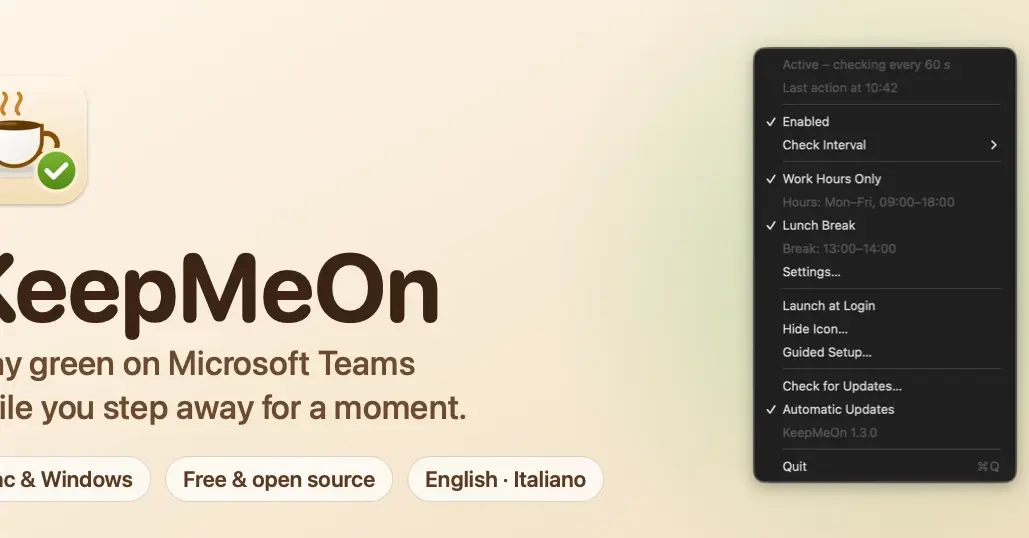
To solve this underlying disconnect, software developer Christian Musumeci built and open-sourced KeepMeOn, a lightweight cross-platform utility for macOS and Windows. By examining how modern operating systems handle hardware and software events, Musumeci engineered a solution that resets the system’s input idle counter cleanly and silently, without simulating unwanted mouse jitter or erratic cursor movements. This investigative report explores the technical architecture of OS idleness, the mechanics of how standard tools fail, and the elegant, low-level code solutions required to finally keep your status green—responsibly.
Detailed Chronology: The Anatomy of a Frustration
The genesis of KeepMeOn began not with grand software architecture, but with a familiar, low-stakes workplace grievance: the premature "Away" badge.
The Five-Minute Timeout Trap
Modern enterprise communication platforms rely on heuristics to gauge availability. When a user steps away from their desk—whether for a brief stretch, a phone call, or a quick hydration break—the application listens for signals from the operating system indicating physical interaction. Across both macOS and Windows, applications generally flag a user as "Away" after approximately 300 seconds (five minutes) of absolute silence from input peripherals.
Initially, users turn to the most direct, system-level solutions available. On macOS, power users invoke the terminal command caffeinate, while graphical utilities like Amphetamine allow for granular control over system sleep states. On Windows, Microsoft’s own official PowerToys suite offers the "Awake" module, designed explicitly to keep machines from going to sleep.
Yet, users quickly noticed a peculiar anomaly: despite running these tools, Microsoft Teams would relentlessly switch its status to yellow. The machine was technically awake, the display was active, but the enterprise chat client remained unconvinced that a human was present.
Investigating the OS Black Box
Dissatisfied with conflicting forum advice and opaque application behaviors, developer Christian Musumeci decided to audit the problem empirically rather than relying on standard API documentation. By constructing test environments on both Windows 11 and macOS, Musumeci began probing how operating systems track user presence.
The investigation revealed that traditional keep-awake tools rely on power management APIs—such as Windows’ SetThreadExecutionState and macOS’s IOPMAssertionDeclareUserActivity. These functions were explicitly designed to inhibit energy-saving protocols. When invoked, they signal to the kernel: “Do not dim the screen; do not spin down the hard drive; do not enter low-power sleep mode because a background task or user is active.”
However, these power assertions operate in a completely isolated domain from input tracking. On Windows 11, calling SetThreadExecutionState had zero impact on the system’s input idle time counter, which continued its upward march regardless of power state. Similarly, macOS’s IOPMAssertionDeclareUserActivity successfully postponed display sleep, but left the specific event counters queried by applications entirely untouched.
Teams and similar productivity software do not care whether your screen is glowing; they care specifically when the last keyboard, mouse, or trackpad event was registered by the window server. Because power management tools do not generate fake input events, the input idle counter keeps climbing. Once it crosses the threshold, the status flips to yellow.
Supporting Context & Metrics: The Technical Breakdown
To understand how KeepMeOn bridges this technical gap, one must examine the fundamental duality of operating system idleness.
The Two Kinds of "Idle" in Modern OS Architectures
- Power Management Idle: This subsystem governs energy conservation. It determines when the display dims, when the screen saver activates, and when the system transitions into deep sleep states (S3/S4 states on Windows, or system-wide sleep modes on macOS). Applications can legally and easily suppress this subsystem by holding a power assertion or execution state flag.
- Input Idle Time: This is a raw, unyielding counter maintained by the window manager or input subsystem. It tracks the exact elapsed time (in milliseconds or seconds) since the last genuine hardware interrupt or software-injected event from a mouse, keyboard, or trackpad. Any application with standard execution privileges can read this counter via system APIs (such as
GetLastInputInfoon Windows).
Standard keep-awake utilities exclusively target the first category. Musumeci’s KeepMeOn targets the second category by safely and invisibly resetting the input idle counter without disrupting the user’s desktop environment.
Benchmarking the Results
During testing on a Windows 11 development machine, Musumeci measured the raw input idle timer before and after executing low-level event injections. Unchecked, the idle timer climbed steadily past 144 seconds. Upon triggering a specialized, unassigned input signal, the system’s internal idle counter instantly plummeted back to 0.3 seconds—all without displacing the mouse cursor by a single pixel or interrupting active text entry.
Deep Dive: Engineering the Fix for macOS and Windows
Achieving this seamless reset required diving deep into platform-specific APIs to craft an event that registers as valid input to the operating system, yet remains completely inert to every other application running on the machine.
macOS: The "Unchanged Modifiers" Event (flagsChanged)
On macOS, injecting synthetic mouse movements or standard keystrokes is notoriously disruptive. Moving the cursor interferes with precision design work or accidental clicks, while typing dummy characters risks injecting stray letters into active text fields.
To circumvent this, Musumeci leveraged a specific event type in the Quartz Event Services framework: flagsChanged.
The flagsChanged event fires whenever a user presses or releases a modifier key—such as Shift, Control, Option, Command, or Caps Lock. Crucially, the event object carries the full set of currently depressed modifier keys.
func postNeutralEvent() -> Bool
    let current = CGEventSource.flagsState(.combinedSessionState)
    // Skip it if the user is holding a modifier right now.
    let held: CGEventFlags = [.maskShift, .maskControl, .maskAlternate, .maskCommand, .maskSecondaryFn]
    guard CGPreflightPostEventAccess(),
          current.intersection(held).isEmpty,
          let event = CGEvent(source: CGEventSource(stateID: .hidSystemState))
    else  return false

    event.type = .flagsChanged
    event.flags = current            // same modifiers as now: at most Caps Lock
    event.setIntegerValueField(.eventSourceUserData, value: 0x4B4D_4F4E) // "KMON" tag
    event.post(tap: .cghidEventTap)
    return true
By crafting a flagsChanged event whose flags are identically equal to the current system flags, the operating system processes an input event, successfully resetting its idle counter. However, because no modifier state actually changed (no key went down, none came up), zero applications react to it. No characters are typed, no windows are focused or unfocused.
To ensure complete safety, the code incorporates several critical checks:
- It checks
CGPreflightPostEventAccess()to ensure accessibility permissions are granted. - It verifies that the user is not actively holding down a modifier key at that exact microsecond to prevent overriding active shortcuts.
- It stamps the event with a custom user data tag (
0x4B4D_4F4E, representing the ASCII values for "KMON") to identify application-generated traffic.
Concurrently, KeepMeOn still calls IOPMAssertionDeclareUserActivity on macOS. While this call alone cannot keep a user’s status green in Teams, it successfully prevents the display from dimming or falling asleep while the user is away.
Windows: The Key-Up of a Phantom Key
On Microsoft Windows, achieving the same invisible reset required exploiting the Win32 API’s handling of virtual key codes.
Windows maintains a vast array of virtual key codes that are entirely unassigned to any physical key or hardware function—specifically the range spanning from 0x97 to 0x9F. Musumeci discovered that if an application uses the SendInput API to transmit a key-up event for one of these unassigned codes, the operating system registers it as valid keyboard input.
const ushort UnassignedKey = 0x97;

var input = new INPUT

    type = INPUT_KEYBOARD,
    u = new InputUnion

        ki = new KEYBDINPUT

            wVk = UnassignedKey,
            dwFlags = KEYEVENTF_KEYUP,
            dwExtraInfo = new IntPtr(0x4B4D4F4E), // "KMON" tag
        ,
    ,
;
SendInput(1, new[]  input , Marshal.SizeOf(typeof(INPUT)));
Because the key (0x97) does not exist on any standard physical keyboard and was never actually pressed down in a "key-down" event, no running application processes or reacts to the key-up signal. Yet, to the Windows kernel and API queries like GetLastInputInfo, it counts indisputably as an input event, instantly resetting the system’s idle timer to zero.
Unlike macOS, Windows requires no special accessibility permissions for this specific method under standard user privileges. On test rigs, this approach safely eliminated idle accumulation without triggering cursor jitter. (While zero-pixel mouse movements via MOUSEEVENTF_MOVE were also tested, the unassigned key-up method proved cleaner and less prone to edge cases).
One limitation noted in the architecture is User Interface Privilege Isolation (UIPI): if an application running with elevated administrator privileges is currently in the foreground, Windows security protocols will block injected input originating from a normal, unprivileged user process. To maintain high reliability across continuous updates, the repository includes a automated GitHub Actions CI/CD probe that tests signal injection against a live Windows runner environment.
Guardrails: Ensuring Ethical and Intentional Use
A tool designed to manipulate activity statuses carries inherent risks of misuse. If an application continuously resets the idle timer every 60 seconds indefinitely, it masks genuine prolonged absences, potentially creating accountability issues in managed corporate environments or bloating collaboration metrics.
To address this, KeepMeOn incorporates strict operational guardrails:
- Conditional Activity: The application is explicitly designed for short, temporary breaks (such as stepping away for coffee or retrieving printouts) rather than sustained, automated deception throughout an entire workday.
- Full Transparency: Recognizing that corporate-managed laptops often monitor software inventories, KeepMeOn is deliberately designed to remain visible. It runs as an identifiable local process, registers cleanly as a login item, and—on macOS—maintains an explicit, visible entry in the system’s Accessibility permissions list.
- Open Source Accountability: Distributed under the permissive MIT license, the entire source code is publicly accessible on GitHub, allowing corporate IT departments and security auditors to inspect every line of execution logic.
Future Outlook & Community Response
The release of KeepMeOn and the transparency of its underlying code have resonated strongly within the remote and hybrid engineering communities. By demystifying the divergence between power management assertions and input event counters, the project provides a masterclass in low-level operating system behavior.
As hybrid work models continue to mature, the friction between automated employee monitoring software and the realities of human workflows remains a persistent point of contention. While enterprise platforms will likely continue refining their presence heuristics, developers like Christian Musumeci have demonstrated that a rigorous, systems-level understanding of operating system internals can resolve these everyday workflow frictions cleanly and transparently.
KeepMeOn is available now as a free, open-source project on GitHub. Developers and users interested in contributing, reviewing the code, or suggesting alternative event injection techniques are encouraged to visit the repository.