Executive Overview
Seven and a half years after the Gutenberg block editor fundamentally altered the architectural landscape of WordPress Core, developers have been handed a tool long thought incompatible with the platform’s modern trajectory: the ability to register and build custom blocks using exclusively PHP.
Historically, crafting a custom block required traversing a labyrinth of modern JavaScript tooling. Developers had to master React, configure complex Node.js build pipelines, manage erratic NPM packages, and register their blocks twice—once in PHP and once in JavaScript. For agencies, enterprise developers, and seasoned PHP engineers whose workflows pre-dated the JavaScript era, this barrier to entry created a massive friction point, delaying the transition from classic themes to modern block themes.
Introduced in WordPress 7.0, the new PHP-only block registration mechanism changes this paradigm. By utilizing a simple autoRegister => true flag, developers can bypass JavaScript compilation entirely, turning legacy PHP code into fully recognized block editor entities.
Yet, this newfound simplicity comes with distinct architectural compromises. PHP-only blocks are heavily restricted by the stateless nature of the WordPress REST API, lack access to live client-side data stores, and offer severely limited user interface controls. This article investigates the capabilities, constraints, and ultimate purpose of WordPress 7.0’s PHP-only blocks, evaluating whether the long wait was truly worth it.

Detailed Chronology: From Gutenberg’s Inception to WordPress 7.0
To understand the weight of this release, it is essential to trace how WordPress block development evolved from a JavaScript-first experiment into an entrenched ecosystem requirement.
1. The Gutenberg Era Begins (Late 2018)
When WordPress 5.0 introduced the block editor, it marked a philosophical pivot away from traditional TinyMCE text editing toward a component-driven architecture modeled heavily on React. While hailed for modernizing the CMS, the shift alienated a large cohort of traditional PHP developers. Building a block required setting up @wordpress/create-block scaffolding, configuring Webpack or Babel, and writing boilerplate JavaScript just to output a simple heading or wrapper.
2. The Rise of Block Themes and Full Site Editing (2021–2023)
As Full Site Editing (FSE)—later rebranded as Site Editing—matured, the WordPress ecosystem began pushing developers toward block themes (theme.json). However, adoption stalled among agencies managing massive inventories of legacy sites. The cost-benefit analysis of rewriting years of stable PHP-based shortcodes, custom post loops, and widget logic into React component trees simply did not add up.
3. The Clamor for Server-Side Simplicity (2024–2025)
While server-side rendering (SSR) existed for dynamic blocks, developers still had to write companion JavaScript files (block.json and edit.js) to satisfy the editor’s client-side runtime requirements. The community repeatedly petitioned core maintainers for a native way to bootstrap blocks purely on the server.

4. WordPress 7.0: The PHP-Only Breakthrough (2026)
Marking a critical philosophical shift, WordPress 7.0 introduced native support for auto-registering blocks entirely via PHP. By removing the requirement for client-side JavaScript compilation for basic structural elements, Core engineering addressed the developer friction that had hampered block theme adoption for years.
Supporting Context & Metrics: The Mechanics of PHP-Only Blocks
To evaluate how this feature functions in practice, we must examine the code and architecture underpinning WordPress 7.0’s simplified block registration.
Registering a Block Using Only PHP
In traditional block development, synchronization between server-side registration and client-side rendering is mandatory. WordPress 7.0 eliminates the client-side requirement through an autoRegister flag:
function css_tricks_hello_world_block()
  register_block_type(
    'css-tricks/hello-world',
      [
        'title' => 'Hello World',
        'render_callback' => function ()
          return sprintf(
            '<div %s>Hello World!</div>',
            get_block_wrapper_attributes()
          );
        ,
        'supports' => [
          'autoRegister' => true,
        ],
      ]
  );

add_action('init', 'css_tricks_hello_world_block');
By passing 'autoRegister' => true, WordPress automatically synthesizes the required client-side registration and editor preview wrappers on the fly.

Expanding Functionality: Attributes and Settings Sidebar
Attributes allow users to customize block behavior. While traditional blocks require manual creation of React-based inspector controls, PHP-only blocks generate simple sidebar inputs automatically based on type definitions:
function css_tricks_hello_world_block()
  register_block_type(
    'css-tricks/hello-world',
    [
      'title' => 'Hello World',
      'render_callback' => function ($attributes)
        return sprintf(
          '<div %s>%s</div>',
          get_block_wrapper_attributes(),
          esc_html($attributes['greeting'])
        );
      ,
      'supports' => [
        'autoRegister' => true,
      ],
      'attributes' => [
        'greeting' => [
          'type' => 'string',
          'default' => 'Hello World!',
        ],
      ],
    ]
  );

add_action('init', 'css_tricks_hello_world_block');
This code snippet yields a fully functioning text input inside the block’s Settings sidebar without writing a single line of JavaScript.
Architectural Limitations: Where PHP-Only Blocks Fall Short
Despite its nostalgic appeal for classic developers, the PHP-only approach comes with severe architectural limitations rooted in how the WordPress block editor communicates with the server.
1. No Intra-Block Interactions or In-Place Editing
Because PHP-only blocks rely on a render_callback executed via a REST API endpoint, they exist outside the editor’s single-page JavaScript application ecosystem. Consequently:

- You cannot build in-place, rich-text editing directly inside the block preview.
- You are locked into the auto-generated controls inside the Settings sidebar.
- Essential control interfaces—such as media library image uploaders, multi-line text areas, and nested inner blocks—are entirely absent.
2. Isolation from Live Client-Side Data
The WordPress block editor manages post state inside a client-side data store. When a user alters a post title or excerpt in the editor, the database is not updated until explicitly saved.
PHP-only blocks bypass this client-side store, querying the database directly. If a block displays dynamic post metadata (such as the post title), it will display stale database data rather than the user’s live, un-saved edits. Developers must save the post and reload the editor for changes to reflect in the PHP block.
3. Stateless REST API and Missing Post Context
On the front end, WordPress blocks execute within "The Loop," granting access to global variables like $post and template tags like the_title().
REST API endpoints, however, are stateless. While the block renderer accepts post identification parameters, the editor component frequently fails to pass context down reliably, rendering many standard template tags useless inside editor previews without custom workarounds.

4. Restricted Attribute Types and UI Controls
WordPress 7.0 restricts PHP-only attribute types to three primitives: strings, numbers, and booleans. These map to basic form fields: text inputs, number counters, checkboxes, and simple dropdowns.
Crucially, dropdown elements do not support keyed arrays. Developers cannot map a human-readable label to an underlying database ID (e.g., displaying category names while storing category slugs or IDs). Using slugs exposes brittle data structures to the block markup, meaning category renames will break existing layouts.
The Killer Use Case: Migrating Legacy PHP Code
Given these steep limitations, why introduce the feature at all? The answer lies in its ultimate killer application: migrating legacy PHP code into modern block themes.
Breaking Down the Block Theme Adoption Barrier
For years, thousands of legacy websites remained trapped on classic themes. The barrier was never a lack of desire to modernize; rather, it was the prohibitive cost of rewriting years of robust PHP functionality—such as custom headers, dynamic footers, shortcode wrappers, and specialized widgets—into React blocks.

With WordPress 7.0, developers can wrap existing procedural PHP code inside a server-side rendered block shell. While the editor preview may be static or lack interactive fidelity, the front end renders flawlessly. This reduces theme migration timelines from weeks of complex JavaScript development to mere hours of straightforward PHP refactoring.
Practical Migration Targets
PHP-only block registration is exceptionally well-suited for converting:
- Custom shortcodes into structured block layout elements.
- Legacy template parts and widgets into drop-in blocks for Site Editing templates.
- Proprietary database query loops into standardized content containers.
Expert Tips for Maximizing PHP-Only Blocks
For developers navigating WordPress 7.0’s new capabilities, several tactical workarounds can mitigate its architectural constraints:
Distinguishing Front-End vs. Editor Rendering
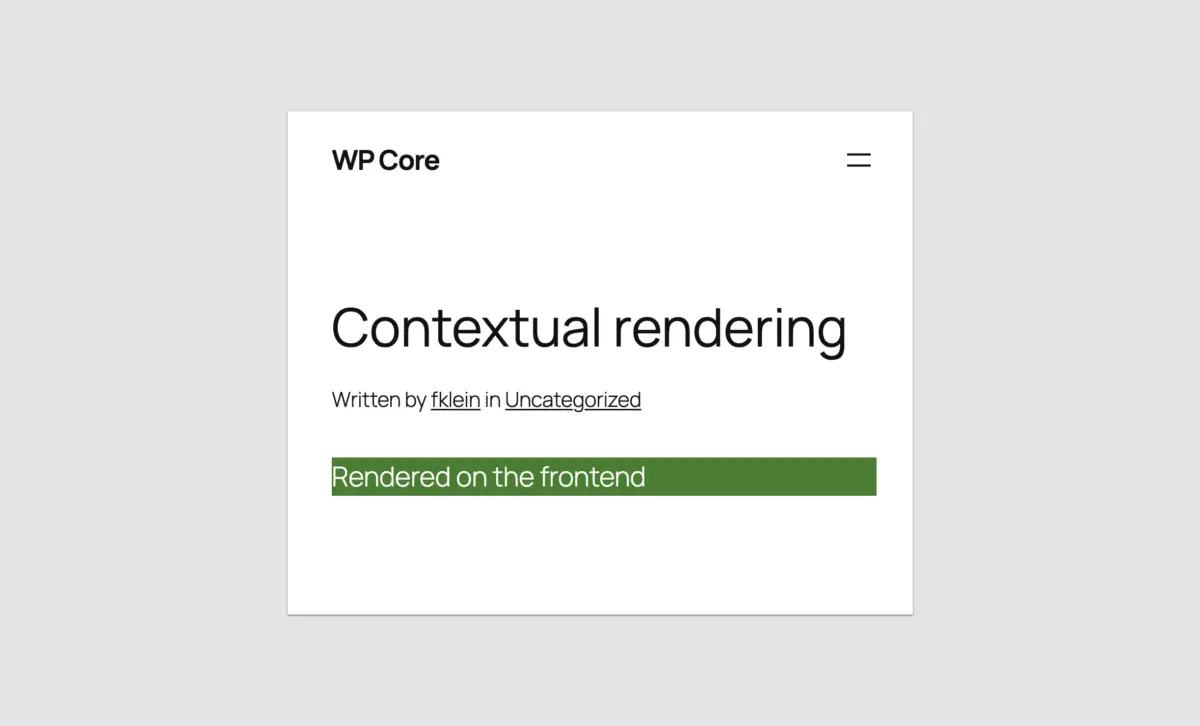
To serve different markup or styles depending on whether the block is viewed on the front end or inside the admin REST API preview, developers can leverage wp_is_rest_endpoint() alongside query parameters:

function css_tricks_php_only_detecting_editor_render()
  register_block_type(
    'css-tricks/php-only-detecting-editor-render',
    [
      'title' => 'PHP-Only Contextual Render',
      'render_callback' => function ()
        $is_editor = wp_is_rest_endpoint() && str_contains($GLOBALS['wp']->query_vars['rest_route'] ?? '', 'v2/block-renderer/');

        $bgcolor = $is_editor ? 'blue' : 'green';
        $text = $is_editor ? 'Rendered in the editor' : 'Rendered on the frontend';

        return sprintf(
          '<div %s>%s</div>',
          get_block_wrapper_attributes(['style' => "color: #fff; background-color: $bgcolor;"]),
          $text
        );
      ,
      'supports' => ['autoRegister' => true],
    ]
  );

add_action('init', 'css_tricks_php_only_detecting_editor_render');
Passing Post Context via Local Attributes
To bypass the lack of post context in editor previews when editing existing posts, developers can capture the post ID from the admin URL ($_GET['post']) and store it as a local, non-UI attribute:
'attributes' => [
  'postId' => [
    'type' => 'integer',
    'default' => isset($_GET['post']) ? absint($_GET['post']) : 0,
    'role' => 'local'
  ],
]
Leveraging Block Supports
PHP-only blocks can fully opt into standard Core layout mechanisms using the Block Supports API. For example, restricting a block to a single instance per post or granting alignment flexibility is handled declaratively:
'supports' => [
  'autoRegister' => true,
  'multiple'     => false, // Limit to one instance per post
  'inserter'     => true,  // Keep visible in the block inserter
  'align'        => ['left', 'center', 'right'],
],
Future Outlook & Conclusion
Was the Long Wait Worth It?
If your goal is to build highly interactive, feature-rich, native-feeling component blocks from scratch, no. JavaScript remains the undisputed king of the Gutenberg ecosystem, and PHP-only blocks cannot—and should not—replace React-driven applications.
However, if your goal is enterprise migration, modernizing legacy client websites, or lowering the barrier to entry for classic WordPress developers trapped in the classic theme ecosystem, yes, the wait was entirely worth it.

A Shift in Core Philosophy
Beyond the technical implementation, WordPress 7.0’s PHP-only block registration signals a monumental philosophical shift within WordPress Core: a renewed commitment to developer experience (DX). By dismantling the mandatory tooling walls that once alienated traditional developers, Core has acknowledged that the ecosystem thrives when developers can use the tools that best fit their project requirements.
For agencies and developers sitting on mountains of legacy code, the path forward is clear. WordPress 7.0 has removed the final roadblock: take your legacy PHP components, wrap them in server-side blocks, and unlock the full power of modern WordPress architecture without writing a single line of JavaScript.