Executive Overview
In a strategic bid to deepen its ecosystem integration and elevate user experience, Google has officially rolled out its September 2026 Android feature drop. This major update introduces five distinct features designed to make Android devices more accessible, personalized, and utility-driven. Announced via an official corporate blog post, the updates target critical pain points ranging from vehicular motion sickness to low-vision navigation, while also introducing sophisticated memory aids and messaging enhancements.
This release highlights an ongoing paradigm shift in Google’s product philosophy. While several of the newly announced features see the search giant playing catch-up to proprietary features already popularized by Apple’s iOS, others aggressively leverage Google’s proprietary Gemini artificial intelligence suite. By integrating multimodal AI directly into system-level accessibility and utility tools, Google aims to establish a clear technological edge over its Cupertino rival, particularly in cognitive offloading and spatial awareness.
Detailed Chronology and Feature Breakdown
The rollout of these features marks a milestone in Android’s evolutionary timeline, reflecting a coordinated effort to bridge hardware capabilities with advanced software solutions. Below is an in-depth breakdown of the five primary updates included in this drop.
1. Motion Assist: Combating Vehicular Kinetosis
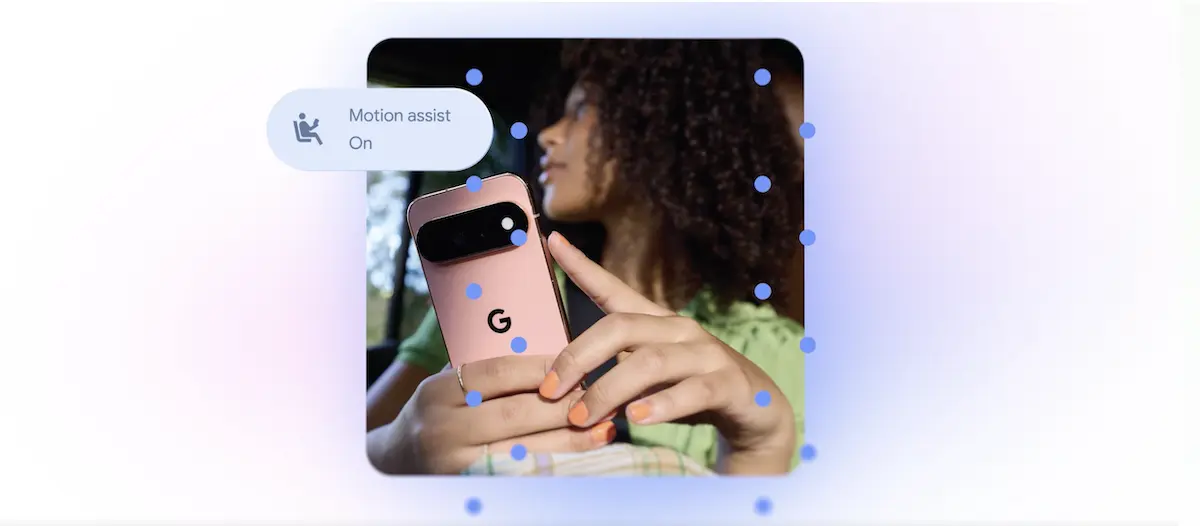
The most visually striking and scientifically intriguing update in this release is Motion Assist. Designed to mitigate the effects of motion sickness (kinetosis) for users who read or browse on their devices while inside a moving vehicle, the feature introduces an interactive visual overlay to the Android interface.
- How it Works: Motion Assist utilizes the device’s built-in telemetry hardware—specifically the accelerometer and gyroscope—to detect real-world physical acceleration, braking, and cornering forces. It then projects a subtle, customizable bubble overlay onto the screen. These bubbles move in real-time opposition to the vehicle’s physical motion.
- The Science: Kinetosis occurs when there is a sensory mismatch between what the eyes see (a static screen) and what the inner ear perceives (the physical motion of the vehicle). By introducing visual elements that mimic the vehicle’s physical inertia, Motion Assist minimizes this sensory discordance, allowing the brain to reconcile the conflicting signals.
- Customization and Requirements: Users can toggle Motion Assist on or off directly via the Quick Settings panel, or set it to activate automatically when vehicular speeds are detected. The shape, color, and transparency of the visual bubbles are fully customizable to prevent interference with underlying app interfaces. However, Google has restricted this feature to devices running Android 17, limiting its initial reach to flagship and newly updated hardware.
+-----------------------------------------------------------------+
|                       MOTION ASSIST MECHANICS                    |
|                                                                 |
|     [ Real-World Vehicle Motion ]                               |
|                  │                                              |
|                  ▼                                              |
|     [ Accelerometer & Gyroscope Sensors ]                       |
|                  │                                              |
|                  ▼                                              |
|     [ Real-Time UI Bubble Translation ]                         |
|                  │                                              |
|                  ▼                                              |
|     [ Visual-Vestibular Alignment (Reduces Motion Sickness) ]   |
+-----------------------------------------------------------------+
2. Guided Vision: Multimodal AI for Low-Vision Navigation
In a direct application of its flagship AI model, Google has introduced Guided Vision, an accessibility feature designed specifically for blind and low-vision individuals.

- The Gemini Integration: Guided Vision transforms the smartphone camera into an active assistant. By running real-time video frames through Gemini’s multimodal engine, the system can identify objects, read fine print on medication or food labels, and decipher menus in dimly lit environments.
- Active Spatial Feedback: Unlike passive image-to-text readers, Guided Vision provides real-time, interactive audio feedback. If a user holds the phone at an incorrect angle or too close to an object, the system issues precise spoken instructions (e.g., "Pan slowly to the left," "Tilt the camera up," or "Center the object").
- Compatibility: In a major win for backward compatibility, Guided Vision is rolling out to devices running Android 9 and newer, provided they reside in regions where the Gemini application and infrastructure are officially supported.
3. Find Hub and "Remembered Items": Cognitive Offloading
As part of its broader push to position Gemini as a proactive personal assistant, Google has updated its Find Hub with a dedicated "Remembered Items" section.
- Functional Utility: This feature acts as a digitized cognitive backup. Users can verbally instruct Gemini to log the location of physical items (e.g., "Gemini, remember that I put my spare keys in the top drawer of the hallway cabinet").
- Photographic Context: To prevent ambiguity, the interface allows users to attach a photograph to the logged memory. If the user later inquires about the item, Gemini retrieves the text-based location alongside the associated image, providing immediate visual verification.
4. Google Keep Integration in Google Messages
To streamline collaborative workflows, Google has broken down the silos between its messaging and productivity suites.
- Direct Collaborative Spaces: Android users can now access, share, and actively edit Google Keep notes and checklists directly within a Google Messages conversation thread.
- Use Cases: This integration allows families or teams to co-edit grocery lists, travel itineraries, or task lists in real-time without having to leave the active chat window, reducing app-switching friction.
5. Chat Personalization and Aesthetic Parity
Finally, Google Messages is receiving a visual overhaul aimed at user personalization.
- Granular Themes: Users can now break away from system-wide dark or light modes to customize individual chat threads with distinct backgrounds, custom photographs, and dedicated color palettes.
- Dynamic Matching: Once a background is selected, Google’s Material You design framework automatically adjusts the text bubbles and accent colors to ensure high contrast and aesthetic harmony.
Supporting Context & Metrics
To understand the significance of this feature drop, it is essential to examine the competitive landscape and the demographic metrics driving these technological developments.
The Competitive Landscape: Google vs. Apple
A comparative analysis reveals that while Google is pioneering new frontiers with Gemini-driven utility, it is also actively neutralizing long-standing iOS advantages.

| Feature Area | Android (September 2026 Drop) | Apple iOS Equivalent | Market Context |
|---|---|---|---|
| Motion Sickness Mitigation | Motion Assist (Android 17) | Vehicle Motion Cues (Introduced in iOS 18, 2024) | Google catches up to Apple’s early-mover advantage in kinetic UI design. |
| Visual Accessibility | Guided Vision (Gemini-powered, Android 9+) | Point and Speak / Magnifier (iOS 17) | Google’s use of Gemini’s multimodal AI offers a more conversational and context-aware solution than Apple’s on-device OCR. |
| Chat Personalization | Custom Messages Backgrounds | Messages Customization / Rich Threads (Updated iOS 18) | Google closes a prominent aesthetic gap in the SMS/RCS messaging experience. |
| Cognitive Memory Aids | Remembered Items (Find Hub / Gemini) | No direct system-level AI equivalent (requires manual Notes/Reminders) | Google takes a distinct lead by utilizing generative AI for memory logging. |
Demographic and Market Drivers
The focus on accessibility and physical comfort is not merely altruistic; it is guided by clear market demographics:
- Kinetosis Demographics: Clinical studies suggest that up to 30% of travelers experience moderate to severe motion sickness under normal travel conditions, with the prevalence spiking when users look down at digital screens. By addressing this, Google improves the usability of its devices for nearly a third of its global user base during commutes.
- Visual Impairment Accessibility: According to the World Health Organization (WHO), at least 2.2 billion people globally have a near or distance vision impairment. Providing legacy support for Guided Vision down to Android 9 ensures that budget-conscious users on older hardware are not excluded from critical accessibility advancements.
Official Statements and Corporate Positioning
In its official blog post detailing the rollout, Google emphasized its commitment to an "AI-first, user-centric" design philosophy. The company framed the update as a cohesive push to make technology more humane, context-aware, and universally accessible.
"Technology should adapt to the user, not the other way around," Google noted in the announcement. "With this feature drop, we are leveraging the advanced cognitive capabilities of Gemini to solve real-world physical challenges—whether that is navigating a dark environment with low vision, minimizing the physical discomfort of travel, or simply remembering where you left your most critical documents."
Industry analysts point out that this release serves a dual strategic purpose. First, it reinforces Google’s narrative that Gemini is not just a novelty chatbot, but a deeply integrated utility layer designed to enhance daily life. Second, by retrofitting older Android versions (up to Android 9) with features like Guided Vision, Google is actively combatting criticisms regarding Android operating system fragmentation, showing a willingness to bring cutting-edge AI utilities to older, mid-range, and budget devices.
Future Outlook
Looking ahead, this feature drop outlines Google’s roadmap for the next generation of mobile operating systems. The reliance on Gemini for everyday tasks indicates that the traditional interface of apps and menus is gradually giving way to an intent-based, conversational UI.

The Evolution of Android 17 and Beyond
The restriction of Motion Assist to Android 17 suggests that future updates will rely heavily on advanced, low-latency sensor fusion APIs that are only present in newer hardware architectures. As Android 17 sees wider adoption, we can expect Google to expand on physical-sensory harmony features, potentially integrating augmented reality (AR) and spatial computing elements directly into the core OS.
Gemini as the System-Level Orchestrator
The "Remembered Items" feature in Find Hub is likely a precursor to a more autonomous AI agent. Industry experts predict that future iterations of Gemini will not only remember where items are placed based on user input, but will actively track items via continuous spatial analysis using wearable devices, smart home cameras, and phone sensors (with strict user permission protocols).
As the boundaries between artificial intelligence, physical accessibility, and cross-platform communication continue to blur, Google’s September 2026 feature drop serves as a clear declaration of intent: the future of Android is not just smarter, but vastly more responsive to the human condition.