While headline-grabbing capabilities like advanced Siri AI integrations, deep contextual automation, and sweeping visual overhauls typically steal the spotlight during major software release cycles, the success of any operating system ultimately hinges on its underlying stability. With the rollout of iOS 27, Apple has taken a decidedly pragmatic approach. Alongside major upgrades to productivity pillars like Notes, Reminders, and Calendar, the Cupertino-based tech giant has quietly delivered a series of crucial under-the-hood quality-of-life enhancements.
Chief among these beneficiaries is the native Apple Mail app. Long plagued by subtle performance hiccups, frustrating synchronization delays, and persistent UI anomalies, Apple Mail is receiving a much-needed technical tune-up in iOS 27. Rather than focusing purely on flashier feature sets, Apple’s engineering teams have tackled three long-standing user complaints: unread badge accuracy, message loading speeds, and search reliability. For power users and casual communicators alike, these fundamental fixes may represent the most impactful upgrade arriving on their iPhones this year.
Executive Overview
For years, the native Apple Mail client has occupied a complex space within the iOS ecosystem. As a default application deeply integrated into the operating system’s architecture, it has always offered unmatched convenience, Siri integration, and seamless cross-device handoff capabilities. However, compared to third-party alternatives like Microsoft Outlook, Spark, or Gmail, the native Mail app has occasionally lagged in day-to-day responsiveness.
In iOS 27, Apple has chosen to address these friction points head-on. By prioritizing foundational performance metrics over superficial additions, the company is signaling a renewed commitment to app reliability. The improvements rolling out to Apple Mail are designed to eliminate the daily micro-frustrations that accumulate when managing heavy email workflows on a mobile device.
- Unread Badge Accuracy: Eradicating "phantom" unread notifications and synchronization discrepancies that have frustrated users for generations.
- Faster Message Loading: Optimizing local caching and rendering pipelines to ensure emails open instantly, even under poor network conditions.
- Reliable Search: Enhancing indexing algorithms and query processing to make finding historical correspondence significantly faster and more accurate.
Detailed Chronology of the Update
The journey toward a more reliable Apple Mail client in iOS 27 has been an iterative process, unfolding across the summer developer and public beta cycles. While Apple’s initial keynote announcement heavily emphasized generative AI features and system-wide personalization, a sprawling, information-dense slide quietly revealed hundreds of minor, high-impact bug fixes slated for the core application suite.
Phase 1: The Developer Beta Reveal (Early June)
When iOS 27 was first unveiled at WWDC, media attention immediately gravitated toward the revamped Siri interface and aesthetic updates across the iOS platform. However, early adopters diving into Developer Beta 1 quickly noticed subtle refinements in daily application performance. Early patch notes hinted at backend optimizations for background data fetching, setting the stage for what would later be formally categorized as major reliability updates for Apple Mail.
Phase 2: Public Beta Realization (July)
As the software cycle progressed into the public beta phases throughout July, users began stress-testing the operating system under everyday conditions. Feedback across developer forums and enthusiast communities began to highlight tangible improvements in the Mail application. Users running intensive email workflows—managing multiple Exchange, Gmail, and iCloud accounts simultaneously—noted a marked reduction in synchronization errors and interface stutter.
Phase 3: Final Polish and General Release Prep (August)
By late August, Apple had dedicated significant keynote and documentation real estate to detailing the breadth of these quality-of-life improvements. The focus shifted away from experimental features toward stability, battery efficiency, and performance parity across supported iPhone models. The three core Mail fixes emerged not as afterthoughts, but as centerpiece solutions to historic user pain points.
Supporting Context & Metrics: Unpacking the Three Core Fixes
To fully understand the significance of these updates, it is essential to examine the specific technical grievances they resolve within the Apple Mail ecosystem.
1. Conquering the Phantom Badge: Unread Badge Accuracy
For many users, application icon badges serve as a vital triage mechanism, indicating at a glance whether attention is required. Unfortunately, the native Mail app has long struggled to maintain synchronization between server-side read states and local springboard indicators.
- The Historical Problem: Users frequently encountered scenarios where opening and reading an email on a Mac, iPad, or even within the iOS app itself failed to clear the red numerical badge on the iPhone home screen. This necessitated force-closing the app, toggling notifications, or navigating deep into subfolders to manually force a refresh.
- The iOS 27 Solution: Apple has restructured the background synchronization daemon responsible for push notifications and fetch intervals. By tightening the handshake between push notification services and local database queries, iOS 27 ensures that unread status changes propagate instantaneously and accurately. For minimalists who keep badges enabled exclusively for essential communication tools, this fix restores absolute trust in the system’s visual cues.
2. Eliminating the Wait: Accelerated Message Loading
In an era of lightning-fast mobile processors and ubiquitous 5G connectivity, waiting for an email to render text and inline images feels increasingly anachronistic. Yet, complex HTML emails, rich media attachments, and large corporate threads have frequently caused momentary freezing or sluggish rendering within past iterations of Apple Mail.
- The Historical Problem: When opening an email containing heavy media or extensive formatting threads, users were often met with a blank white screen or a spinning progress indicator while the app fetched remote resources or processed local markup caches.
- The iOS 27 Solution: iOS 27 introduces optimized local rendering pipelines and smarter background caching algorithms. The Mail app now aggressively pre-fetches and renders preview data locally, drastically shortening the time-to-display metric. Whether opening a plain-text notification or a media-heavy newsletter, messages snap open with near-instantaneous fluidity.
3. Finding the Needle in the Haystack: Reliable Search
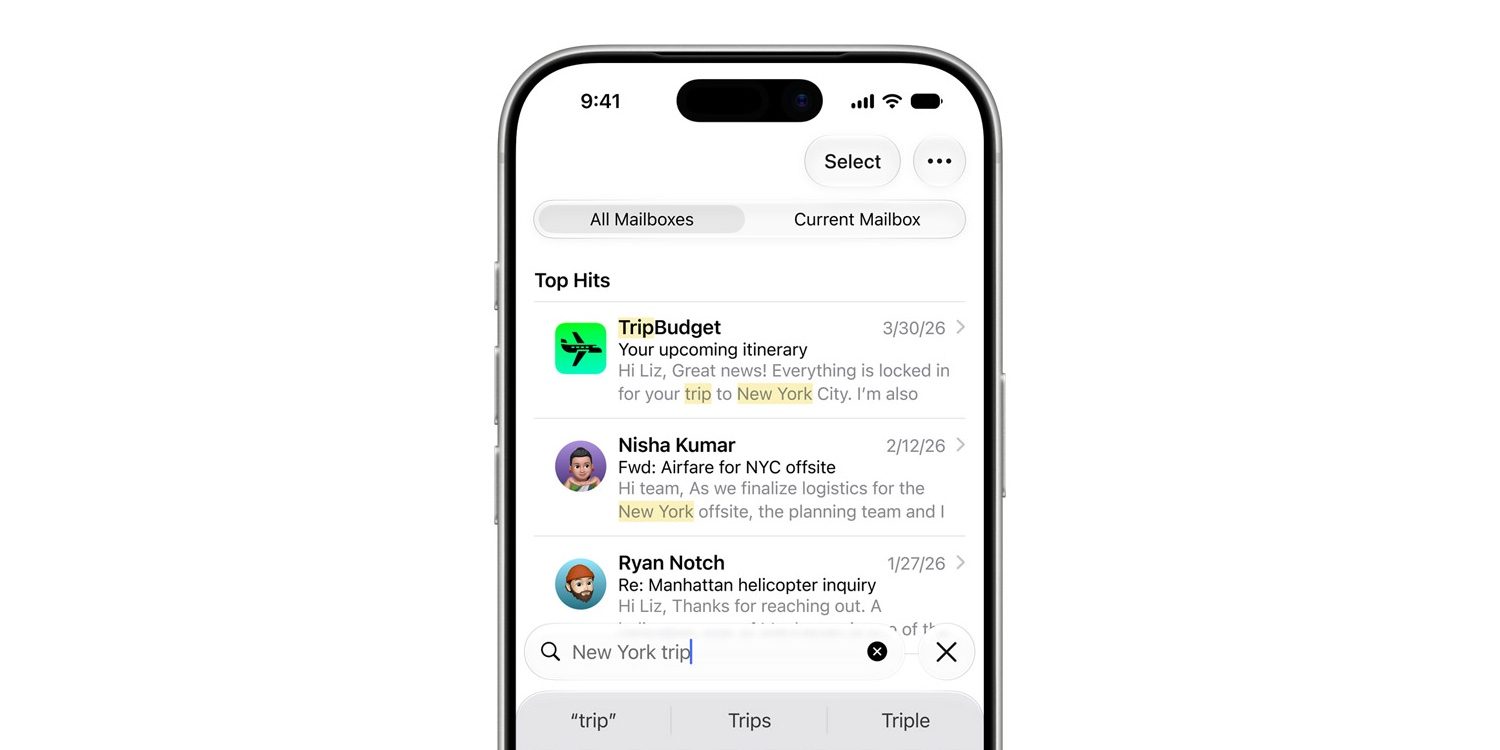
Perhaps the most universally welcomed upgrade in iOS 27 is the overhaul of the Mail search architecture. Email is rarely just a communication medium; for millions of professionals, it serves as a permanent, searchable archive of contracts, receipts, travel itineraries, and project documentation.

- The Historical Problem: Historical search queries in Apple Mail have historically been plagued by false negatives. Users searching for specific keywords, sender names, or dates often encountered "No Results Found" screens, even when the target message was demonstrably sitting in the inbox or archive. This forced users to rely on external file managers or desktop clients to locate critical documents.
- The iOS 27 Solution: Leveraging deeper integration with the system-wide indexing engine, iOS 27 brings smarter keyword matching, natural language processing improvements, and robust metadata indexing to Mail. The search interface now surfaces relevant contacts, recent attachments, and contextual threads with vastly superior accuracy and speed, transforming search from a guessing game into a dependable utility.
Official Statements and Industry Perspective
While Apple traditionally avoids dwelling extensively on bug fixes during marketing presentations—preferring to frame software updates around revolutionary user experiences—the inclusion of these foundational enhancements reflects a maturing corporate software philosophy.
During the technical sessions accompanying the iOS 27 rollout, Apple engineers emphasized that the longevity of modern hardware relies equally on software efficiency and feature expansion. Industry analysts have largely praised this pivot. As smartphone hardware performance plateaus at exceptionally high baselines, consumer satisfaction is increasingly driven by software refinement, stability, and the elimination of micro-friction.
Furthermore, enterprise IT professionals managing fleets of corporate iOS devices have welcomed the improvements. Email remains the lifeblood of mobile enterprise communication; enhanced badge accuracy, faster load times, and reliable search directly translate to measurable productivity gains for corporate end-users operating on tight schedules.
Future Outlook: What This Means for the iOS Ecosystem
The implementation of these targeted fixes in iOS 27 establishes a promising benchmark for future software iterations. By listening closely to long-standing community feedback regarding native productivity applications, Apple has demonstrated a willingness to refine core utilities that may not generate flashy headlines, but undeniably dictate daily user sentiment.

As we look toward subsequent point releases of iOS 27 and the eventual horizon of future operating systems, several key takeaways emerge:
- The Return to Fundamentals: Apple is recognizing that feature bloat must be counterbalanced by rigorous architectural cleanup and performance tuning.
- Ecosystem Synergy: Improvements in Mail tie directly into broader system optimizations affecting Notes, Reminders, and Calendar, creating a cohesive, high-performance productivity suite.
- User Trust: Resolving persistent quirks like phantom badges and unreliable search rebuilds consumer confidence in native Apple applications over third-party alternatives.
For users hesitant to upgrade due to historical fears of launch-day bugs or performance degradation, iOS 27 offers a compelling counter-narrative. By making everyday tasks noticeably faster, more accurate, and entirely seamless, Apple has ensured that its native communication suite remains a top-tier choice for mobile professionals and casual users alike.
Whether you are diving back into the Apple Mail ecosystem for the first time in years or simply seeking a smoother, more reliable day-to-day communication experience, iOS 27 delivers the foundational polish that makes the iPhone feel better than ever to use.