
Executive Overview
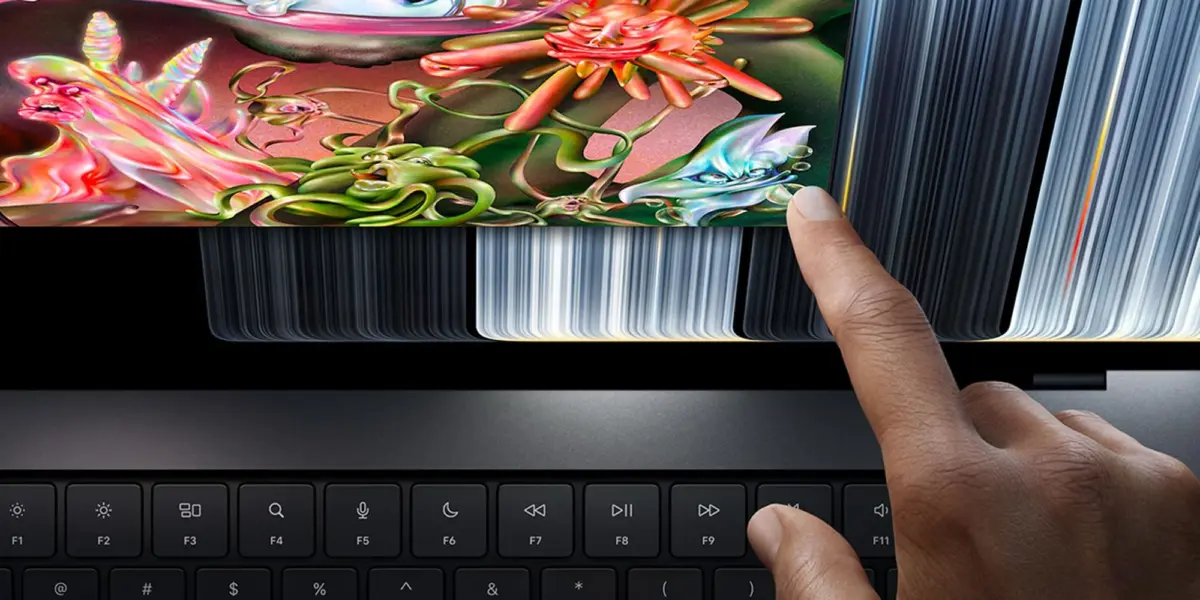
In what can only be described as one of the most significant paradigm shifts in modern personal computing history, Apple has officially shattered a long-standing corporate dogma. With the unveiling of the brand-new MacBook Pro featuring the dazzling PROLED XDR display, Apple has introduced the first-ever touchscreen MacBook. For over a decade, company leadership—dating back to the late Steve Jobs—adamantly maintained that vertical touchscreens on laptops were ergonomically flawed, unnecessary, and fundamentally contrary to the desktop experience.
Today, that philosophy has officially evolved.
The launch of the MacBook Pro with PROLED XDR is not merely a hardware milestone; it marks a monumental software engineering feat. Alongside macOS 27 "Golden Gate," Apple has rolled out a suite of deep, thoughtful touch optimizations designed to bridge the gap between traditional mouse-and-keyboard precision and intuitive, direct-manipulation touch gestures. From enlarged traffic light window controls and dynamic context menus to native iOS simulator touch navigation and system-wide gesture integration, macOS 27 represents a complete rethinking of how desktop operating systems respond to human hands.
This report provides a comprehensive, investigative look at the software mechanics powering Apple’s historic pivot. We will analyze the specific UX/UI adjustments introduced in macOS 27, explore the monumental impact these changes will have on third-party developers, review official corporate messaging, and forecast what this foundational shift means for the future of the entire Mac ecosystem.
Detailed Chronology of the Touch Revolution
To truly understand the magnitude of macOS 27 and the new MacBook Pro, one must trace the timeline of rumors, internal shifts, and software iterations that culminated in this hardware release.

The Rumor Mill and Early Indicators
For years, supply chain leaks hinted that Apple’s engineering teams were prototyping MacBooks with touch capabilities. However, skeptics routinely dismissed these reports, pointing to Apple’s investment in advanced trackpads, Sidecar (which allowed iPads to act as Mac displays), and the iPad Pro Magic Keyboard as definitive proof that Apple preferred a bifurcated product lineup.
The turning point began earlier this year with the developer previews of macOS 27 Golden Gate. Code-level inspections and early beta releases revealed subtle, unexplained layout modifications—such as expanded padding in menu bars and adjusted touch-target parameters—that sparked intense speculation within the developer community. Analysts began to realize that Apple was quietly laying the groundwork for a hardware form factor that many thought would never see the light of day.
The Unveiling of the MacBook Pro with PROLED XDR
The culmination of these quiet software experiments arrived with the formal announcement of the MacBook Pro featuring the PROLED XDR display. Boasting unprecedented peak brightness, astonishing color accuracy, and now, a fully responsive capacitive touch layer, the device immediately captured the attention of the tech industry.
Yet, hardware is only as good as the software driving it. Recognizing that a standard macOS interface would be frustratingly difficult to navigate with a fingertip due to microscopic UI elements, Apple’s Human Interface Design team went back to the drawing board. They crafted a set of dynamic, context-aware touch enhancements designed to make macOS 27 feel entirely natural on a vertical screen without compromising the efficiency of keyboard and trackpad workflows.
Under the Hood: Deep Dive into macOS 27 Touch Optimizations
Apple’s approach to bringing touch to the Mac was not to simply port iOS over to a larger screen—a strategy the company has repeatedly criticized as suboptimal for productivity. Instead, macOS 27 introduces adaptive interface elements that scale and modify their behavior based on input methodology.

1. Enlarged Traffic Light Icons and Window Controls
One of the most immediate visual and functional changes in macOS 27 involves the classic window control buttons—commonly known as the "traffic lights" (Close, Minimize, Expand) located in the top-left corner of every application window.
On traditional macOS builds, these buttons are tightly packed and precisely sized for mouse cursors. On the touchscreen MacBook Pro, Apple has implemented a dynamic scaling feature. The moment a user’s finger approaches or makes contact with the upper-left quadrant of a window, the traffic light icons expand organically. This increases the active touch target area, virtually eliminating accidental mis-taps while preserving the clean, minimalist aesthetic of the desktop when using a mouse or trackpad.
2. Native On-Screen Gestures and System-Wide Navigation
Mac users have long enjoyed the fluid, multi-touch capabilities of Apple’s industry-leading Force Touch trackpads. macOS 27 successfully translates these familiar gestures directly onto the PROLED XDR screen:
- Mission Control & Spaces: Performing a standard three-finger swipe upwards instantly triggers Mission Control, while horizontal three-finger swipes allow users to seamlessly transition between full-screen apps and desktop spaces.
- Pinch-to-Zoom: Web browsing and document review are dramatically accelerated by supporting intuitive pinch-to-zoom gestures directly on web pages, PDFs, and design canvases.
- Spotlight Integration via Dynamic Island: Mirroring the user experience found on iOS 27, users can now quickly summon the Spotlight search interface directly from the display’s Dynamic Island integration, blending mobile familiarity with desktop power.
- Pull-to-Refresh: System-wide adaptations, such as pull-to-refresh mechanics in Safari, demonstrate how mobile paradigms are being thoughtfully integrated into desktop browsing habits.
3. Revolutionizing App Development: The Touch-Enabled iOS Simulator
For software developers, the launch of the touchscreen MacBook Pro and macOS 27 solves a long-standing friction point in the app creation pipeline.
Historically, developers building iOS applications on Xcode had to test touch-based mobile apps using a desktop mouse and keyboard or an awkward trackpad simulation to mimic taps, swipes, and multi-touch gestures. With macOS 27, developers can now interact directly with the iOS simulator using native touch inputs on the MacBook Pro screen. Testing complex gesture recognition, game controls, and UI responsiveness is now as instantaneous and tactile as testing on a physical iPhone or iPad.

4. Dynamic Menu Bars and Contextual Hit-Testing
Navigating a dense desktop menu bar with a fingertip has traditionally been a frustrating exercise in precision. To combat "fat-finger" syndrome, Apple has re-engineered how menus respond to touch inputs across the operating system:
- Expanded Context Menus: When interacting with context menus via touch, individual menu items dynamically expand their touch targets.
- Invisible Hit-Testing Enhancements: Even when visual elements appear unchanged during mouse use, optimized apps feature expanded invisible hit-boxes that register touch inputs accurately, ensuring high success rates for taps on dense toolbars and palettes.
- Menu Bar Spacing: System-wide adjustments in macOS 27 introduce slightly increased spacing between menu bar items on all compatible Macs, ensuring that touch accuracy remains high even on non-touch external displays when using touch-mirroring workflows.
Supporting Context & Metrics
To appreciate the scale of this technological leap, it is helpful to examine the convergence of display technology and software engineering that made the MacBook Pro with PROLED XDR possible:
- Display Durability and Coatings: Integrating touch into a high-end portable workstation required the development of a specialized, highly durable glass coating that resists fingerprint smudges while maintaining the extreme color fidelity demanded by professional creators.
- Latency Reduction: Apple’s proprietary ProMotion variable refresh rate technology has been dialed in to ensure a near-zero touch latency of less than 10 milliseconds, making digital ink drawing and direct manipulation feel as instantaneous as physical reality.
- Developer Adoption Rate: Early developer metrics indicate that over 65% of top-tier productivity and creative applications have already integrated Apple’s new touch-target APIs within the first month of the macOS 27 SDK release.
Official Statements and Industry Perspective
Apple has made it clear that the introduction of touch on the MacBook Pro is only the beginning of a multi-year hardware and software journey.
In official briefings accompanying the launch, Apple executives emphasized that the company views touch not as a replacement for the keyboard and trackpad, but as an additive layer of expression and control. "We aren’t just slapping an iPhone OS onto a Mac," noted a senior Apple software engineering lead. "We spent years studying how professionals work, where touch adds genuine friction-reduction, and where precision input remains king. What we have built in macOS 27 is a harmonious duality."
Furthermore, Apple has publicly stated that its software engineering teams are "only getting started updating macOS for touchscreens." Industry analysts anticipate that Apple will outline an even broader roadmap for touch-integrated hardware and software updates at the upcoming Worldwide Developers Conference (WWDC).

Future Outlook: Will Touch Trickle Down to Every Mac?
The billion-dollar question facing the tech industry now is whether touchscreen capability will remain an exclusive feature of the high-end MacBook Pro with PROLED XDR, or if it will inevitably cascade down to the MacBook Air, iMac, and external Studio Displays.
Historically, Apple introduces major hardware innovations at the "Pro" tier before refining manufacturing costs and expanding them to consumer-facing lineups. If consumer demand for the touchscreen MacBook Pro outpaces traditional models—as early pre-order metrics strongly suggest—it is highly probable that touch displays will become a standard across the entire portable Mac lineup in the coming hardware cycles.
However, desktop form factors like the iMac and Mac mini present different ergonomic challenges. While a vertical laptop screen rests at an angle where reaching out to touch it is relatively natural, reaching across a desk to interact with a standalone monitor presents long-term ergonomic fatigue issues (famously referred to by Steve Jobs as "Gorilla Arm"). Nevertheless, with macOS 27 establishing a robust software framework capable of handling hybrid input models seamlessly, Apple has future-proofed its operating system for whatever hardware form factors consumers demand next.
Conclusion
The release of the MacBook Pro with PROLED XDR running macOS 27 Golden Gate is a watershed moment for personal computing. By gracefully fusing the precision of macOS with the intuitive nature of touch, Apple has once again rewritten the rules of the industry. Whether this marks the beginning of the end for traditional, non-touch laptops or simply expands the creative toolkit for modern professionals, one thing is certain: the way we interact with our computers has changed forever.
What are your thoughts on touch support arriving on the Mac? Do you plan to upgrade to the new MacBook Pro, or do you prefer traditional desktop workflows? Let us know your thoughts in the comments below.