
Executive Overview
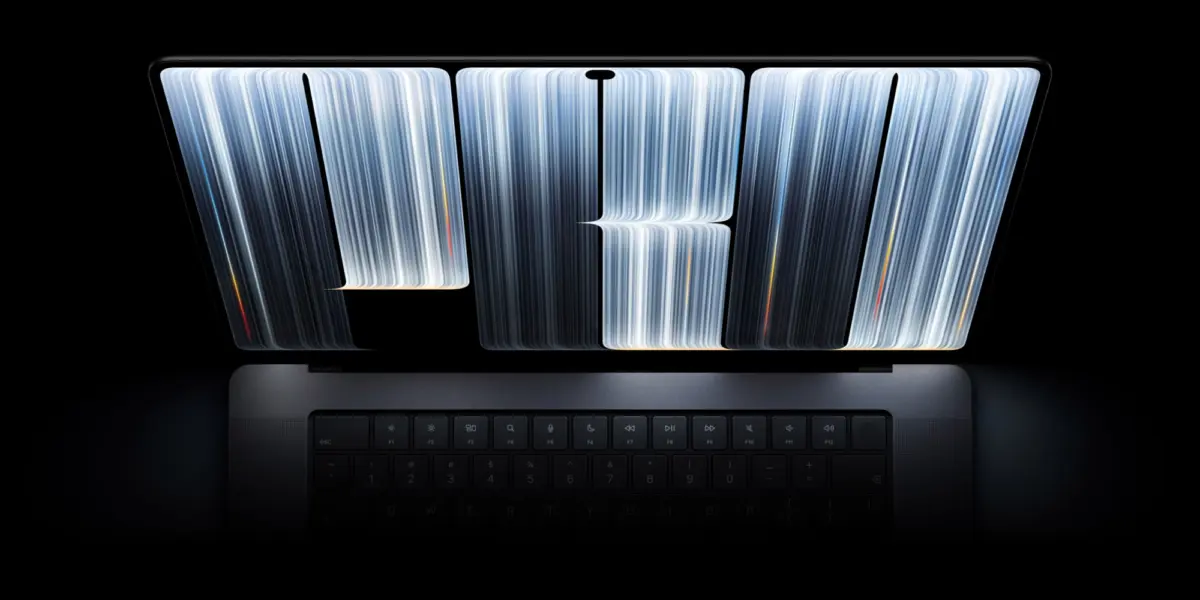
The release of macOS 27.3 Beta 1 has brought more than just routine bug fixes and underlying security patches to Apple’s desktop ecosystem. Chief among its visual additions is a striking, dynamic new screensaver dubbed "Pro Light." This animated feature brings to life the controversial, typography-based design first unveiled alongside the new MacBook Pro featuring the PROLED XDR Display.
Apple has a long-standing tradition of marking the launch of flagship hardware with dedicated, bespoke wallpapers that push the boundaries of its software’s aesthetic capabilities. However, the latest design—featuring flowing, metallic-looking lines that explicitly spell out the word "PRO"—has ignited fierce debate within the Apple user community. While some praise its futuristic, industrial aesthetic, others have criticized it for resembling a malfunctioning or glitchy display.
This article provides an in-depth exploration of the new "Pro Light" screensaver, the design philosophy behind Apple’s typography wallpapers, the community backlash, and how this fits into the broader visual and hardware narrative of Apple’s late-2026 product cycle.
Detailed Chronology: From Static Wallpaper to Dynamic Screensaver
Understanding the journey of the "Pro Light" aesthetic requires tracing its evolution across recent software and hardware rollouts.

1. The Hardware Launch and Initial Reveal
When Apple lifted the curtain on its latest generation of professional laptops powered by the new PROLED XDR Display, hardware specifications were not the only talking point. True to form, the marketing materials and default desktop environments showcased a brand-new, high-contrast wallpaper. Continuing a subtle design trend seen in previous macOS iterations—where product branding is abstractly integrated into the default desktop artwork—the design utilized a matrix of glowing, metallic threads that meticulously formed the letters P-R-O.
2. Community Reaction and the "Glitch Art" Debate
Almost immediately after the wallpaper leaked and subsequently rolled out to early adopters, social media platforms and tech forums were flooded with commentary.
- The Supporters: Enthusiasts lauded the metallic sheen and the way the artwork leveraged high-dynamic-range panels, making the graphic look as though it were physically popping off the screen.
- The Critics: A vocal contingent argued that the jagged, overlapping lines felt uncharacteristically garish for Apple’s typically minimalist design ethos. Some users pointed out an unfortunate coincidence: the design’s chaotic linear patterns bore a striking visual resemblance to screen tearing or hardware glitches—an association exacerbated by unrelated reports of early display quirks affecting the newly launched iPhone Duo lineup.
3. The Arrival of macOS 27.3 Beta 1 and "Pro Light"
Addressing the static nature of the initial artwork, Apple’s software engineering team integrated a motion element in macOS 27.3 beta 1. Entitled "Pro Light," the new screensaver transforms the static typography into a living, breathing visual experience.
Instead of a fixed image, the screensaver employs a subtle, slow-motion lighting effect. Beams of light organically travel along the metallic contours of the "PRO" lettering. As the illumination sweeps across one section of the word, adjacent areas gracefully fade back into shadow. This deliberate pacing—enhanced by macOS’s native slow-motion rendering engine—softens the aggressive geometry of the original wallpaper, giving it a much more hypnotic, ambient quality.

Supporting Context & Metrics: The Evolution of Apple’s Desktop Aesthetics
To fully appreciate the significance of the "Pro Light" screensaver, it is helpful to contextualize Apple’s history with dynamic wallpapers and screensavers, as well as the technical foundations of modern macOS displays.
The Shift Toward Motion-Driven Branding
Over the past decade, Apple has transitioned static desktop backgrounds into deeply integrated, system-aware experiences. From the dynamic time-lapse landscapes of macOS Mojave to the abstract, fluid geometry of Apple Silicon launch eras, wallpapers have increasingly served as technological showcases for display hardware.
| Era / OS Version | Primary Design Focus | Community Reception | Technical Showcase |
|---|---|---|---|
| macOS Mojave | Dynamic time-of-day shifting | Universally praised | Ambient lighting synchronization |
| macOS Big Sur | Abstract vector geometry | Highly favorable | Retina color accuracy & gradients |
| macOS Ventura/Sonoma | Cinematic aerial slow-motion | Very positive | High-efficiency video streaming codecs |
| macOS 27.3 (Current) | Typographical and metallic branding | Divisive / Polarizing | PROLED XDR contrast & motion lighting |
The PROLED XDR Display Connection
The hardware driving these visual choices—the PROLED XDR Display—represents a massive leap forward in portable panel technology. Featuring advanced local dimming zones, unprecedented peak brightness, and deep blacks, displays of this caliber demand content that can stress-test their contrast ratios. The "Pro Light" screensaver acts as a literal stress test and showcase: the intense highlights moving against pitch-black negative space highlight the zero-blooming characteristics and extreme dynamic range of the new hardware.
Official Statements and Industry Perspective
While Apple rarely comments directly on aesthetic controversies—preferring to let its design choices speak for themselves—internal sources close to Cupertino’s Human Interface Guidelines (HIG) team suggest that the typography-centric approach is designed to reinforce brand identity within professional environments.

Industry analysts have weighed in on the dual nature of the release:
- Brand Synergy: "Apple has always blurred the line between hardware identity and software customization," notes a prominent Silicon Valley design critic. "By baking the literal product category (‘PRO’) into the operating system’s default visual vocabulary, they are creating a cohesive ecosystem experience that starts the moment you open the lid."
- Addressing User Feedback: By introducing the fluid motion of the "Pro Light" screensaver in the 27.3 beta, Apple has effectively softened the blow for users who found the static wallpaper too abrasive. The gentle fade-in and fade-out mechanics transform a potentially polarizing graphic into a calming, cinematic screensaver.
Future Outlook: What to Expect in macOS 27.3 and Beyond
As the development cycle for macOS 27.3 progresses through its beta phases toward a public release, several trends and features are worth monitoring:
- Further Optimization of Motion Graphics: Beta testers have noted that the "Pro Light" screensaver is exceptionally well-optimized for Apple Silicon, running with negligible impact on thermal performance or battery life when idling. Apple will likely fine-tune these power-management profiles ahead of the official public rollout.
- Expansion of Typography Themes: Given the internal experimentation with the "PRO" branding, industry watchers speculate whether Apple might introduce customizable color grading or alternate typographic screensavers for standard (non-Pro) MacBook and desktop lineups in future minor software updates.
- Accessibility and Customization: As user feedback continues to pour in regarding high-contrast moving elements, there is growing demand for granular controls over screensaver speeds and ambient brightness levels within the macOS System Settings app.
How to Experience the "Pro Light" Screensaver
For users eager to check out the new visual assets ahead of the public release:
- Beta Access: Developers and public beta participants can install macOS 27.3 beta 1 to access the native "Pro Light" screensaver directly within the Screen Saver settings panel.
- Static Assets: For those remaining on stable builds, community recreations (such as those by Basic Apple Guy) and official first-frame extractions are widely available for download across tech media outlets, allowing users to experience a slice of the new aesthetic regardless of their operating system version.
Ultimately, whether viewed as a bold masterclass in hardware-software integration or a divisive aesthetic gamble, the "Pro Light" screensaver proves that Apple continues to spark passionate conversations about every pixel of its ecosystem.