Executive Overview
Navigating the labyrinth of Google Play’s developer console requirements can be a daunting experience for independent developers and growing studios alike. For personal developer accounts established after November 13, 2023, Google enforces a stringent rule: apps must undergo a closed testing phase with a minimum of 12 active testers continuously opted in for at least 14 days before production access can be requested.
While the Google Play Console provides progress indicators toward this requirement, it notoriously lacks granular historical data. It does not display join dates, track quiet departures, or project the exact day an app becomes eligible for production review. To bridge this information gap, developers need a reliable, proactive tracking system.
This guide provides a comprehensive framework—featuring multi-platform spreadsheet formulas, a Python utility script, and a daily operational checklist—to help developers accurately monitor their testing timelines, maintain compliance, and streamline their eventual application for production access.
Detailed Chronology & Regulatory Background
The November 2023 Policy Shift
In late 2023, Google updated its developer policies to enhance the overall quality and security of the Google Play ecosystem. Aimed at curbing low-quality, spam, or malicious applications, the mandate requires all new personal developer accounts to demonstrate sustained user engagement through a formal closed testing track prior to public release.
The Mechanics of the 14-Day Requirement
The core challenge of the closed testing rule lies in its continuity clause. It is not enough to simply accumulate a total of 12 unique email addresses over a period of time. The requirement stipulates that:
- Threshold: At least 12 individual testers must be opted in simultaneously.
- Duration: This cohort must remain continuously opted in for a strict minimum of 14 consecutive days.
- Recency: Any drop-offs reset the baseline for the affected slots, meaning if a tester opts out, the remaining pool must still satisfy the numerical and temporal thresholds.
Because the Google Play Console interface provides aggregated metrics rather than granular historical logs, developers frequently encounter unexpected delays. Without an independent tracking mechanism, projecting the exact date of eligibility becomes guesswork, often leading to rejected applications or stalled release pipelines.

Supporting Context & Spreadsheet Metrics
To maintain absolute clarity, developers should track tester activity using a dedicated spreadsheet (compatible with Google Sheets, Microsoft Excel, and LibreOffice).
The Core Spreadsheet Architecture
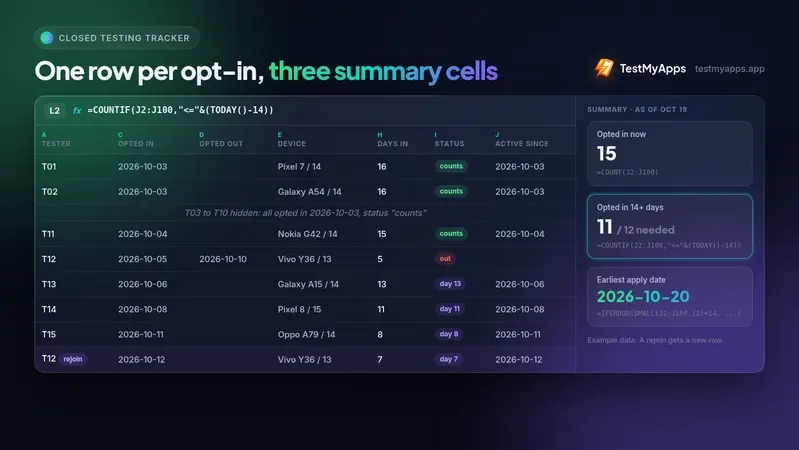
The foundational rule for maintaining this tracker is straightforward: never edit a tester’s historical row if they leave and return. Instead, treat each opt-in event as a distinct lifecycle entry. If a tester drops out and rejoins later, append a new row with the fresh opt-in date. This preserves an accurate audit trail.
Table: Spreadsheet Column Layout
| Column | Header | Description & Content |
|---|---|---|
| A | Tester | A unique identifier, name, or alias. |
| B | Google Account | The precise Google account email linked to their Play Store device. |
| C | Opted In | The exact date the tester completed the opt-in process and installed the app. |
| D | Opted Out | The date the tester left the test. Leave blank while active. |
| E | Device | The specific hardware model and Android OS version. |
| F | Last Active | The most recent date of interaction, bug reporting, or feedback. |
| G | Notes | Qualitative feedback, bug logs, and feature requests for the production form. |
| H | Days In | Automated formula calculating duration of participation. |
| I | Status | Automated formula tracking compliance status. |
| J | Active Since | Helper formula filtering active users for summary functions. |
Universal Spreadsheet Formulas
Implement these formulas starting in row 2 and drag them down to scale across your roster.
1. Days In (Column H)
Calculates the total active duration for current testers or total tenure for departed ones:
=IF(C2="","",IF(D2="",TODAY(),D2)-C2)2. Status (Column I)
Categorizes each user’s current standing ("counts", "out", or the active day count):
=IF(C2="","",IF(D2<>"","out",IF(TODAY()-C2>=14,"counts","day "&(TODAY()-C2))))3. Active Since Helper Column (Column J)
Isolates opt-in dates exclusively for users who remain actively opted in:

=IF(OR(C2="",D2<>""),"",C2)Summary Dashboard Cells
Place these summary metrics anywhere in your workbook (ensure the final formula cell is formatted for dates):
Opted in now:        =COUNT(J2:J100)
Opted in 14+ days:   =COUNTIF(J2:J100,"<="&(TODAY()-14))
Earliest apply date: =IFERROR(SMALL(J2:J100,12)+14,"fewer than 12 opted in")
For users operating in modern spreadsheet environments like Google Sheets or Microsoft Excel 365 who wish to bypass the helper column, use this dynamic array formula:
=IFERROR(SMALL(FILTER(C2:C100,(C2:C100<>"")*(D2:D100="")),12)+14,"fewer than 12 opted in")Alternative: Automated Python Scripting
For developers who prefer managing infrastructure via code repositories, a lightweight Python script paired with a local testers.csv file (tester,account,opted_in,opted_out,device) can automate the verification process:
import csv
from datetime import date, timedelta

today = date.today()
active = []  # Stores opt-in dates of currently active testers

with open("testers.csv", newline="") as f:
    for row in csv.DictReader(f):
        if not row["opted_in"] or row["opted_out"]:
            continue  # Ignore inactive or departed records
        active.append(date.fromisoformat(row["opted_in"]))

qualified = [d for d in active if today - d >= timedelta(days=14)]
print(f"Opted in now:      len(active)")
print(f"Opted in 14+ days: len(qualified)")

if len(active) >= 12:
    earliest = sorted(active)[11] + timedelta(days=14)
    print(f"Earliest apply date if nobody leaves: earliest")
else:
    print(f"Short by 12 - len(active) testers")
Official Statements & Operational Protocols
Maintaining data hygiene requires consistent oversight. Developers are advised to execute a structured, five-minute morning check inside the Google Play Console before writing or debugging code:
- Dashboard Review: Inspect overarching progress indicators to detect sudden shifts in active user counts.
- Closed Track Monitoring: Verify that the primary testing track remains healthy and free of configuration errors.
- Feedback Analysis: Review user-submitted bug reports and crash logs directly from the console interface.
- Android Vitals Check: Monitor performance metrics, ANRs (Application Not Responding), and crash rates.
- Reconciliation: Cross-reference active user counts with your local spreadsheet or Python database. Any discrepancies must be investigated immediately.
If a tester departs unexpectedly, swift action is necessary. Recruit a replacement on the same day and log them with a fresh row. Because Google’s automated evaluation is sensitive to continuity, maintaining a surplus of testers beyond the minimum requirement cushions your timeline against sudden drop-offs.
Future Outlook & Production Access Strategy
Streamlining the Application Form
When the closed testing window concludes and you submit your application for production access, Google’s review questionnaire evaluates several qualitative and quantitative factors:

- Recruitment methodology and testing ease.
- Feature utilization and user behavior alignment.
- Logged feedback mechanisms and qualitative responses.
- Iterative changes made during the testing cycle.
By maintaining a meticulously updated tracking sheet—capturing hardware profiles in Column E, direct feedback in Column G, and engagement timestamps in Column F—the majority of the application form is already answered.
Developers are also encouraged to maintain a secondary changelog tab detailing version codes, deployment dates, implemented fixes, and the specific user feedback that inspired them. This level of thoroughness directly satisfies Google’s compliance inquiries.
Addressing Recruitment Bottlenecks
For many independent creators, the primary obstacle is not spreadsheet management, but acquiring and retaining 12 reliable testers for 14 continuous days. While services like TestMyApps provide structured networks of real Android users to fulfill compliance quotas, developers must ultimately balance external recruitment with organic community building.
As Google continues to refine its store policies, proactive data hygiene, rigorous internal auditing, and adherence to testing timelines will remain essential pillars for successful Android application deployment.