Executive Overview
For nearly eight years, building a custom WordPress block has meant diving headfirst into the JavaScript ecosystem. Developers looking to extend the block editor have had to master React, configure complex build pipelines with Webpack or Babel, juggle NPM dependencies, and register their blocks twice—once in PHP and once in JavaScript. For classic WordPress developers whose expertise lies firmly in backend systems and PHP, this modern tooling barrier has served as a formidable speed bump, often delaying or halting the adoption of modern block themes.
Enter WordPress 7.0. In a move that signals a profound shift toward developer experience, WordPress has introduced a radically simplified block-building architecture: PHP-only block registration. Driven by a new autoRegister flag, this feature allows developers to register, render, and add basic controls to custom blocks using nothing more than server-side PHP.
While purists may argue that the feature arrives seven and a half years after the initial rollout of the Gutenberg block editor, its arrival is nonetheless transformative. It is not designed to replace sophisticated JavaScript-driven blocks, nor does it eliminate the need for front-end scripting entirely. Instead, PHP-only block registration serves a singular, immensely powerful purpose: simplifying the migration of legacy PHP code, widgets, and shortcodes into modern block-based themes.

Detailed Chronology & Architecture
The Paradigm Shift: From Dual Registration to PHP-Only
Historically, standard WordPress block development required a bifurcated workflow. Developers defined a block.json metadata file, registered the block server-side using PHP (register_block_type), and then built out the client-side editor interface using JavaScript and React. This decoupling ensured deep interactivity within the editor canvas, but it created an immense overhead for simple, server-rendered components.
WordPress 7.0 radically streamlines this pipeline. By utilizing the autoRegister => true parameter within the block supports array, WordPress dynamically generates the necessary client-side JavaScript and editor previews directly from the PHP registration schema.
Consider a standard "Hello World" block constructed entirely in PHP:

function css_tricks_hello_world_block()
  register_block_type(
    'css-tricks/hello-world',
      [
        'title' => 'Hello World',
        'render_callback' => function ()
          return sprintf(
            '<div %s>Hello World!</div>',
            get_block_wrapper_attributes()
          );
        ,
        'supports' => [
          'autoRegister' => true,
        ],
      ]
  );

add_action('init', 'css_tricks_hello_world_block');
This single snippet fully registers the block, injects it into the editor’s inserter, and renders it seamlessly alongside native Gutenberg elements—all without a single line of React code or an NPM build step.
Introducing Attributes and Sidebar Controls
Attributes allow users to customize block behavior and appearance. In traditional workflows, developers had to write custom React components to render settings in the block inspector sidebar. With PHP-only registration, WordPress abstracts this complexity. By defining an attributes array during registration, the core editor automatically generates standard form controls in the sidebar:
function css_tricks_hello_world_block()
  register_block_type(
    'css-tricks/hello-world',
    [
      'title' => 'Hello World',
      'render_callback' => function ($attributes)
        return sprintf(
          '<div %s>%s</div>',
          get_block_wrapper_attributes(),
          esc_html($attributes['greeting'])
        );
      ,
      'supports' => [
        'autoRegister' => true,
      ],
      'attributes' => [
        'greeting' => [
          'type' => 'string',
          'default' => 'Hello World!',
        ],
      ],
    ]
  );

add_action('init', 'css_tricks_hello_world_block');
When this code executes, WordPress inspects the type definitions and provisions a fully functional text input field inside the block’s Settings sidebar, persisting user modifications directly into the block’s serialized attributes.

Technical Limitations & Architectural Constraints
Despite its initial charm, developers must exercise caution. PHP-only block registration comes with strict architectural boundaries designed to prevent performance degradation and security vulnerabilities within the REST API-driven editor environment.
1. No Client-Side Interactivity or DOM Manipulation
Because PHP-only blocks are rendered server-side via REST API endpoints (/v2/block-renderer/), they do not participate in the single-page application (SPA) state of the editor. Consequently:
- No Inline Editing: You cannot edit text directly inside the block preview canvas; you are strictly confined to the auto-generated sidebar controls.
- DOM Integration Failures: Scripts that rely on querying and transforming static HTML markup into dynamic components (such as sliders, accordions, or carousels) will fail. Because the editor asynchronously re-renders blocks on user interaction, attached JavaScript event listeners are immediately disconnected.
2. Disconnection from Fresh Client-Side Data
The WordPress block editor manages post data in an asynchronous client-side store until the user hits "Save." PHP-only blocks, however, query the database directly. If a user alters the post title or featured image within the editor, a PHP-rendered block will continue displaying stale database data until the post is explicitly saved and the page is reloaded.

3. Stateless REST API Challenges
The global state—specifically "The Loop" and variables like $post—is absent in REST API requests. Consequently, classic template tags such as the_title() or the_content() will fail to resolve the active post context inside an editor preview unless explicitly patched.
4. Limited Attribute Types and Interface Elements
As of WordPress 7.0, supported attribute types are restricted to strings, numbers, and booleans. These map to basic UI elements: text inputs, number fields, checkboxes, and simple dropdowns. Essential interface components such as media uploaders, date pickers, and rich-text toolbars are entirely absent. Furthermore, dropdowns lack support for keyed arrays, preventing developers from separating user-facing labels from stored database slugs or IDs.
The Killer Use Case: Migrating Legacy PHP Code
Given these limitations, why should developers care? The answer lies in theme modernization.

Thousands of enterprise and boutique WordPress websites remain chained to "classic" themes simply because the cost of rewriting custom PHP features—such as proprietary headers, dynamic shortcode outputs, custom sidebars, and widgetized areas—into JavaScript block components is economically unviable.
PHP-only blocks eliminate this barrier to entry. By wrapping legacy PHP templates inside a server-side rendered block structure, development teams can transition sites to performant, modern block themes in hours rather than weeks.
- What you can migrate: Shortcodes, legacy widgetized sidebars, custom dynamic headers, footers, and specialized post-meta displays.
- The philosophy: The block preview inside the editor does not need to be pixel-perfect. As long as the inspector controls allow basic configuration and the block renders impeccably on the public-facing front end, the migration is a success.
Practical Implementation Tips & Workarounds
Advanced developers navigating the edge cases of PHP-only blocks can employ several clever workarounds to overcome core limitations.

Detecting Editor vs. Front-End Rendering
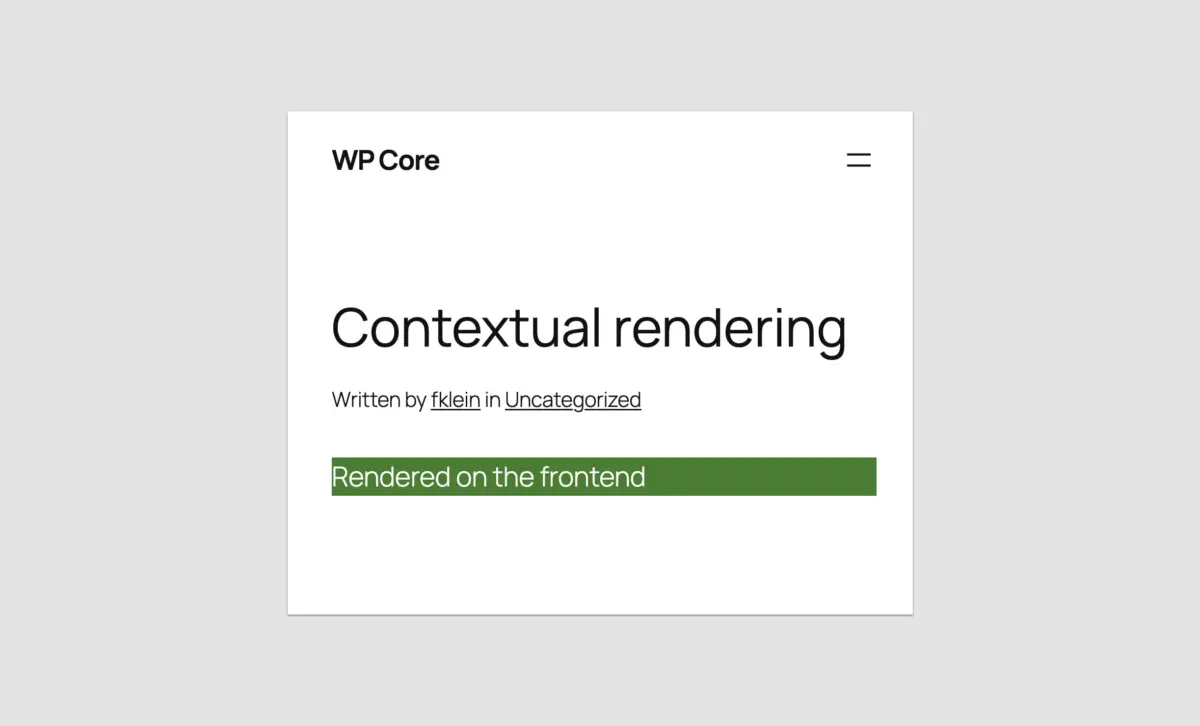
If your block needs to output different markup or styling depending on whether it is viewed in the admin canvas or on the live site, standard is_admin() checks will fail. Instead, inspect the REST route:
function css_tricks_php_only_detecting_editor_render()
  register_block_type(
    'css-tricks/php-only-detecting-editor-render',
    [
      'title' => 'PHP-Only Contextual Render',
      'render_callback' => function ()
        $is_editor = wp_is_rest_endpoint() && str_contains($GLOBALS['wp']->query_vars['rest_route'] ?? '', 'v2/block-renderer/');
        $bgcolor = $is_editor ? 'blue' : 'green';

        return sprintf(
          '<div %s>%s</div>',
          get_block_wrapper_attributes(['style' => "color: #fff; background-color: $bgcolor;"]),
          $is_editor ? 'Rendered in the editor' : 'Rendered on the frontend'
        );
      ,
      'supports' => ['autoRegister' => true]
    ]
  );

add_action('init', 'css_tricks_php_only_detecting_editor_render');
Accessing the Current Post ID
To bypass the lack of post context in REST requests, developers can harvest the post ID directly from the admin URL during the initialization hook and store it as a local attribute:
'attributes' => [
  'postId' => [
    'type' => 'integer',
    'default' => isset($_GET['post']) ? absint($_GET['post']) : 0,
    'role' => 'local'
  ],
]
Leveraging Block Supports
Enhance native functionality by integrating WordPress Core’s Block Supports API. For example, you can hide migration-only utility blocks from the inserter, restrict them to a single instance per post, or enable advanced alignments:

'supports' => [
  'autoRegister' => true,
  'inserter' => false,             // Hide from the block inserter
  'multiple' => false,             // Limit to one instance per post
  'align' => ['left', 'center', 'right'], // Restrict alignment options
]
Future Outlook & Conclusion
Was the seven-and-a-half-year wait for PHP-only block registration worth it?
If your goal is to build highly interactive, dynamic, native-feeling components from scratch, the answer is a resounding no. JavaScript and React remain the definitive standard for advanced Gutenberg development.
However, looking at the broader ecosystem, PHP-only registration represents a watershed moment. It acknowledges that the WordPress community is vast, heterogeneous, and filled with backend developers who should not be locked out of the block theme revolution by arbitrary tooling requirements.

By lowering the barrier to entry, WordPress 7.0 empowers developers to rescue legacy PHP codebases from technical obsolescence, paving the way for a faster, cleaner, and fully block-native web.