Executive Overview
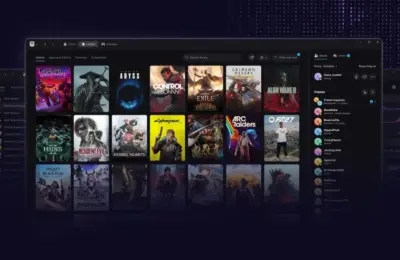
Valve has deployed a substantial new update to its flagship Steam client, bringing a wide array of quality-of-life adjustments, under-the-hood performance upgrades, and architectural enhancements aimed squarely at Big Picture Mode. While improvements to startup speeds, Remote Play technology via the experimental Pyrowave codec, and specific bug fixes for Linux operating systems mark a functional leap forward for desktop and portable users alike, the update’s cultural footprint has been swiftly hijacked by a piece of nostalgic, psychological warfare.
Buried within the newly public-facing screensaver customization options—graduated from its prior beta-only status—is a retro-inspired, infinitely looping bouncing Steam logo. Directing an overt homage to the infamous late-1990s and early-2000s DVD Video logo screensaver, Valve has unleashed a digital artifact that is equal parts charming and diabolical. For millions of users who grew up watching television displays in breakrooms, living rooms, and computer labs, the bouncing logo triggers an immediate, visceral fixation: the desperate, agonizing wait for the graphic to cleanly and satisfyingly strike the absolute corner of the display.
This report offers a comprehensive examination of the latest Steam client update. Beyond the psychological trap of Valve’s new screensaver, we analyze the structural upgrades to Big Picture Mode, the technical implications of the Pyrowave video codec for remote streaming, and the broader context of Valve’s ongoing software optimization for handhelds, living room setups, and desktop environments.
Detailed Chronology of the Update
The trajectory of this significant client release began weeks prior to its general public deployment, taking shape through incremental builds released via the Steam Client Beta channel. Initially introduced to a smaller cohort of testers, the update’s marquee features—most notably the integration of expanded screensaver options, custom art display capabilities, and Big Picture Mode layout refinements—underwent rigorous evaluation before getting the green light for stable deployment.
Phase 1: Beta Incubation and Big Art Integration
In the initial beta phases, Valve tested the waters by introducing large-scale game artwork integration into Big Picture Mode and the Steam Deck interface. This allowed users to immerse themselves in high-resolution promotional key art from their recently played titles whenever the system sat idle. Alongside this visual overhaul, developers integrated customizable screensaver support, moving away from a rigid, static idle screen toward a modular system where users could supply their own imagery or select from curated presets.
Phase 2: The Introduction of the Retro Bouncing Logo
Among the presets shipped during the beta cycle was a seemingly innocuous selection found under the customization settings: a retro-inspired bouncing logo. Modelled after vintage hardware screensavers, this feature renders a clean, vector-based Steam logo that drifts across a stark black void, its color shifting systematically every time it ricochets off the perimeter of the monitor. While testers initially treated the addition as a lighthearted nod to internet meme culture, extended exposure quickly revealed its hypnotic, stress-inducing properties.
Phase 3: General Public Rollout and Global Deployment
Following successful stability tests, Valve pushed the update live to the global Steam user base. Alongside the screensaver features, the official patch notes revealed systemic updates affecting application startup times, advanced video streaming protocols for Remote Play, and comprehensive Linux compatibility patches. However, within hours of the public launch, community forums, social media channels, and gaming subreddits were dominated by discussions—and collective groans—concerning the psychological torment inflicted by the bouncing Steam logo.
Supporting Context & Metrics: Under the Hood of the New Client
While the internet fixates on retro screensavers, the architectural adjustments made in this Steam update represent significant engineering milestones. Valve continues to refine its software ecosystem to seamlessly span multiple form factors, from high-end desktop rigs to specialized living-room setups and portable handheld hardware like the Steam Deck.

Startup Performance and Resource Allocation
One of the most requested, yet historically difficult, metrics to optimize for Steam has been cold-boot startup time. With this patch, Valve has introduced unspecified under-the-hood adjustments designed to streamline client initialization. For users with massive libraries containing thousands of titles and extensive metadata caches, the reduction in startup friction translates to a snappier, more responsive desktop experience.
Remote Play and the Pyrowave Video Codec
A major highlight for tech-focused enthusiasts is the integration of Pyrowave, a new experimental video codec built directly into Steam Remote Play. Pyrowave is engineered to handle high-bandwidth transmissions while maintaining ultra-low latency. For users streaming games from a powerful desktop rig to a living-room television, a secondary laptop, or a mobile device, this codec promises to significantly mitigate compression artifacts, input lag, and frame drops, bridging the gap between local rendering and remote streaming.
Linux and Steam Deck Optimization
Linux users—whose numbers have surged dramatically following the commercial success of the Steam Deck and SteamOS—receive a dedicated suite of tweaks and bug fixes in this update. These optimizations focus heavily on window management, graphics API translation layers, and stability improvements within Big Picture Mode. Because Big Picture serves as the default interface for both the Steam Deck and custom Linux-based Steam Machines, these targeted enhancements ensure a fluid, console-like user experience that minimizes desktop fallback errors.
The Psychology of the Bouncing Logo: A Cultural Post-Mortem
To understand why Valve’s inclusion of a bouncing logo has generated such fervent discussion, one must examine the deep cultural scars left by late-90s consumer electronics.
The phenomenon originated with standalone DVD players and early flat-screen televisions. When left idle on a menu or pause screen, these devices would trigger a screensaver featuring the iconic, multicolored "DVD Video" logo bouncing at a fixed diagonal velocity across a black matrix.
[Screen Edge] ---> ( DVD VIDEO ) ---> [Screen Edge] (Color Shifts)In the pre-broadband, pre-social media era, millions of people stared at these screens in waiting rooms, classrooms, and living rooms while waiting for movie features to load. This gave birth to a universal, unspoken psychological phenomenon: the desperate yearning to witness the logo make direct, mathematically precise contact with the exact corner of the display box.
Because the logo’s trajectory is governed by a deterministic reflection algorithm based on the aspect ratio and starting coordinates, hitting a corner requires an extraordinarily specific initial vector. For the vast majority of observers, the logo would pass agonizingly close to the corner—missing by mere pixels—causing an immediate spike in collective frustration and obsessive focus.
Psychologists and cultural historians note that this behavior taps into humanity’s innate desire for closure, symmetry, and pattern completion. When a system denies that closure indefinitely, it creates a persistent loop of cognitive engagement.

By recreating this exact psychological trap within Steam’s Big Picture Mode, Valve has knowingly or unknowingly subjected its user base to a masterclass in digital trolling. Early reports from users who left the screensaver running during lunch breaks or idle periods confirm that the simulation remains true to its predecessor: it appears structurally incapable of satisfying the user with a true corner strike, preserving the legendary frustration for a new generation of gamers.
Official Statements and Community Reception
Valve’s official patch notes approach these monumental updates with the company’s trademark understated technical precision. Describing the new customization options, the developers note:
"Big Picture Mode now supports public-facing screensavers, allowing custom image imports and curated presets, including a retro-inspired bouncing logo available via the settings menu."
However, the community reception has oscillated wildly between technical appreciation and lighthearted exasperation. Industry analysts and community moderators have pointed out that while features like the Pyrowave codec and startup optimizations directly benefit functional productivity and gameplay performance, the bouncing logo has single-handedly dominated the public narrative.
Prominent tech journalists and hardware reviewers have issued tongue-in-cheek warnings to their audiences, advising users against enabling the screensaver under any circumstances, lest they lose hours of productivity staring blankly at a drifting, color-shifting Steam icon.
Future Outlook: What This Means for the Steam Ecosystem
The deployment of this client update signals several critical trajectories for Valve’s software strategy moving forward:
- Unification of Desktop and Console Interfaces: By continuing to invest heavily in Big Picture Mode, Valve ensures that the software layer powering the Steam Deck remains robust, scalable, and visually engaging. As living-room PC gaming and handheld ecosystems grow, a unified interface is paramount.
- Advanced Streaming Paradigms: The experimental introduction of the Pyrowave codec indicates that Valve is actively preparing for higher-fidelity remote play environments, potentially paving the way for 4K streaming at high refresh rates over local networks with negligible latency.
- Community-Centric Easter Eggs: Valve’s willingness to lean into internet culture—such as immortalizing the DVD screensaver trauma via a custom Steam variant—proves that the company maintains a strong pulse on consumer nostalgia, even if those nostalgic artifacts border on psychological torture.
As the update settles into general release, users are advised to enjoy the improved startup speeds, take advantage of Pyrowave’s low-latency streaming, and approach the Steam customization menu with extreme caution. If you decide to enable the bouncing logo, prepare yourself for an eternity of near-misses.