
Tech Desk Analysis — Apple’s hardware redesign cycles are rarely straightforward, but the introduction of the new MacBook Pro featuring the PROLED XDR display represents one of the most mechanically ambitious shifts in the portable Mac lineup in years. Bringing together a tandem OLED panel, touch capabilities, and the triumphant return of the beloved, illuminated glowing Apple logo on the lid, the machine has captivated both consumers and industry analysts alike.
Now, the hardware experts at iFixit have completed their traditional surgical teardown of the new device. Their findings pull back the curtain on how Apple managed to pull off these engineering feats while simultaneously trimming the laptop’s overall weight. Yet, beneath the glossy marketing points lies a familiar tug-of-war between modular modernization and traditional Apple repair restrictions.
Here is an in-depth look inside Apple’s latest flagship portable, detailing how the glowing logo works, the complexities of the tandem OLED panel, and why the device ultimately earned a modest repairability score.
Executive Overview: A Slimmer Silhouette Meets Complex Engineering
When Apple announced that the standard 14-inch form factor had dropped from roughly 3.4 pounds (1.55 kg) down to an agile 3.0 pounds (1.38 kg)—all while packing a heavier architectural punch that includes touch support and an illuminated logo—skeptics wondered where the weight savings originated.

iFixit’s exhaustive teardown answers this question by mapping out weight reductions across nearly every major component class. Apple shaved 92 grams off the aluminum chassis itself and an impressive 101 grams directly off the display assembly. Minor auxiliary weight cuts include a fraction of an ounce trimmed from the slightly smaller trackpad, whereas the internal battery remains virtually identical, losing a mere 2 grams.
Beyond weight, the teardown offers critical insights into component modularity, modular parts pairing, and the intricate micro-architecture of the new PROLED XDR screen. While the device scores a respectable 5 out of 10 on iFixit’s repairability scale—climbing one point above the previous-generation M5 MacBook Pro—it remains a device heavily guarded by proprietary engineering choices, soldered silicon, and complex component dependencies.
Detailed Chronology: Inside the Teardown Process
Taking apart a modern MacBook Pro is a masterclass in patience and precision, and the latest PROLED XDR model is no exception. The process begins with the usual removal of bottom-case pentalobe screws and unsepping tight interior clips, but the hurdles quickly escalate.
Tackling the Tandem OLED
The crown jewel of the new MacBook Pro is its tandem OLED screen. Unlike single-layer panels, a tandem OLED layout stacks two separate light-emitting diode layers on top of one another. This configuration allows the display to achieve dramatically higher peak brightness levels and sustained HDR performance without driving a single layer to its thermal or electrical breaking point.

Under a high-powered microscope, iFixit made a fascinating discovery regarding the panel’s subpixel array: the blue subpixels are noticeably larger than their red and green counterparts. According to display manufacturing insights, this is a deliberate design choice aimed at mitigating organic material degradation. By enlarging the blue subpixels—which historically degrade faster than other colors—Apple can distribute the electrical load more evenly, thereby extending the overall lifespan of the display.
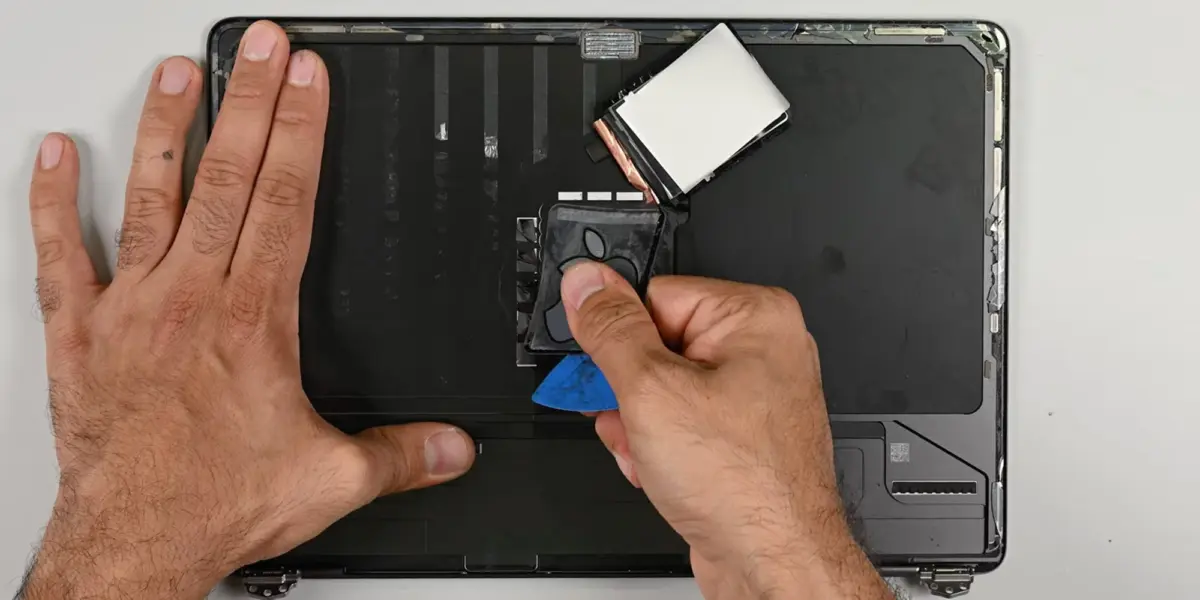
However, getting to the display assembly and attempting to isolate the illuminated logo proved to be a destructive endeavor. iFixit noted that reaching the logo housing required tearing through the delicate OLED layers, leaving them to ask whether it is practically possible for a standard technician to extract the mechanism without collateral damage.
Unlocking the Illuminated Apple Logo
For years, Mac enthusiasts mourned the quiet disappearance of the glowing white Apple logo on the lid, which was replaced in modern generations with a polished, non-illuminated metal insert. Its return in this model has been met with universal acclaim, but the mechanics behind it are surprisingly sophisticated.
Once iFixit successfully breached the housing, they discovered that the iconic glow is generated not by a massive backlit panel, but by a remarkably compact strip of four high-efficiency LEDs. These LEDs project light into a specialized optical system comprising a reflective layer and an advanced diffuser. This ensures the light is spread uniformly across the contours of the Apple insignia without creating hot spots.

The logo itself features a specialized two-way mirror coating. When the internal LEDs are powered down, the coating functions like a standard metallic mirror, granting the logo a reflective, stealthy appearance. The moment the LEDs activate, the coating permits light to pass cleanly through, recreating the classic luminous aesthetic of older MacBook generations while maintaining modern structural tolerances.
Logic Board Swap and Modular Realities
One of the most heavily scrutinized areas of modern Apple hardware repair is software lockouts and component pairing. In previous models, swapping core components like the logic board or Touch ID sensor often triggered strict security blocks via Apple’s Repair Assistant, frequently disabling biometric authentication or rendering displays unusable without proprietary calibration tools.
Fortunately, iFixit observed a notable improvement in this year’s hardware architecture. When swapping a logic board between two separate MacBook Pro units, the device successfully recognized the donor battery, display, and Touch ID sensor. Essential features—including True Tone, native brightness controls, and the newly integrated touchscreen functionality—operated normally out of the box.
Furthermore, iFixit successfully enrolled a new fingerprint into the system using a donor logic board sourced from another identical machine. This points to a slightly more forgiving modular ecosystem, though heavy hurdles still remain.

Supporting Context & Metrics: Breaking Down the Build
To truly understand how Apple achieved its weight and performance goals, the numbers tell a compelling story.
- Weight Reductions:
- Total machine weight reduced to 3.0 lbs (1.38 kg) from 3.4 lbs (1.55 kg).
- Chassis weight reduced by 92 grams.
- Display assembly weight reduced by 101 grams.
- Trackpad weight reduced by 8 grams.
- Battery weight reduced by 2 grams.
- Display Technology: Dual-layer tandem OLED configuration with oversized blue subpixels for enhanced longevity.
- Logo Illumination: 4-LED array coupled with a reflective layer, light diffuser, and a dual-purpose two-way mirror coating.
- Repairability Score: 5 out of 10 (An improvement over the M5 MacBook Pro’s 4/10, but trailing the budget-oriented MacBook Neo).
Despite the positive strides in component recognition during swaps, certain frustrating repair barriers persist. Replacing essential elements like the USB-C ports, internal cooling fans, or the standard headphone jack still requires the tedious, multi-step removal of the entire logic board, despite those components theoretically being physically independent. Meanwhile, heavy-hitting components such as the HDMI port, SDXC card slot, unified system RAM, and solid-state storage remain permanently soldered directly to the primary logic board.
Official Statements and Industry Reception
While Apple has not published a formal white paper specifically detailing the mechanical hurdles of the illuminated logo’s return, the company’s engineering ethos has long centered on maximizing thermal efficiency, user ergonomics, and display fidelity.
Independent analysts have pointed out that integrating an active illumination system into a lid that is already housing a complex touch-enabled tandem OLED panel required immense mechanical coordination. Balancing structural rigidity against the need to aggressively shed weight meant rethinking material thicknesses down to the micron level.

Early consumer reviews and teardown reactions have generally praised Apple’s willingness to listen to user nostalgia by bringing back the glowing logo, though hardware purists remain cautious regarding the continued lack of upgradeable RAM and storage.
Future Outlook: What This Means for Future Mac Repairs
The iFixit teardown of the PROLED XDR MacBook Pro offers a nuanced look at where Apple’s hardware design is heading. On one hand, the device demonstrates encouraging progress regarding software calibration and component swapping; the successful recognition of donor displays and Touch ID sensors suggests that Apple is gradually loosening some of its more draconian parts-pairing restrictions in response to Right to Repair pressures.
On the other hand, the stubborn persistence of soldered storage, memory, and ports—coupled with the sheer difficulty of accessing display-level components without destruction—proves that thin-and-light laptop engineering continues to prioritize factory integration over field serviceability.
As tandem OLED technology and multi-layered display housings become more prevalent across the portable computing market, repair technicians will need to adapt to increasingly fragile modular components. For now, the PROLED XDR MacBook Pro stands as a triumph of modern industrial design—one that successfully resurrects a piece of Apple history while pushing display and weight-saving boundaries into a new era.