
Executive Overview
The macOS menu bar has long been a canvas for utility, efficiency, and subtle personalization. From system monitors to weather widgets, developers continually find creative ways to maximize this prime real estate. However, few applications manage to bridge the gap between whimsical seasonal novelty and tactile utility quite like Pumpkin Lights, a newly released indie application for the Mac.
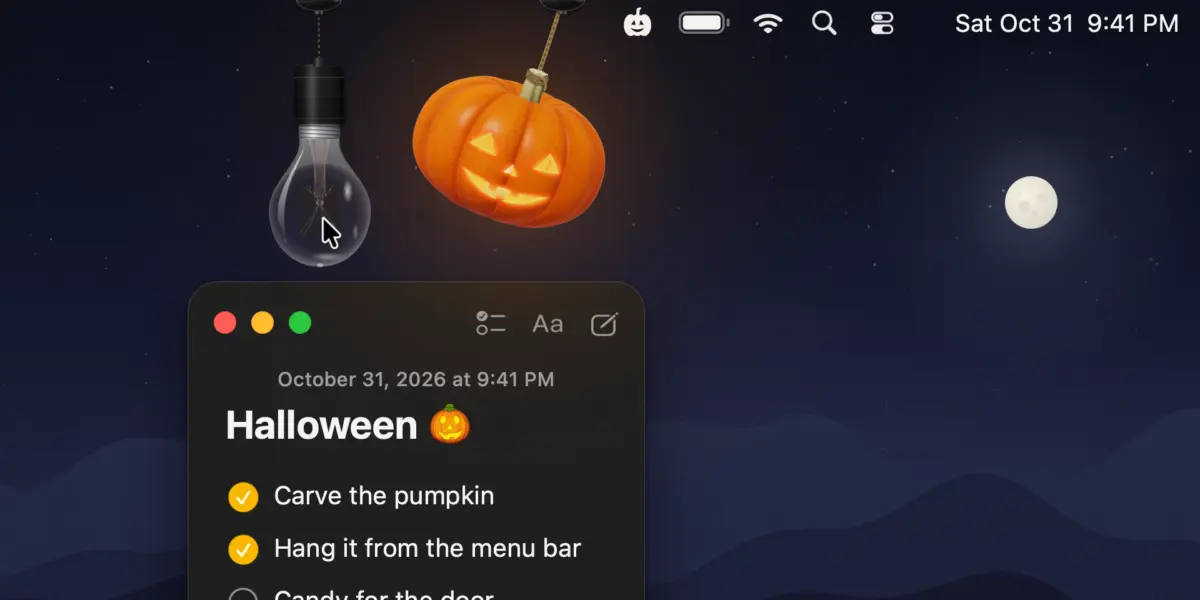
Created by developer Boyu Cheng, Pumpkin Lights is a free menu bar utility designed to celebrate the Halloween season by dropping a fully ray-traced, physics-enabled jack-o’-lantern right from the top of your display. Far more than a static graphic or a simple holiday JPEG, the app utilizes real-time rendering and interactive physics to turn a mundane digital action—switching between macOS Light and Dark Mode—into a tactile, delightful physical experience.
Reminiscent of last year’s viral holiday-themed menu bar utilities, Pumpkin Lights injects personality back into desktop computing. By transforming a buried system setting into a swinging, interactive 3D object, Cheng has created a masterclass in indie software design: simple in premise, deeply polished in execution, and entirely free to use.
Detailed Chronology & Development Origins
To understand the appeal of Pumpkin Lights, it helps to trace the lineage of interactive macOS menu bar decorations. In recent years, indie developers have increasingly leaned into creating contextual, holiday-specific interface elements that break the monotony of flat UI design. Apps like Festivitas, which introduced holiday lights to the Mac menu bar during previous winter seasons, laid the groundwork for software that treats the screen edge as a physical boundary.
Pumpkin Lights takes this concept several steps further by introducing actual spatial computing elements to a standard 2D menu bar. According to the developer, the project was born out of a desire to rethink one of the most common, yet frictionless, interactions Mac users perform throughout the day: toggling between Light and Dark Mode.
"The idea came from something most of us do every day without thinking: switching between Light and Dark Mode," Cheng explains. "It’s always a toggle buried in Control Center or System Settings, and it never feels like anything. I wanted it to feel like touching a real object."
Rather than relying on a static menu bar icon or relying strictly on keyboard shortcuts, Cheng set out to engineer a virtual object that users could physically manipulate. The development process focused heavily on moving away from flat UI paradigms toward real-time 3D simulation.

By employing real-time ray tracing, the app ensures that the inner glow of the jack-o’-lantern’s carved candle accurately illuminates its surroundings and shifts dynamically as the object moves. The developer reportedly spent the majority of the app’s development cycle refining micro-interactions: how the hanging cord behaves under tension, how momentum carries the pumpkin across the screen edge, and how light cascades across its carved surfaces. The goal was to build an interface element that remains delightful even after a hundred repetitions.
Supporting Context & Core Features
While Pumpkin Lights wears its Halloween theme proudly, its underlying architecture offers a surprising degree of versatility and customization. A breakdown of its core features reveals a surprisingly robust utility hiding beneath its spooky exterior.
1. Real-Time Physics and Ray-Traced Graphics
At the core of the experience is a custom physics engine tailored for the macOS desktop environment. The jack-o’-lantern hangs from a customizable rope attached to the top edge of your monitor. Because the object adheres to real-world physics principles, users can click and drag the pumpkin to toss it, swing it, or spin it across the screen. When the virtual candle inside is lit, the interior illumination shines realistically through the carved facial expressions, reacting in real-time to the pumpkin’s orientation and movement.
2. Deep Customization Options
Pumpkin Lights avoids a one-size-fits-all approach by offering a suite of aesthetic and functional configurations:
- Pumpkin Morphing: Users can "grow" and select from a variety of distinct pumpkin shapes and geometries.
- Color Variations: The app features four distinct color palettes, allowing users to fine-tune the hue of their desktop decoration.
- Alternative Fixtures: For users who prefer a minimalist or year-round aesthetic, the app includes an option to swap the pumpkin for a hanging light bulb that serves the exact same functional purpose.
- Rope Customization: The hanging cord itself can be modified in length, thickness, and dynamic response behavior.
3. Functional Mapping: Beyond Light and Dark Mode
While toggling between macOS Light and Dark Mode is the default action triggered by interacting with the pumpkin, Pumpkin Lights provides expansive functional mapping. Users can reconfigure the trigger action to execute a wide variety of secondary tasks, including:
- Launching a designated application or web URL.
- Triggering a system-wide "Coffee" or "Keep Awake" state to prevent the Mac from sleeping.
- Muting system audio or adjusting volume parameters.
- Executing custom shell commands.
- Running native macOS Shortcuts directly from the menu bar interaction.
System Requirements and Availability
True to the spirit of the indie app community, Pumpkin Lights is distributed as a completely free utility. It is engineered specifically for modern versions of macOS, requiring macOS 14 (Sonoma) or later to ensure proper support for the underlying rendering and physics frameworks. Users can download the app directly from the developer’s official distribution website and track ongoing updates via the developer’s social media channels.
Official Statements & Design Philosophy
The philosophy driving Pumpkin Lights speaks to a broader trend within software design: the humanization of digital interfaces. For decades, graphical user interfaces have trended toward hyper-minimalism, flat designs, and invisible interactions. While efficient, this relentless pursuit of sterile minimalism has arguably stripped operating systems of their organic charm.

In discussing the design ethos behind Pumpkin Lights, Boyu Cheng emphasizes the importance of sensory feedback in software engineering:
"Instead of a flat icon, the pumpkin and the bulb are real 3D models, ray-traced in real time, hanging on cords you can swing and spin… I wanted it to still feel delightful the hundredth time you use it, not just the first."
This sentiment resonates strongly within the modern indie Mac developer ecosystem. As major tech conglomerates push uniform design languages across mobile and desktop operating systems, indie developers are finding massive audiences by injecting character, nostalgia, and tactile physics back into the desktop environment. By making a system preference feel like a physical toy, Pumpkin Lights successfully merges form and function in a way that stock operating system interfaces rarely achieve.
Future Outlook: The Rise of Contextual Mac Utilities
The enthusiastic reception of Pumpkin Lights highlights a growing appetite for expressive, personality-driven desktop software. As macOS continues to evolve with more powerful silicon chips capable of handling complex real-time rendering and physics engines natively without taxing system resources, the boundary between static UI elements and interactive 3D simulations will continue to blur.
Looking forward, applications of this nature point to a fascinating future for the Mac menu bar. No longer constrained to simple text readouts and monochrome icons, developers are increasingly treating the menu bar as a dynamic sandbox. Whether through seasonal novelties like pumpkins and holiday lights or fully realized productivity widgets disguised as physical objects, indie developers are proving that utility and joy do not have to be mutually exclusive.
For Mac users looking to embrace the autumn season—or simply add a touch of dynamic physics and playful interaction to their daily workflow—Pumpkin Lights stands out as a must-try utility. It transforms a routine system toggle into a brief moment of delight, proving that even the smallest corners of an operating system can be reimagined with enough creativity and technical polish.